On this page
AI Resolution Rate Defined: What This Metric Actually Measures (And What It Doesn't)
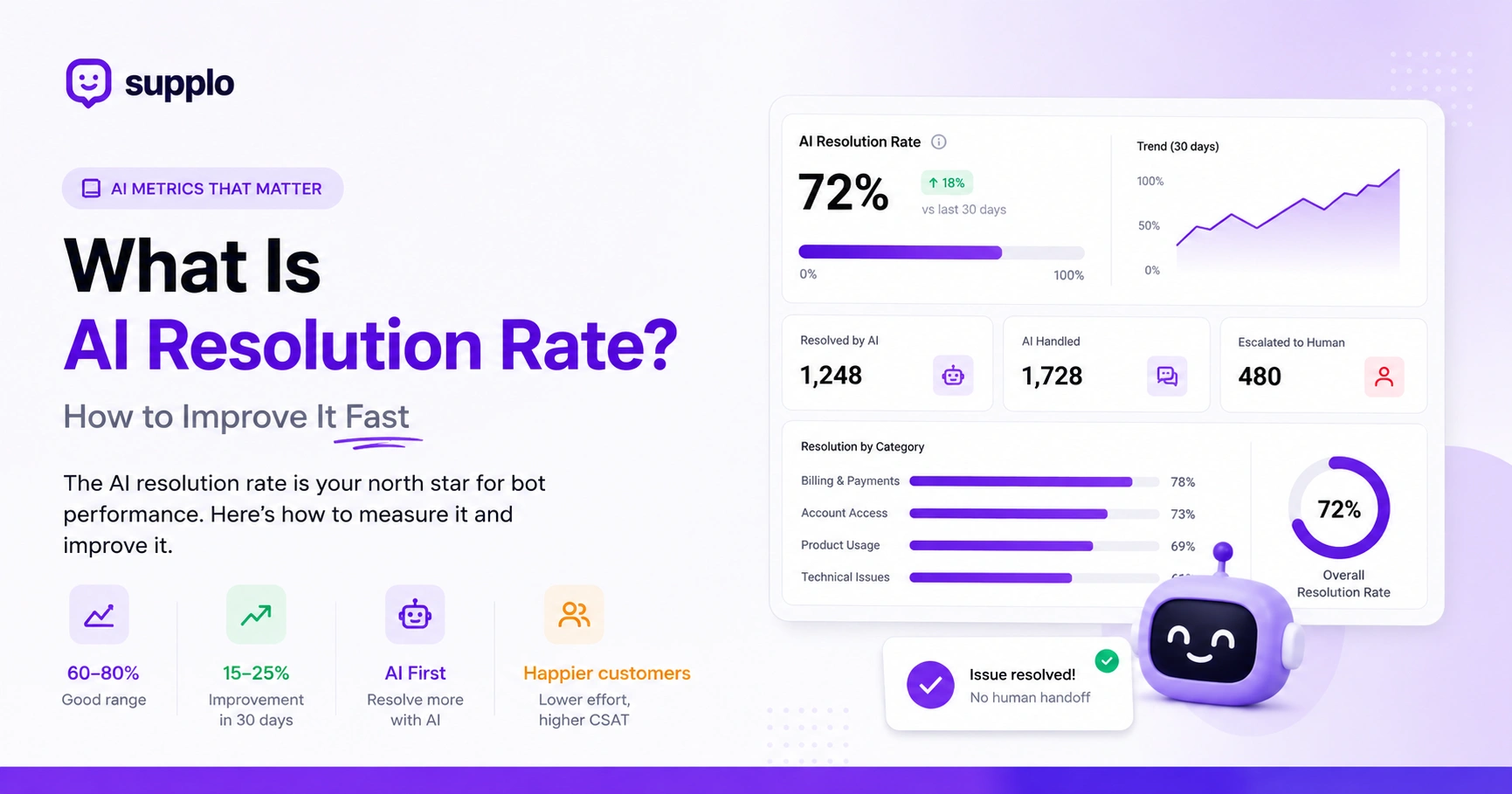
AI resolution rate measures the percentage of customer conversations in which the AI agent resolves the issue without a human handoff. It's not the same as deflection (which counts any conversation the bot touches) or containment (which includes partial bot involvement). A true resolution means the customer got their answer and didn't ask for a person.
This metric is your north star for bot performance. Here's what it includes and excludes:
- Resolution: customer confirms the answer or stops replying after the bot response (with no follow-up escalation).
- Deflection inflates numbers by counting bot-started conversations that still end with a human.
- Containment counts any bot interaction, even if the human agent finishes the job.
- AI resolution rate is the cleanest signal of whether your bot is actually useful.
Supplo is not affiliated with any app or website. Please follow each app's terms and local regulations.
Quick Answer
- AI resolution rate is the % of conversations your bot resolves end-to-end without human help.
- It's different from deflection or containment (both are vanity metrics)
- A good rate for small-to-mid teams is 60–80%
- A score below 40% indicates your knowledge base or routing needs work.
- Fix your KB first, add feedback loops, and use smart routing.
Why AI Resolution Rate Matters More Than Chatbot Deflection or Containment
Because deflection and containment are vanity metrics that make your bot look good on a dashboard while customers still wait for a human, AI resolution rate tells you if your bot is actually solving problems, which directly impacts CSAT, first-response time, and agent workload. If your resolution rate is low, you're paying for a bot that doesn't work.
Here's why this distinction matters:
- High deflection with low resolution means customers are bouncing back to humans anyway.
- Containment hides the real cost: agents still handle the same volume.
- Resolution rate correlates with the customer effort score (CES): lower effort scores correspond to higher resolution rates.
- Focus on resolution, and deflection and containment will follow naturally.
The Math Behind the Metric: How to Calculate AI Resolution Rate Correctly
AI resolution rate = (Conversations resolved by AI without human handoff) ÷ (Total conversations handled by AI) × 100. Only count conversations where the AI had a chance to resolve; exclude chats that were manually routed to a human from the start. Most platforms calculate this automatically, but it's worth verifying the formula.
Let's break down the calculation with a concrete example:
Example: 800 AI-resolved out of 1,000 AI-handled = 80% resolution rate.
Common pitfalls to avoid:
- Don't include conversations where the AI only said "Let me get a human", that's a failure, not a resolution.
- Time-bound the metric: measure over 7-day and 30-day windows for trend visibility.
- Some tools count "AI suggested answer, agent sent it" as an AI resolution, which is misleading. Clean resolution means the bot sent the answer, and the customer was satisfied.
- Exclude chats manually routed to humans from the start; the AI never had a chance.
What's a Good AI Resolution Rate? Benchmarks for Small-to-Mid Support Teams
For most small-to-mid support teams, a good AI resolution rate falls between 60% and 80%. Enterprise bots with massive knowledge bases can hit 85%+, but that's rare without heavy tuning. If you're below 40%, your knowledge base or routing needs work; don't blame the AI.
Here are realistic benchmarks to guide your expectations:
- SaaS support often hits 65–75%
- E-commerce typically lands 55–70%
- New bots (under 30 days) should expect 30–50%; it takes time to train.
- Caution: A rate above 85% with low CSAT usually means the bot is giving wrong answers that customers accept out of frustration
- Best practice: Compare your rate month-over-month, not against random internet numbers
How to Improve AI Resolution Rate: 7 Tactical Steps That Work
Improving AI resolution rate isn't about buying a better bot; it's about feeding it better data and smarter rules. Start with your knowledge base, then layer in routing logic, fallback handling, and continuous learning. Here are seven steps that actually move the needle.
- Audit your knowledge base, remove outdated articles, fill gaps, and write for how customers actually ask questions.
- Enable AI to learn from resolved tickets; let the bot study what worked.
- Set up smart routing, send simple questions to AI, complex ones to humans immediately.
- Add a "Did this answer your question?" prompt after every AI response.
- Use conversation history, let the AI reference past interactions for context.
- Test different response styles, formal vs. casual, and measure which resolves more.
- Review unresolved conversations weekly and update the KB based on patterns.
Ready to test your AI resolution rate for free? Start a free trial of Supplo and see your AI resolution rate in real time—no credit card required. Set up in 5 minutes. Start Free Trial →
Boost AI Resolution Rate by Fixing Your Knowledge Base First
Your AI is only as smart as the content it pulls from. If your knowledge base is a mess of outdated PDFs and vague FAQs, your resolution rate will tank. A clean, structured, search-optimized knowledge base is the single highest-leverage improvement you can make.
Here's how to fix your knowledge base for maximum AI resolution:
- Write articles in a Q&A format, and the AI matches questions to answers better.
- Use clear headings and bullet points so the AI can parse the structure.
- Remove duplicate or contradictory articles; they confuse the AI.
- Add a "common issues" section for your top 20 support tickets.
- Update the KB weekly based on what customers are actually asking.
Teams that fix their knowledge base and add feedback loops typically see a 15–25% improvement in resolution rate within 30 days.
Increase AI Resolution Rate with Smarter Routing
A high AI resolution rate doesn't mean the bot handles everything; it means the bot handles what it can and hands off gracefully when it can't. Smart routing rules that send complex issues to humans immediately prevent the bot from failing and frustrating customers. The result? Higher resolution on the conversations the bot does handle.
Here are routing strategies that work:
- Route by intent, billing questions to AI, and account recovery to humans.
- Route by sentiment, angry customers go to humans, neutral ones stay with AI.
- Set a max-turn limit; if the AI goes 3 rounds without resolving, escalate.
- Use keyword triggers; if a customer says, "speak to a person," honor it immediately.
- Track handoff reasons and fix the top 3 each month.
Optimize AI Resolution Rate Without Hiring More Agents And The Flat-Rate Advantage
Most support platforms charge per agent seat, so improving the resolution rate means you can handle more volume without adding headcount. With a flat-rate platform like Supplo, you can optimize your AI resolution rate aggressively because there's no per-seat penalty for success. Every percentage point you gain is pure cost savings.
Here's why flat-rate pricing changes the game for AI resolution:
- Flat-rate pricing means you can let the AI handle 80%+ of conversations without worrying about seat costs.
- No per-resolution fees (except Supplo's $0.04 AI resolution cost, roughly 96% cheaper than Intercom Fin).
- You can A/B test AI responses freely without budget anxiety.
- More resolved conversations = fewer agents needed = lower total cost.
- The flat-rate model aligns incentives: you want the AI to succeed.
Common AI Resolution Rate Pitfalls: Why Your Number Is Stuck (And How to Unstick It)
If your AI resolution rate hasn't budged in weeks, you're likely making one of these mistakes: stale knowledge base, no feedback loop, or routing that lets the bot fail repeatedly. The fix is usually simpler than you think, but it requires looking at the data, not just the dashboard.
Pitfall 1: You're not reviewing unresolved conversations; you're flying blind. Fix: Schedule a weekly 30-minute review of the top 10 unresolved chats.
Pitfall 2: Your KB hasn't been updated since launch, and customers' questions keep changing. Fix: Update your knowledge base weekly based on new ticket patterns.
Pitfall 3: You're measuring resolution too broadly (including chats the AI never had a chance to resolve). Fix: Exclude manually routed conversations from your calculation.
Pitfall 4: You're not using customer feedback to train the AI. Fix: Add a "Did this help?" prompt after every AI response.
Pitfall 5: Your AI is too rigid; it can't handle paraphrased questions. Fix: Train your AI on multiple phrasings of the same question.
Stuck below 40%? Let's fix that. If your AI resolution rate isn't budging, Supplo's team can help you audit your setup. Book a free optimization call, no pressure, just practical advice.
How Supplo's AI Agent Delivers a High Resolution Rate at $0.04 Per Resolution
Supplo's AI agent is built for small- to mid-sized support teams who want enterprise-level resolution rates without the enterprise price tag. It learns from your knowledge base and past conversations, routes intelligently, and costs $0.04 per AI resolution, roughly 96% cheaper than Intercom Fin. And because Supplo is flat-rate with no per-seat fees, you can scale resolution without scaling costs.
Here's what makes Supplo's approach different:
- Self-learning AI that improves from every resolved and unresolved conversation.
- Multi-channel support, live chat, email, Telegram, WhatsApp, Instagram, Facebook, all in one shared inbox.
- Built-in knowledge base that's easy to update and optimize.
- Smart routing, AI handles what it can, hands off what it can't.
- EU-hosted, GDPR-compliant, and available with crypto and global payment options.
Supplo is not affiliated with any app or website. Please follow each app's terms and local regulations.
Stop paying per seat. Start paying per resolution. Supplo's flat-rate pricing lets you scale your AI resolution rate without increasing costs. AI resolutions cost just $0.04 each, roughly 96% cheaper than Intercom Fin. Plus, pay with crypto, Binance Pay, Payeer, GCash, AmanPay, QIWI Wallet, DOKU, Nigeria and South Africa cards, Skrill, or Payoneer. See Pricing →
Key Takeaways
- AI resolution rate is the most honest metric for bot performance, as it measures actual problem-solving, not bot activity
- A good rate for small-to-mid teams is 60–80%; below 40% means your knowledge base or routing needs work
- Fix your knowledge base first (Q&A format, weekly updates), then add feedback loops
- Use smart routing to prevent the bot from failing on complex issues
- Supplo delivers high resolution rates at $0.04 per resolution with flat-rate pricing, no per-seat fees
FAQ
What is the AI resolution rate?
AI resolution rate is the percentage of customer conversations that an AI agent resolves without needing a human handoff. It's a direct measure of how well your bot actually solves problems.
How is the AI resolution rate different from the deflection rate?
Deflection counts any conversation the bot touches, even if a human finishes it. Resolution counts only conversations the bot fully resolves. Deflection inflates numbers; resolution tells the truth.
What's a good AI resolution rate for a small support team?
60–80% is solid for most small-to-mid teams. A score below 40% indicates your knowledge base or routing needs work. Above 85% with low CSAT usually means the bot is giving wrong answers.
How can I improve my AI resolution rate quickly?
Fix your knowledge base first: remove outdated articles, write in Q&A format, and update it weekly. Then add a feedback prompt after every AI response and review unresolved conversations.
Does AI resolution rate matter if I have a small team?
Yes, a higher resolution rate means your team handles fewer repetitive questions, allowing them to focus on complex issues. It directly reduces workload and improves response times.
Can the AI resolution rate be too high?
Yes, if it's above 85% and CSAT is dropping, the bot may be giving incorrect answers that customers accept out of frustration. Always pair resolution rate with CSAT or feedback scores.
How does Supplo calculate AI resolution rate?
Supplo counts a conversation as AI-resolved if the customer doesn't ask for a human and doesn't reopen the conversation within 24 hours. It excludes chats manually routed to humans from the start.
Compliance line: Supplo is not affiliated with any app or website. Please follow each app's terms and local regulations.