On this page
Automating password reset support requests means putting an AI agent in charge of handling those never-ending "I forgot my password" tickets that clog up your inbox day after day. This guide is written for support managers, founders and IT pros who want to stop drowning in reset requests while keeping security tight and customers happy.
Use this approach when you're tired of watching your team waste hours on repetitive password issues. But here's the thing: don't automate everything unthinkingly. Keep human oversight for admin accounts, financial data, or anything that feels high-risk.
Quick Answer
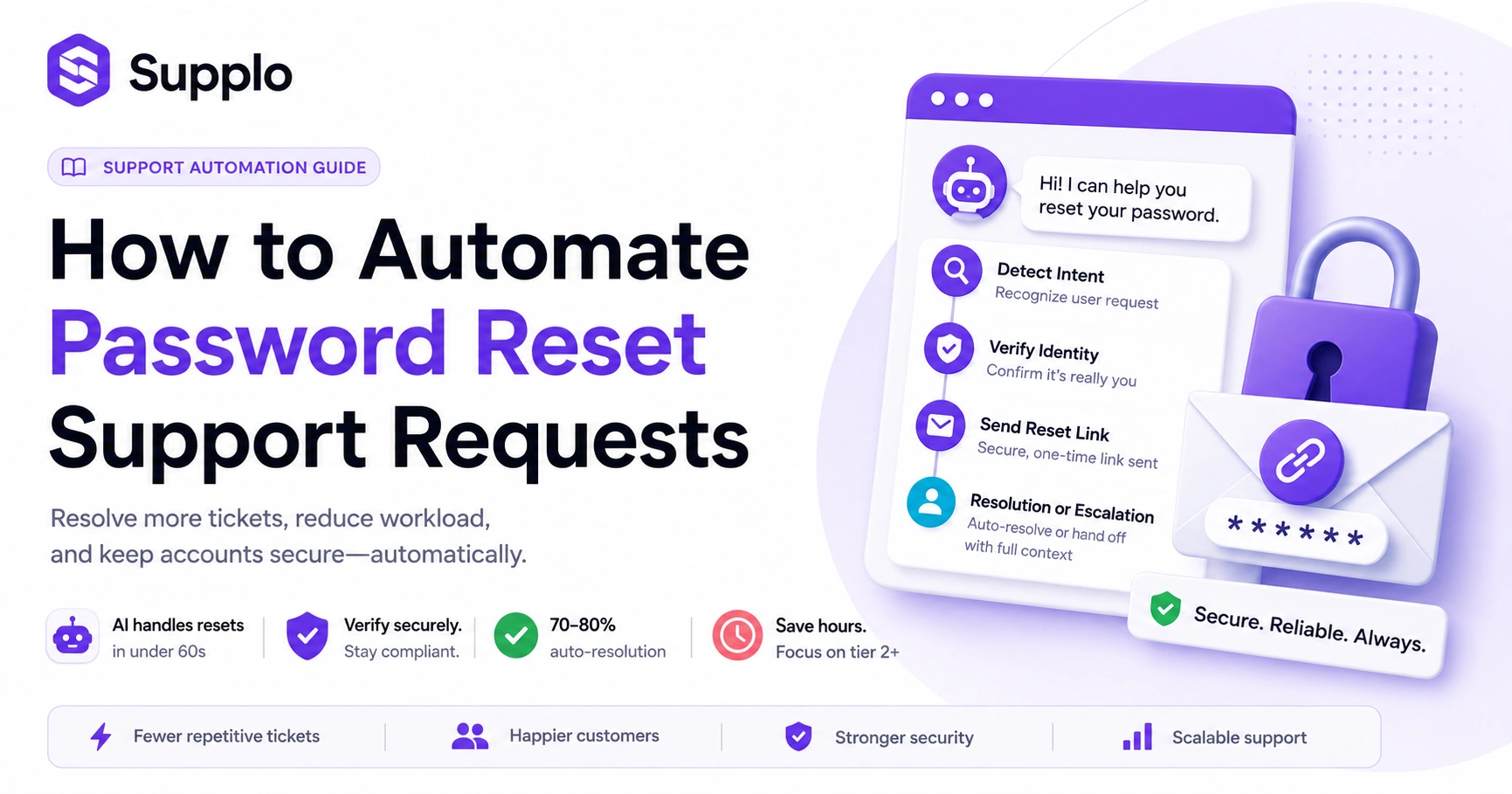
- Spot the intent: Train your AI to recognize phrases like 'can't log in' or 'reset my password'.
- Verify identity: Use email checks or knowledge base questions to confirm who's asking.
- Send a secure link: AI automatically generates a one-time reset link.
- Know when to bail: If verification fails or things get messy, the AI hands off to a human with full context.
- Test like crazy: Run through failure scenarios before going live, catch loops and gaps early
Why Automating Password Resets is a Reliability Game-Changer for Support Teams
Password resets are the unsung time-suck of every support team. They're simple enough, but they eat up hours because they interrupt flow and force context switching. Automating them means your AI handles the whole thing, from spotting the request to verifying the user to closing the ticket, without a human lifting a finger. The best part? The AI never gets bored, never rushes and never forgets a step.
The hidden cost of manual password resets on your team's bandwidth
Here's what manual resets actually cost you: about 10–15 minutes per ticket, including the time it takes to switch tasks. An AI agent can do the same job in under 60 seconds. That's not just faster, it's a massive recovery of team focus.
Consistency is another win. The AI follows the same verification steps every single time. No shortcuts, no slip-ups. And when it can't resolve something? It escalates immediately with a clear summary: no stalling, no repeating questions, no frustration.
What happens when a password reset isn't just a password reset?
Sometimes that forgotten password ticket is actually hiding something bigger. Maybe the user lost access to their email. Maybe their phone got wiped and they can't get their 2FA codes. Or their account is locked due to too many failed login attempts.
A good AI agent spots these patterns. It doesn't just blindly send a reset link; it asks smart follow-ups, checks the knowledge base and decides whether to guide the user through an alternative path or escalate to a human with all the context. That saves everyone time and prevents repeat contacts.
How to Handle Difficult Password Resets with an Automated AI Agent
Not every reset is straightforward. Some users have genuinely forgotten everything. Others changed their phone number and can't get SMS codes. An advanced AI agent can handle these edge cases by asking adaptive questions, cross-referencing your knowledge base with session data and figuring out the right path forward, whether that's an alternative verification route or a clean handoff to a human.
When the user forgot everything, handling zero-recall scenarios
When a user claims to have forgotten their email, phone number and security questions, the AI shouldn't just throw up its hands. First, it tries the standard route, email or SMS verification. If that fails, it pivots to a knowledge base–based on security questions. If the user still can't verify, the AI collects whatever scraps of info it can (like When did you create the account?) and passes a structured summary to a human agent. No wasted time trying to force a self-service fix that isn't going to work.
How to automate password reset support requests without locking users out
This is the golden rule: never issue a reset link without at least one verification factor. The AI should allow a single re-send of a verification code before triggering a human escalation. A solid knowledge base is essential here; it stores your verification rules and procedures so the AI always knows what to check.
This way, you balance security and convenience. Users get a couple of attempts, but the AI knows when to stop and call in a human: no accidental lockouts, no frustrated customers.
Troubleshooting Password Reset Issues: The 3 Most Common Failures and Fixes
Three problems account for the majority of password reset failure tickets: expired links, emails landing in spam and users mistyping their email addresses. Each one has a straightforward fix that your AI can handle automatically.
Why the 'reset link expired' support ticket is the number one and how to automate around it.
Expired links are a classic frustration. The user clicks the link, gets an error and has to start the whole process over. The AI can automatically send a new link with a longer Time-to-Live (e.g., 60 minutes instead of 15) when a user reports an expired link. For email not received issues, the AI checks whether the domain is valid, prompts the user to check spam and, if that fails, offers to resend to a different email address.
For typos, implement a double-entry prompt: have the user type their email twice before submitting and let the AI verify both matches. If the email is unverifiable, the AI escalates with a pre-filled ticket so the human doesn't have to start from scratch.
If your reset automation isn't working, we'll fix it. Supplo's AI agent is built to handle these exact failures, expired links, spam-blocked emails, typos and escalate cleanly when needed.
See How Supplo Handles It at Supplo's website.
Your Actionable Plan: Automate Password Reset Support Requests from Ticket to Resolution
Ready to set this up? Here's a practical plan using an AI agent like Supplo. The whole setup takes under 10 minutes in Supplo's inbox and AI agent workspace.
Set up your AI agent to handle password resets.
- Train your AI in language: Teach it to recognize 5–8 common password reset phrases, such as 'forgot password,' 'reset my login,' or 'can't get in.'
- Connect to your knowledge base: Integrate the AI with your KB so it knows the standard reset URL and verification criteria.
- Set conditional logic: If the user provides their registered email, proceed. If not, ask two KB-based security questions.
- Automate the resolution: On success, log the resolution and automatically close the thread.
- Define escalation rules: On failure (like no matching email in the system), escalate to a human in your shared team inbox with a structured summary of what happened.
The handoff rule: when the AI escalates to a human
A solid handoff rule is what separates good automation from frustrating automation. The AI needs to know when to stop. After multiple failed verification attempts or when the query exceeds its capabilities, it must be escalated. And it must include the full conversation history and the reason for the handoff, so the human can pick up without having to ask the same questions again.
Ready to automate password resets in under 10 minutes? Set up your Supplo workspace and configure your AI agent today, no credit card required. Start your free 14-day trial and see how we handle those tricky resets for you.
Start Free at Supplo.
Advanced Password Reset Support: Handling MFA, Expired Sessions and Locked Accounts
Password resets get complicated fast when MFA devices are lost, sessions are fully expired, or accounts are locked due to too many failed login attempts. The AI needs to know the difference between a simple password reset and a full account recovery. Advanced support means the AI recognizes an MFA-locked user, guides them through backup code usage and, if that fails, hands off to a human with account recovery access only, never a password reset link.
Best practices for password reset support when MFA is involved
For users locked out of their MFA device, the AI should first check whether backup codes were issued. If the session has expired, the AI can verify the user's IP against recent login IPs before allowing a reset. When an account is locked due to too many failed attempts, the AI can recommend a cooldown period (Try again in 30 minutes) or escalate to admin unlocking via email ticketing.
One thing the AI should never do: trigger multiple back-to-back password reset emails. That floods the user's inbox and raises security flags.
Account recovery automation vs. security risk: where to draw the line
Automation is great, but security comes first. The AI should be programmed to spot high-risk scenarios, such as multiple failed login attempts from new locations or requests to change primary contact information and immediately flag them for human review. This prevents potential breaches and ensures sensitive changes get the human oversight they need. Automate the predictable stuff. Keep the risky stuff with your team.
How to Test Your Automated Password Reset System for Failures Before Go-Live
Don't assume it'll work perfectly on day one. It won't. Run a controlled test with at least 3–4 scenarios: a user who knows their email address, one who doesn't, one with an invalid email address and one whose MFA device is lost. Watch for loop failures (where the AI keeps asking the same question) and fallback gaps (where the AI escalates without giving enough context). Fix these before you let real users loose.
To test effectively:
- Use a test account to simulate each scenario and log the AI's responses.
- Make sure the AI never offers a reset link if identity verification fails.
- Verify that escalation includes a structured summary (context, steps attempted, failure reason) so humans don't have to re-ask
- Test across channels: what works in live chat may break in WhatsApp or Instagram DMs
- Run the test twice: once fresh and once with a cached session to catch cookie-related bugs.
How to Measure the Reliability of Your Password Reset Automation
If you're not tracking success rates, you're flying blind. The three key metrics are resolution rate (how many resets the AI closes without human help), escalation rate (how often it hands off) and re-login success rate (how many users who get a reset link actually log in within 15 minutes). A healthy system should achieve a resolution rate of 70–80% and a re-login rate of 90%.
Key metrics to track: resolution rate, escalation rate and user re-login success
- Resolution rate: Track per channel (widget vs. email vs. Telegram) to spot channel-specific issues
- Escalation rate: If it's above 30%, tweak your AI's KB integration or verification rules
- Re-login success rate: This is the real test. If users get a link but never use it, something's broken.
- Average handling time (AHT): Measure the time from the first message to the link sent. Aim for under 2 minutes.
Understanding these metrics helps you keep improving. And with transparent pricing for AI-powered customer support, you can scale without surprises.
The Security vs. Speed Trade-Off in Automated Password Reset Requests
Speed and security naturally pull in opposite directions. The fastest system hands out reset links to anyone who asks, but that's a nightmare for security. The most secure system requires three-factor verification and human review, but users hate it. The practical middle ground? An AI that verifies identity with one strong factor (like a working email plus the ability to click a link), offers one backup path and escalates to a human for anything riskier than a simple email reset.
- One factor is the minimum: the user must have access to their registered email or phone number
- Two-factor for sensitive accounts: email + KB-based question
- The AI must log every reset attempt, success, failure and escalation for compliance
- Never let the AI issue a new password directly. Always send a user-initiated reset link
- Be transparent: tell the user why the automation can't proceed if it fails (That email doesn't match our records)
Key Takeaways
- Automate password resets to save time and increase support team efficiency
- An AI agent can handle complex scenarios like MFA issues and locked accounts with proper setup
- Test your automated system thoroughly to prevent loops and ensure smooth escalations
- Measure success with resolution rates, escalation rates and re-login success
- Balance speed and security with robust verification steps
Control your support costs with a single flat price, not per-seat. Supplo charges $0.04 per AI resolution, not $0.99. Your bill stays predictable as your team and ticket volume grow. Start your 14-day trial now.
FAQ
Is it safe to fully automate password resets?
Yes, as long as you enforce at least one verification step (email or phone access) before the AI sends a reset link. The AI should never issue a new password directly; it should always send a user-initiated reset link. Supplo is not affiliated with any app or website. Please follow each app's terms and local regulations.
Why do password reset codes sometimes fail to arrive?
Most often, it's a deliverability issue, the email goes to spam, the phone number is wrong, or the SMS gateway is delayed. An AI can check the email domain validity and prompt the user to check spam before escalating.
Should I use one-time codes or permanent reset links?
One-time codes are generally safer because they expire after use. Permanent reset links can be intercepted or reused. Your AI should generate and send a fresh one-time code or link for each request.
What should I NOT use automated password reset for?
Don't automate resets for admin accounts, accounts with financial data, or accounts that have recently been flagged for suspicious activity. Those should always go through human verification.
How do I troubleshoot an automated password reset loop?
A loop occurs when the AI keeps asking the same question (e.g., "What is your email? ") even after the user has provided it. Add a check: if the AI receives the same piece of information twice without progress, it should escalate immediately.
Can an AI handle password resets on WhatsApp or Instagram DMs?
Yes, if properly configured. The AI must verify the user's identity through a KB-based question before sending a reset link on those channels, because email deliverability isn't guaranteed on messaging apps.
What happens if a user's primary email is no longer accessible?
The AI should move to a secondary verification path (e.g., KB-based security questions or manual escalation). Never issue a reset link to an email or phone that hasn't been verified against the user's current account record.
Compliance line: Supplo is not affiliated with any app or website. Please follow each app's terms and local regulations.