On this page
Every support ticket is a promise waiting to happen. A customer support SLA is the document that defines the terms of that promise, so your team knows what to deliver, and your customers know what to expect. This guide covers what an SLA actually is, why even a two-person team needs one, and how to set up a working version in under 30 minutes.
This article is for founders, support leads, and operations managers who want to move from chaotic inbox management to predictable service delivery, without hiring a dedicated ops person or buying a complex ITIL toolkit.
Disclaimer: Supplo is not affiliated with any app or website. Please follow each app's terms and local regulations.
Quick Answer
- The short version: A formal commitment from your support team to respond and resolve issues within defined timeframes.
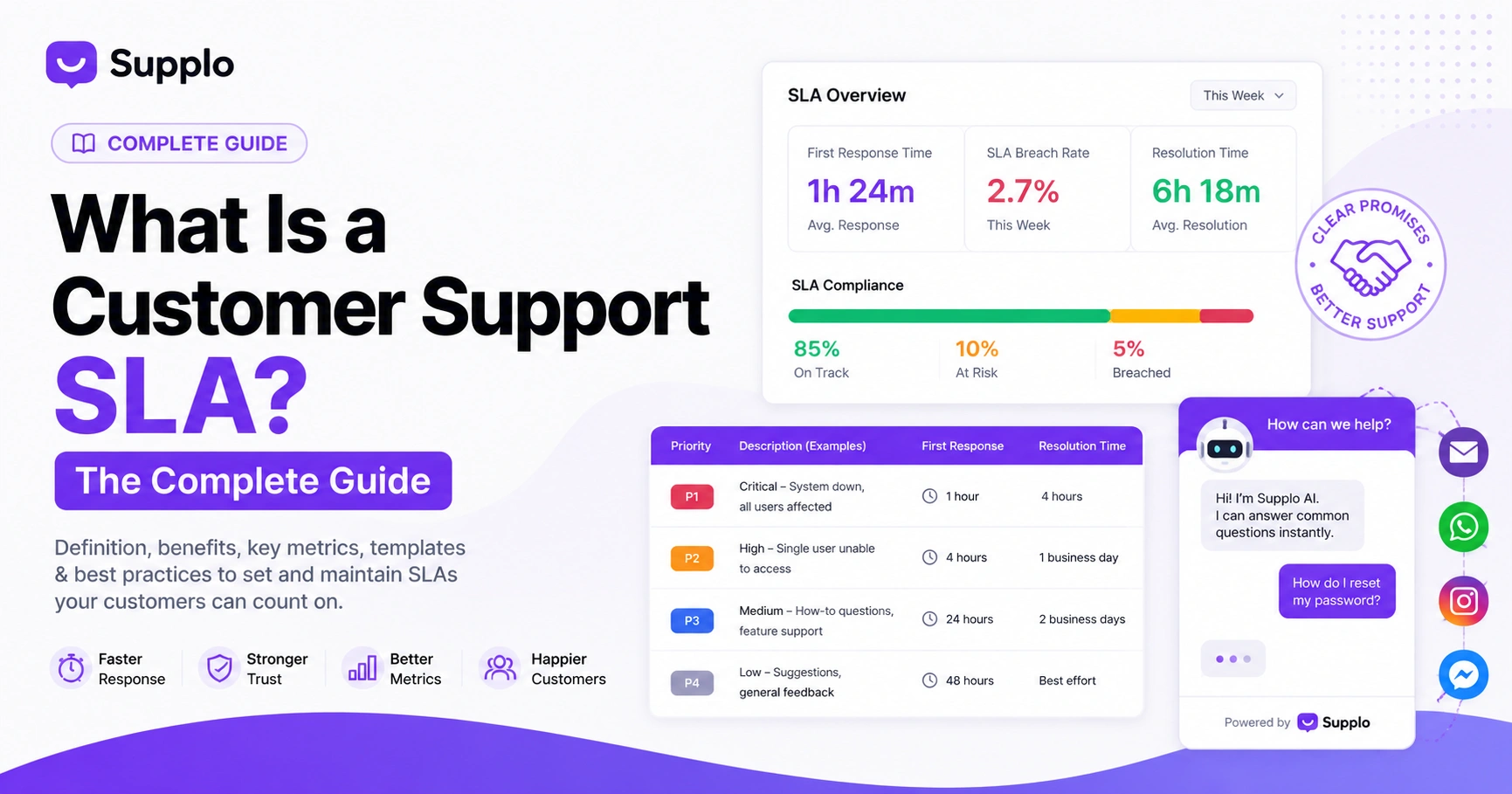
- Organized by urgency: Tickets get a priority level (P1–P4), each with its own target for first response and full resolution.
- Channel-specific: Applies to email, live chat, WhatsApp, social DMs, you name it. The clock works differently on each.
- Sets a clear deadline: No more guessing games for your customers. They know what to expect.
- For most small teams: It's an internal guideline backed by your support tool, not a legal contract written by lawyers. Start there.
What Does "Customer Support SLA" Actually Mean?
A customer support SLA (Service Level Agreement) is a formal promise between your team and your customers. It defines how quickly you'll respond to a question and how fast you'll actually fix the problem. Think of it less as a legal shackle and more as a shared understanding.
Without one, every ticket is a wild card. Your team has no clear target, and your customers have no idea when they'll hear back. That's a recipe for frustration on both sides.
Here’s what a solid definition of a customer support SLA usually includes:
- Core promise: "We will reply within X hours and resolve within Y days."
- Covers: Email, live chat, social DMs, and phone.
- Escalation paths: Critical stuff (like "the entire site is down") gets a faster, separate track.
- Priority-based: A P1, "nobody can log in", gets way more attention than a P4, "I'd like a dark mode option."
- Flexible structure: It can be a legally binding part of a B2B contract or just an internal guideline for the team. Both are fine.
A customer support SLA isn’t a constraint; it’s a shared compass. Without it, your team guesses, and your customers hope.
Why You Need a Support SLA Even If You’re a Small Team
Look, SLAs aren't just for huge companies with entire departments dedicated to process. If you're running a small team, a simple SLA can be the difference between feeling like you're drowning in tickets and running a tight ship.
It builds customer trust. It reduces churn because people know when to expect a reply. And most importantly, it gives your team a fair, documented benchmark to aim for. When things go sideways (and they will), you have a standard to fall back on, not a bunch of finger-pointing.
- Customers who know when to expect a reply are far less likely to hit that "escalate" button or leave for a competitor.
- It prevents burnout. Your team knows which tickets to drop everything for and which ones can wait an hour.
- If you're in a regulated industry like fintech or healthcare, a documented SLA is often non-negotiable.
- It makes scaling easier. You can add new agents without reinventing your entire support process.
- Most small teams skip this. That gives you a serious competitive edge.
Check out the real case studies: small business SLA success stories from teams that implemented SLAs without hiring extra headcount.
The Core Components of a Customer Support SLA
A solid customer support SLA needs a few non-negotiable pieces. Skip these, and you're just making vague promises that won't hold up.
- Scope: Which channels are included? Is it email, or does it cover live chat, WhatsApp, and Instagram DMs as well? Be specific.
- Priority Matrix: Map each issue type to a priority level. For example: "Forgot password" = P3. "Entire team can't log in" = P1.
- Response Time: This means the first human reply, not an auto-acknowledgment or a chatbot saying "We got your message."
- Resolution Time: The time to the actual fix or a working workaround. "We sent it to engineering" doesn't count as resolved.
- Escalation Chain: Who gets notified if a ticket misses its target? Define the path.
- Service Hours & Holidays: Define what "business hours" actually mean. Does the clock stop on weekends?
A strong SLA scope answers one question: what is included and, just as importantly, what is not.
Critical SLA Metrics That Actually Matter
Don't track everything. Focus on the metrics that show you're actually meeting your commitments. A lot of teams get distracted by vanity numbers that look good in a report but don't mean much.
- First Response Time (FRT): This is the fastest indicator that your system is actually working.
- Time to Resolution (TTR): This measures how good your team is at actually solving problems.
- SLA Breach Rate: The percentage of tickets that missed their target. This is your failure signal; pay attention to it.
- Backlog Growth: If your queue of unresolved tickets is growing, your SLA targets are too ambitious.
- Reopened Tickets: If tickets keep coming back, your "resolutions" are temporary fixes, not real solutions.
Use a Live chat widget with auto-SLA tracking to capture these metrics automatically—no more manual spreadsheet entry.
How to Set a Customer Support SLA (Step-by-Step)
Start with your real data, not your ambitions. Pull your actual performance numbers first, then set targets that are tough but achievable.
Step 1: Pull the last 60 days of ticket data. Examine response and resolution times for different types of issues.
Step 2: Define 3–4 priority levels with real-world examples your team will instantly understand:
- P1: "All users can't log in" or "Payment system is down."
- P2: "A single user can't access their account."
- P3: "How do I reset my password?" or general feature questions.
- P4: "I'd love to see a dark mode option."
Step 3: Set realistic response targets based on your team's size:
- P1: 1 hour during business hours.
- P2: 4 hours.
- P3: 24 hours.
- P4: 48 hours (or best effort).
Step 4: Map your escalation chain. Who gets pinged when a ticket hits 75% of its target time?
Step 5: Write it up as a one-pager. Share it with your team. Schedule a quarterly review to make sure it still makes sense.
Customer Support SLA Best Practices to Avoid Common Pitfalls
The biggest mistake? Promising response times based on your best day ever, instead of your average Tuesday. Here’s how to keep it real.
- Be honest about capacity: Don't promise a 2-hour P2 response if you only have one agent.
- Define "response" clearly: Make sure everyone knows it means the first human contact, not a chatbot auto-reply.
- Plan for black swans: Unless it's a legal contract, your SLA is a "best effort" promise.
- Automate reminders: Use your tool to alert the team before a breach happens, not after.
- Review quarterly: Your SLA is a living document. Treat it like one.
What Goes Into a Support SLA Template?
You absolutely do not need a 20-page document. One or two clear pages are perfect. The goal is absolute clarity, not legal armor.
- Scope: "This SLA covers email, live chat, and WhatsApp support."
- Service Hours: "Monday–Friday, 9 AM–6 PM EST, excluding US holidays."
- Priority Definitions: 3–4 levels with clear, real-world examples.
- Response/Resolution Targets: Per priority level, measured from ticket creation.
- Escalation Paths: Who gets notified and when.
- Exclusions: "Planned maintenance, force majeure, and issues on the customer's side."
- Revision Clause: "This SLA will be reviewed and updated quarterly."
How to Monitor and Enforce Your Support SLA
Manually monitoring an SLA is a recipe for failure. Use a support tool that tracks response times automatically, flags tickets that are approaching a breach, and generates reports so you can actually see what's happening.
- Automate tracking: Your tool should calculate response and resolution time per ticket without you lifting a finger.
- Visual alerts: Use color-coded tickets (green = on track, yellow = warning, red = breached).
- Weekly SLA report: Share it with the team. Transparency drives accountability.
- Breach protocol: For every missed SLA, log a reason. "Agent sick, no backup" is a real reason.
Supplo tracks all SLA metrics natively across live chat, email, and social DMs, with automatic breach alerts and weekly performance dashboards. It just works.
What Happens When You Don’t Meet Your SLA?
You will miss targets. It happens. The key is how you handle it. Start with honesty.
Customer communication: Send a proactive email within 24 hours of the breach. Explain why it happened and what you're doing about it.
Remedy options:
- A service credit on their next invoice.
- Priority handling on their next ticket.
- A free training or onboarding session.
Internal root-cause analysis:
- Was it unrealistic?
- Did an agent drop the ball?
- Was there a tool failure?
A missed SLA isn't a failure; it's data. It's telling you something needs to change. If you see the same reason for three breaches in a row, you have a systemic problem that needs a real fix.
If your SLA is failing because your tool doesn't track consistently, try Supplo. It flags tickets approaching breach and gives you hard data to fix the right problems. Start free.
Tools That Help You Stick to Your SLA (Including Supplo)
The right tool makes SLA tracking invisible. You want a platform that automatically timestamps every ticket response and alerts your team before a breach. You shouldn't have to think about it.
Supplo does all this natively across email, live chat, Telegram, WhatsApp, Instagram, and Facebook, without per-seat fees or per-resolution charges. That means you can track SLA performance for your entire team without needing a separate analytics tool or a huge budget.
- Its AI agent handles routine queries 24/7, keeping your First Response Time low without breaking the bank.
- Both human and AI responses are logged against SLA time.
- It's multi-channel, so your SLA applies equally to email, your live chat widget, and social DMs.
How to Adapt Your SLA for Multi-Channel Support
Your SLA shouldn't be the same for email and live chat. They're different channels with different expectations. You need per-channel targets with different clocks.
- Email: 4–24-hour response target (depending on priority).
- Live chat: 30-second to 2-minute first response (human or AI).
- WhatsApp/Telegram: 2–4 hour response. 1 hour for critical stuff.
- Instagram/Facebook DMs: Similar to WhatsApp, but account for social media weekends when nobody's watching.
The trick is unifying all of this into one dashboard. A Unified inbox for all channels lets you track response times consistently without managing separate timelines for each silo. It makes your life a lot easier.
Your First Support SLA in Under 30 Minutes
You don't need a month-long project. You can have a working SLA in half an hour.
- 0–10 minutes: Check the last 30 days' average response times in your inbox.
- 10–20 minutes: Define 3 priority levels with clear examples.
- 20–25 minutes: Write your one-pager: scope, hours, targets, escalation.
- 25–30 minutes: Share it with your team. Set your tool up to track it. Plan a 60-day review.
Remember, your first SLA is a starting point, not a contract carved in stone. A functional SLA today beats a perfect one next quarter.
Ready to test your SLA setup? Start a free trial on Supplo to see how your response times stack up across email, live chat, WhatsApp, and more. No credit card required.
Key Takeaways
- A customer support SLA defines response and resolution time targets per priority level.
- Core components: scope, priority definitions, targets, escalation paths, and a revision cadence.
- Best practices: set achievable targets based on actual capacity, automate tracking, and review quarterly.
- Multi-channel SLAs require different targets per channel; email, chat, and social DMs are not the same.
- Use a unified platform like Supplo to track SLA metrics across all channels in a single dashboard, without per-seat fees.
FAQ
What's the difference between an SLA and a KPI in customer support?
An SLA is a commitment to your customer (e.g., "We'll reply within 4 hours"). A KPI is an internal measurement (e.g., "Our average first response time is 3.2 hours"). SLAs are promises; KPIs are how you track them.
Can a customer support SLA be legally binding?
Yes, especially in B2B contracts where response and resolution times are written into the service agreement. For most small-to-mid teams, SLAs are internal guidelines, but any external SLAs should be carefully drafted to avoid legal risk.
Should my SLA include weekends and holidays?
Only if your staff supports those days, be explicit: "Business hours are Monday–Friday, 9 AM–6 PM EST, excluding US federal holidays." If you offer weekend support, note that response times may differ.
How often should I review and update my SLA?
At least quarterly. A quarterly review lets you adjust targets based on team capacity, seasonality, and customer feedback. If you're growing fast, monthly is better.
What's a realistic first response time for a small support team?
For email: 4–12 hours is common and manageable for a team of 1–3 agents. For live chat: 1–5 minutes. Don't overcommit. Honest, achievable targets build more trust than ambitious ones you constantly miss.
How do I handle SLA breaches gracefully?
Acknowledge the breach directly to the customer within 24 hours, explain the root cause, and offer a remedy (e.g., priority handling on their next ticket or a service credit). Internally, document why you missed it and adjust your SLA or staffing accordingly.
Does my SLA apply to AI responses or only human agents?
It depends on your definition. If your SLA says "first human response," then AI auto-replies don't count. If it says "first response" (period), then an AI answer within 30 seconds satisfies the SLA. Be crystal clear about this in your SLA language.
Compliance line: Supplo is not affiliated with any app or website. Please follow each app's terms and local regulations.


