On this page
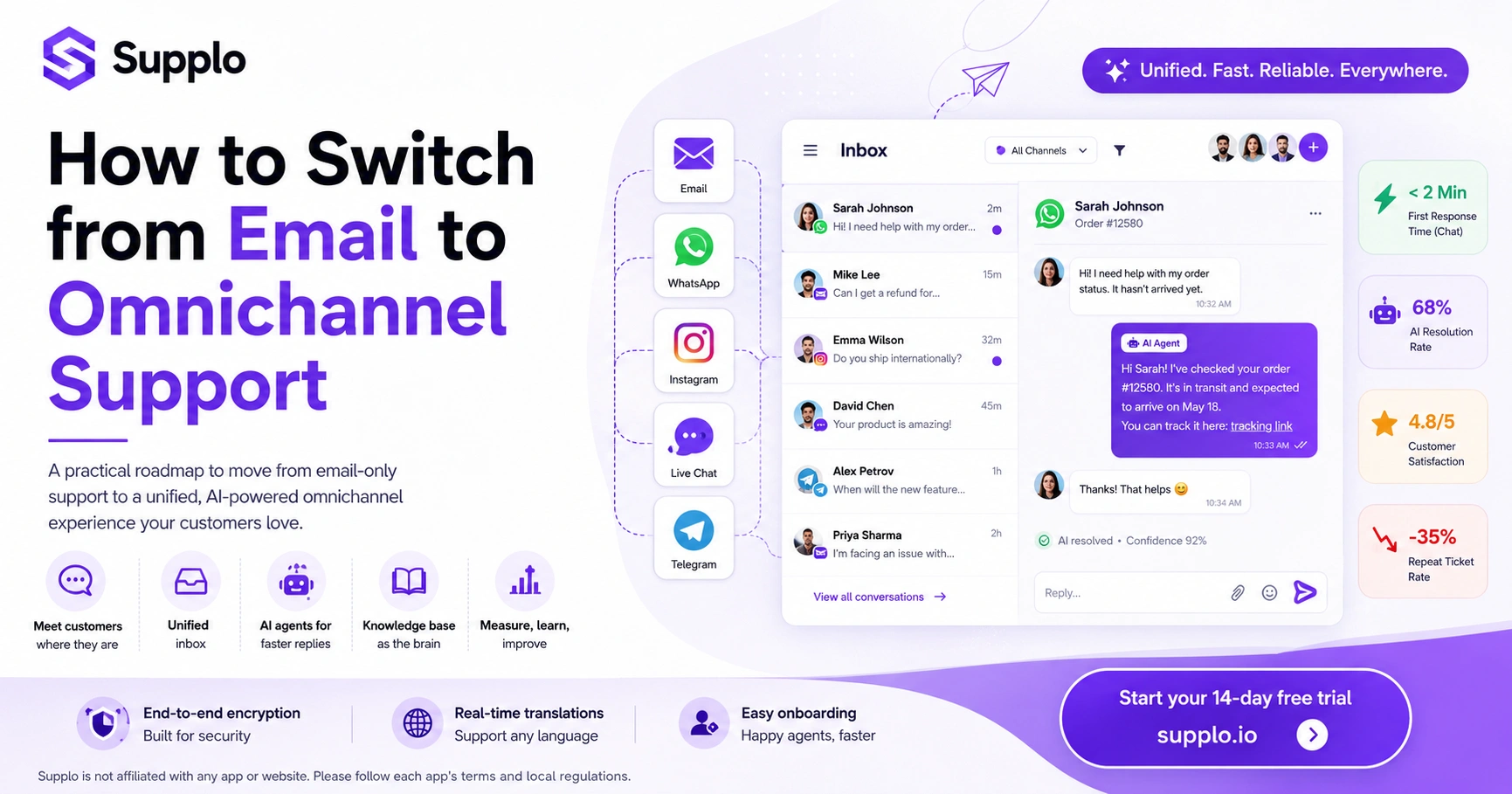
Moving from a traditional email-only support system to a comprehensive omnichannel approach can transform your customer relationships and operational efficiency. This guide offers a practical roadmap to make this transition smoothly, ensuring you meet customers where they are while maximizing reliability and reach. It's for businesses currently relying on email for customer service but ready to offer a seamless, integrated experience across multiple digital channels, such as live chat, WhatsApp, and social media.
Quick Answer
- Start your transition by choosing 1-2 key messaging channels where your customers are most active, like a website chat widget and WhatsApp.
- Implement a unified, thread-based inbox to centralize all customer conversations, regardless of the channel they originate from.
- Deploy an AI agent to automate responses to common inquiries, freeing your human team to focus on complex issues.
- Establish a robust knowledge base to serve as the single source of truth for both your AI and human agents.
- Continuously monitor key metrics, such as first-response time and AI resolution rate, to gauge success and refine your strategy.
Email vs. Omnichannel: Why Your Single-Channel System is Costing You, Customers
Let's be real, sticking with email-only support creates friction and frustration for modern customers. When you only offer email, you're basically forcing customers to adapt to your preferred communication method. And guess what? That approach frustrates modern buyers and often drives them straight to competitors who offer easier, faster support on their preferred platforms.
Here's the thing about email: it inherently creates asynchronous delays, where responses can take hours or even days. In contrast, omnichannel support offers near-instant responses via live chat and messaging apps. Email also forces agents to manage repetitive context switching across multiple threads, whereas an omnichannel system keeps the entire conversation history in a single unified view. Customers who wait more than five minutes for a response are far less likely to complete a purchase, highlighting the immediate financial impact. Businesses with omnichannel setups typically achieve higher customer retention rates compared to those relying solely on email.
Email-only support creates asynchronous delays and forces customers to adapt, often leading to frustration and lost revenue opportunities.
The True Value of Omnichannel Customer Service
The value of omnichannel customer service goes beyond mere convenience; it's a strategic imperative. It builds reliability by ensuring that no inquiries are lost across disparate channels. By integrating all touchpoints, your team gains a holistic view of every customer interaction.
Omnichannel expands your reach by letting you engage customers on their preferred platforms, whether it's WhatsApp in Southeast Asia, Instagram in the U.S., or Telegram in Eastern Europe. This expanded reach directly impacts revenue because faster, more personal support increases conversion rates and encourages repeat purchases. A centralized inbox means your team never misses a message, helping reduce abandoned carts. Channel flexibility keeps customers engaged longer, boosting satisfaction scores and fostering loyalty. This comprehensive approach also typically leads to a measurable increase in customer lifetime value.
Audit Your Current Email Support Workflow Before You Change Anything
Before you embark on a significant transition to omnichannel support, you must have a clear understanding of your existing email system. This initial audit provides a crucial baseline. Focus on collecting data related to ticket volume, average response times, and the common themes of incoming queries.
This foundational data will guide your selection of new channels and inform the setup of your AI. The goal is to move beyond simply migrating inefficiencies to new platforms.
Audit Checklist:
- Identify your top 10 most frequent email questions. These common inquiries are prime candidates for your initial knowledge base articles.
- Measure your average first-response time for email. Use this as a benchmark to set an ambitious goal for your new omnichannel setup, aiming for less than two minutes on chat channels.
- Pinpoint gaps in your current support: Are there specific questions customers repeatedly ask that email struggles to answer clearly or efficiently?
- Map the entire customer journey from an incoming email inquiry to its final resolution. Look for bottlenecks, redundant steps, or friction points in the handoff process.
Choose Your Channels: Don't Boil the Ocean, Start with Messaging
The biggest mistake in an omnichannel customer service transition is launching on every possible platform simultaneously. This approach can quickly overwhelm your team and dilute the quality of your support. Instead, start strategically with one or two high-impact messaging channels where your customers are already active.
For most businesses, this often means beginning with a website chat widget and WhatsApp. Gradually add channels like Instagram DMs and Telegram only after your core operation is stable and performing well.
WhatsApp, Instagram, and Live Chat: Where to Begin
- Analyze Your Audience: Examine your existing customer data to determine which social media and messaging platforms your target audience uses most frequently for interactions.
- Prioritize Website Widget and WhatsApp: A website chat widget addresses immediate needs for visitors on your site, while WhatsApp caters to a broad mobile-first user base and is essential in many international markets.
- Strategic Expansion: Consider Instagram DMs if your brand has a strong visual presence or operates in e-commerce or retail. Implement Telegram if your audience is particularly tech-savvy or if you serve Eastern European markets.
- Phased Rollout: Test each new channel for approximately 30 days. This allows your team to become comfortable with the platform and refine workflows before introducing another platform, preventing agent burnout.
Ready to test your first channel? Start the free 14-day trial at Supplo.io. No credit card required, just a clean, unified inbox waiting for you.
Unify Everything in a Single Thread-Based Inbox
An omnichannel support strategy crumbles if your agents are forced to juggle multiple tabs and applications for email, WhatsApp, and live chat. The core principle of effective omnichannel support is a unified inbox that seamlessly threads every conversation. Regardless of whether an interaction started on email or Instagram, it appears in a single, chronological view. This eliminates disruptive context-switching, ensures no reply gets lost in a different tab, and provides a complete picture of the customer journey.
- Utilize a platform that aggregates all communication channels into one workspace, breaking down silos.
- Agents gain access to a full conversation history, irrespective of the initial channel or subsequent shifts.
- Implement internal notes and tags to facilitate team collaboration on complex tickets directly within the same thread.
- Automated assignment rules can efficiently route inquiries to the appropriate agent or team based on the query's channel or topic.
A unified, thread-based inbox is the backbone of efficient omnichannel support, eliminating context-switching and ensuring agents have a complete view of every customer interaction.
Implement Your AI Agent for Reliable
The most impactful way to scale your transition to omnichannel support is to deploy an AI agent that can automatically handle common questions. A self-learning AI can resolve a significant portion, often up to 60–80%, of incoming tickets without requiring human intervention. This intelligent automation ensures that only complex or nuanced cases are escalated to your human team, keeping response times exceptionally fast and allowing your agents to focus on high-value interactions.
- Train Your AI: Use your archived email conversations and comprehensive knowledge base articles to train your AI accurately. The quality of its training data directly impacts its effectiveness.
- Define AI Boundaries: Clearly delineate what your AI agent should handle (FAQs, order status updates, policy questions) and what requires human escalation.
- Monitor Performance: Regularly monitor the AI's resolution rate. If it consistently struggles with common queries, adjust its training data and refine its algorithms.
- Ensure Seamless Handoffs: Design a clean handoff mechanism so that customers never have to repeat themselves when transitioning from the AI to a human agent.
Set Up Your Knowledge Base as the Brain of the Operation
Your omnichannel support system can only be as effective and reliable as the information it draws from. A robust, live knowledge base serves as the authoritative source of truth for both your AI agent and your human support team. When customers can easily self-serve through a searchable help center, your overall ticket volume decreases, and both agents and the AI can provide faster, more consistent answers.
- Create Core Articles: Develop clear, concise articles that address your 20-30 most frequently asked questions. These form the foundation of your self-service portal.
- Maintain Freshness: Continuously update your knowledge base with new product information, policy changes, and seasonal FAQs to keep it relevant and accurate.
- Integrate with AI: Link your AI agent directly to the knowledge base, enabling it to cite sources for its responses and ensure accuracy.
- Enable Self-Service: Allow customers to search your knowledge base directly from your website chat widget before initiating a conversation, further deflecting tickets.
Best Practices for Omnichannel Customer Engagement
Even with the most advanced technology, the best omnichannel system requires human empathy to succeed. The ultimate goal of omnichannel support is to create a seamless experience that feels efficient, not robotic. This means personalizing responses using the full conversation history, injecting a human, conversational tone into automated replies, and always providing a clear, unimpeded path to a live agent when customer situations become complex or emotionally charged.
- Maintain Context: Never force a customer to repeat their problem across different channels; leverage the unified thread to retain all prior context.
- Personalize Interactions: Use the customer's name and reference previous interactions to build rapport and demonstrate familiarity.
- Manage Expectations: Set clear response time expectations for each channel (e.g., live chat under 1 minute, email under 4 hours).
- Facilitate Channel Switching: Train agents on how to smoothly transition conversations between channels (e.g., moving from an Instagram DM to email for attachment sharing).
The human touch remains paramount in omnichannel support; personalization and seamless handoffs build trust and prevent a robotic experience.
How to Handle the Tricky Parts: Security, Translations, and Team Onboarding
A reliable transition to omnichannel support requires thoughtful consideration of security, language barriers, and ensuring your team fully adopts the new system. It's crucial to use a platform that protects customer data with end-to-end encryption and offers real-time translation capabilities so you can support customers in any language, regardless of your team's language. Additionally, the platform should have a smooth learning curve to facilitate quick adoption.
- Security First: Implement two-factor authentication and role-based permissions to safeguard sensitive customer data and limit access appropriately.
- Bypass Language Barriers: Leverage built-in translation functionalities to communicate with customers in their native language effortlessly, removing the need for a fully bilingual support team. Check out how email ticketing integrates with this.
- Phased Agent Onboarding: Introduce agents to the new system in phases; start with existing email workflows, then gradually add one new channel per week.
- Practice Scenarios: Conduct mock scenarios and role-playing exercises with your team to practice seamless handoffs between the AI, email, and live chat.
Getting stuck on handoffs or security concerns? Supplo's flat per-workspace pricing includes end-to-end encryption and built-in transformations. Start your trial and see it in action.
What to Track After Your Omnichannel Implementation
You cannot improve what you do not measure. After transitioning to omnichannel support, it's essential to track key metrics that reflect both operational efficiency and the overall customer experience. Aim for target outcomes such as first-response times under two minutes on chat platforms, a consistently rising AI resolution rate, and a noticeable reduction in repeat contact rates. These measurable indicators will unequivocally confirm whether your shift from email to omnichannel is delivering tangible value.
- First Response Time (FRT): Compare your historical average email FRT to the new, significantly faster response times achieved on chat and messaging channels.
- AI Resolution Rate: Monitor the percentage of inquiries your AI agent resolves without human intervention. Aim for at least 60% automated resolution within the initial month.
- Customer Satisfaction Score (CSAT): Track CSAT scores across different channels to identify where human intervention and empathy are most critical.
- Ticket Volume Shift: Observe how the overall ticket volume changes and specifically how many fewer repeat tickets you receive due to improved omnichannel context and self-service.
Your transition from email to omnichannel doesn't have to be expensive or complex. With Supplo's flat $0.04 per AI resolution and a 14-day free trial, you can start seeing results today. Visit Supplo.io to begin.
Key Takeaways
- Prioritize Customer Convenience: Move beyond email to meet your customers where they are, on their preferred platforms, reducing friction and improving satisfaction.
- Unify Communication: Centralize all customer interactions into a single, thread-based inbox to ensure agents always have the full context.
- Automate Smartly: Implement an AI agent trained on your knowledge base to handle routine queries, freeing human agents for complex issues.
- Build a Strong Knowledge Base: Make your knowledge base the authoritative source for both AI and human teams, empowering customer self-service.
- Measure and Adapt: Continuously track key metrics like response times and AI resolution rates to refine your omnichannel strategy.
FAQ
Why should I move from email to omnichannel support?
Moving to omnichannel means meeting customers where they already are, on WhatsApp, Instagram, or live chat, instead of forcing them into your email inbox. It reduces response times, prevents messages from getting lost, and creates a seamless experience that builds trust and loyalty.
How long does it take to transition from email to omnichannel support?
A phased transition typically takes 2–4 weeks. Set up your unified inbox and primary channel (e.g., live chat) in week one, add one or two messaging apps by week three, and train your AI agent alongside your human team throughout that period.
What's the biggest mistake businesses make when setting up omnichannel support?
Launching on too many channels at once is the most common misstep. It overwhelms your team and diminishes service quality. Start with one or two channels where your customers are most active, stabilize those, and then expand.
Do I need a separate team for each channel when implementing omnichannel support?
No. The whole point of a unified inbox is that one agent can manage all channels from a single view. You don't need separate teams; you need a platform that threads conversations together regardless of the source.
How do I handle security during an omnichannel customer service transition?
Use a platform with end-to-end encryption, role-based access controls, and regular data audits. Also, remember that Supplo is not affiliated with any app or website. Please follow each app's terms and local regulations.
Which channels should I prioritize in my email to support my omnichannel strategy?
Start with a live chat widget on the website and WhatsApp. Those two cover your highest-intent visitors and your mobile-first customers. Add Instagram DMs if you're a visual brand, and Telegram if you serve tech-savvy or international audiences.
How do I measure success after implementing omnichannel support?
Track first-response times (target under 2 minutes on chat), your AI's automated resolution rate, customer satisfaction scores per channel, and the percentage of tickets that get resolved without escalation. These will show you if your omnichannel implementation is working.
Compliance line: Supplo is not affiliated with any app or website. Please follow each app's terms and local regulations.