On this page
If your support team starts every Monday morning with 200 unread emails and a knot in your stomach, you don’t need more caffeine. You need a better system.
This article is for team leads, ops managers, and solo founders who are tired of the "unread badge" culture and want a practical, repeatable inbox zero customer support strategy. Use this if you manage a high volume of tickets across email, chat, and social media. Do not use this if you have fewer than 10 tickets a week; a simple filter will do.
Quick Answer
- Definition: Zero unprocessed tickets in your inbox at the end of each day.
- Who it’s for: Teams of 2–15 agents handling 50+ tickets per day.
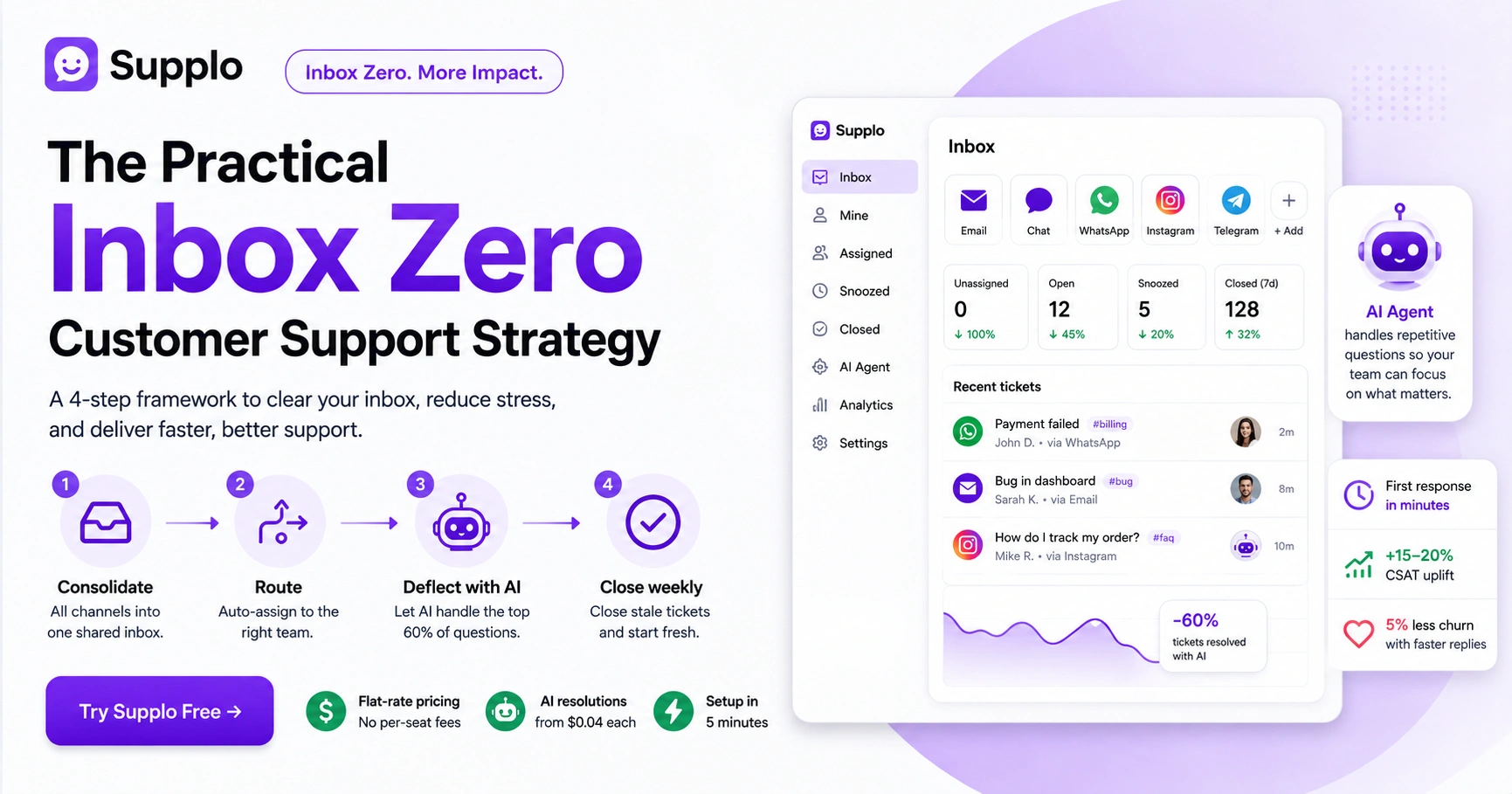
- The 4-step framework: Consolidate → Route → Deflect with AI → Close weekly.
- The secret: Stop sorting manually. Use a shared inbox with auto-routing and an AI agent.
- The cost of failing: Burnout, churn, and wasted agent time (roughly $33 per lost ticket).
Why "Inbox Zero" Feels Impossible for Support Teams
Most support teams are trying to manage email chaos with a system built for personal use. You’re fighting against notification fatigue, threading nightmares, and the tyranny of the "Reply All" button. The solution isn't more discipline; it's changing the architecture of how your inbox receives and processes work.
- The "unread badge" culture is the enemy of reliability.
- Threads break when one agent replies to a different email client.
- Manual assignment = 30% idle time per ticket.
- Stress is a feature of broken inboxes, not a personality flaw.
When you feel like you’re drowning, it’s not because you’re lazy. It’s because your tool is failing you. A real inbox zero customer support strategy doesn’t ask you to work harder; it asks you to work smarter.
The Real Cost of Not Achieving Inbox Zero Support (It’s Not Just Stress)
Missed follow-ups, burned-out agents, and churned customers. Every extra minute your team spends hunting for a lost email costs roughly $33 in agent time per ticket. Over a month, that’s weeks of salary wasted on chaos.
- Customer retention drops 5% for every 24-hour delay in first response.
- Agent burnout is the #1 cause of support team turnover.
- Lost emails = lost revenue (especially in handling payment issues).
- Vendors hate waiting; they’ll switch to a competitor.
If you think you can’t afford to fix your inbox, run the numbers on what it’s already costing you. Achieving inbox zero support isn't a luxury; it’s a retention play.
A 24-hour delay in first response costs you 5% of your customers. A systematic inbox zero strategy keeps them.
How to Implement Inbox Zero Support
It’s not a guru’s secret, it’s a process. You consolidate channels into one pane of glass (email, chat, WhatsApp, Telegram), set up smart routing, activate a self-service AI agent for the top 60% of questions, and enforce a strict weekly close-out ritual. Done.
- Consolidate: Kill the 6 separate inboxes you’re checking.
- Route: Use tags or rules to auto-assign by skill/region.
- Deflect: Let the AI handle password resets and FAQs.
- Close: Every Friday, close all stale tickets > 72 hours old.
This is how to implement inbox zero in 4 actionable steps. No fluff, no meditation apps, no "inbox detox."
Ready to build your inbox zero framework? Start for free at Supplo.io, no credit card needed. You can test the shared inbox and AI agent on your real inbox right now. Try Supplo Free →
The Triage Triage, Stop Sorting, Start Routing
Stop manually dragging emails into folders. Use a shared inbox tool (like Supplo) that lets you auto-route based on keywords, customer tier, or channel. If it’s a "bug" from email, send it to devs. If it’s a "payment failed" from chat, send it to billing. Let the machine sort, you solve.
- Set up 3–5 manual or automated tags (e.g., #urgent, #billing, #bug).
- Assign routing rules for repeat offenders (e.g., "refund" = billing team).
- Create a "buffer" folder for non-urgent replies to batch later.
- Use collision detection to stop two agents from replying to the same ticket.
This one step will cut your sorting time by 40% on day one. Efficient support ticket management starts with eliminating the manual drag-and-drop.
The Self-Service Security Blanket
You can't achieve inbox zero if your humans answer, "What are your hours?" 50 times a day. Deploy an AI agent trained on your knowledge base. It learns from past tickets and instantly answers the top 10 questions. Each AI resolution costs you $0.04 vs. $1.00+ with manual agents.
- Train the AI on your top 20 most-asked questions.
- Set it to auto-respond to simple queries (hours, returns, tracking).
- Let it escalate complex issues to a human without losing context.
- Review weekly what the AI "got wrong" to improve your knowledge base.
"Let the AI handle the boring stuff, password resets, tracking numbers, and store hours. Your humans are for the hard problems."
Learn how to activate the self-learning AI agent and watch your ticket volume drop by half. This is the best practice for inbox zero support that scales.
The Team Collaboration Inbox Zero Playbook
Email was built for one person, not a team. Stop it. Use a shared inbox where every email is a ticket, not a thread. Tag it, assign it, and use internal notes to discuss without the customer seeing. The goal is for a single glance at the dashboard to reveal who owns what.
- Assign every email to one person immediately, no "unassigned" limbo.
- Use internal notes for agent-to-agent comms (not reply-all).
- Set a "first response" SLA: reply within 4 hours, even if you can’t solve it yet.
- Use "snooze" to temporarily remove a ticket from your view until a deadline.
Learn how Supplo's shared inbox eliminates the chaos of CC'd threads and duplicate replies. Team collaboration inbox zero is achieved when everyone knows their lane.
Troubleshooting Common Shared Inbox Problems:
- Problem: Two agents reply to the same ticket. Fix: Enable collision detection in your shared inbox.
- Problem: A ticket sits unassigned for days. Fix: Set a 1-hour auto-assignment rule.
- Problem: Customers get conflicting answers. Fix: Use internal notes to align on a response before sending.
The Weekly "Close-Out" Ritual for Managing High Volume Support Inbox
Every Friday at 4 PM, close all tickets that are more than 72 hours old and have no customer reply. This isn’t giving up, it’s clearing the deck. If they reply later, the system reopens it. A clean inbox on Monday morning is worth more than a dirty one with "pending" ghosts.
- Set a 72-hour auto-close rule for tickets with no customer activity.
- Batch close 5–10 similar tickets at a time (e.g., "Thanks, we fixed it.").
- Send a "We’re closing this, reply to reopen" auto-response.
- Track your weekly close rate; celebrate hitting 100%.
This is the secret to managing high-volume support inboxes without burning out your team. A closed ticket is a finished ticket.
A clean inbox on Monday morning is worth more than a dirty one with 50 'pending' ghosts.
The Best Practices for Inbox Zero Support That Scale with Your Team
It’s not about being faster; it’s about being smarter. Use a self-learning AI agent, a shared inbox with multi-channel support, and flat-rate pricing so you don’t get hit with per-seat fees as you grow. If your tool charges per agent, you’re financially incentivized to drown.
- Never use a per-seat pricing model if you have more than 3 agents.
- Integrate WhatsApp, Telegram, and Instagram into one inbox.
- Use a knowledge base that the AI automatically learns from.
- Avoid "out of office" cycles, use the AI to set expectations.
Explore our multi-channel integrations to see how you can consolidate all your channels without doubling your tool stack.
The 30-Minute Daily Workflow for Efficient Support Ticket Management
First 15 minutes: Triage new tickets, assign or close. Next 10 minutes: Clear 5–10 small replies (password resets, confirmations). Last 5 minutes: Review escalated tickets and select one to deep-dive into. If you stick to this, you’ll hit zero before lunch.
- Block 30 mins on your calendar (called "Inbox Zero Block").
- Filter by newest tickets first in the shared inbox.
- Use saved replies (canned responses) for common answers.
- Don’t check email after 2 PM, batch only in the morning.
An AI agent answers the top 10 questions instantly. Your team handles the rest. That’s how inbox zero becomes a habit, not a fantasy.
If the framework feels heavy, you’re probably using the wrong tool. Supplo combines a shared inbox, an AI agent, and multi-channel routing into one flat-rate plan. Get started in 5 minutes →
What Happens When You Actually Achieve Inbox Zero for Customer Service Teams?
Your team stops working on weekends. First response time drops from hours to minutes. Customer satisfaction scores climb by 15–20%. And you stop losing money because you’re not paying per-ticket or per-seat. It’s not a theory, it’s arithmetic.
- Agent stress drops; retention improves.
- You can now handle 2x the volume with the same team.
- You gain the ability to reach out to happy customers proactively.
- The "sick day" panic disappears.
Compare flat-rate pricing vs per-seat and see how much you’re overpaying for your current tool. Achieving inbox-zero support is a side effect of a smarter pricing model.
How One Support Team Finally Slayed Their Inbox
This is a real example of a support team that cut their inbox from 400 unread to zero in 3 weeks using a simple shared inbox and AI agent. They didn't hire more people; they just routed smarter and automated the dumb stuff.
- The old way: 3 people, 7 email accounts, chaos.
- The fix: One shared inbox, an AI agent, and routing rules.
- The result: 90% of tier-1 questions handled by AI.
- The savings: Flat monthly fee vs. per-seat pricing.
Read the full case study to see how PVAPins went from drowning to done. It’s the blueprint for inbox zero for support teams at any size.
Your Inbox Zero Customer Support Strategy Checklist
Here’s your homework: Consolidate to one inbox. Set up 3 routing rules. Deploy AI for the top 10 questions. Enforce the weekly close-out. Track your weekly score. That’s it. Stop reading, start doing.
- Consolidate all channels into one shared inbox.
- Activate the AI agent for the top 10 FAQs.
- Set up 3 automated routing rules.
- Schedule weekly close-out (Friday, 4 PM).
- Set a 30-min daily block for triage.
Inbox zero isn’t a lifestyle change; it’s a tool change. Supplo charges a flat monthly rate for the whole platform, not per agent or per resolution. Your AI resolutions cost just $0.04 each, roughly 96% cheaper than other tools. Start today →
Key Takeaways
- Inbox zero is possible for any team size with the right system: a shared inbox, an AI agent, and routing rules.
- The biggest mistake is keeping "pending" tickets alive forever; set a 72-hour auto-close.
- Per-seat pricing penalizes you for efficiency; choose a flat rate.
- Your first response time will drop from hours to minutes within the first week.
FAQ
1. What is inbox zero for customer service teams?
Inbox zero means your support inbox has zero unprocessed tickets. It's a state of "done" where every email, chat, and DM has been assigned, replied to, or closed. It's not about zero messages, it's about zero work waiting.
How long does it take to implement inbox zero?
Most teams can set up the framework (shared inbox, routing, AI agent) in one afternoon. Achieving a sustained zero requires daily discipline, but you’ll see a clean inbox within 3–5 days of consistent workflow.
What’s the biggest mistake teams make when trying inbox zero?
Forgetting to close old tickets. They keep "pending" tickets alive for weeks. Set a 72-hour auto-close rule. If the customer replies, it reopens, no guilt.
Can I achieve inbox zero without an AI agent?
Yes, but it’ll be harder. An AI agent handles the boring stuff (hours, tracking, password resets) so your humans can focus on complex tickets. Without it, you’re fighting volume with brute force.
Is inbox zero realistic for high-volume support teams?
Absolutely, but only if you use the right tool. If you’re paying per-seat, you’re financially penalized for efficiency. Use a flat-rate tool (like Supplo) so you don’t pay more as your inbox gets smaller.
Does inbox zero mean I ignore customers?
No. It means you process, assign, and reply faster. A customer who gets a reply in 5 minutes feels more valued than one who sits in a queue for 3 hours.
What’s the best tool for inbox zero?
A tool that combines shared inbox, multi-channel support, and an AI agent, without per-seat fees. Supplo is not affiliated with any app or website. Please follow each app's terms and local regulations.
Compliance line: Supplo is not affiliated with any app or website. Please follow each app's terms and local regulations.


