On this page
If your team is still waiting for customers to open tickets before helping them, you're already behind. Proactive customer support flips the script: it solves problems before they become complaints. This playbook is for support managers, founders, and ops leads who want to cut ticket volume, boost satisfaction, and build a reputation for reliability—without adding headcount.
Who it is for: Small-to-mid support teams tired of reactive firefighting. Teams that want to scale support without scaling costs. Anyone evaluating a proactive customer support strategy for the first time.
When to use this playbook: When your top 3 ticket types account for 60%+ of volume. When CSAT dips during peak hours. When you're planning a tool migration or a pricing model change.
When NOT to use it: If your team has fewer than 50 tickets per month, proactive triggers may overcomplicate things. Focus on the reactive quality first.
Quick Answer
- Proactive support = solving problems before the customer asks. It uses behavioral triggers (page visits, pauses, errors) to serve answers instantly.
- It is NOT chatbots that apologize for delays. That's still reactive, just automated.
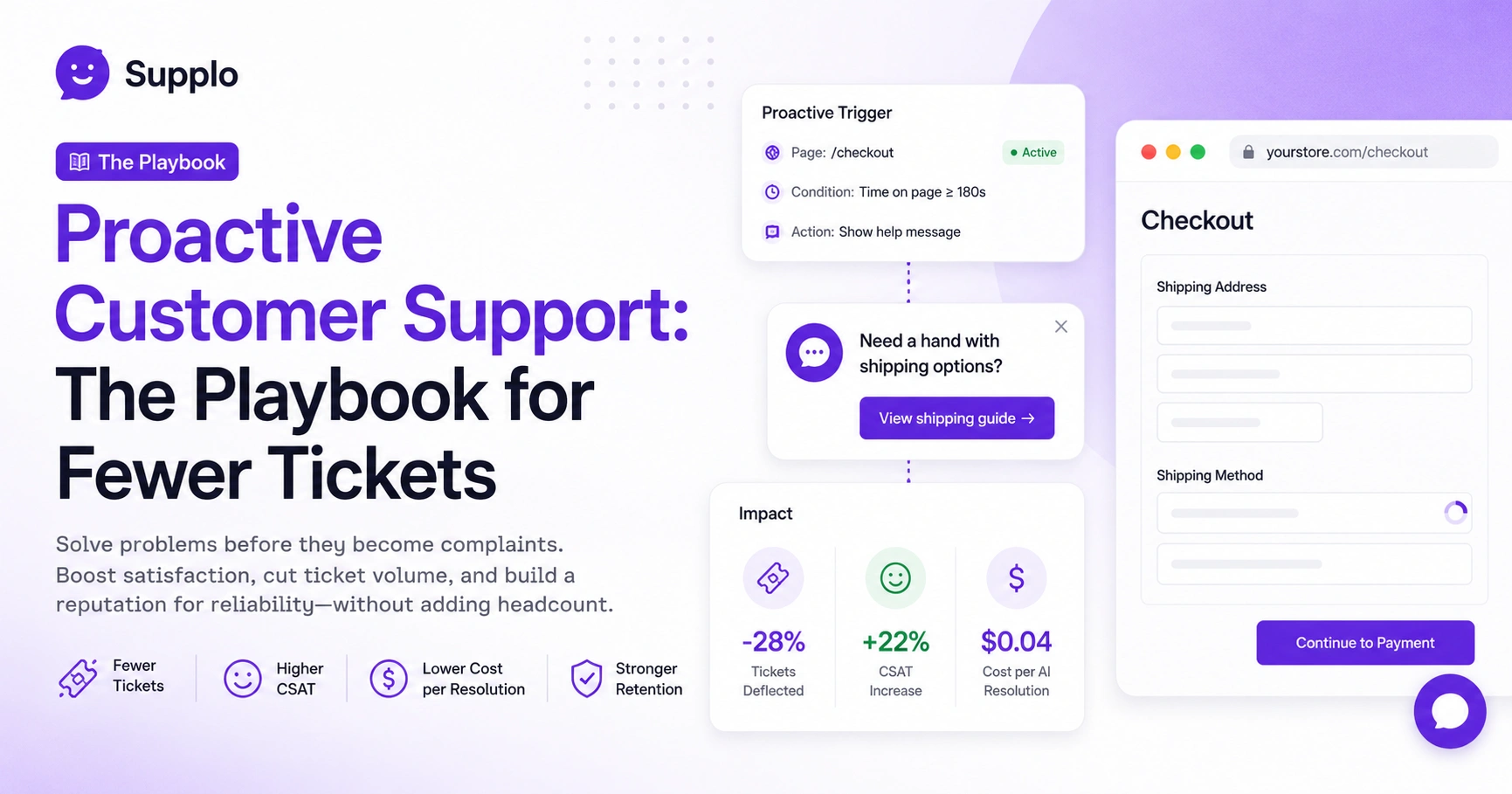
- Core benefit: fewer tickets, higher CSAT, and lower cost per resolution. An AI resolution costs ~$0.04 vs. $3–5 for a human reply.
- Start small: One channel (web widget), one trigger (e.g., cart abandonment), and one week of testing.
- Avoid per-resolution pricing. It punishes success. Flat-rate workspaces like Supplo align cost with scaling proactive messaging.
Defining Proactive Support: What It Is And What It Isn't
Proactive customer support means identifying and resolving a customer's problem before they even know they have one, or before they decide to contact you. It is the opposite of ticket-based, reactive support, where you wait for a customer to hit "send." True proactive support uses data, triggers, and automated workflows to deliver answers and solutions first.
It is NOT:
- A chatbot that says "Sorry for the wait." That's reactive, even if automated.
- A generic "Can I help you?" pop-up that fires on every page.
It IS:
- Surfacing a knowledge base article mid-checkout when a user hesitates on a field.
- Sending a status update on an order delay before a customer asks, "Where is my package?"
- Triggering an AI reply when a user hits a 404 error, offering the closest help article.
Proactive support requires a shared view of user behavior, not just a ticket queue. Supplo is not affiliated with any app or website. Please follow each app's terms and local regulations.
Why Proactive Support Matters: The Reliability Dividend
Reactive support drains trust. Every ticket a customer has to open is a tiny failure state in your product or process. Proactive support pays a reliability dividend; it proves to your customer that you're paying attention. That reliability is the single highest driver of long-term retention for small- to mid-sized support teams.
- Customers who experience proactive support report higher satisfaction, even if the underlying issue is negative (e.g., a delay).
- It reduces "support anxiety", the feeling that a user is screaming into a void.
- Reliability becomes a brand differentiator when competitors are all playing catch-up via ticket waits.
- It directly reduces the volume of reactive tickets by 10–30% in most implementations.
A customer who has their issue solved before they complain is 20% less likely to churn in the next 90 days.
Proactive Customer Service Examples: What This Looks Like in the Real World
A SaaS user tries to upload a file in an unsupported format. Before they close the modal, a chat bubble appears: "Need help? Here's our guide on acceptable file types." Or, if a Telegram subscriber misses a payment renewal, you send a gentle, automated in-app reminder before their access drops. The best proactive examples feel invisible, not intrusive.
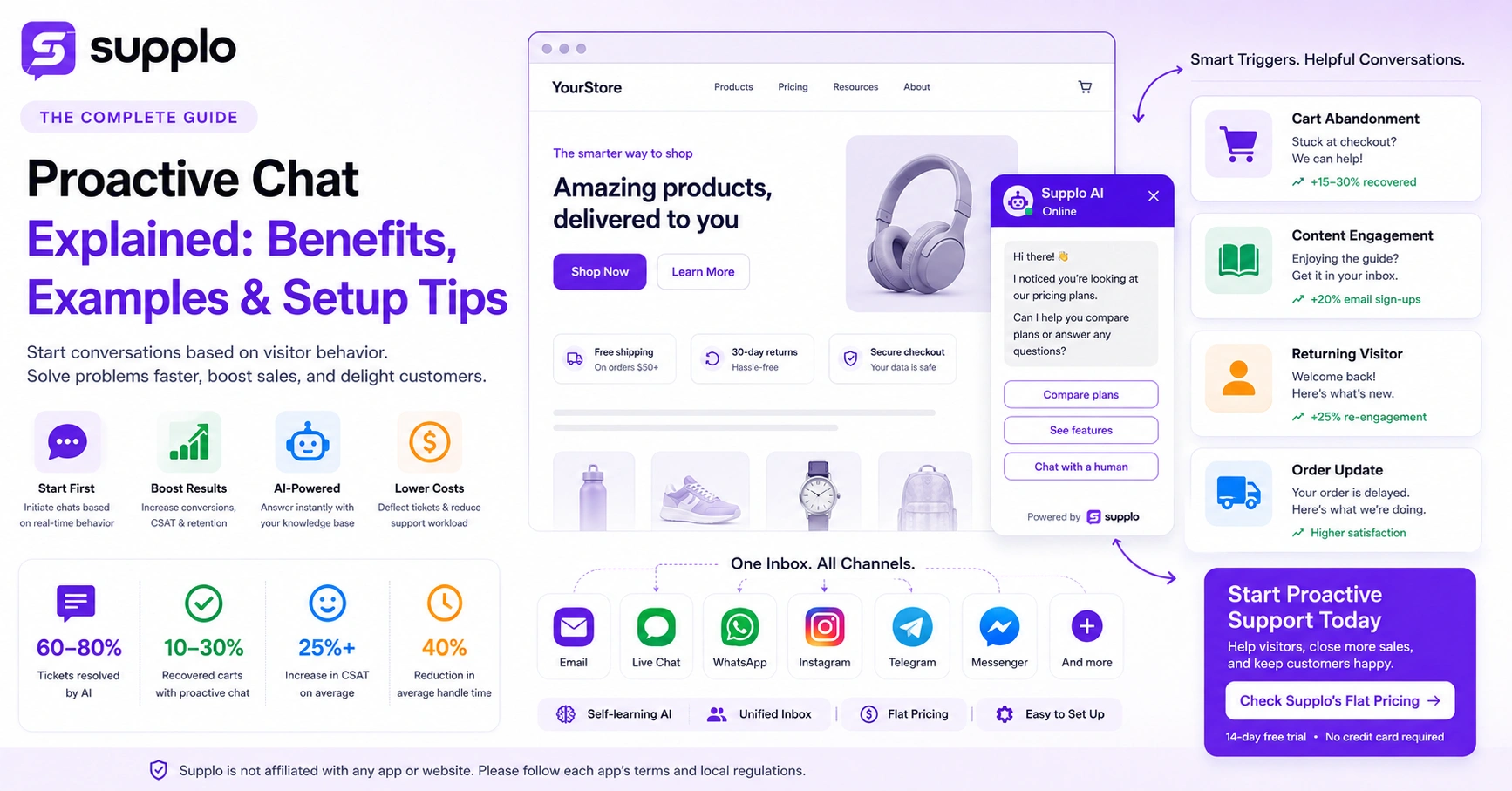
- Abandoned cart + live chat: A user spends 3 minutes on the checkout page. A message triggers: "Need a hand with shipping options?"
- Shipping delay notification: Automated email or WhatsApp update: "Your order is delayed 2 days. We've prioritized yours."
- Feature announcement: A user has been on a free plan for 30 days. A quick chat pop-up explains the Pro feature that solves their usage pattern.
- Error state recovery: A user gets a 404 error when accessing a doc. The system instantly offers a link to the closest match from your knowledge base.
Proactive support converts support from a cost center into a retention engine.
The Core Benefits of Proactive Support
The obvious benefit is fewer inbound tickets. But the real value is threefold: higher Customer Satisfaction Score (CSAT) because issues are resolved instantly, lower support costs per interaction (a proactive AI message costs pennies vs. a 15-minute live chat), and compound knowledge, every proactive interaction you run teaches your AI agent what works.
- Cost per resolution drops: An AI resolution costs ~$0.04, compared to ~$3–5 for a human reply.
- Faster first response time (FRT): Proactive messages arrive before the user types, so FRT hits 0 seconds.
- Reduced agent burnout: Agents handle only complex, escalated issues instead of the same "Where is my order?" 50 times a day.
- Data-rich feedback loop: Every proactive trigger that fires gives you insight into where your product breaks, allowing you to fix the root cause. A unified shared inbox and knowledge base make this loop seamless.
Proactive messaging costs ~$0.04 per resolution, compared to ~$3–5 for a human reply.
Is There an ROI to Proactive Support? The Value Proposition
Yes, but it's not just about saving money on tickets. The value proposition of proactive support is that it converts support from a cost center into a retention engine. A customer who has their issue solved before they complain is 20% less likely to churn in the next 90 days. The hard ROI calculation: (tickets deflected x $ per ticket) + (retained customers x customer lifetime value).
- For a team handling 3,000 tickets/month, deflecting just 15% saves 450 tickets. At a $2.50 per ticket, that's $1,125/month saved.
- Proactive support reduces 'email tag' (back-and-forth) because the answer is delivered at the moment of friction.
- It increases self-service adoption, lowering your overall cost-to-serve over time.
- Payment note: Supplo accepts global payment methods, including crypto, Binance Pay, and GCash, making it accessible to teams worldwide.
Proactive support converts support from a cost center into a retention engine.
Proactive Customer Support Adoption: Why Most Teams Get Stuck
Most teams fail because they try to build the perfect proactive flow before launching anything. They map 50 scenarios, get analysis paralysis, and never ship. The second blocker is tool lock-in; most support platforms charge per agent or per resolution, making proactive expansion expensive. The third is a lack of clear ownership: is this a product, support, or marketing initiative?
- Analysis paralysis: Start with one trigger (e.g., cart abandonment) and perfect it for 2 weeks before adding a second.
- Pricing model friction: If your tool charges per resolution, proactive messages become a cost liability. Compare pricing models, flat-rate pricing (like Supplo) removes that fear.
- No feedback loop: Teams don't log whether the proactive message closed the loop or if the user still opened a ticket, so they can't optimize.
- Integration gaps: Proactive support requires data from your app, email, and chat. If those are silenced, you trigger on bad info.
If your proactive message fails, it's not you; it's usually the tool's pricing or missing features.
Try Supplo's AI agent at $0.04 per resolution, with no per-seat fees or surprise bills. Run a head-to-head test: 50 tickets priced per resolution vs. Supplo flat rate. The math explains itself.
How to Set Up Proactive Support
Start by mapping your top 5 most common reactive tickets. For each one, ask "When does the user experience the frustration?" and "What trigger can we use to intercept them?" Then, in your support tool, create a rule that fires a specific knowledge base article or AI reply at that trigger point. Test for one week. Measure deflection rate. Iterate.
- Audit your ticket data. Pull your last 500 tickets. Group them by theme (billing, login, shipping).
- Identify the trigger. Is it a time delay? A page visit? An error code?
- Write the proactive message. Keep it under 80 characters. Don't ask "How can I help?", state "I noticed you're on the billing page. Here's how to find your invoice [link]."
- Configure on your platform. In Supplo, you set the trigger (e.g., URL contains /checkout), the message, and the target channel (widget, WhatsApp). For example, you can set up multi-channel routing on WhatsApp for transaction updates.
- Monitor and optimize. Check the 'deflection rate', % of users who saw the message and did NOT open a ticket.
Start with one trigger (e.g., cart abandonment) and perfect it for 2 weeks before adding a second.
Ready to test your first proactive trigger without paying per seat? Start with Supplo's free tier at Supplo. You can set up your widget, knowledge base, and first trigger in under 10 minutes. If it works, keep going. If not, no strings.
Proactive Support Software: What to Look For in a Tool
Your proactive support software must do three things well: detect user behavior in real-time (page visits, pauses, errors), serve relevant content instantly (articles, AI replies), and route complex cases seamlessly to a human without losing context. Avoid tools with per-resolution pricing; they punish you for successfully deflecting tickets.
- Real-time user detection: The tool must detect the user's location in your app or website (via a widget or API).
- AI Agent readiness: Can your AI learn from your knowledge base and offer proactive answers without a human writing every script? Look for a platform with a self-learning AI resolution engine.
- Multi-channel triggers: Proactive support isn't just a web widget. Does it work on WhatsApp, Telegram, or email? If not, you're leaving gaps.
- Flat vs. usage pricing: Per-seat or per-resolution models make proactive scaling expensive. Look for a flat-rate workspace model.
- Knowledge base integration: Proactive messages should link directly to a specific help article or step-by-step guide.
Proactive Customer Service Plan: Building Your 90-Day Roadmap
A practical proactive customer service plan runs on a 90-day cycle. Days 1–30: Identify one channel (likely your web widget) and one trigger (cart abandonment or 404 page). Days 31–60: Expand to a second channel (WhatsApp or email) and add two more triggers. Days 61–90: Optimize based on deflection data and introduce an escalation path for when the proactive message fails.
- Month 1 (Foundation): Focus on the highest volume ticket. Ex: Billing questions. Set up one trigger in your widget.
- Month 2 (Expansion): Add a second trigger (e.g., account setup flow) and enable the AI agent to handle variable answers (not just one static reply).
- Month 3 (Optimization & Multi-channel): Analyze which proactive messages users ignored and improve them. Export the flow to WhatsApp or Telegram. Check case studies of proactive support wins for real-world results.
- Monthly review key metric: Deflection rate. Aim for 15% in month 1, 25% by month 3.
Most teams see a measurable drop in ticket volume within 2 to 3 weeks of launching their first proactive trigger.
Proactive Support Best Practices
Never interrupt a user who is already engaged in a high-focus task (such as entering credit card details). Always give them an easy "Dismiss" or "Not now" button. Language matters, frame the message as helpful ("I noticed you paused, can I help?"), not creepy ("We see you're looking at pricing for the 4th time"). And always log the interaction so you can measure ROI.
- Timing is everything: Trigger too early, and you annoy. Trigger too late, and they've already opened a ticket. Test timing in 2-second increments.
- Don't be creepy: Avoid "We see you've been here for 8 minutes." Instead, use "Looking for something specific?"
- Channel choice matters: Use a widget for web, WhatsApp for transaction updates, and email for passive notifications. Don't blast all channels.
- Measure what matters: Track 'message viewed' AND 'ticket created afterward.' If 80% view but 50% still create a ticket, your message is weak.
- Keep a human escape hatch: Every proactive interaction should have a clear "Speak to a human" link. If you trap them, they churn.
Key Takeaways
- Proactive customer support solves problems before customers ask, using behavioral triggers such as page visits or pauses.
- It cuts ticket volume by 10–30%, lowers cost per resolution to ~$0.04, and boosts CSAT.
- Start small: one channel, one trigger, one week of testing. Avoid analysis paralysis.
- Flat-rate pricing is key; per-resolution models punish success.
- Measure deflection rate and ticket volume trends; aim for 15% in month 1, 25% by month 3.
You now have the blueprint. The only missing piece is the workspace to execute it. Build your proactive support plan on Supplo. See the full feature set at Supplo Features. Ongoing access to a unified inbox, an AI agent, and multi-channel routing, all at a flat monthly rate. No gimmicks. No hidden per-agent charges.
FAQ
Does proactive support violate any privacy rules?
No, as long as you are transparent. Proactive support uses behavioral triggers (page visits, time spent) and never personally identifiable data without consent. You must have a privacy policy that states you use session data for support. Supplo is not affiliated with any app or website. Please follow each app's terms and local regulations.
Why would my proactive message fail to deflect a ticket?
Usually, because the message is too generic or too late, if you say "Can I help?" instead of "Here is the answer," users still open a ticket. The message has to answer the unasked question, not ask another one.
Can I set up proactive support for just one channel first?
Absolutely. Start with your highest-traffic channel (usually the website widget). Once that runs smoothly, expand to WhatsApp or Telegram. Trying to do all channels at once is the #1 reason proactive adoption fails.
How do I know if my proactive support is working?
A: Track your deflection rate (messages served vs. tickets opened in the same session) and your overall ticket volume trend. A 10–15% reduction in the top three ticket types within 30 days is a solid start.
What's the difference between a proactive chatbot and a reactive one?
A reactive chatbot waits for a user to type. A proactive chatbot detects behavior (such as a pause on a complex form) and offers help without the user having to ask. Both are chatbots, but only one requires less effort from the customer.
Should I use proactive support for billing issues?
Yes, cautiously. For simple billing (e.g., "How do I get an invoice?"), Proactive replies work great. For sensitive billing (e.g., "Can I get a refund?"), Route immediately to a human. Never let an AI agent handle refund or account deletion requests without human oversight.
How long does it take to see results from proactive support?
Most teams see a measurable drop in ticket volume within 2 to 3 weeks of launching their first proactive trigger. Full optimization (multi-channel, multiple triggers) usually takes 90 days.
Compliance line: Supplo is not affiliated with any app or website. Please follow each app's terms and local regulations.