On this page
Waiting for customers to raise their hand when they're stuck? That's the old way. Proactive chat flips everything. Instead of sitting back and hoping someone finds your contact form, your support system starts the conversation based on what visitors actually do on your site. It's smarter, faster and way less frustrating for everyone involved.
In this guide, we'll break down exactly what proactive chat is, why it beats reactive support for certain situations and how to set it up without annoying your visitors. We'll keep it practical, no fluff, just stuff you can use.
Quick Answer
- Proactive chat initiates the conversation based on visitor behavior.
- Reduces ticket volume, increases CSAT and recovers lost sales.
- Requires clear trigger rules, a trained AI agent and a unified inbox.
- Avoid common mistakes like triggering too early or with generic messages.
What Is Proactive Chat? The Definition That Actually Matters
Here's the simple version: Proactive chat is when your support system, whether it's a human agent or an AI, sends the first message to a website visitor based on specific triggers. Maybe they've been staring at your pricing page for 30 seconds. Maybe they abandoned their cart. Maybe they've visited three times this week. Instead of waiting for them to type "I need help," you step in first.
Think of it like a good retail associate who notices you're squinting at a product label and casually asks, "Got questions about that one?" without hovering. That's the vibe you're going for.
- It's all about behavioral triggers: things like scroll depth, mouse inactivity, returning visitor status, or checkout drop-off.
- The rule of thumb: always add value first. Solve a friction point or guide a decision. Never interrupt to "check in."
- Best-in-class proactive chat uses AI trained on your own knowledge base. So instead of a generic "Can I help you?" the bot says something like, "I noticed you're on our billing page, here's a quick guide to our plans."
Proactive Chat vs Reactive Chat: Why Waiting Hurts Your Support
Reactive support is the standard play: customers type first; you answer. It works, sure. But it's like waiting for a leak to flood your kitchen before you grab a bucket. Proactive chat catches the drip early.
- Reactive chat: The customer has to find your widget, type a message and wait for a response. By the time they get help, they're already annoyed.
- Proactive chat: The system spots a high-value moment and initiates helpful contact before frustration sets in.
- The real magic? Proactive chat reduces ticket volume for repetitive questions, password resets, shipping FAQs and plan comparisons by offering self-service answers before customers even ask.
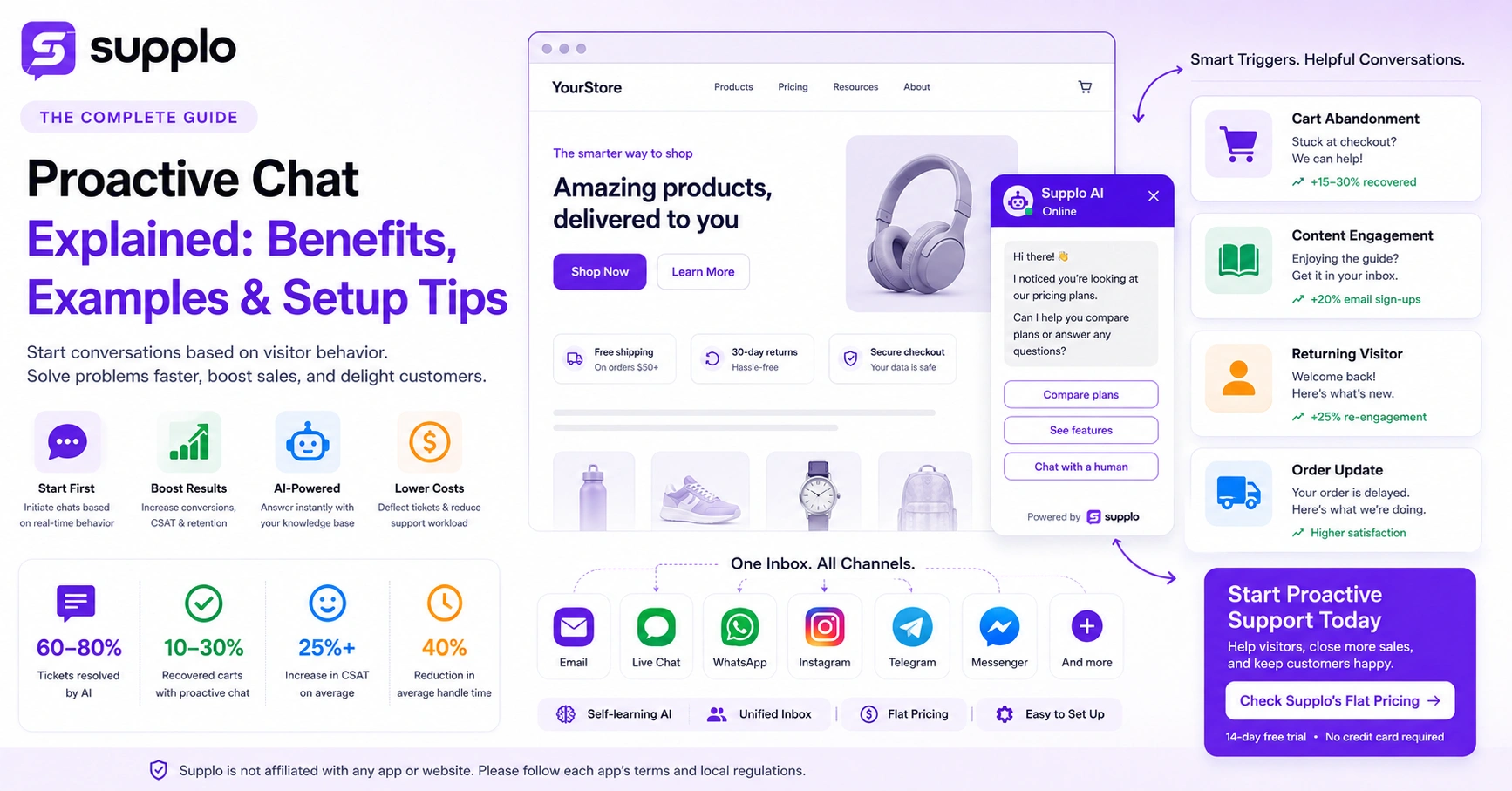
- Conversion impact: For e-commerce, a simple "Stuck on checkout? I can help" can recover 10-30% of visitors who abandon. That's not a guess; that's what well-timed triggers consistently deliver.
- Here's the catch: Proactive chat isn't a replacement for reactive support. It's a companion layer. When an issue gets complex, the system should hand off cleanly to a human: no dropped balls.
The Real Benefits of Proactive Chat for Business and Your Customers
The core benefit? Your support feels smarter and more human. That's not just feel-good talk; it translates directly into numbers you care about.
- Higher CSAT scores: Customers remember the brands that helped them before they had to ask. That's the kind of loyalty you can't buy with discounts.
- Lower ticket volume: When you solve common questions proactively, your team deals with fewer repetitive tickets. Supplo's AI agent handles resolutions at a flat $0.04 per resolution, so scaling is predictable and cheap.
- Sales enablement: A proactive message such as "That question usually comes from someone looking for [feature]" can naturally guide visitors toward a trial or sign-up.
- Reduced Average Handle Time: Context from the visitor's session means agents don't have to ask, "What page are you on?"They again. already know.
For the customer, it's simple: less effort, faster answers and a brand that actually pays attention.
4 Proactive Customer Service Examples That Boost Retention
Good proactive chat doesn't feel robotic. It feels timed perfectly. Here are four examples you can steal (I mean, adapt):
- E-commerce cart recovery: A visitor adds a $200 item to their cart, spends 60 seconds at checkout, then leaves. Your AI sends a proactive message: "Need help with shipping? Or want a quick coupon?" Done.
- Blog-to-email guidance: Someone reads 90% of your "How to set up X" article but hasn't converted. A trigger asks: "Would you like this as a step-by-step email guide?" Easy upsell.
- Welcome back message: A returning user logs into your app after a week of inactivity. The AI initiates: "Welcome back! Two updates since you last visited, want me to summarize?"
- Order delay notification: A customer's order is delayed. You proactively message them on WhatsApp: "Hey, your order's running a bit behind. Here's an alternative: we'll make it right."
- Cart abandonment recovery is the highest-ROI example for e-commerce. Start there.
- Knowledge base suggestion: If someone's stuck on your "Billing" page, offer a direct link to the billing FAQ before they click away.
- Post-purchase check-ins are gold. One automated message asking "How's everything?" can catch a problem before it becomes a return.
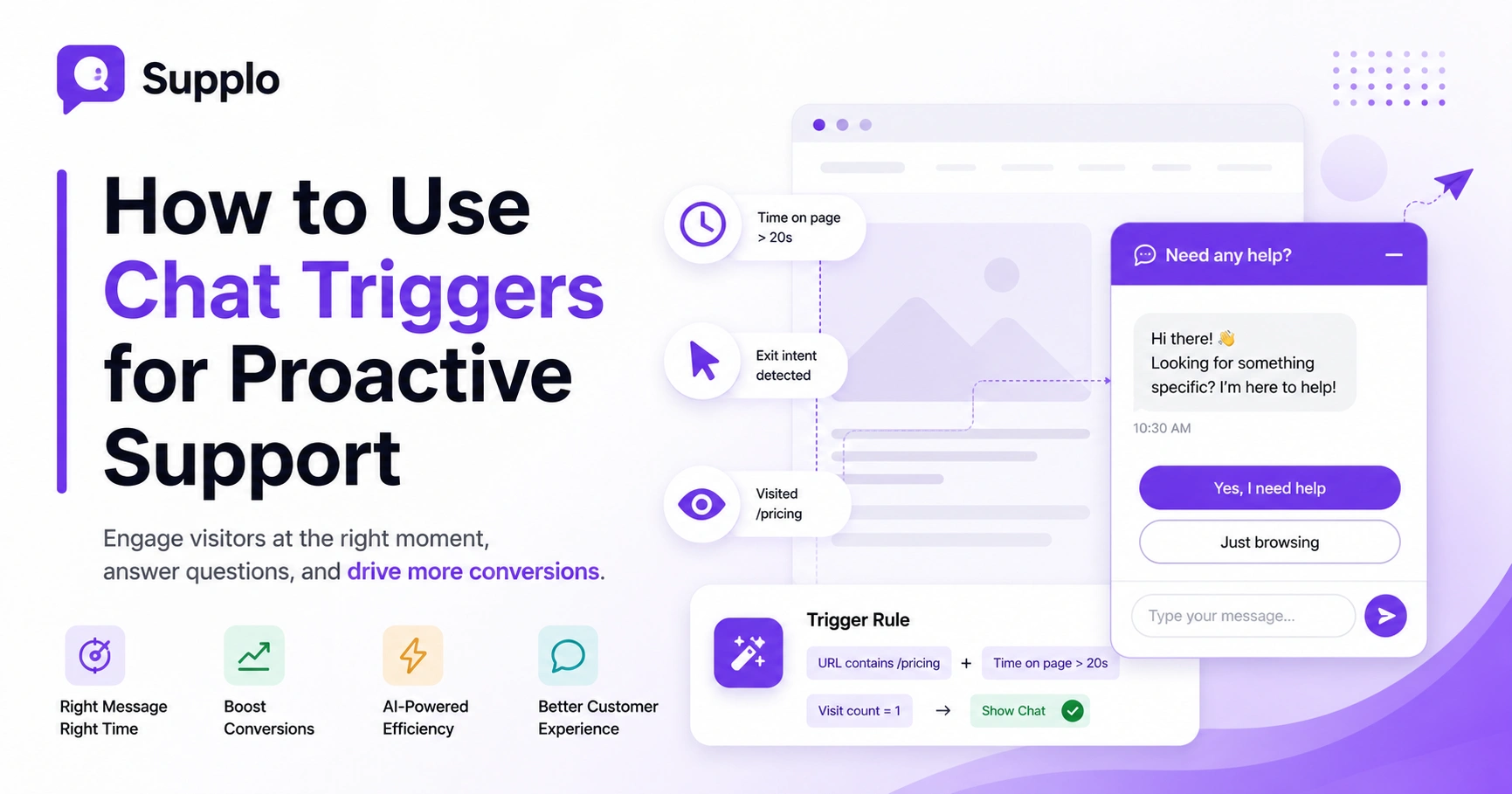
- The best triggers are simple: exit intent, scroll depth, repeat page visits, or idle time on pricing.
Using Proactive Chat for Sales Without Being Pushy
Here's the thing: the line between helpful and aggressive is razor-thin. Cross it and you're just another annoying pop-up. Stay on the right side and you're a trusted guide.
The secret? Timing based on clear behavioral intent. Don't message someone who just landed on a blog post asking "Ready to buy?" That's creepy. But when they've visited your pricing page three times in a week? Now you've got permission to nudge.
- Use soft CTAs: "A lot of customers pair this with [feature]." Way better than "Buy now."
- Avoid interrupting high-intent reading. If someone's deep in your pricing page, give them a solid 15-20 seconds before triggering anything.
- Train your AI to recognize sales objections from support FAQs. If someone asks about pricing, your AI can proactively offer a comparison sheet.
- Leverage session context: If the visitor just watched a product demo video, a message offering a free trial feels natural rather than forced.
How to Implement Proactive Chat Without Breaking Your Flow
Implementation should be methodical, not rushed. Start by auditing your knowledge base and your top 5 reactive ticket types. Then, build trigger rules that match those specific use cases. For example, if "How do I reset my password?" is a top ticket, set a proactive rule to prompt anyone on your login page who stays for more than 15 seconds. The implementation steps below will help you roll out proactive chat without annoying your customers.
Define Your Trigger Rules
Identify the top 3-5 moments of friction or confusion on your site. Set rules for exit intent, cart value thresholds, or time-on-page.
Set Up Your AI Agent for Proactive Support
Use Supplo's self-learning AI, trained on your knowledge base, so it answers accurately. The AI resolves up to 80% of incoming tickets automatically and hands off to a human when needed. Learn more about Supplo's AI Agent.
Connect Your Channels via a Unified Inbox
Proactive chat is most powerful when it's consistent across channels. Connect your website, WhatsApp, Instagram DMs, Telegram and Facebook Messenger into one thread-based inbox. Learn more about Supplo's AI agent.
Test and Iterate
Start with a low frequency (e.g., triggered at 30 seconds of idle time) and measure click-through rates before scaling.
The One Mistake That Kills Proactive Customer Engagement
Here's the mistake I see over and over: triggering too early, too often, or with zero context. If you greet every visitor with "Hi, how can I help you?" the second they land on your homepage, you're not being proactive; you're being intrusive. The result? Higher bounce rates, lower opt-in rates and a bad taste in customers' mouths.
- Bad trigger: Immediate pop-up on first page load. Good trigger: Wait 15-20 seconds, or detect multiple page visits.
- Avoid generic messages: "Need help?" is weak. "I see you're looking at our pricing, anything I can clarify?" is contextual and inviting.
- Test different frequencies using A/B tests. Some audiences love proactive chat; others hate it: segment by returning vs. new visitors if possible.
- The fix is simple: Build a "wait and listen" phase before you speak. Let the visitor's behavior tell you when it's okay to interrupt.
How to Measure Proactive Support Strategy Success
Don't just track chat initiation rate. That's a vanity metric. The real numbers are:
- Proactive resolution rate: How many issues were solved in that first message, no human handoff needed.
- Deflection rate: Of all proactive chats, how many prevented a support ticket from ever being created?
- Conversion impact: For sales use cases, measure click-through to a product page or trial sign-up from the proactive message.
- Customer Effort Score (CES): Did the proactive message reduce effort (good) or increase friction (bad)? This tells you if your triggers are actually helping.
- The North Star: Your proactive rate should be high enough to see a clear dip in reactive tickets for common issues (password reset, shipping, order tracking). If you're not moving that needle, your triggers need work.
Automating Email and Messaging with Proactive Chat
Proactive chat doesn't just live on your website. The most powerful deployments happen on the channels your customers already use daily: proactive order updates over WhatsApp, a "Thanks for following!" on Instagram, or community updates on Telegram. Supplo unifies all these channels into a single inbox, so your proactive triggers and AI agent work across every platform without manual switching.
Integrating WhatsApp for Time-Sensitive Proactive Alerts
Use WhatsApp Business API to send proactive shipping confirmations, payment confirmations, or appointment reminders. Users already expect proactive updates on this channel. Learn more about WhatsApp customer support with Supplo.
Instagram DMs and Telegram for Community-First Support
Set up proactive greetings for new followers or first-time message senders. Telegram groups benefit from proactive announcements about common bugs or updates. Learn more about Instagram DM support with Supplo and Telegram support with Supplo.
- Email: Proactive chat can also trigger automated follow-up emails if a chat doesn't convert, adding another layer of reliability. Learn more about email ticketing with Supplo.
- Consistency matters: Your proactive tone and trigger rules should be the same across channels. Your brand voice should feel unified, not fragmented.
Compliance and Safety
"Supplo is not affiliated with any app or website. Please follow each app's terms and local regulations."
Pricing and Scalability: Keeping Proactive Chat a Cost Center You Control
Proactive chat should reduce costs, not inflate them. Many legacy tools charge per seat or per resolution, which makes scaling risky. Supplo's model is flat per workspace, with AI resolutions billed at $0.04 per resolution. That means as you add more proactive triggers and channels, your cost stays predictable. You can start free with a 14-day trial. Learn more about Supplo's pricing.
- Avoid per-seat pricing that penalizes you for adding more agents to handle proactive handoffs.
- Supplo supports alternative payment methods: Crypto, Binance Pay, Payeer, GCash, AmanPay, QIWI Wallet, DOKU, Nigeria and South Africa cards, Skrill and Payoneer.
- Proactive chat should be measured as a cost-saving investment: fewer reactive tickets = fewer human hours.
- If your proactive chat system adds to your bill without clear deflection or CSAT improvements, it's time to re-evaluate your triggers.
Start Proactive Support the Right Way
Proactive chat isn't just a tactic; it's a mindset shift. Instead of reacting to problems, you're anticipating them. The brands that do this well don't just see higher satisfaction scores; they build real trust. Start small, test your triggers and scale with a tool that makes automation feel human.
- Key takeaways: Define your triggers, start simple, test relentlessly and use omnichannel proactive messaging.
- Trust the process: A 10% reduction in reactive tickets can save a small team hours of work per week.
- Don't overcomplicate it: One good proactive trigger (cart recovery) can pay for itself.
Get a tool that's transparent, affordable and designed to scale with your team. Supplo is the practical alternative to expensive legacy tools. Pricing is flat per workspace, not per seat.
Button: Check Supplo’s flat pricing →
FAQ
Is proactive chat always safe and legal?
Proactive chat is legal as long as you comply with privacy rules such as GDPR (in Europe) and CAN-SPAM (in the US). Always get consent for data collection on your website. Supplo is not affiliated with any app or website. Please follow each app's terms and local regulations. Avoid storing sensitive personal data in chat logs unless explicitly needed for support.
Why do some proactive chat triggers fail to engage users?
The most common reasons are poor timing (pop-up too early), irrelevant messaging (generic "Can I help?") and too much frequency. Users ignore proactive chat that feels like spam. Solve this by testing different trigger timings and personalizing the message based on the page or user behavior.
What's the difference between a one-time proactive message and a campaign?
A one-time proactive message is triggered by a single user action (e.g., cart abandonment). A campaign is a series of pre-scheduled proactive messages (e.g., onboarding sequence for new users). Most businesses should start with one-time triggers and scale to campaigns only once they have data.
Should I use proactive chat for account recovery or security messages?
Yes, but only within a trusted, authenticated channel. For example, sending a proactive message like "Your password was changed?" via WhatsApp or email is fine. Never send full recovery codes or sensitive data through an unauthenticated proactive chat on your website.
How do I troubleshoot a proactive chat that shows up but doesn't convert?
First, check your trigger logic: are you targeting the right pages? Second, review the message itself: is it clear, helpful and concise? Third, test different placements (bottom-right vs. center). Finally, measure the click-through rate (CTR). If CTR is below 1-2%, it's likely a timing or relevance issue.
Can proactive chat be used for sales and support simultaneously?
Absolutely. Many businesses run two separate proactive flows: one for support (e.g., "Need help with that article?") and one for sales (e.g., "Looking for the right plan? I can help"). Just make sure they don't conflict; for example, don't trigger a sales message if the user has an open support ticket.
What should I NOT use proactive chat for?
Do not use proactive chat to push unrelated products to a user who is trying to solve a support issue. It's also not suitable for emergency or life-safety scenarios. And avoid using it to request sensitive information, such as passwords or bank details; that's a security red flag.
Compliance line: Supplo is not affiliated with any app or website. Please follow each app's terms and local regulations.