On this page
If you're in charge of comparing chatbot platform pricing, you've probably noticed what everyone else does: it's a mess. Most vendors bury their real costs behind per-seat fees, AI resolution charges and growth plan tiers that somehow cost triple the price. This guide cuts through the noise. It's written for operations managers, founders and small support teams (3–10 agents) who want to compare live chat software costs without needing a finance degree.
When to use this guide: You're actively evaluating tools for your team.
When NOT to use it: You're happy with your current setup and have zero budget concerns.
Quick Answer
- Don't compare monthly prices; compare the total cost of ownership. Include seats, AI usage, integrations and support.
- Flat-rate pricing beats per-seat for teams of 3–10. You pay one base price for your whole team, not per head.
- The real killer is hidden AI resolution fees. Some platforms charge $ 1 or more per AI answer. Modern models charge $0.04.
- Channel add-ons are a red flag. WhatsApp, Telegram, Instagram and email should be standard.
- Test with your real data. A trial sandbox won't reveal your actual cost.
Why "Compare Chatbot Platform Pricing" Is Harder Than It Should Be
Here's the truth: most pricing pages are designed to confuse you, not help you. Vendors hide per-seat fees, resolution costs and add-on charges in fine print. Comparing apples to apples means knowing exactly what you're paying for and what you're not paying for.
- Look for per agent vs. per resolution vs. flat rate; these are completely different math formulas.
- A platform might look cheap at $49/month, but add 5 agents and you're looking at $245.
- Some charge extra for email integration, WhatsApp, or Telegram support.
- "Unlimited" often means unlimited messages, not unlimited agents or features.
- Always calculate your total cost at 3, 5 and 10 agents to see the real curve.
The short version: When you compare chatbot platform pricing, the monthly sticker price is rarely the final number. Always model your real team size.
The 4 Hidden Costs That Blow Up Your Live Chat Software Budget
You sign up for $99/month. Your first invoice hits $400. Shocked? You shouldn't be. The usual suspects: per-seat overage fees, AI resolution charges, integration costs and premium support tiers. Here's how to spot them before you commit.
- Per-seat pricing: 5 agents at $30/each = $150/month before any features.
- AI resolution fees: Some charge $0.50+ per AI answer; that adds up fast.
- Integration surcharges: Want WhatsApp or Instagram support? That's another plan tier.
- Premium support: Basic support is email-only; chat or phone support costs extra.
Check whether there's an onboarding fee; some platforms charge $500–$2,000 to get you started. If you want to truly compare live chat software costs, make a checklist of these four categories for every vendor.
Traditional vs. Modern: The Real Difference in AI Chatbot Pricing Models
Traditional live chat software charges per seat and often per message. Modern AI chatbot pricing models lean toward flat monthly rates with low per-resolution costs. The difference can be 10x or more for a small support team.
- Traditional: Seat-based, add-on heavy, complex tiered plans.
- Modern: Flat-rate base + small per-resolution fee (like $0.04 at Supplo).
- Traditional models punish scale: more customers = more seats = higher cost.
- Modern models reward efficiency: AI handles volume, humans handle escalations.
- The shift is toward "outcome-based" pricing, pay for what works, not for seats.
Comparing chatbot pricing models? Traditional vendors profit from your growth. Modern vendors profit from your efficiency. Pick the latter.
Stop guessing and start saving. Compare your total chatbot software cost with a free, no-obligation trial. See exactly how flat-rate pricing works for your team → Try Supplo Free.
Per-Seat vs. Flat-Rate: Which Pricing Model Wins for Small Teams?
For teams of 3–10 agents, flat-rate pricing almost always wins. Per-seat models punish you for having a full team. Flat-rate models let you scale support without scaling costs, exactly what growing businesses need.
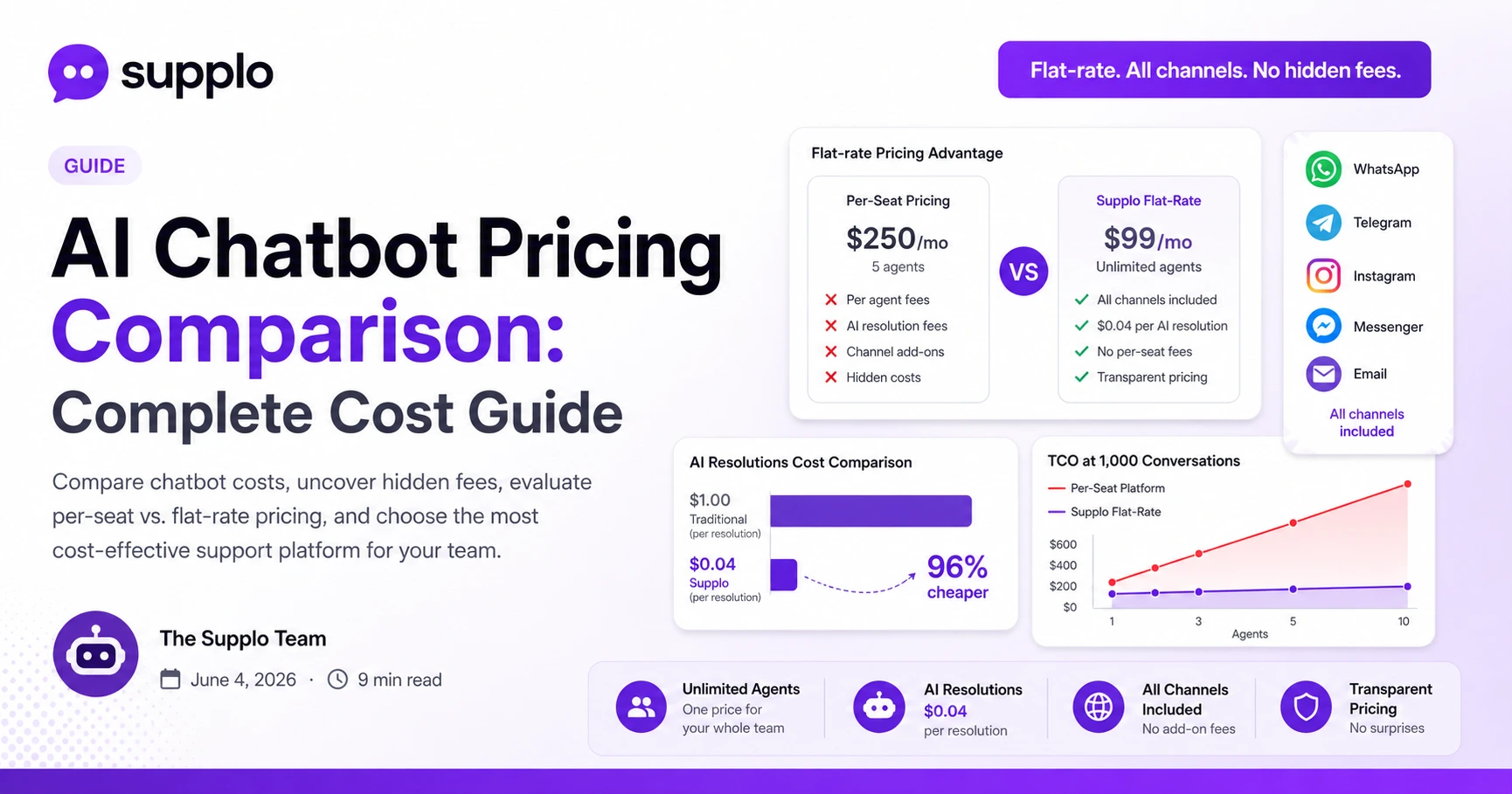
- Per-seat example: 5 agents × $50 = $250/month before AI or integrations.
- Flat-rate example: A single flat monthly rate for unlimited agents, all channels included.
- Per-seat breaks down when you add part-time or seasonal agents.
- Flat-rate simplifies budgeting: one line item, no surprises.
- Exception: If you have 1 agent, per-seat might look cheaper, but check the fine print.
For small teams, the best chatbot pricing models are transparent and predictable. Flat-rate pricing wins hands down for live chat tools at scale.
How to Compare Live Chat Solution Pricing Without Getting Tricked
Don't compare monthly prices; compare the total cost of ownership. Include seats, AI usage, integrations and support. A $99 "starter" plan can end up costing $500+ when you actually use it. The trick is to model your real usage.
- Make a checklist of agents, AI volume, channels, integrations and support tier.
- Ask vendors: "What's my total cost at 500 conversations/month?"
- Look for hidden caps: message, agent and channel limits.
- Trial the platform with real data, not just the demo sandbox.
- Prioritize transparent pricing pages that show numbers, not "contact sales."
When comparing live chat solution pricing, always run the numbers using your actual expected monthly volume. A chatbot software cost comparison is only useful if it's based on reality.
The $0.04 Truth: What AI Chatbot Pricing Actually Costs When You Strip the Fluff
Most AI chatbot pricing is inflated by 10–50x. Industry heavyweight AI resolutions can cost $1+ each. Modern approaches like Supplo charge $0.04 per resolution, roughly 96% cheaper. The math changes everything for high-volume support.
- 1,000 AI resolutions at $1 = $1,000. At $0.04 = $40.
- Flat-rate base covers humans; AI is a variable cost tied to value.
- No per-seat fees means you can have 2 agents or 20 at the same base rate.
- AI resolutions are often better than humans for repetitive tier-1 questions.
- Always ask: "What's your per-resolution cost at scale?"
The real innovation in AI chatbot pricing isn't the AI itself; it's making the AI cheap enough to use without thinking.
Look for AI agent features that include self-learning and a knowledge base to maximize your $0.04 spend. This is where real-time chat pricing models truly shine.
Still unsure about AI chatbot pricing? We'll show you the math with your actual numbers. No sales pitch, just a clear, line-item comparison.
Features vs. Fees: What You're Actually Paying For in Live Chat Tools
Not all features are created equal. A shared inbox, AI agent and multi-channel routing should be standard, not premium add-ons. If you're paying extra for WhatsApp or Telegram support, you're being nickel-and-dimed.
- Must-have: shared inbox, live chat widget, AI agent, multi-channel routing.
- Should-not-be-extra: WhatsApp, Telegram, Instagram, Facebook, email.
- Nice-to-have: translation, analytics, knowledge base, custom branding.
- Red flag: "Contact us for pricing" usually means expensive and variable.
- Flat-rate platforms bundle these; per-feature platforms charge per toggle.
A shared inbox and live chat widget should be your baseline. If the vendor charges extra for them, your pricing for live chat tools just got a lot more complicated.
Global Support on a Budget: WhatsApp, Telegram and Email Without Extra Fees
Serving global customers means supporting their preferred channels: WhatsApp, Telegram, Instagram and email. Many platforms charge per-channel or per-region. A flat-rate platform covers all channels in one price, no matter where your customers are.
- WhatsApp Business API integration shouldn't require a premium plan.
- Telegram support is standard in modern platforms, not an add-on.
- Email ticketing is baseline, don't pay extra for it.
- Instagram DMs and Facebook Messenger should be included.
- Payment flexibility helps: some platforms accept crypto, Binance Pay, GCash and more.
Check if WhatsApp support and Telegram support are included in your base plan. If not, your live chat solution pricing just went up.
Supplo is not affiliated with any app or website. Please follow each app's terms and local regulations.
How One Team Cut Live Chat Costs by Using a Smarter Pricing Model
A real support team switched from a per-seat platform to flat-rate pricing. They saw their monthly bill drop significantly while handling more volume. The key was eliminating per-agent fees and paying only for AI resolutions used.
- Team size: 5 agents handling ~1,000 conversations/month.
- Previous cost: ~$400/month with per-seat + AI add-on.
- New cost (Supplo): flat base + ~$40 in AI resolutions = significantly less.
- They gained: Instagram, WhatsApp, Telegram support in one inbox.
- They lost: budget anxiety and spreadsheet math every month.
The short version: This team didn't need more features; they needed a fair pricing model. Switching saved them hundreds per month without sacrificing quality.
See more real-world examples in our case studies. This is the best proof of how to compare chatbot platform pricing and win.
Best Chatbot Pricing Models for Growing Support Teams
The best chatbot pricing model is transparent, flat-rate and rewards efficiency. Avoid per-seat traps and per-resolution gouging. Look for a platform that charges a fair base and a tiny per-resolution fee, nothing else.
- Flat-rate base + low per-resolution = the sweet spot.
- Avoid platforms that hide costs in "growth" plan tiers.
- Prioritize platforms that support all channels out of the box.
- Test with a free trial before committing to a long-term contract.
- Supplo's model: flat rate, unlimited agents, $0.04 per AI resolution. No surprises.
For the best overview of chatbot service pricing, compare Supplo with category leaders. You'll see the difference immediately.
Ready for a support platform that doesn't nickel-and-dime you? Supplo's flat-rate, all-channels-included plan starts at a fair base price of $0.04 for AI resolutions. No per-seat traps. No hidden fees.
Key Takeaways
- Always model your total cost based on your actual team size and conversation volume.
- Flat-rate pricing with low per-resolution fees is the most scalable model for 3–10 agents.
- Hidden costs live in per-agent fees, AI resolution charges and channel add-ons.
- A transparent pricing page is the best sign of a trustworthy vendor.
- Supplo offers flat-rate billing that includes all channels, with AI resolutions at $0.04 each.
Supplo is not affiliated with any app or website. Please follow each app's terms and local regulations.
All claims are based on publicly available pricing information. Individual results from the case study may vary based on usage volume and team structure.
FAQ
What's the cheapest way to add AI chatbot support for my team?
Flat-rate base plans with low per-resolution fees (like $0.04) are the most cost-effective. Avoid per-seat or per-message models that scale poorly.
Why do some chatbot platforms charge hidden fees?
Traditional platforms built pricing around seat licenses and added channels as upsells. Modern platforms like Supplo bundle everything into one transparent price.
Can I switch from a per-seat platform mid-contract?
Yes, most platforms allow monthly billing. Check your contract for early termination fees. Many teams switch mid-cycle to reduce costs immediately.
What's the difference between per-resolution and per-seat pricing?
Per-seat charges are for each human agent. Per-resolution charges you for each AI answer. Flat-rate models blend both for predictable billing.
Is flat-rate pricing actually cheaper for small teams?
Almost always. For teams of 3–10 agents, flat-rate pricing eliminates seat-scaling costs. You pay one price for the whole team, not per head.
Do I need AI chatbot pricing that includes all channels?
Yes. WhatsApp, Telegram, Instagram and email should be standard. Paying extra for channels is outdated and wasteful.
How do I calculate the total cost of chatbot software for my team?
Add: base plan + (number of agents × per-seat fee if applicable) + (AI resolutions × per-resolution cost) + any integration fees. Compare across 3–5 platforms.
Compliance line: Supplo is not affiliated with any app or website. Please follow each app's terms and local regulations.