On this page
You've polished your pricing page. Your features list is solid. Your landing page converts like crazy. But if your live chat widget takes two seconds to load or drops a message mid-conversation? None of that matters. In B2B, every second of latency costs you credibility and often a deal.
Who this is for: Support leads, operations managers, and founders at small-to-mid B2B companies who want professional live chat software without the enterprise price tag.
When to use this: If you're evaluating tools, fed up with per-seat pricing, or losing leads because your current widget feels unreliable.
When NOT to use this: If you need a full-suite CRM or a multi-tier enterprise helpdesk with 50+ integrations.
Supplo is not affiliated with any app or website. Please follow each app's terms and local regulations.
Quick Answer
- Reliability is the real differentiator: B2B buyers forgive missing features, but they won't forgive dropped chats during a demo.
- Flat-rate billing saves you money: Per-seat pricing punishes growth. A single flat rate for unlimited agents is way more predictable.
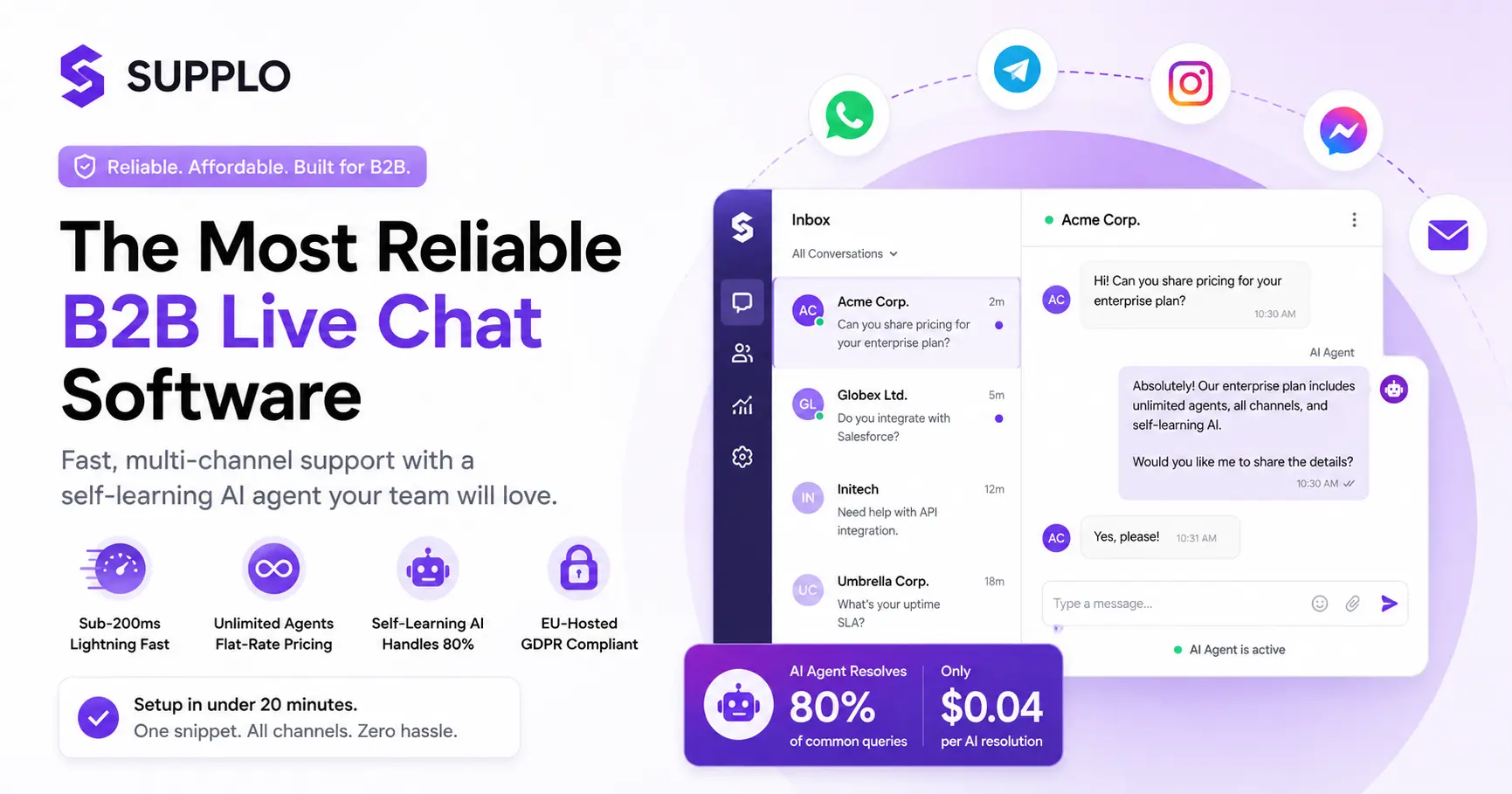
- Multi-channel inbox eliminates chaos: Unify email, WhatsApp, Telegram, Instagram, and Facebook into a single threaded view.
- Self-learning AI handles 80% of queries: Your team focuses on complex issues while the AI resolves common questions for $0.04 each.
- Setup takes under 20 minutes: Paste one snippet, upload your FAQ, and go live.
Why Reliability is the Most Overlooked Feature in B2B Live Chat Software
Here's the thing nobody talks about: most buyers compare features, pricing, and design but completely forget to stress-test uptime and latency. In B2B, a chat widget that loads half a second slower during a sales demo can cost you a five-figure deal. A platform that goes down during a product launch isn't a tool. It's a liability. Real reliability means messages never drop, the inbox stays synced, and your AI agent doesn't hallucinate mid-conversation.
"Reliability is the silent deal-maker. If your chat tool goes down during a live demo, you've already lost the deal regardless of your product quality."
- Downtime vs. latency: Downtime kills the conversation entirely; latency kills the buyer's patience. Both hurt conversions, but latency is harder to detect because it creeps in slowly.
- Why "we run on AWS" isn't a guarantee: Cloud infrastructure is only as reliable as the application layer built on top of it. Third-party dependencies can fail without warning.
- The cost of a dropped chat: One dropped message during a qualification call means the lead walks. Recovery is rare.
- How Supplo avoids US-based CDN outages: By hosting exclusively in EU data centers, we bypass routing issues and latency spikes common with US-centric providers.
- Real-world example: One support team lost 40 leads in a single hour because their widget's third-party provider had a regional outage. That's not a tool failure; it's a revenue failure.
- See how we compare to industry alternatives for reliability and uptime.
Live Chat for Business: How to Fix the "Always Busy" Agent Problem
B2B buyers expect a response in under 60 seconds. Most small teams can't staff 24/7. The fix isn't hiring more agents; it's routing smarter. You need a system where an AI agent handles common pre-sales questions (pricing, integrations, compliance) while your human team tackles the complex stuff. This isn't about replacing humans. It's about buying them time.
- Priority routing: Send "urgent billing" to one agent, "demo request" to another. Don't let a high-intent lead wait behind a forgotten password request.
- Shared inbox view: No two agents reply to the same lead. Everyone sees the full thread and knows who's handling what.
- Auto-assignment by skill set: Sales queries go to sales reps, technical questions go to support engineers, account management requests go to the right person.
- The "human takeover" button: The AI agent knows when it's out of its depth and hands off the entire conversation context without repetition for the customer.
- Connect your WhatsApp integration setup to handle pre-sales queries on the channel your leads prefer.
Professional Live Chat Software vs. DIY Chat Widgets: The Hidden Costs
A free or cheap DIY widget might seem tempting for startups, but the hidden costs add up fast. You lose context when leads move between devices. You can't tag or prioritize. Zero reporting on which conversations turn into revenue. Professional software gives you a CRM-style inbox, tagging, and historical chat logs tied to the customer profile. Without it? You're just guessing.
- Lost context: A lead chats on mobile at lunch, follows up via email at 3 PM, then visits your site on desktop at night. With a DIY widget, you see three separate strangers, not one buyer.
- No reporting = no ROI calculation: You won't know which channels, agents, or pages generate the most revenue.
- DIY widgets often lack end-to-end encryption: Sensitive B2B conversations (contract terms, pricing, compliance requirements) need proper security.
- Scalability limits: Adding WhatsApp or Instagram later means rebuilding your entire setup. Professional software adds channels with one click.
- The real cost of "free": Hidden per-agent fees, data mining, and zero support when something breaks.
Best B2B Live Chat for Sales: Turning Clicks Into Conversations
The best sales chat software doesn't just answer questions; it qualifies leads before a human even looks. Triggers based on the page visited, time on site, or past interactions can automatically assign a high-intent lead to a senior rep. Intelligent routing ensures that a CEO asking about enterprise pricing doesn't end up chatting with a tier-1 support agent.
"A lead that types 'pricing' on your website is worth ten times more than one who lands on your homepage. Treat that conversation differently."
- Page-level triggers: "Lead visited /pricing > 30 seconds > escalate to senior sales rep."
- Intelligent routing: Route by geography, company size, or past engagement levels.
- Proactive chat invites: Timed to buyer intent, not random pop-ups. A visitor reading your case studies for two minutes gets a gentle "Can I help?"
- CRM integration: Every chat automatically logs into your sales sequence, so no lead data falls through the cracks.
How to Increase B2B Sales with Chat: The 3-Step Lead Capture Flow
A simple "hello" widget rarely works for B2B. You need a lead capture flow that asks the right questions up front: company size, budget, timeline, and specific need. Once captured, the chat should auto-populate into your sales pipeline. The fastest way to increase B2B sales with chat is to shorten the path from "curious visitor" to "scheduled demo" to three clicks or fewer.
- Step 1: Pre-chat form with qualifying questions (not spam). Ask for the company name and primary need. Keep it to two fields maximum.
- Step 2: Auto-route to the right agent or AI agent. High-intent leads (pricing, demo) go to sales; general questions go to the AI.
- Step 3: One-click calendar booking inside the chat window. No email tag pick a time, and the meeting is set.
- Follow-up: If there is no reply in 5 minutes, the AI agent continues the conversation or schedules a callback.
- Pro tip: A/B test your form length. Short forms (2 fields) convert roughly 25% better than long forms.
Not sure if your current chat tool is dropping leads? Switch to Supplo and see the difference. Our in-house infrastructure means messages arrive. Every time. Try it risk-free.
Affordable Business Live Chat: Why Flat-Rate Billing Beats Per-Seat Pricing
Per-seat pricing punishes you for growing. Every time you add an agent, the bill jumps. Affordable business live chat should have a predictable flat rate. Supplo charges a single monthly fee for unlimited seats. You add 10 agents? Same price. 20 agents? Same price. The only variable cost is AI resolutions at $0.04 each, roughly 96% cheaper than what competitors charge per resolution.
- The math: 5 agents at $30/seat per month = $150. One flat-rate plan at $99/month saves you $51 immediately.
- No surprise invoices: No "higher tier" access fees, no per-API-call charges, no hidden seat minimums.
- Transparent pricing: What you see on the pricing page is what you pay.
- AI resolution cost: $0.04 vs. competitor average of $1.00+. That's 96% cheaper.
- Scalability: Add agents freely without involving the billing department.
- Check out our flat-rate pricing starting at $29/month for unlimited agents and channels.
Payment options: Supplo accepts Crypto and Paypal for maximum flexibility.
Business Chat Solutions for Multi-Channel Teams (Email, WhatsApp, Telegram)
Modern B2B support rarely happens in one place. A lead might DM you on Instagram, then follow up via email, then ask a quick question on WhatsApp. Without a unified inbox, you're context-switching across five tabs, losing the full conversation history. Business chat solutions that combine all channels into one threaded view save hours of back-and-forth and prevent leaks.
- Unified inbox: Email, WhatsApp, Telegram, Instagram, and Facebook all in one threaded view.
- Multi-channel routing: Assign channels based on customer habits (e.g., urgent queries to WhatsApp, documentation to email).
- Sync across devices: Reply from mobile without losing desktop context or thread history.
- Compliance: Every chat is stored in a single exportable log for audit or recordkeeping.
- Explore our unified shared inbox to see how multi-channel support reduces response times.
Live Chat Software for Small Businesses: What to Look for in an AI Agent
Small-business live chat software needs an AI agent that learns quickly, not one that requires weeks of training. Look for a self-learning AI that automatically absorbs your knowledge base PDFs, FAQs, and previous chat logs. It should handle 80% of common questions on its own, leaving your tiny team to handle the edge cases. The ultimate test: Can the AI agent tell you when it doesn't know the answer?
"The best AI agent for small businesses isn't the one with the most features; it's the one that knows when to say 'I don't know' and hands off to a human."
- Self-learning AI: Trains on your existing documents (PDFs, FAQs, past chats) without manual setup or tagging.
- Confidence thresholds: Configurable so the AI only answers when it's at least 80% certain of the correct response.
- Seamless handoff: Passes full conversation context to a human agent, with no repeating questions.
- Multi-language support: Translate responses on the fly for international leads.
- Budget-friendly: $0.04 per AI resolution vs. $1+ industry average.
- Look for an AI agent that learns automatically to reduce your team's workload.
B2B Chat for Startups: Scaling Support Without Scaling Headcount
In early-stage startups, the CEO is often the first point of contact for support. That's a massive time drain. B2B chat for startups automates repetitive queries ("What's your pricing?", "Do you integrate with X?", "What's your refund policy?") so the founding team can focus on product development. The goal isn't to eliminate the human touch; it's to preserve it for complex, high-value interactions.
- Free up the CEO: Automate 80% of incoming queries with the AI agent.
- Affordable startup stack: No per-seat pricing, no minimum commitment, no long contracts.
- Onboard new hires instantly: No retraining needed; the AI agent already knows your product.
- Startup-specific triggers: "Trial user" gets priority routing with a personal welcome.
- Channel priority: Start with email and Telegram, then add WhatsApp and Instagram as you grow.
Lead Generation Live Chat: Technical Specs That Matter
A good lead gen chat loads in under 200ms, doesn't block your page rendering, and passes Core Web Vitals. It should support custom triggers (page visits, scroll depth, time on page) and allow you to capture phone numbers or email addresses with minimal friction. Technical specs also mean GDPR-compliant data handling (EU hosting by default) and no third-party tracking scripts.
- Lightweight widget: Sub-200ms load time, asynchronous loading so it never blocks your page.
- Dynamic triggers: Page views, scroll depth, time on page, and exit intent are all configurable.
- Pre-chat fields: Name, email, company size. Keep it to a maximum of two fields for higher completion.
- GDPR ready: EU-hosted, encryption at rest and in transit, no third-party tracking cookies.
- Integration hooks: Automatically push lead data into your CRM, email tool, or WhatsApp.
How We Built the Most Reliable Chat for SMEs (In-House Tech Stack)
Most SaaS platforms outsource their real-time infrastructure to third-party providers. Supplo's entire tech stack is built in-house, from the WebSocket server to the AI engine. That means we control every layer of reliability: uptime, message ordering, data replication. For SMEs, this eliminates the "black box" problem where you have no idea why a message failed. When you use Supplo, you're talking to a platform engineered for zero-message-loss.
- In-house WebSocket server: No third-party fallback that drops context or loses messages during failover.
- Message queuing with delivery receipts: Every message is acknowledged; if an agent's connection drops, the message is queued and delivered upon reconnection.
- EU-hosted data centers: Full GDPR compliance, no US data transfer, no latency from transatlantic routing.
- Auto-scaling infrastructure: Handles traffic spikes (product launches, viral posts) without pre-warning or manual scaling.
- Real-time sync: Zero delay between widget and inbox agents see messages as they're typed.
- Read how PVA Pins scaled with Supplo to handle 10x chat volume without adding headcount.
Getting Started with Supplo: Setup in Under 20 Minutes
You can have a fully functional live chat widget on your website in under 20 minutes, no coding required. Add your company info, customize the widget colour, paste one snippet of JavaScript into your site header, and you're done. The AI agent starts learning from your existing knowledge base within minutes. You get immediate access to a shared inbox that works across desktop and mobile, so your team can start converting leads today.
- Step 1: Sign up for Supplo (no credit card needed to start).
- Step 2: Paste one code snippet into your website's header.
- Step 3: Upload your FAQ or knowledge base PDF so the AI agent can learn immediately.
- Step 4: Customize widget appearance (colour, position, greeting message) and set your triggers.
- Step 5: Invite your team (unlimited seats at the same price).
- Bonus: Connect Telegram, WhatsApp, or Instagram in one click.
- Explore all features to see the full power of the platform.
Ready to stress-test the most reliable b2b live chat software? Get started on Supplo for free in under 20 minutes, no credit card required. Paste one snippet, and watch your first live lead come in.
Key Takeaways
- Reliability matters more than features: A widget that goes down during a demo costs you revenue, not just user experience.
- Flat-rate billing is the smarter choice: Per-seat pricing penalizes growth. A single monthly fee for unlimited agents is more predictable.
- Multi-channel inboxes prevent context loss: A unified view across email, WhatsApp, Telegram, Instagram, and Facebook saves hours of context-switching.
- Self-learning AI is essential for small teams: It handles 80% of common queries, freeing your humans for complex interactions.
- Setting up in under 20 minutes is achievable: With no coding required, any team can go live fast.
FAQ
Is B2B live chat software secure for handling customer data?
Yes, but only if the platform uses end-to-end encryption and compliant hosting. Supplo is hosted in the EU (GDPR-ready) and encrypts chats both in transit and at rest. Always verify the provider's hosting region and encryption standards before deploying.
Can I use live chat software for lead generation?
Absolutely. A well-configured widget with pre-chat forms and intelligent routing can capture leads directly from your website. The best systems auto-populate lead data into your CRM or sales sequence without manual entry.
What's the difference between a live chat widget and an AI chatbot?
A live chat widget routes visitors to human agents. An AI agent automates responses to common questions. The best B2B platforms combine both: the AI handles first-level queries and seamlessly hands off complex issues to humans.
How much should I expect to pay for professional live chat software?
Avoid per-seat pricing if you have a growing team. Expect $80–150/month for a flat-rate plan that includes unlimited agents. Supplo charges a flat $99/month for unlimited seats, with optional AI resolutions at $0.04 each.
Does live chat software support WhatsApp and Instagram?
Many professional solutions now integrate multi-channel support. Supplo unifies email, Telegram, WhatsApp, Instagram, and Facebook Messenger into a single shared inbox so you don't have to juggle multiple apps.
How quickly can I set up live chat for my B2B website?
The fastest setup is under 20 minutes. You sign up, paste a JavaScript snippet into your site's header, customize the widget, and connect your channels—no developer required.
What happens if my live chat software goes down during a sales demo?
Downtime during a demo directly costs revenue. Choose a provider with in-house real-time infrastructure and a solid SLA. Supplo's custom WebSocket stack is designed for zero-message-loss, even during traffic spikes.
Compliance note: Supplo is not affiliated with any app or website. Please follow each app's terms and local regulations.