On this page
You need a support chatbot that actually works. Not one that makes up answers, charges you more the better it performs, or locks you into some weird per-seat math. This piece cuts through the noise. We’ll show you what real reliability looks like, who it’s for and when an AI chatbot for customer support is a smart move (and when it’s definitely not).
Small-to-mid support teams (2–20 agents) running Shopify stores, service businesses, or SaaS products that live and die by multi-channel communication.
Your team spends half the day on the same five questions, like Where’s my order?, Do you ship to X? Or how do I reset my password? – and you want to cut response times without hiring three more people.
If your support handles complex financial, medical, or legal advice, stick with humans. Seriously. You can test the bot on a very limited scope later, but don’t let it loose on sensitive stuff.
Quick Answer
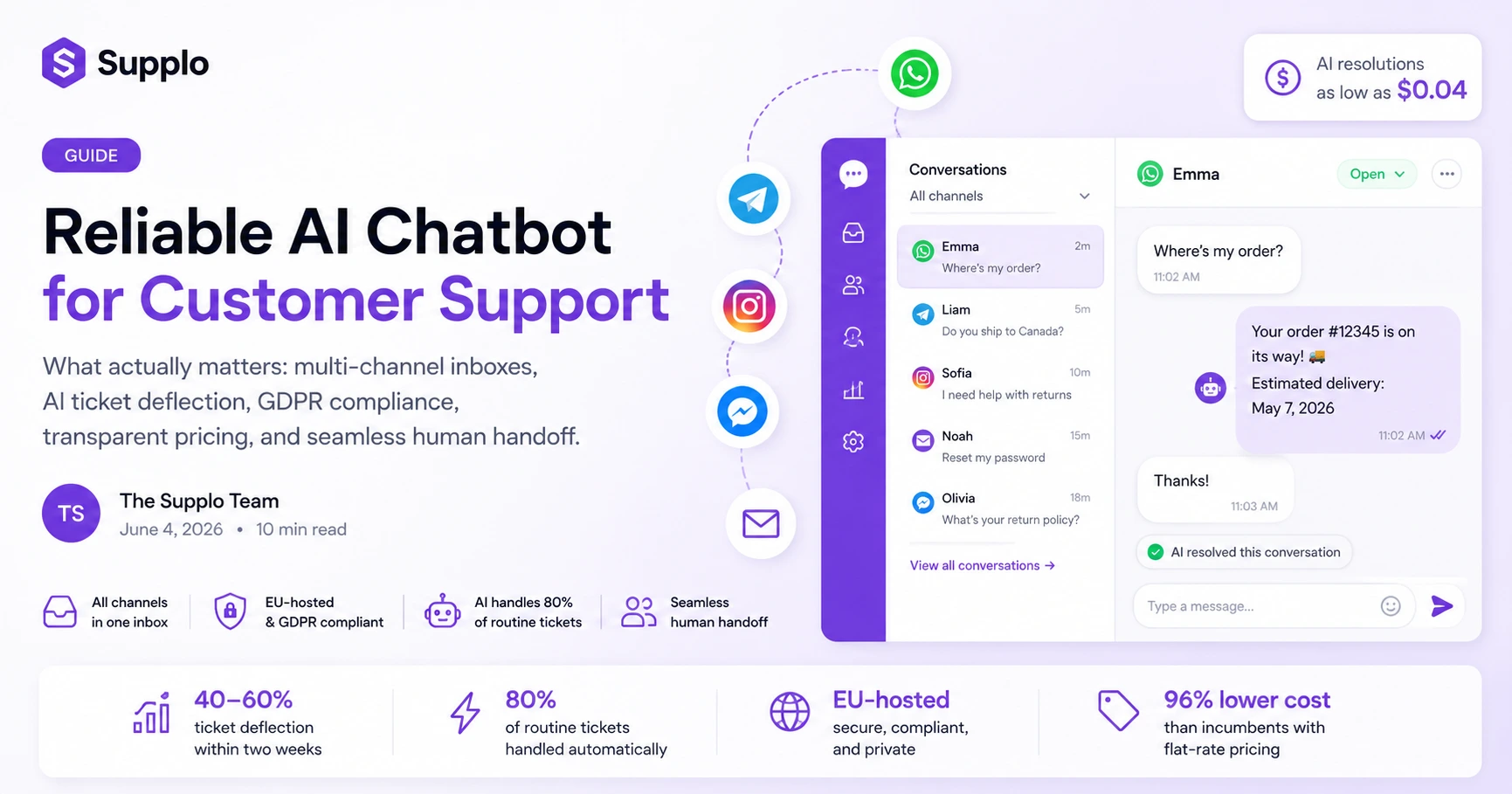
- Look for an AI chatbot for customer support that unifies WhatsApp, Telegram, Instagram, email and Facebook into one shared inbox. No channel silos.
- Skip per-resolution pricing traps. Choose flat-rate billing with low per-resolution costs (as low as $0.04).
- Make sure the bot is EU-hosted for GDPR compliance and actually learns from your existing knowledge base. You don't want a black box.
- The best setup handles roughly 80% of routine tickets automatically and routes the messy stuff to a human without friction.
What Makes an AI Customer Support Chatbot Actually Reliable?
True reliability isn’t just about uptime. It’s about how consistently the bot understands what a customer actually wants, routes the tough stuff to a human and learns from every interaction without making things up. A reliable bot doesn’t just answer; it owns the outcome.
Key reliability markers:
- Hallucination-proofing: The bot must stick to your knowledge base and not invent answers just because it thinks it knows better.
- Handoff logic: Seamless escalation to a human when the AI hits its limit. No dead ends.
- Data privacy: EU-hosted infrastructure means your customer data stays compliant. Non-negotiable for most businesses.
- Self-learning: It should get better without you having to manually re-train it every week.
- Uptime SLA: Look for platforms that treat downtime as a critical failure rather than a minor inconvenience.
A reliable AI customer support chatbot doesn’t just answer; it owns the outcome.
A well-tuned bot can usually achieve a ticket deflection rate of 40–60% within two weeks. That cuts first-response time from hours to seconds. Start by testing it on one channel (such as email or WhatsApp) and measuring the response time and customer effort score.
Key Features of a Customer Support AI Chatbot That Small Businesses Actually Need
SMBs often get sold suites with 50 features they’ll never touch. What you actually need is a shared inbox that merges WhatsApp, email, Telegram and Instagram into one view, an AI agent that learns from your content and a flat monthly rate that doesn’t explode when ticket volume spikes, no per-seat math required.
Must-have features for small teams:
- Multi-channel inbox: Handle Instagram DMs, Facebook Messenger and email from one pane. Your team will thank you.
- Instant translation: The AI translates customer messages and your replies live, no more copy-pasting into Google Translate.
- Knowledge base sync: The bot answers from your existing help docs, not some mysterious black box.
- Transparent AI pricing: $0.04 per AI resolution. No surprise bills.
- No per-agent fees: Add team members without the finance team having a heart attack.
A customer support AI chatbot should handle the repetitive 80% of tasks, not replace your best agents.
AI agent that learns from your content – see how a self-learning agent cuts your first-response time.
Why the Best AI Chatbot for Customer Support Isn’t Always the Most Expensive
The market leaders (you know the ones) charge per resolution, per seat and often per channel. That means your costs grow linearly with your success. A better metric is cost per resolved ticket and solutions with flat-rate core pricing and low per-resolution fees (like $0.04) often win by a landslide, at 96% of the big guys' cost.
Why expensive doesn’t mean better:
- The per-resolution trap: Success shouldn’t be a liability. Don't pay more for doing a good job.
- Flat-rate foundation: Pay one monthly price for the infrastructure.
- Volume-friendly: AI resolutions are a rounding error in your budget (cents, not dollars).
- No seat shock: Invite the whole team without second-guessing.
- Feature parity: You get the same multi-channel routing and analytics without the premium sticker.
Pricing that doesn’t penalize you for scaling – compare total cost of ownership against the incumbents.
AI Chatbot for Small Business Customer Support
Small teams can’t afford a bot that requires a dedicated operator to manage. You need an AI that plugs in quickly, learns from your existing content and handles the repetitive 80% of questions. The goal isn’t to replace your team; it’s to stop them from answering Where is my order? five times a day.
How to deploy it fast:
- Connect your knowledge base (FAQ, help docs, return policy). This is the most important step.
- Let the AI go live on one channel (e.g., email or WhatsApp). Start small.
- Monitor deflection and escalation rates for the first week.
- Tweak tone and fallback responses based on real conversations.
- Expand to more channels once you hit 40%+ deflection.
An AI chatbot for small business customer support should go from setup to live in under an hour.
Ready to test the bot on your own customers?
Connect your knowledge base and see how the AI handles live questions.
Chat AI for SMB Support: How to Stop Playing Whack-a-Mole with Tickets
When every channel (email, WhatsApp, Telegram) is a separate silo, you lose track and lose customers. An AI-first shared inbox that unifies all your channels and centralizes everything. The bot pre-filters the noise, suggests replies and ensures no customer falls through the cracks even when the team is asleep.
Stop the chaos with these tactics:
- Unified view: See all conversations from one inbox, regardless of source. Simple, but game-changing.
- AI triage: The bot tags, categorizes and even drafts a response before a human looks at it.
- 24/7 coverage: Answer WhatsApp at 3 AM without waking anyone up.
- Collision prevention: Two agents never reply to the same customer simultaneously. No more awkward "as my colleague said" emails.
- Audit trail: Every interaction is logged for quality review.
Shared inbox that unifies all your channels – see it in action.
AI Chatbot for E-commerce Customer Support
During peak season, support volume can triple. Hiring temps is expensive and slow. An AI chatbot for e-commerce customer support handles the surge, instantly answering shipping questions, processing returns and updating order status, all while keeping the human team focused on complex claims. It scales down just as easily in January.
E-commerce specific capabilities:
- Order lookups: The bot pulls tracking info directly from your system.
- Return logic: Handles common return scenarios without human intervention.
- Cart recovery: Engages browsing customers who may have a question.
- Volume elasticity: No extra charge for a sudden spike in November.
- Shopify native: Works with your platform, not against it.
A proper AI chatbot for e-commerce can cut the team’s ticket load by half during Black Friday.
Case studies from stores using AI support – real results, real stores.
The AI-Powered Customer Service Chat That Works While You Sleep
Customers don’t only email during business hours. An AI-powered customer service chat never clocks out. It answers questions, routes urgent issues and logs everything for the morning team. The result? A customer wakes up to a resolved ticket, not a we’ll get back to you auto-reply.
How 24/7 coverage changes the game:
- Global time zones: Handle customers in different regions without a night shift.
- Async communication: The bot collects all necessary info before a human ever joins.
- Offline mode: Captures leads and requests even when the office is closed.
- Reduced burnout: Your team starts the day with a clean queue.
- Customer satisfaction: I got an answer at 2 AM builds serious loyalty.
Overcoming the Robot Stereotype: Making AI Feel Human
The best AI chatbots don’t sound like a robot reading a phone book. They use conversational language, admit when they don’t know something and hand off with grace. The secret is in tone customization and the ability to say Let me get a human who can help better with that.
How to humanize your AI chatbot:
- Tone control: Adjust from formal to friendly to match your brand voice.
- Auto-translate: Respond in the customer’s language, not yours.
- Semantic understanding: The bot grasps intent, not just keywords.
- Graceful failure: When it’s unsure, it hands off cleanly instead of guessing.
- Fallback education: If the bot fails twice, it flags the issue for KB improvement.
Supplo is not affiliated with any app or website. Please follow each app’s terms and local regulations.
Multi-channel routing for WhatsApp, Telegram and Instagram – keep the human touch across every channel.
Shopify AI Chatbot for Support: Deep Integration Without the Custom-Dev Headache
If you run a Shopify store, you don’t need a bot that says Hello. You need one that reads order status, cancellation windows and shipping zones. A Shopify AI chatbot for support connects to your store data to provide real-time answers without you writing a single line of code.
What a Shopify-native AI does for you:
- Live order data: The bot pulls from Shopify to answer shipping or stock queries.
- Cancellation rules: Automatically respect your store’s return window.
- Product recommendations: Suggest items based on the question context.
- Cart assistance: Helps customers who get stuck during checkout.
- One-click install: No custom coding required.
A Shopify AI chatbot for support should be plug-and-play, not a dev-week-long effort.
The Hidden Cost of Free AI Chatbots And How to Avoid the Trap
Free-tier AI chatbots often monetize through data mining, limited history, or forced upsells after a trial. Worse, they may host your data on US servers with subpar privacy laws. The real cost is lost trust and compliance exposure. A reliable paid plan with flat pricing and EU hosting is cheaper in the long run.
Five traps to watch for:
- Data monetization: Free bots often use your conversations to train their general models. Your customer data becomes their product.
- Feature gating: The free version hides routing, analytics and multi-channel support.
- Security gaps: Non-EU hosting can violate GDPR or local data laws.
- Abandonment risk: Free products get killed or pivoted without notice.
- Scaling shock: When you need to grow, the free plan no longer works.
How we compare to the expensive alternatives – see why flat-rate beats per-seat every time.
Tired of paying per seat and per channel?
One flat monthly price, no surprise invoices. Unlimited team members. AI resolutions at $0.04.
Key Takeaways
- Reliability in an AI chatbot for customer support means hallucination-proofing, clear handoff logic and EU-hosted data privacy.
- Small businesses need a shared inbox that merges all channels, not 50 unused features.
- Avoid per‑resolution pricing; flat-rate with low AI costs (like $0.04) saves 96% vs. incumbents.
- Test the bot on one channel first, then expand – expect 40–60% ticket deflection within two weeks.
- Free chatbots come with hidden compliance risks; invest in a secure, transparent platform instead.
FAQ
Is an AI chatbot for customer support safe to use with my customers’ data?
Yes, but only if it uses secure, compliant hosting. Look for EU-hosted infrastructure (like Supplo) that keeps your data off US servers and complies with GDPR. Always avoid free bots that train on your conversations.
Can an AI chatbot really replace a human support agent?
Not entirely, nor should it. The best setup handles the repetitive 80% (tracking, FAQs, returns) and hands off complex or emotional issues to a human. The goal is efficiency, not replacement.
What happens if the AI gives a wrong answer?
A reliable chatbot is trained on your knowledge base and can’t hallucinate outside it. If it’s unclear, it should be escalatedbe escalated to a human or admitted ignorance. You can also review incorrect responses in the logs and update your KB.
How fast can I set up an AI chatbot for my small business?
Most modern platforms, including those with a shared inbox and AI agent, can go live in under an hour if you have an FAQ or help docs ready, no coding required.
Will an AI chatbot work with my existing tools like WhatsApp or Telegram?
Yes. A proper multi-channel AI support platform routes messages from WhatsApp, Instagram, Telegram, Facebook Messenger and email into a single inbox. Your team sees everything in one place.
What should I NOT use an AI customer support chatbot for?
Don’t use it for legal advice, medical diagnostics, financial compliance decisions, or any scenario where a mistaken answer could cause harm. Also, avoid it for complex account security issues that need human judgment.
How do I know if my AI chatbot is actually improving customer satisfaction?
Track first-response time, resolution rate and customer feedback scores. A good bot will cut wait times by 80%+ and lower the number of escalations. If these metrics don’t improve, your bot is likely poorly configured.
Compliance note: Supplo is not affiliated with any app or website. Please follow each app’s terms and local regulations.