On this page
Managing Instagram Direct Messages (DMs) can quickly overwhelm any business, regardless of size. This guide is for customer support managers, marketing teams and business owners struggling to keep pace with incoming Instagram messages while maintaining quality and avoiding burnout. We'll show you how to leverage reliable software and smart strategies to engage customers effectively, prevent messages from falling through the cracks and scale your support operations, not just your headcount.
Quick Answer
- Focus on context, not just volume: The goal is accurate, not just fast, replies.
- Use official Instagram API tools: Avoid risky third-party bots that can lead to bans.
- Implement a unified inbox: Consolidate Instagram DMs with other channels for a complete customer view.
- Automate repetitive FAQs: Free up human agents for complex, high-value interactions.
- Always provide a human handoff: Automation should assist, not replace, human judgment.
The Real Problem with Scaling Instagram DMs
Let's be honest, most teams think scaling DMs is about hiring more people or finding a bot that replies instantly. But that's not the real issue. The real pain isn't the volume; it's the context. When messages flood in across product inquiries, support issues and sales leads, you either reply fast (and risk being wrong) or take your time (and risk the customer leaving). The goal isn't just to reply; it's to reply correctly, at scale, without dropping the ball.
The hidden cost of just hiring someone is significant. Complexity increases, training never ends and agent burnout becomes real. Volume alone isn't the only metric that matters; first response time is crucial, but so is the ultimate resolution time. Without proper systems, you end up with a Swiss cheese inbox problem, where messages disappear between team members and shifts, leading to critical context loss. To manage Instagram DMs at scale, you need a system that ensures consistency and accuracy.
What Instagram DM Automation Software Actually Can and Can't Do
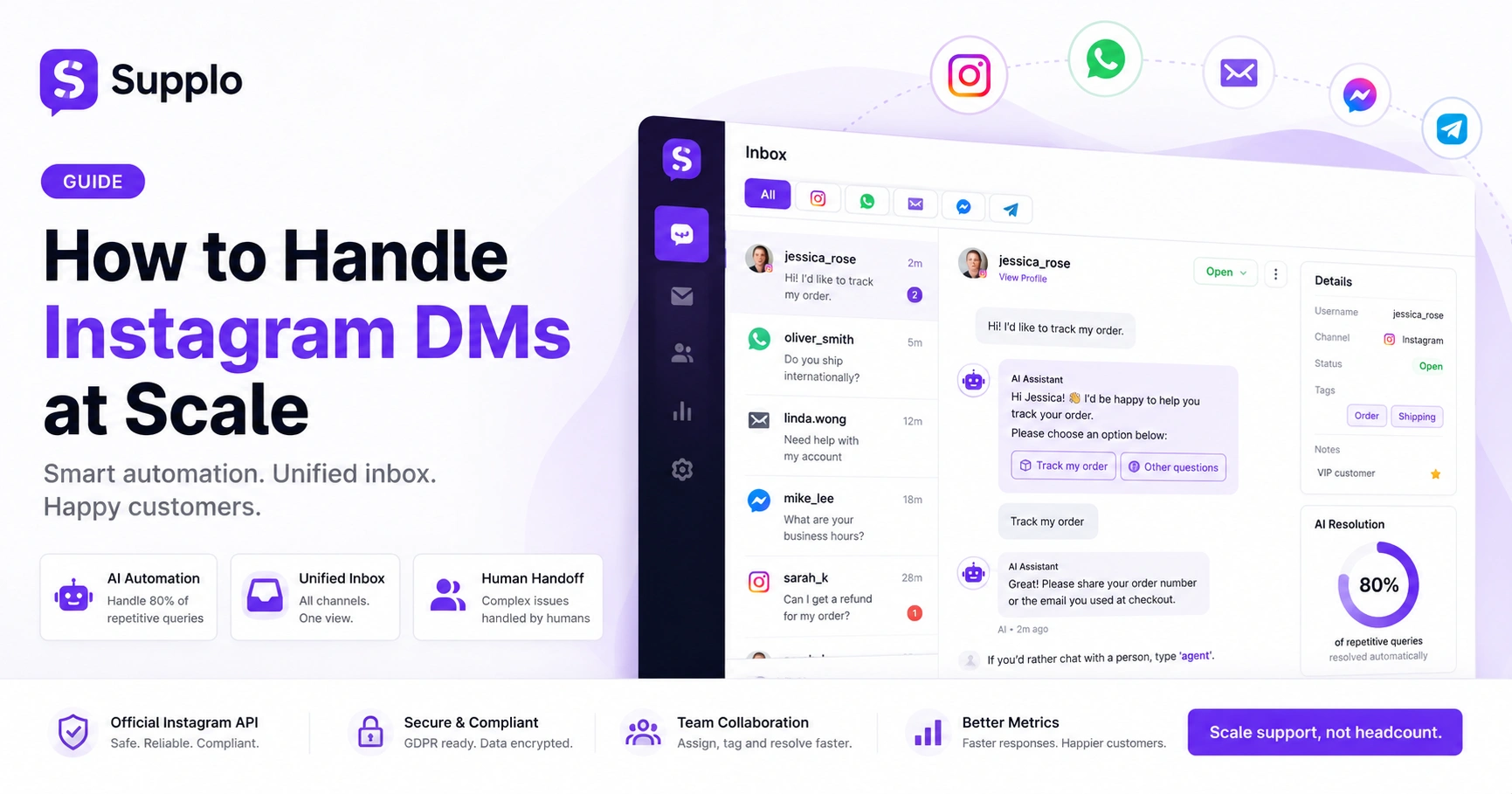
Instagram DM automation software can handle repetitive, high-volume tasks, such as shipping updates, business hours and FAQ answers. But it can't replace the human judgment needed for complex issues like refunds, escalations or sensitive conversations. Good software bridges that gap by automating the 80% of messages that follow predictable patterns, then cleanly handing off the tricky 20% to your team. The reliability comes from knowing when to step back and let humans take over.
Automatable tasks include:
- Order status inquiries
- Common FAQ answers
- Account link requests
- Scheduling appointments
Tasks that always need a human:
- Refund disputes
- Legal issues
- Nuanced product questions requiring empathy or in-depth knowledge
When evaluating tools to automate Instagram DMs at scale, look for those that facilitate handoff workflows rather than all-or-nothing automation.
How to Auto Reply Instagram Direct Messages Without Sounding Like a Bot
The secret to auto-replying without sounding robotic is layering, not scripting. Instead of one giant block of text, start with a short, human-sounding opener, match the customer's tone and then offer two or three clear next steps. Tools like Supplo let you use conditional logic so the reply changes based on keywords (like price or shipping), making it feel like a real conversation. Always include an opt-out to talk to a human.
Try the three-sentence rule: Keep initial auto-replies concise and warm. Use conditional branching to ensure customers don't get the same answer to different questions. Always add a human escape hatch, such as: If you'd rather chat with a person, type 'agent'.
Test your auto-reply Instagram direct messages by sending them to a friend. If they cringe, rewrite them. A smart AI agent that handles these replies can learn from your interactions to refine its responses over time.
Choosing Your Instagram Message Automation Software: The Reliability Checklist
Not all automation tools are built the same. A reliable platform should offer native Instagram API integration (not hacky workarounds) and a shared inbox. Hence, no message falls through the cracks and a self-learning AI that trains on your actual conversations, not generic scripts. Avoid tools that claim 100% automation; they're either lying or using risky bots. Look for clear pricing, transparent AI limits and a proven track record of uptime.
Here's a checklist for reliable Instagram message automation software:
- Native API Integration: Essential for stability and compliance.
- Unified Inbox: Consolidates all customer messages in one place.
- Self-Learning AI: Improves over time with real data from your conversations.
- Clear Human Handoff: Seamlessly transfers complex queries to agents.
- Transparent Pricing: Avoids hidden costs, like Supplo's transparent pricing model.
- Security & Compliance: Data encryption and GDPR adherence.
- Free Trial: Allows you to test with real traffic before committing.
Setting Up an Instagram DMs Unified Inbox for Scale
A unified inbox pulls messages from Instagram, email, WhatsApp and other channels into a single chronological feed. This eliminates the chaos of toggling between tabs and ensures your team sees the full context, not just the last Instagram message. The key is thread-based grouping: a single customer's conversation stays together even if they switch from DM to email. Without this, scaling is just organised chaos.
What this looks like in practice:
- Centralise Instagram, email, WhatsApp and Messenger into one view
- Use thread-based grouping to prevent fragmented customer histories
- Set up routing rules that direct the right query to the right team member
- Agents have all the information they need without switching tabs
A shared team inbox for Instagram drastically reduces first-response time by eliminating the question, "Where did that message go?" problem. It's the only effective way to build a unified Instagram DM inbox at scale.
How to Handle Multiple Instagram Accounts DMs Management in One Place
If you run multiple brand, regional or client accounts, managing DMs separately is a nightmare. The fix is a platform that lets you log into every Instagram handle from one dashboard, with clear labelling so your team knows which account they're replying from. Permissions and role-based access are critical here to prevent junior staff from accidentally posting from the CEO's account.
The account switching problem wastes hours every day. With a smart system for managing multiple Instagram accounts' DMs, you can:
- Assign agents to specific accounts only using role-based permissions
- Use labelling and tagging to ensure responses stay on-brand for each account
- Implement visual account indicators to prevent cross-account mix-ups
Supplo's workspace model handles this natively, eliminating per-seat pricing and streamlining operations considerably.
Best Practices for Scaling Instagram DM Responses Across Your Team
Scaling isn't just software; it's a process. Start by defining clear response templates for the top 10 questions you get (like pricing, hours, shipping). Then set up internal notes or tags so agents can hand off conversations without repeating the customer's name. Use saved replies for consistency, but train your team to personalise them. Finally, track your response time and resolution rate weekly, not just volume.
Implement a top 10 template strategy:
- Base templates on your most frequent questions
- Use internal notes or tags for seamless handoffs
- Pass along context, not just the message
Follow the 'personalise before you send' rule: make at least one small edit per reply to keep it human.
Focus on metrics that matter:
- First response time
- Resolution time
- Customer Satisfaction (CSAT)
These are the real ways to measure the scale of Instagram DM responses.
Avoiding Bans While You Automate Instagram DMs at Scale
Instagram's terms explicitly prohibit automated, bot-like behaviour, including mass DMs, rapid-fire replies and the use of third-party apps that simulate human action. The safest path is using official Instagram Graph API integrations (which tools like Supplo offer) rather than browser automation or DM blast services. Stay away from any service that promises unlimited DMs or bot accounts; those violate the terms and will get your account restricted or banned. Always follow Instagram's community guidelines and rate limits.
The key distinction:
- Official API integrations: Safe, reliable, compliant
- Third-party bots: Risky, can lead to bans
Be mindful of rate limiting: How many messages you can send per hour without triggering flags. If Instagram flags your account, pause automation and verify your identity.
The golden rule for safe Instagram DM automation: Never automate actions a human wouldn't realistically do.
Compliance Line: Supplo is not affiliated with any app or website. Please follow each app's terms and local regulations.
Why a Multichannel Strategy Beats Instagram Messenger Integration Alone
Relying only on Instagram Messenger integration is like having a store with one door. Customers reach you via email, WhatsApp, Facebook Messenger and your website chat widget. A multichannel strategy that funnels all these into a single inbox means you never miss a message and customers get consistent support regardless of where they start. It also future-proofs you if Instagram changes its terms.
The single-channel trap: Leaves you vulnerable to outages or API changes.
Top channels to integrate:
- Email (especially if you cube your email ticketing system)
- WhatsApp (you can integrate WhatsApp alongside Instagram)
- Your website widget
- Telegram
- Facebook Messenger
A unified inbox preserves context across channels, offering business continuity: if one channel dips, others pick up the slack. This comprehensive approach is far more robust than relying solely on Instagram Messenger integration.
The Quick-Start Guide to Consolidate Instagram DMs Today
Start by connecting your Instagram Business account to a platform like Supplo using the official Instagram Graph API. Then set up your knowledge base so the AI can automatically answer common questions like order status and business hours. Next, invite your team and assign roles. Finally, enable auto-replies for high-frequency queries and set a clear escalation path to a human. Test with a small volume first, then scale gradually. You should see a measurable drop in response time within 48 hours.
Here's how to quickly consolidate Instagram DMs:
- Connect Instagram Business Account: Use the official API to link your business profile (not personal).
- Build a Knowledge Base: Populate it with FAQs, policies and common responses. This is where your knowledge base comes in.
- Configure Auto-Reply Rules: Set up conditional logic and AI training based on historical conversations.
- Set Up Team Roles: Define permissions and notification preferences for your agents.
- Go Live Gradually: Test with a small volume (10-20 DMs) before a full rollout.
Ready to stop juggling Instagram DMs? Test your strategy risk-free. Start a free 14-day trial at Supplo and connect your first Instagram account in under 5 minutes.
Key Takeaways
- Effective Instagram DM management prioritises context and correct replies over sheer speed.
- Leverage official Instagram Graph API integrations for safe and reliable automation.
- A unified, thread-based inbox is crucial for consolidating messages across all channels.
- Smart AI-powered automation can handle repetitive queries, freeing agents for complex conversations.
- Always provide a clear path for customers to speak with a human agent when needed.
- Implement best practices like clear templates, internal notes and consistent metrics to scale team responses.
FAQ
Is it legal to automate Instagram DMs?
Yes, when done through Instagram's official Graph API (not third-party bots). Using the API to send automated replies to customer-initiated conversations is within Instagram's terms. Mass DMs to people who didn't message you first violate terms.
Will automation get my Instagram account banned?
Not if you use legitimate tools that integrate with the official Instagram API. Browser automation, DM blast services and any tool that mimics human behaviour outside the official API are risky and may result in restrictions or bans.
Can I manage multiple Instagram accounts from one dashboard?
Yes. Platforms like Supplo (and others that support multi-account management) let you connect multiple Instagram handles and manage them from a single inbox, with clear labelling so you know which account you're replying from.
What's the difference between auto-reply and a chatbot?
Auto-reply sends a pre-written response immediately after a customer DMs. A chatbot (or AI agent) carries a back-and-forth conversation, answers follow-up questions and can hand off to a human. Auto-reply is simpler; AI agents are more powerful for scaling.
How many DMs can I send per hour without Instagram flagging me?
Instagram's exact rate limits aren't published, but a general safe rule is 50-100 direct messages per hour per account when using the official API. Exceeding that can trigger temporary blocks. Use a tool that respects rate limits automatically.
What if my automated reply doesn't answer the customer's question?
Always include a human escalation option (e.g., Type 'agent' to speak to a person). Good automation tools also let you set up fallback replies that route unanswered questions to your team. No automation is perfect, so always leave an escape hatch.
Can I use Instagram DM automation for sales outreach?
No. Instagram's terms explicitly prohibit using automation for unsolicited outreach (mass DMs to people who haven't messaged you). Automation should only be used to reply to customers who have initiated a conversation.
If your current tool fails or your account gets flagged, don't risk a ban. Use a platform built on the official Instagram API. Try Supplo free, no credit card required.
Scale support without scaling your costs. Supplo's AI resolves up to 80% of incoming tickets automatically at a flat $0.04 per resolution, not $0.99. Plus, pricing is per workspace, not per seat. See our transparent pricing →
Support payments: Cryptocurrency, Binance Pay, Payeer, GCash, AmanPay, QIWI Wallet, DOKU, Nigeria and South Africa cards, Skrill and Payoneer accepted.
Compliance Line: Supplo is not affiliated with any app or website. Please follow each app's terms and local regulations.