On this page
If your live chat goes down during a flash sale or your AI agent hallucinates a return policy, you lose orders and trust. Shopify stores live and die by real-time support, especially when you're running ads or handling high-ticket items. A flaky chat app costs you more than the subscription; it costs you revenue and repeat customers.
This guide is for Shopify store owners, e-commerce managers, and support leads who need the best customer support software for Shopify that handles traffic spikes, integrates natively, and doesn't bill you per agent or per AI resolution.
Supplo is not affiliated with any app or website. Please follow each app's terms and local regulations.
Quick Answer
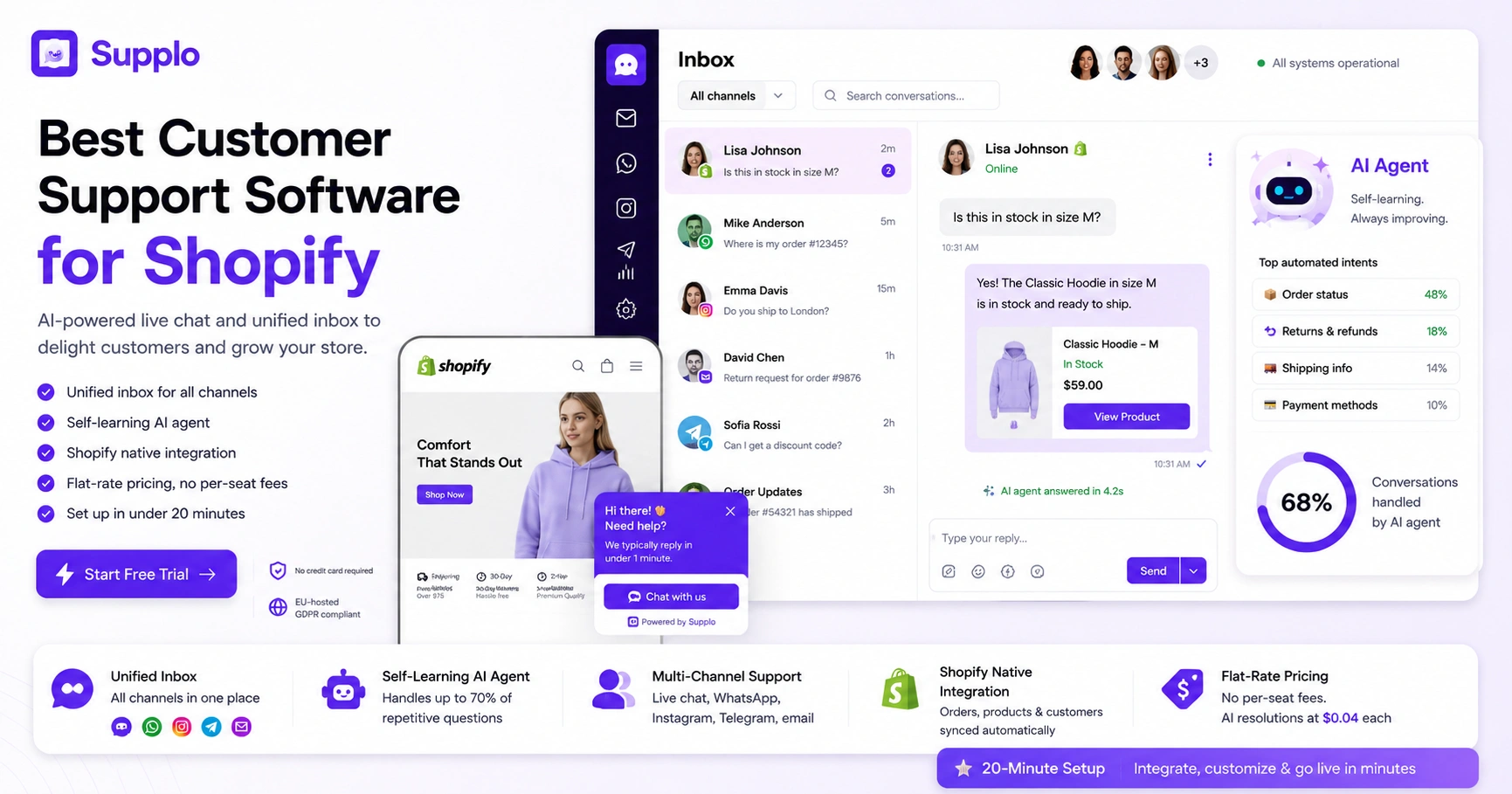
- Reliability first: The chat widget must load without slowing your store and stay online during peak traffic.
- Unified inbox: Chat, email, WhatsApp, Instagram, and Telegram in one view, no more tab-hopping.
- Self-learning AI agent: Answers order status, returns, and shipping questions without canned FAQ links.
- Flat-rate pricing: No per-seat fees and no per-resolution charges that balloon with volume.
- 20-minute setup: Integrate with Shopify, customize your widget, and go live in under 20 minutes.
Why Your Shopify Store Can't Afford Bad Live Chat Software
Here's the thing about live chat: it's not a "nice to have" anymore. It's the front door of your store. When that door slams shut during a flash sale, customers don't wait. They leave.
And it gets worse. Bad automation isn't just unhelpful, it's insulting. When your bot fires off a generic "check our FAQ" link instead of actually answering the question, you're basically telling the customer their time doesn't matter. They feel it. And they bounce.
One real-world example: a Shopify store running flash sales saw a 15% drop in cart recovery simply because their chat response time exceeded 2 minutes during the event. That's thousands in lost revenue from a $50/month tool that couldn't scale.
The internal damage is real, too. Missed messages, duplicate replies, and context switching burn out support agents faster than any angry customer ever could. The wrong software creates chaos where clarity is needed.
The bottom line: Shopify's ecosystem is crowded. Reliability separates professional stores from hobby shops. Choose software that treats uptime and accuracy as non-negotiable.
Reliable live chat isn't a nice-to-have; it's the difference between closing a sale and watching a cart abandon.
Learn how a unified inbox prevents missed messages →
What to Look for in Shopify Live Chat Software: The Non-Negotiables
Not all Shopify live chat apps are built the same. You need seamless Shopify integration, a responsive widget that loads without slowing your store, and routing that puts the right conversation in front of the right agent.
The must-haves checklist:
- Native Shopify integration: The app should automatically sync orders, products, and customer profiles, no manual data entry.
- Lightweight widget: It must load asynchronously to avoid blocking page rendering or harming Core Web Vitals.
- Mobile-first design: Over 70% of Shopify traffic comes from mobile devices. Your widget must work flawlessly on phones.
- Intelligent routing: Priority queuing and auto-routing for VIP customers or high-intent pages (cart, checkout).
- Real-time sync: No lag between your inbox and the customer's chat window. A 2-second delay feels like an eternity.
If a chat tool doesn't check these boxes, keep looking. The foundation determines everything else.
See how Supplo integrates with Shopify →
How a Shared Inbox Turns Chaos into Control for Your Shopify Team
If your support team is bouncing between a chat tool, email, and social DMs, you're losing time and context. A shared inbox unifies every customer conversation into one view, so no message gets missed, and agents can collaborate without switching tabs.
What a shared inbox actually does:
- All customer messages, live chat, email, WhatsApp, Instagram, Telegram, land in one chronological feed.
- Agents see who last replied, avoiding duplicate responses and unnecessary work.
- Internal notes let team members tag a product expert or shipping lead without leaving the thread.
- Status tags (open, pending, resolved) keep everyone aligned on what's been handled.
- Average response time drops because context switching is eliminated.
Your agents stop asking "did someone reply to this yet?" and start resolving tickets faster. That's the control you get when you stop managing six inboxes.
A shared inbox removes the friction of context switching. Your team answers faster because they see every conversation in one Place.
The AI Agent That Actually Handles Customer Questions
Most AI chat agents dump a link to your FAQ and hope the customer figures it out. A self-learning AI agent actually answers common questions, order status, return windows, and shipping times, using your knowledge base. It learns from your team's responses, becoming smarter over time and handling more volume without human hand-holding.
What makes a self-learning AI different:
- It answers in natural language, not canned replies. Customers get a sentence, not a link.
- It studies how your team resolves similar questions and automatically improves accuracy.
- It handles up to 70% of routine inquiries (order status, tracking, basic returns) without escalation.
- It integrates with your product catalog to answer specific questions about size, availability, or compatibility.
- Your team is freed to focus on complex issues and upsell conversations.
The result: faster response times, lower costs, and a support team that doesn't burn out repeating the same answers.
Explore how a self-learning AI agent works for Shopify →
Multi-Channel Support: Why Shopify Stores Need Live Chat + WhatsApp + Email in One Place
Your customers don't just chat on your site; they message on WhatsApp, Instagram, Telegram, and email. If each channel is a separate inbox, your support team spends more time switching tools than answering questions. A unified inbox brings every channel together so you reply from one screen, not five.
The channels that matter for Shopify stores:
- WhatsApp: Preferred for order updates, shipping questions, and follow-ups in many regions.
- Instagram DMs: Where customers browse and ask product questions before clicking "buy."
- Telegram: Growing in popularity for real-time support, especially in Europe and Asia.
- Email: Still essential for order confirmations, invoices, and detailed follow-ups.
- Live chat: The primary touchpoint for on-site visitors.
A unified inbox keeps the conversation thread intact across platforms. A customer can start on WhatsApp, continue on live chat, and follow up via email, and your team sees it all in one thread. No more asking, "Can you tell me what you already said in the other app?"
Multi-channel support isn't about being everywhere. It's about managing everywhere from one Place.
Discover multi-channel support, including WhatsApp and Instagram →
Live Chat Widgets for Shopify: What Works and What's Just Noise
The live chat widget is the first thing a customer interacts with; it needs to load fast, look good, and not annoy visitors with pop-ups. The best widgets are customizable to match your brand, trigger intelligently (not on every page load), and work seamlessly on mobile.
Widget features that actually improve the experience:
- Asynchronous loading: The widget script doesn't block your page from rendering. Speed stays intact.
- Smart triggers: Offer help on high-intent pages (cart, checkout, product pages) rather than every page.
- Brand customization: Colors, placement, and greeting messages should match your store's identity.
- Mobile-first design: The widget must expand cleanly on small screens without interfering with the checkout flow.
- No annoying auto-play: Avoid widgets that auto-play audio or video without consent. It drives customers away.
What's just noise: Bloated widgets with animations, sound effects, and complex menu trees. They look flashy, but slow down your store and confuse customers. Simpler is better.
Pricing Sanity: Why Per-Seat and Per-Resolution Fees Are Killing Your Budget
Many Shopify live chat tools charge per agent and per AI resolution, which adds up fast as your team grows or your bot gets busy. The smarter model is a flat monthly rate for unlimited agents and a low, transparent fee per AI resolution (think $0.04 each instead of $1+).
The math on per-seat pricing vs. flat rate:
- Per-seat pricing forces you to limit your team. Adding a new agent means a new line item on your bill.
- Per-resolution fees from tools like Intercom Fin can cost $1+ for each AI answer. If your bot answers 500 questions a day, that's $15,000+ a month.
- Flat-rate billing lets you scale support without budget surprises. You know exactly what you'll pay every month.
- Some platforms even accept crypto and alternative payments (Binance Pay, GCash, Payeer).
The total cost of per-agent + per-resolution models is unpredictable and typically far higher than flat-rate alternatives. For small-to-mid Shopify teams, every dollar saved on software can go toward growth.
Flat-rate pricing means your support costs don't spike when your business grows. Predictable bills, no surprises.
Compare pricing models for Shopify support tools →
If you're tired of surprise invoices for AI resolutions, switch to a flat rate.
Real-Time Customer Engagement for Shopify: The Human + Bot Balance
Customers want fast answers, but also want to talk to a human when the question gets tricky. The best setup uses the AI agent for common queries (order status, shipping, basic product questions) and seamlessly hands off to a live agent when context, empathy, or a decision is needed.
How the balance works in practice:
- AI handles the first 2–3 back-and-forths. If the question is routine, it's resolved in seconds.
- If the customer asks a nuanced question (a custom order, a dispute, a product recommendation), the AI transfers the conversation to a human.
- The human agent sees the full chat history. No forcing customers to repeat themselves.
- Real-time typing indicators and read receipts keep customers engaged while they wait.
- Proactive chat invites can engage shoppers browsing high-value items, increasing average order value.
This balance keeps satisfaction high and response times low. Your team doesn't burn out on repetitive questions, and customers get quick answers without feeling like they're talking to a brick wall.
The Knowledge Base That Works While You Sleep And Doesn't Need Manual Updates
A knowledge base is only useful if it's up to date. The best tools integrate with your live chat so the AI agent pulls answers directly from your knowledge base, and updates can be made in the same interface where you chat. No more updating a separate wiki and hoping it syncs.
What a connected knowledge base looks like:
- Knowledge base entries link directly to AI agent responses. The AI reads from the same source you edit.
- Updates apply immediately across all channels, chat, email, and widget. No delay.
- Supports rich media: images, videos, product links, and even step-by-step guides.
- Built-in search helps both customers and agents find answers fast, reducing repetitive questions.
- The knowledge base becomes the single source of truth for every support interaction.
When the AI learns from your team's actual conversations, the knowledge base improves automatically. You stop writing static FAQs and start building a living support system.
A knowledge base that updates itself means your support is never outdated. Your team writes less, resolves more.
Set up your Shopify knowledge base in minutes →
Getting Started: How to Set Up Reliable Shopify Live Chat in Under 20 Minutes
You don't need a month-long onboarding or a dedicated IT team. The best customer support software for Shopify installs with a single integration, a quick widget customization, and a basic knowledge base import. Within 20 minutes, your store can be live with an AI-powered chat that actually helps customers.
Steps of setup guide:
- Install the integration: Go to the Shopify app store or enter your API key. One click typically does it.
- Customize your widget (10 minutes): Choose colors, set the widget placement (bottom right or left), write a greeting message, and choose proactive trigger pages (cart, checkout, product pages).
- Build your knowledge base (5 minutes): Import existing FAQs or write 10–15 core articles covering order status, shipping times, returns, and product questions. The AI will use these immediately.
- Set routing rules (3 minutes): Create basic rules, for example, VIP customers go to senior agents, or high-intent cart page visitors get priority.
- Test the flow (2 minutes): Make a mock purchase from your own store, then open the live chat. Confirm the AI answers a question and that a handoff to a human agent works correctly.
That's it. Your store now has a reliable, AI-powered live chat that won't break at 3 AM.
Test live chat on your Shopify store today, no credit card required.
Start your free trial at Supplo.
Ready to stop juggling four different support tools? Get everything in one workspace.
Key Takeaways
- Reliable live chat software must load fast, stay online during traffic spikes, and integrate natively with Shopify.
- A shared inbox unifies chat, email, WhatsApp, Instagram, and Telegram into one view for your team.
- Self-learning AI agents handle up to 70% of routine inquiries, freeing your team to focus on complex issues.
- Flat-rate pricing with $0.04 per AI resolution beats per-seat and per-resolution fees by a wide margin.
- You can set up Shopify live chat in under 20 minutes with zero coding required.
FAQ
Is live chat software for Shopify safe to use?
Yes. Reputable apps use encryption and comply with privacy regulations. Supplo is EU-hosted and does not share data. Always check that the app uses HTTPS and doesn't store sensitive payment information. Supplo is not affiliated with any app or website. Please follow each app's terms and local regulations.
Can the AI agent handle returns and exchanges?
Absolutely. If your knowledge base includes return policies and procedures, the AI can guide customers through the process, including generating return labels and checking eligibility.
Do I need to install any code to use Shopify's live chat?
In most cases, no. The app integrates directly with Shopify via the app store or an API key. Some customization may require a small code snippet, but the basic setup is code-free.
What happens if the AI agent can't answer a question?
The conversation is automatically transferred to a human agent. The customer doesn't need to repeat themselves, and the human sees the full chat history for context.
Can I use live chat on my Shopify mobile app?
Yes. Most modern live chat widgets are mobile-responsive and work within Shopify's mobile checkout flow. Some even offer a dedicated mobile app for agents to reply on the go.
How does the shared inbox work with multiple team members?
Every conversation is visible to all agents in a single inbox. You can assign chats, leave internal notes, and see who is actively replying to avoid stepping on each other's toes.
What if I need support via WhatsApp or Instagram, in addition to live chat?
A unified inbox solution like Supplo consolidates WhatsApp, Instagram, Telegram, email, and live chat into a single view. You reply from one screen, not five separate apps.
Compliance line: Supplo is not affiliated with any app or website. Please follow each app's terms and local regulations.