On this page
If you manage customer support, you've probably heard the term "what is a chatbot resolution rate" tossed around in meetings. But here's the thing: most people don't actually track what matters. They track deflection, pat themselves on the back, and miss the real story.
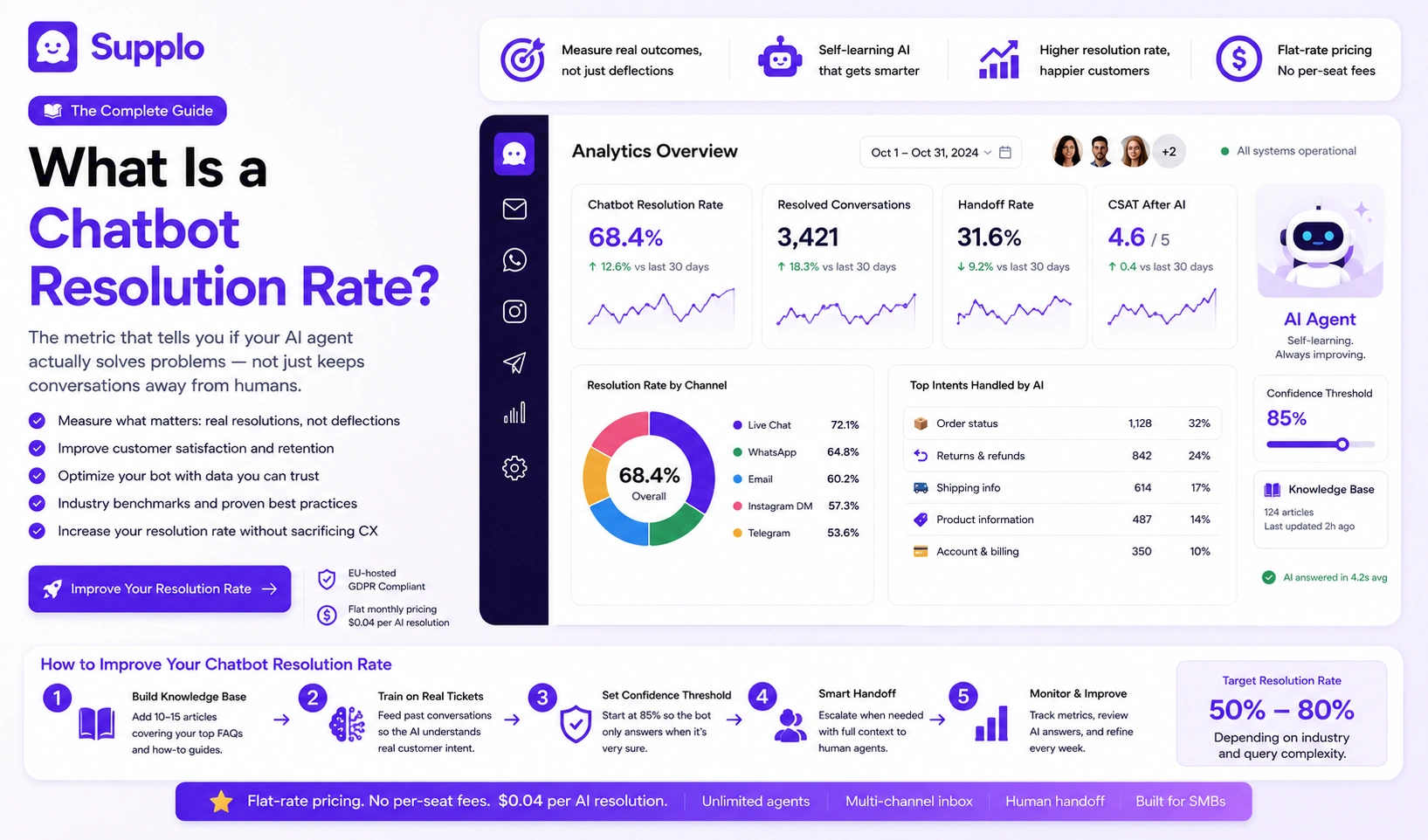
A chatbot's resolution rate measures something simple: the percentage of conversations your chatbot resolves without ever needing a human agent. It's the metric that actually tells you if your AI is helping or just pretending to help. This guide is written for support managers, operations leads, and founders who want to get this number right, calculate it honestly, improve it smartly, and never sacrifice customer experience in the process.
Quick Answer
- Chatbot resolution rate = percentage of conversations resolved by AI without human help
- Formula: (Resolved conversations ÷ Total bot conversations) × 100
- More honest than the deflection rate (which can hide unresolved issues)
- Key factors: intent coverage, knowledge base quality, escalation timing
- Industry benchmarks: 50–80% depending on complexity.
- Pair with CSAT for accuracy, high resolution + low satisfaction is a red flag.
Chatbot Resolution Rate Defined: What It Actually Measures and What It Misses
Let's cut through the jargon. A chatbot resolution rate tracks the percentage of conversations your bot completes from start to finish, without a human stepping in. You calculate it by dividing the number of resolved conversations by the total number of bot conversations. But here's what most definitions conveniently leave out: it only counts first-contact resolutions. If a customer bounces, comes back with the same problem, and the bot resolves it on try number two? The bot gets credit for that second attempt. The first failure? Ignored completely.
What it measures vs. what it misses:
- Resolution vs. containment: Resolution means the issue is actually solved. Containment means the bot kept the conversation inside the channel, not the same thing at all.
- Auto-resolved vs. truly resolved: A bot can auto-close a ticket because a timer ran out, not because the customer got what they needed.
- Time-bound resolutions: Some systems only count a resolution if the issue doesn't re-open within 24–48 hours. Others don't bother checking.
Supplo is not affiliated with any app or website. Please follow each app's terms and local regulations.
A chatbot's resolution rate that ignores reopened tickets isn't measuring success; it's measuring the time between failures.
Why Chatbot Resolution Rate Matters More Than Chatbot Deflection Rate
Here's the dirty secret about deflection rate: it measures how many conversations never touch a human. Sounds good, right? Except that includes conversations where customers got frustrated, gave up, and silently left. Deflection counts those as wins. Resolution rate? It counts actual outcomes.
A high deflection rate with a low resolution rate means you're not solving problems; you're just hiding them. Customers aren't happier because your bot kept them away from a human. They're angrier because they never got an answer.
Why this matters:
- Deflection inflates easily by ignoring unhappy customers who stop trying
- Resolution rate ties directly to customer satisfaction scores and long-term retention
- Teams that chase deflection often design bots to say "no" quickly. That hurts trust fast.
A high deflection rate with a low resolution rate isn't efficiency; it's avoidance with a dashboard.
The 7 Factors That Impact Your Chatbot Resolution Rate
Your chatbot resolution rate isn't luck. Seven factors drive it up or down. Fix these, and your rate climbs. Ignore them, and you'll keep wondering why your bot underperforms.
Factors:
Intent coverage gaps
Does your bot handle your top 10 customer queries, or just the easy ones? If it only answers "Where's my order?" but ignores refund questions, you're leaving money on the table.
Confusing bot flows
Complex flows with too many branches create dead ends. Customers get lost. Conversations get abandoned.
Weak knowledge base content
Stale, outdated answers create false resolutions. Customers think they got an answer, try to act on it, fail, and re-open the ticket. A fresh, well-connected knowledge base is non-negotiable.
Lack of escalation paths
A bot that can't hand off to a human smoothly? That's a resolution killer. Customers get stuck in loops and leave angry.
Poor language handling
Multilingual customers often hit dead ends if your bot only understands English. Translation isn't optional anymore.
Insufficient training on phrasing
Customers don't type like your documentation. They use slang, typos, and shortcuts. Your bot needs to understand natural language, not just perfect sentences.
Bot personality mismatch
A formal bot for a casual brand feels robotic. A casual bot for a serious product feels unprofessional. Tone matters more than most teams realize.
Related resource: Supplo's knowledge base integration ensures your bot always works from accurate, up-to-date content.
How to Calculate Your Chatbot Resolution Rate With a Simple Formula
The math is straightforward: (Number of conversations resolved by the bot without human intervention) ÷ (Total bot conversations) × 100.
But here's where it gets tricky: how do you define "resolved"? Do you count conversations where the customer never returned within 24 hours? Or do you only count ones where the bot explicitly asked "Did this solve your problem?" and got a confident yes?
Example calculation:
- 400 conversations handled, 280 resolved → 70% resolution rate
- 200 conversations handled, 120 resolved → 60% resolution rate
Key tracking decisions:
- Choose a time window: The 48-hour no-reopen window is the most common standard. It's fair and catches repeat issues.
- Manual vs. automatic confirmation: Manual feedback loops (asking customers) are more accurate but harder to scale. Automatic tracking is easier but can miss false resolutions.
- Be consistent: Switching your definition mid-quarter makes your data useless for trend tracking.
A resolution rate without a time-bound definition isn't a metric; it's a guess dressed up as a number.
How to Improve Chatbot Resolution Rate: 5 Optimization Tactics That Work
Want a 15–25% improvement within 30 days? Focus on these five tactics. Nothing fancy, just solid execution.
Tactics:
Expand your knowledge base with real customer conversations.
Pull chat transcripts from your human agents. Find the most common unresolved topics. Add those answers to your bot. You already have the data; use it.
Add clear escalation triggers.
Train your bot to recognize keywords for frustration. "I'm angry," "this isn't working," "I want a human." When those pop up, escalate immediately. After two failed resolution attempts, hand off automatically.
Simplify bot flows
Eliminate dead ends. Limit choices to 2–3 per message. Keep bot responses under 50 words. Short and direct beats long and thorough every time.
Train your bot on failed conversations weekly.
Review every failed conversation. Identify new patterns. Update your knowledge base. Do this every single week. Monthly is the absolute minimum, and you'll feel the gap.
Add a confirmation prompt at the end of every interaction.
Ask "Did this help?" Use every "No" answer to identify gaps. Fix those gaps, and your rate climbs immediately.
Want to test this in real time? Start a free trial of Supplo and see how our self-learning AI boosts your resolution rate without per-resolution fees. No credit card required. Get started →
The fastest way to improve the resolution rate is to stop your bot from failing twice on the same question.
How to Increase Chatbot Resolution Rate Without Sacrificing Customer Experience
Chasing resolution rate can backfire. If you force your bot to resolve issues it can't handle, you'll frustrate customers and tank satisfaction. The trick is to increase the rate by making the bot better, not more aggressive.
What to do instead:
- Never hide the "talk to a human" button. It builds trust. Customers who know they can escape are more patient with the bot.
- Use sentiment detection. If a customer is clearly frustrated after two responses, escalate immediately. Don't make them repeat themselves.
- Add a feedback loop, ask "Did this help?" Use no answers to retrain the bot. It's that simple.
Here's the counterintuitive truth: customers actually prefer a bot that says "I can't solve this" over one that pretends it did. Transparency beats false efficiency every single time.
The Hidden Factor That Kills Chatbot Resolution Rate and How to Fix It
The biggest hidden killer? Poor bot-to-human handoff timing. Most bots keep conversations going way too long. Customers get forced through dead-end flows, get frustrated, and by the time they reach a human, they're already angry.
The fix:
- Set a hard maximum of two bot attempts before escalation
- Add an "escalate to human" button in the very first message
- Configure your bot to recognize frustration keywords as escalation triggers
- Keep handoff latency under 10 seconds
What happens after: When a human takes over with a smooth handoff, the customer is less angry. The conversation takes less time. This fix alone can boost the overall resolution rate by up to 20%.
The best thing your bot can do is know when to hand off. A failed escalation is worse than no escalation at all.
What a Good Chatbot Resolution Rate Looks Like by Industry
A "good" rate depends entirely on what industry you're in. Query complexity varies wildly.
Industry benchmarks:
- E-commerce: 70–80%, Most queries are simple (Where's my order?)
- Financial services: 45–55%, Regulatory complexity and nuance, lower resolution
- SaaS: 50–65%, Mix of easy (billing) and hard (product issues)
- Healthcare: 40–55%, Compliance and personalization needs limit bot autonomy
- Telecommunications: 55–70%. Many queries are standard, but escalations are frequent.
Anything above 80% for a bot handling open-ended queries is rare and usually inflated by a narrow scope. Always pair resolution rate with customer satisfaction scores. A 90% rate with a 60% CSAT means you're lying to yourself.
A 90% resolution rate on 5 queries is a party trick. A 60% resolution rate on 500 queries is a support operation.
How Supplo Helps You Achieve a Higher Chatbot Resolution Rate
Supplo's AI agent is built differently. It's self-learning, meaning it automatically improves your chatbot's resolution rate by analyzing every conversation and updating its knowledge base in real time. Combined with Supplo's shared inbox that routes unresolved issues to the right human instantly, you never lose a customer to a dead-end bot.
How Supplo stands out:
- An AI agent that self-learns from conversations, retraining on failed conversations weekly without any manual work. You literally don't have to lift a finger.
- Instant human handoff: unresolved conversations route directly to your team in the shared inbox. No delays, no dropped balls.
- Multi-channel, Resolution rate applies across email, WhatsApp, Telegram, Instagram, Facebook, and live chat. One bot, all channels.
- Supplo's flat monthly pricing means you can optimize resolution without worrying about per-resolution costs or seat fees.
Ongoing access, no hidden costs. Supplo combines live chat, a shared inbox, an AI agent, and multi-channel routing for one flat monthly rate. AI resolutions cost just $0.04 each. Stop paying per seat or per resolution.
Supplo supports payments via crypto, Binance Pay, Payeer, GCash, AmanPay, QIWI Wallet, DOKU, Nigeria and South Africa cards, Skrill, and Payoneer.
Common Pitfalls in Chatbot Resolution Rate Optimization and What to Do Instead
Three mistakes kill optimization efforts almost every time. Here's what they are and how to fix them.
Pitfall 1: Optimizing for the wrong metric
Chasing resolution rate without measuring customer satisfaction.
- Fix: Measure CSAT alongside resolution. High resolution + low CSAT = false success. You're solving problems, but you're making people unhappy while doing it.
Pitfall 2: Over-engineering bot responses
Long, unnatural conversations that try to sound human but end up sounding like a robot reading a textbook.
- Fix: Keep bot responses under 50 words. Limit choices to 2–3 per message. Short and direct wins every time.
Pitfall 3: Ignoring multilingual customers
Non-English queries are automatically closed without resolution because the bot can't understand them.
- Fix: Use a bot with built-in translation for global teams. This alone can boost the resolution rate by 10–15% for non-English queries.
Additional quick fixes:
- Review no-resolution feedback every single week
- Run 50 test conversations per week to identify gaps
- A/B test bot responses: shorter vs. longer, more vs. less empathy
Still seeing low resolution rates? If your bot is failing on the same queries week after week, it's time for a smarter approach. Supplo retrains automatically on failed conversations, so you stop losing customers to dead-end answers. See how →
Key Takeaways:
- Chatbot resolution rate = (resolved conversations ÷ total bot conversations) × 100
- It's more honest than deflection rate because it measures outcomes, not avoidance
- Seven factors influence it: intent coverage, bot flows, knowledge base, escalation, language, training, and personality
- Industry benchmarks: 50–80% depending on query complexity
- Pair with CSAT, high resolution + low satisfaction is a warning sign
- Improve by expanding the knowledge base, adding escalation triggers, simplifying flows, weekly training, and confirmation prompts
- Avoid pitfalls: don't over-engineer responses, don't ignore multilingual users, and don't optimize for resolution alone
FAQ
What's the difference between chatbot resolution rate and deflection rate?
Resolution rate measures actual problem-solving. Deflection rate measures how many conversations never reached a human, including ones that were dropped or unresolved. Resolution rate is the more honest metric, full stop.
What is a good chatbot resolution rate for a small business?
For most small businesses, 50–70% is realistic if your bot handles common queries like order status, hours, and basic FAQs. If you handle complex support (tech troubleshooting, billing disputes), 40–55% is still healthy.
Can you have a resolution rate that's too high?
Yes, absolutely. If your bot has a 90%+ resolution rate, it likely means it's handling only narrow, easy queries, or it's auto-closing tickets without confirming the issue is actually solved. Always pair resolution rate with customer satisfaction scores.
How often should I retrain my chatbot to improve the resolution rate?
Weekly is ideal. Review failed conversations, identify new patterns, and update your knowledge base. Monthly is the absolute minimum for keeping the resolution rate from dropping over time.
Does multi-channel support affect chatbot resolution rate?
Yes, dramatically. Resolution rate varies by channel. Email and web chat tend to have higher rates because queries are text-based. Instagram DMs and WhatsApp often have lower rates because conversations are shorter and more fragmented.
What's the fastest way to improve chatbot resolution rate?
Add a "Did this solve your problem?" prompt at the end of every bot interaction. Then use the "No" responses to identify gaps in your knowledge base. Fix those gaps, and your rate improves immediately.
Is there a formula for chatbot resolution rate?
Yes: (Conversations resolved by bot without human intervention ÷ Total bot conversations) × 100. Define "resolved" consistently (e.g., no re-open within 48 hours) for accurate tracking.
Compliance line: Supplo is not affiliated with any app or website. Please follow each app's terms and local regulations.


