On this page
You’ve got a hunch your support costs are too high. Maybe you’ve got a number in your head, $5 per ticket, or $10. But unless you’ve actually done the math, like, the real math, with software, salaries, and all the rework, that number’s probably wrong. This guide is for founders, ops managers, and team leads at small-to-mid support teams who want a realistic, honest look at what support actually costs. No fluff. Just a practical playbook for cutting costs without gutting your service quality.
Quick Answer
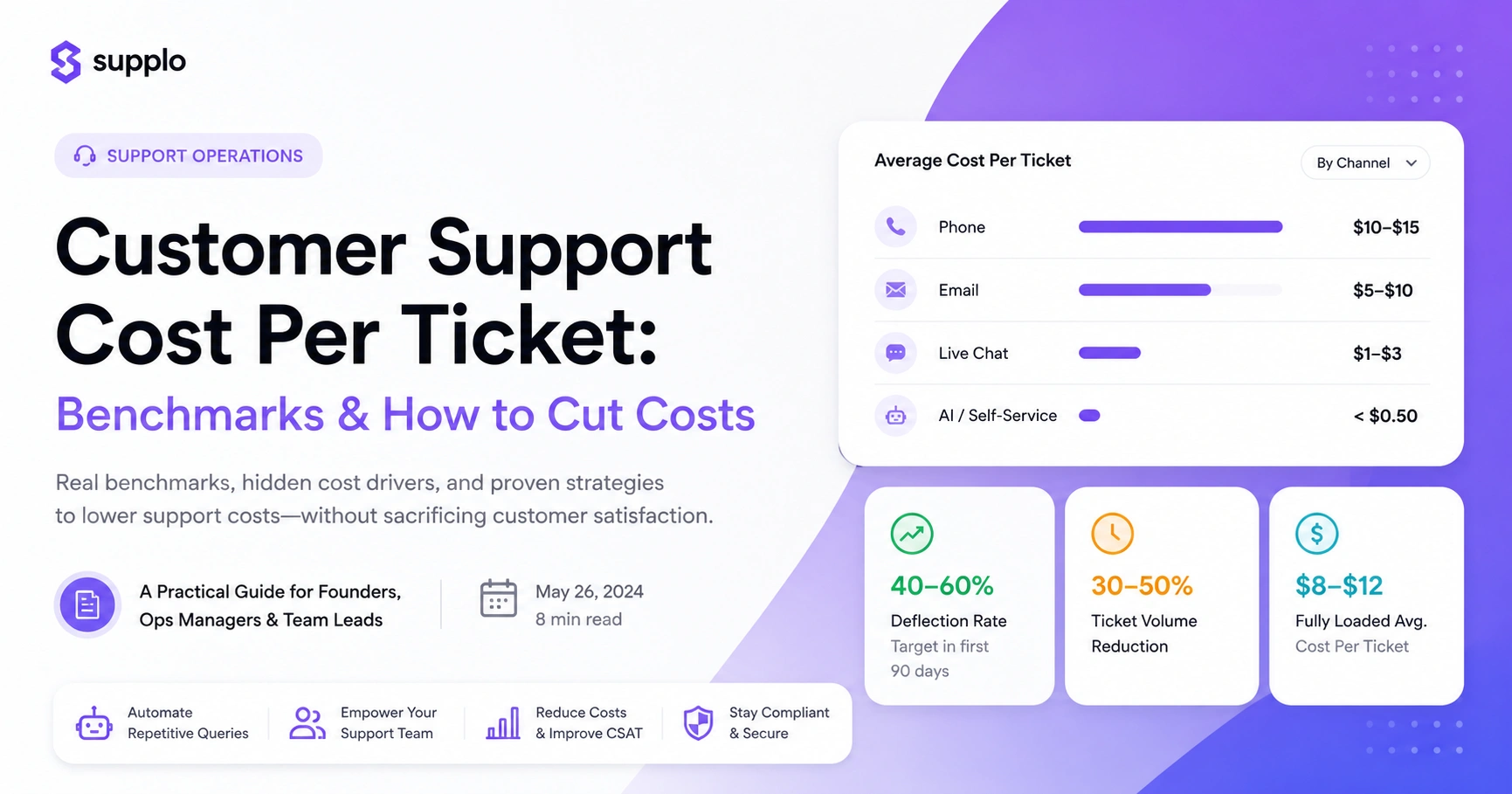
- Phone support is the most expensive channel, averaging $10–$15 per interaction.
- Email tickets cost $5–$10, but back-and-forth threads can significantly inflate that figure.
- Live chat and messaging are the cheapest human channels: $1–$3 per ticket.
- AI-automated resolutions can drop costs to under $0.50 per ticket, but only with proper implementation.
- For most small-to-mid teams, the fully loaded average cost is between $8 and $12 per ticket.
Compliance Note: Supplo is not affiliated with any app or website. Please follow each app's terms and local regulations.
What Is the Average Cost of a Customer Support Ticket?
Let’s cut to the chase: industry benchmarks say support tickets cost between $5 and $15. But that’s a wide range. The real, honest average for a small-to-mid team like yours? It’s probably between $8 and $12 per ticket when you factor in everything: software, salaries, training, overhead. That’s the customer support cost-per-ticket benchmark you should actually be using.
- Phone support: Still the priciest option at $10–$15 per interaction. That’s a lot of handle time.
- Email tickets: Average around $5–$10, but those “simple” threads that go back and forth? They can balloon the real cost.
- Live chat and messaging: The sweet spot for human support at $1–$3 per ticket. Fast, efficient, and cheap.
- Self-service: A robust knowledge base or AI agent can keep costs below $0.50 per ticket. The catch? Customers actually have to use it.
- Industry matters: SaaS and fintech often hit $10–$18 per ticket (complex stuff); e-commerce and retail tend to be lower, around $3–$7.
Customer Service Cost Per Interaction: Why the Industry Average Is Misleading
You’ve probably heard the averages: $5.50 for chat, $15 for phone. But here’s the problem: those numbers usually come from big enterprises with 500+ agents and negotiated software deals you can’t get. If you’re running a 10-person team, your actual cost could be half that… or double, depending on your tool stack. Most benchmarks conveniently omit platform fees, training churn, and the cost of reopened tickets.
- Most public benchmarks are from companies with massive teams and special pricing. Not your reality.
- A “simple” question that bounces between three agents? That’s a $20+ ticket right there.
- That $90/seat/month tool seems cheap, until you’re paying for 20 seats and got nickel-and-dimed on AI “resolutions.”
- The "cost per interaction" metric is pretty useless without also tracking first-contact resolution (FCR) and customer satisfaction (CSAT).
- For small teams, the real cost is your monthly software bill divided by the number of resolved tickets. And honestly, that number is often higher than you think.
The Hidden Drivers of High Customer Support Operational Costs
Most people look at agent salaries and think that’s the big number. It’s not. The real money drains are usually invisible: tool sprawl, ticket rework, and the brutal cost of training new hires. Customer support operational costs benchmarks rarely account for the time your team spends switching between five different apps, the lost productivity from clunky onboarding, or the revenue you lose from slow responses. If your costs are creeping up, look at your workflow, not just your headcount.
- Tool sprawl is a silent killer: Paying for separate apps for chat, email, social, and knowledge base? That’s 3–4 subscriptions and zero context between them.
- Ticket rework (a customer reopening a ticket) can add 30–50% to your effective cost per ticket.
- Training costs are a beast: It takes 3–6 months for a new agent to be fully productive, and that onboarding can eat up 20–30% of their annual salary.
- Escalation loops (tickets bouncing between Level 1 and Level 2) multiply the cost without improving anything.
- Compliance and data rules can force you into pricier tools if your provider doesn’t offer local hosting or EU data centers.
How to Reduce Customer Support Costs Without Firing Your Team
Look, the fastest way to cut costs isn’t layoffs. It’s eliminating the work that humans shouldn’t do in the first place. Automate those repetitive tier-1 questions, password resets, order status, and shipping info with an AI agent that actually learns from your knowledge base. Then let your team focus on the complex stuff that really needs a human brain. You don’t need fewer agents. You need smarter routing.
- Audit your ticket data first: Find the top 10 questions that make up 60%+ of your volume. Automate those first.
- Use a unified inbox for all channels (email, chat, WhatsApp, social DMs). Stop wasting time context-switching.
- Implement a self-learning AI agent that handles common questions instantly and only escalates when it gets stuck.
- Set up automated triggers for common workflows: order confirmation, refund status, and account reactivation.
- Measure deflection rate (tickets resolved by AI without human touch) and aim for 40–60% within the first 90 days.
Tips to Decrease Support Ticket Volume Without Making Customers Angry
Lower ticket volume isn’t about making it harder to reach you. It’s about answering questions before they get asked. A well-built knowledge base that your AI learns from, combined with proactive in-app messaging and clear documentation, can cut your ticket volume by 30–50%. The trick? Make self-service so good that customers actually prefer it to waiting for a human.
- Build a searchable knowledge base: Step-by-step guides, video walkthroughs, and a prominent search bar. Then train your AI on it.
- Use proactive chat triggers: If someone’s on your pricing page for 30 seconds, offer a “Need help choosing a plan?” message.
- Add contextual help within your product: Tool Tips, guided tours, and inline FAQs. Stop confusion before it becomes a ticket.
- Monitor your top ticket categories monthly and update your knowledge base or product UI to fix recurring issues.
- Don’t hide your contact options: If self-service is good, customers will choose it. If it’s bad, they’ll force a ticket anyway.
See How Much You Could Save. Stop guessing your ticket costs. Get a free audit of your current support setup and see exactly where flat-rate pricing with AI automation could cut your bill. Start Your Free Audit →
How to Lower Customer Support Expenses by Automating the Right Way
Automation works, but only if you automate the right things. The big mistake? Trying to automate everything at once. You end up with a brittle bot that frustrates everyone and creates more escalations. Instead, start with high-volume, low-complexity tickets. Train your AI on real conversation data. Keep a human in the loop for the edge cases. Do it right, and automation can slash your cost per ticket by 60–80%.
- Focus automation on tier-1 questions with clear, factual answers: pricing, hours, shipping, and account settings.
- Use a self-learning AI agent that learns from your knowledge base and past chats, not one that needs manual intent-building.
- Set up escalation rules: If the AI can't resolve a ticket after two tries, route it to a human with full context.
- Monitor automation accuracy weekly: Track how often the AI resolves correctly vs. escalates unnecessarily.
- Avoid per-resolution pricing: It punishes you for high volume. Flat-rate automation costs are way more predictable and scalable.
Compare Customer Support Software Pricing: What You’re Actually Paying For
When you compare our pricing to traditional platforms, you’ll notice a pattern: low per-seat number, then add-ons for everything. AI resolutions at $0.99 each? Premium support? Multi-channel access? Data storage overages? That $49/seat/month tool can hit $200+/seat/month real quick when you need the features that actually work. The real cost isn’t the base price; it’s the total cost of getting your team fully operational.
- Most platforms charge per agent per month. Adding five agents? That’s 5x the cost. Ouch.
- AI add-ons are the quiet killer: $0.50–$1.00 per AI resolution adds up fast if you handle thousands of tickets.
- Multi-channel access is often gated behind higher-tier plans. Want WhatsApp, Instagram, or Telegram? That’ll be extra.
- Data storage, API call quotas, and audit logs are common sources of surprise overage charges.
- Look for flat-rate pricing that includes all channels, AI, and unlimited storage: no per-seat fees, no per-resolution meters.
Tired of Hidden Fees? Most platforms hide AI costs, channel add-ons, and per-seat overages. Supplo shows you the full price upfront, flat rate, all channels, AI included. See Transparent Pricing →
Customer Support Platform Costs: The Flat-Rate Alternative That Changes the Math
Most customer support platform costs are built on a per-seat model that gets expensive fast. But there’s another way: flat-rate pricing. Cover your entire team, all channels, and AI automation with a single bill. Supplo, for instance, charges a flat monthly rate with no per-seat fees, AI resolutions at $0.04 each. That’s about 96% cheaper than the industry average. Starts to change the math for small-to-mid teams, doesn’t it?
- Flat-rate = predictable costs: You know exactly what you’re paying each month. No surprises.
- No per-seat fees = freedom to add agents (or contractors) without a budget meeting. Scale your team freely.
- AI at $0.04 per resolution vs. $0.99+ elsewhere means automation actually saves money.
- All channels included (email, chat, WhatsApp, Telegram, Instagram, Facebook) in one workspace, no add-on fees.
- Flexible billing for global teams: Payments via crypto, Binance Pay, Payeer, GCash, and more.
How to Optimize Customer Service Costs for Long-Term Growth
Optimizing support costs isn’t a one-and-done project. It’s a continuous loop of measuring, adjusting, and reinvesting. The teams that win in the long term track three metrics: cost per ticket, first-contact resolution rate, and customer satisfaction score. They don’t just cut costs. They shift spending from low-value manual work to high-value automation and agent training. The goal isn’t the cheapest ticket, it’s the most efficient one.
- Set a quarterly review cadence: Audit your top 10 ticket types, measure deflection rate, and update your knowledge base.
- Invest in agent training on your most common complex issues. Reducing escalations saves more than any tool discount.
- Use a unified inbox to kill tool-switching: one workspace for all channels means faster responses and fewer dropped tickets.
- Track cost per ticket by channel and issue type. Some are cheap but high-volume; others are rare but expensive.
- Reinvest savings from automation into better self-service content, faster response times, and proactive outreach.
What a “Cheap” Ticket Actually Costs You
Here’s the thing: a cheap ticket isn’t always a good ticket. If you’re paying $0.50 per AI resolution but your customer satisfaction drops 10 points, that “cheap” ticket costs you a renewal. The real cost includes the revenue impact of a bad experience, rework time, and churn risk. Optimize for value, not price. Pick a platform that aligns your costs with your outcomes.
- A single bad support experience can cost 3–5x the ticket price in lost customer lifetime value.
- Cheap automation that frustrates customers creates more tickets (escalations, complaints, refunds).
- The best metric? Cost per resolved ticket with high satisfaction.
- Flat-rate pricing removes the incentive to rush tickets or under-serve customers.
- Choose a platform that lets you scale support quality without scaling costs linearly. That’s the real win.
Key Takeaways
- The average cost of a support ticket is $8–$12 for most small-to-mid teams, but hidden fees can inflate it.
- Automating tier-1 questions can reduce costs by 60–80%.
- Per-seat and per-resolution pricing models hide the true cost of your stack.
- Flat-rate pricing (like Supplo) gives you predictable costs and aligns incentives with quality.
- The most efficient ticket isn’t the cheapest; it’s the one that resolves quickly and delivers high customer satisfaction.
Stop Paying Per Ticket. Start Paying Flat. Your support costs shouldn’t skyrocket just because your team grows. Supplo’s flat-rate model gives you predictable bills, unlimited agents, and AI at $0.04 per resolution. No surprises. No per-seat fees. Try Supplo Free →
FAQ
What is the average cost of a customer support ticket?
The average cost ranges from $5–$15 for phone, $3–$10 for email, and $0.50–$3 for live chat. For small-to-mid teams using modern tools, the fully loaded cost per ticket typically ranges from $8 to $12.
How can I reduce customer support costs without hurting service quality?
Automate tier-1 questions with an AI agent, unify your channels into one inbox, and build a strong knowledge base. This cuts ticket volume by 30–50% while letting your team focus on complex issues that need human judgment.
What’s the cheapest way to handle customer support for a small team?
A flat-rate platform like Supplo that includes all channels, AI automation, and unlimited team members, all on one bill. No per-seat fees and AI resolutions at $0.04 each make it dramatically cheaper than per-agent pricing models.
Why do some customer support platforms charge hidden fees?
Many platforms charge per agent, per AI resolution, per channel, or for data storage. These add-ons can double or triple your bill. Always ask for a breakdown of the total cost before signing up.
How do I calculate my actual cost per support ticket?
Divide your total monthly support costs (software, salaries, and overhead) by the number of tickets resolved. Include reopened tickets and escalations for an accurate picture.
Is it better to pay per agent or per resolution?
Neither is ideal. Per-agent pricing penalizes growth; per-resolution pricing encourages rushing tickets. Flat-rate pricing is the most predictable and aligns with quality outcomes.
Can AI really lower my support costs?
Yes, if implemented correctly. A self-learning AI agent can resolve 40–60% of tier-1 tickets automatically, dropping your effective cost per ticket by 60–80% compared to human-only support.
Compliance Note: Supplo is not affiliated with any app or website. Please follow each app's terms and local regulations.