On this page
An omnichannel inbox is a centralised platform that consolidates all customer communication across channels into a single, unified interface. It's built for businesses that need to streamline support, enhance customer experience, and boost agent productivity by providing a comprehensive view of every customer interaction. If your team is juggling multiple tabs for email, live chat, and social media, an omnichannel inbox is for you. If you only use one communication channel, it might be overkill.
Let's be real, if you're still bouncing between five different apps to keep up with customer messages, you're burning time you don't have. An omnichannel inbox fixes that. It's the one place where everything lands.
Quick Answer
- An omnichannel inbox unifies all customer messages (email, chat, social, messaging apps) into one thread.
- It provides agents with a complete conversation history and context, regardless of the channel used.
- Key benefits include faster response times, reduced agent burnout, and a consistent customer experience.
- Essential features include channel unification, a shared team inbox, automated routing, and AI automation.
- Modern omnichannel inboxes can often replace traditional help desk software, offering more flexibility and better pricing.
Omnichannel Inbox Meaning: What Does It Actually Do?
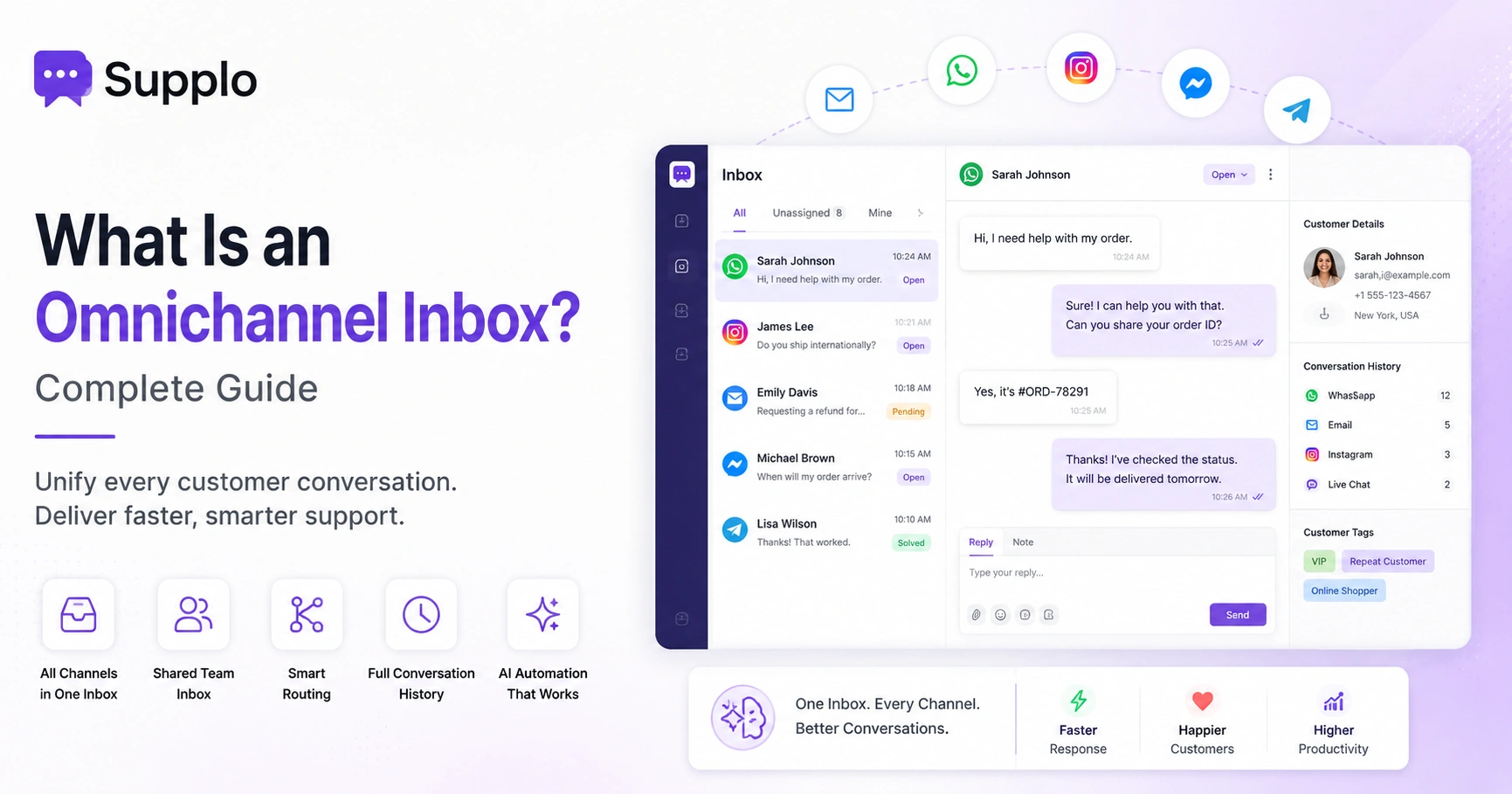
Here's the simple version: an omnichannel inbox is a single workspace that pulls all customer messages from email, live chat, WhatsApp, Instagram, Telegram, Facebook Messenger, and more into one chronological thread view. Instead of jumping between tabs and tools, your team sees every conversation, past and present, in one place with context. Think of it as the single source of truth for every customer interaction.
Every message, regardless of original channel, lands in one unified feed with thread history visible. Internal notes and private tags allow team collaboration without leaving the inbox. It eliminates the question of which app they messaged us on. A guessing game that kills response times. The inbox auto-assigns conversations to the right team member based on rules or round-robin. You can reply from the inbox, and the customer sees it from the original channel they used, creating a seamless experience.
Want to see what a unified inbox looks like in action? Start a free 14-day trial of Supplo, no credit card required. See how we bring email ticketing support, WhatsApp, Instagram, Telegram, and live chat into one thread view with self-learning AI.
What Does Omnichannel Mean in Customer Support vs Multichannel?
Omnichannel in customer support means all your communication channels are connected and share context, so a customer can start a conversation on WhatsApp, email a follow-up, and then hop onto live chat. Your agent sees the entire history without asking them to repeat themselves. Multichannel is the opposite: you're present on multiple channels, but they live in silos with no shared data. Omnichannel is seamless; multichannel is fragmented.
In a multichannel setup, a customer might explain their issue twice because each channel has its own inbox. Omnichannel creates a continuous thread: if a bot answers via chat and then escalates to email, the human agent sees the bot's notes. Customers expect omnichannel today, and most expect context to carry over between channels. It's not just about being everywhere; it's about being consistent and aware wherever you are. Omnichannel requires that all channels feed into a single inbox backend, not separate queues.
Key Features of an Omnichannel Inbox
The best omnichannel inbox software must include channel unification, a shared team inbox, automated routing, conversation history, and AI-powered automation for repetitive tickets. Without these five, it's just a fancy chat widget dashboard. Look for a platform that treats each channel equally, not one that prioritises one channel over others, and that lets you customise workflows without a developer.
- Channel unification: Email, live chat widget, WhatsApp, Telegram, Instagram DMs, Facebook Messenger, all in one thread view.
- Shared team inbox: Multiple agents can see, assign, and reply without stepping on each other.
- Automated routing: Incoming messages are routed based on keywords, channels, or the previous agent.
- Full conversation history: Every interaction from every channel is logged in a single customer timeline.
- AI automation: Self-learning AI that resolves FAQs automatically and hands off to a human when needed.
Benefits of an Omnichannel Inbox: Why Your Team Needs One
An omnichannel inbox cuts average response time, eliminates channel-switching fatigue for agents, and gives customers a consistent experience no matter how they reach you. Support teams typically manage 3–5 separate channel logins before unifying, which amounts to 10–15 minutes lost per hour just switching tabs. A single inbox saves time, reduces burnout, and ensures no message falls through the cracks.
Customers don't repeat themselves: conversation history is visible, so agents pick up exactly where the last message left off. Agents handle more tickets per hour because they don't have to context-switch between tools. You get a single source of truth for reporting, no more exporting from five different platforms. Omnichannel inboxes reduce the risk of missed messages, especially on less-frequently-checked channels like Telegram or Instagram DMs. It scales with your team: add agents without needing extra logins or seat-based pricing that balloons your bill.
Ready to stop switching between 5 separate inboxes? Supplo unifies your channels at a flat per-workspace price, not per seat. Your bill stays predictable, your team moves faster. Start your free trial today.
Best Omnichannel Inbox Capabilities: What to Look For
When evaluating omnichannel inbox software, prioritise real-time synchronisation, native integration with the channels your customers already use, AI that learns from your knowledge base, and transparent pricing that doesn't penalise you for adding team members. The best capabilities solve real problems: no double-handling, no manual tagging, no per-seat fees that spiral out of control. Test the trial with actual customer traffic, not just internal demos.
- Real-time sync: When a customer waits, they expect a reply in minutes, not hours. The inbox must refresh automatically, without manual intervention.
- Native channel coverage: No third-party bridges that break; direct integrations for WhatsApp, Instagram, Telegram, email, and widget.
- AI agent with self-learning: The AI should pull from your knowledge base and past conversations, not generic scripts.
- Flat-rate pricing: Per-seat billing can cost 3x more once you scale past 5 agents; look for per-workspace pricing.
- Translation built-in: If you support global customers, the inbox should translate messages so your team can reply in any language.
Top Omnichannel Inbox Solutions: How to Choose the Right One
Top omnichannel inbox solutions range from legacy heavyweights to newer, simpler platforms like Supplo that emphasise transparency and flat-rate pricing. The right choice depends on your team size, channel mix, and budget. For small to mid-sized teams, the priority should be easy setup, AI that works out of the box, and pricing that doesn't punish growth. For larger enterprises, customisation and API access may matter more.
Legacy platforms are powerful but often complex and expensive at scale. Supplo is an alternative with a unified inbox for email, widgets, WhatsApp Support, Telegram, Instagram, and Facebook Messenger, at a flat $0.04 per AI resolution, not per seat. Supplo supports payment via Crypto, Binance Pay, Payeer, GCash, AmanPay, QIWI Wallet, DOKU, Nigeria and South Africa cards, Skrill, and Payoneer, so teams in any region can get started without friction.
Consider your primary channels: if most customers use WhatsApp, ensure the solution has a native WhatsApp Business API integration. Evaluate the AI agent's accuracy: does it learn from your content, or is it generic? Always test the shared inbox for real-time collaboration features: private notes, assignments, and collision detection.
Omnichannel Inbox vs Separate Channel Tools
Using separate tools for each channel, Gmail for email, WhatsApp Web for messages, and Instagram for DMs, might feel free, but it costs your team hours of lost productivity and creates blind spots where messages go unanswered. A unified omnichannel inbox centralises everything, adds context, and gives you a single place to manage, report, and automate. The real comparison isn't just about cost; it's about reliability: can you guarantee that no message is missed?
Separate tools require you to check 4–6 different logins; an omnichannel inbox checks one. With separate tools, you can't assign conversations across the team; whoever sees it first gets it. Reporting across separate tools is manual and error-prone; a unified inbox gives you a single dashboard. AI automation is impossible with separate tools; an omnichannel inbox can answer FAQs from a single AI agent. The cost of separate tools adds up in time; an omnichannel inbox is a cost centre you can control.
Ditch the cost and complexity of legacy per-seat pricing. Supplo offers AI-powered omnichannel support starting at $0.04 per resolution with a unified inbox your team will actually enjoy using. Start free and see the difference in under 10 minutes.
Supplo is not affiliated with any app or website. Please follow each app's terms and local regulations.
Essential Omnichannel Inbox Features That Actually Save Time
The essential features that impact daily workflows include collision detection (so two agents don't reply to the same customer), saved replies for common questions, automated workflows for routing and tagging, and a centralised customer view. Time-saving isn't about having the most features; it's about having the right ones that eliminate repetitive clicks. If a feature doesn't save at least one click per conversation, it's probably not essential.
- Collision detection: Alerts or locks so only one agent replies at a time.
- Saved replies (canned responses): Instantly answer common questions with pre-written, customizable templates.
- Automated workflows: Rules that auto-tag, auto-assign, or auto-respond based on keywords or channel.
- Centralised customer view: See the full history of interactions, not just the current thread.
- Private notes and internal mentions: Collaborate on tickets without the customer seeing internal chatter.
Can an Omnichannel Inbox Replace Your Help Desk Software?
In most cases, yes, a modern omnichannel inbox with shared inbox, AI agent, and knowledge base capabilities can replace traditional help desk software for teams that need faster, more flexible support without the bloat. Old-school help desks were built for email-only ticketing; an omnichannel inbox is built for the multichannel reality of 2025 and beyond. If your current help desk charges per seat and still can't handle WhatsApp or Instagram natively, it's time to consider the switch.
Help desks often require heavy configuration and IT involvement; omnichannel inboxes are designed for fast onboarding. Traditional ticketing systems silo conversations into ticket numbers; an omnichannel inbox keeps conversations in threaded channels. AI automation in omnichannel inboxes can resolve a significant portion of incoming tickets, reducing the need for heavy human routing. Pricing: legacy help desks charge per agent; modern omnichannel inboxes charge per workspace, often with AI included. Migrating? Look for a platform that supports importing historical conversations and offers a simple export policy.
Key Takeaways
- An omnichannel inbox unifies all customer communication channels into a single, comprehensive view.
- It goes beyond multichannel by integrating context across all interactions, preventing customers from having to repeat themselves.
- Core features include channel unification, a shared team inbox, automated routing, and AI-powered automation.
- The benefits are significant: faster response times, increased agent efficiency, reduced burnout, and improved customer satisfaction.
- When choosing a solution, prioritise native integrations, self-learning AI, flat-rate pricing, and real-time syncing.
- Modern omnichannel inboxes can effectively replace traditional help desk software, offering more agile and cost-effective support.
FAQ
What is an omnichannel inbox?
An omnichannel inbox is a single workspace that collects all customer messages from email, chat, WhatsApp, Instagram, Telegram, Facebook Messenger, and more into one chronological thread. It gives your team a unified view of every conversation, past and present.
What is the difference between omnichannel and multichannel support?
Multichannel means you're available on multiple channels, but they don't share context. Omnichannel means all channels are connected, so a customer can switch from WhatsApp to email to chat, and the agent sees the full history. Omnichannel is seamless; multichannel is siloed.
What features should I look for in an omnichannel inbox?
At minimum: channel unification (email, widget, WhatsApp, Instagram, Telegram, Facebook Messenger), shared team inbox with collision detection, automated routing, full conversation history, and AI automation for common questions. Avoid platforms that charge per seat and limit channel integration.
Can I replace my help desk with an omnichannel inbox?
Yes, if your omnichannel inbox includes shared inbox, AI agent, and knowledge base capabilities. Modern platforms like Supplo are built to replace legacy help desks that were designed for email-only support.
Does an omnichannel inbox work with WhatsApp and Instagram?
Yes, top solutions include native integrations for WhatsApp Business API, Instagram DMs, Facebook Messenger, Telegram, email, and website chat widgets. Make sure the platform supports both send and receive with full thread history.
How much does an omnichannel inbox cost?
Pricing varies widely. Legacy per-seat tools can be expensive as your team grows. Modern alternatives like Supplo offer flat per-workspace pricing, with AI resolutions at $0.04 each and no per-agent fees. Start with a free trial to test.
Is an omnichannel inbox secure?
Reputable omnichannel inbox platforms use encryption for data in transit and at rest, comply with GDPR and CCPA, and offer role-based access controls. Always check the provider's compliance certifications and ask about data residency if needed.
Compliance line: Supplo is not affiliated with any app or website. Please follow each app's terms and local regulations.