On this page
B2B live chat software isn't some nice-to-have add-on anymore; it's basically table stakes if you're serious about engaging sophisticated buyers and supporting complex products. This guide is written for customer experience leaders, sales managers, and ops teams at B2B companies who want something practical, transparent, and actually scalable. No fluff, no marketing theatre. Just what matters.
We're going to help you cut through the noise and figure out which features, pricing models, and security requirements actually matter for your business. Frankly, there are a lot of tools out there that promise the moon and deliver a cardboard cutout.
When you nail your live chat software for B2B, you get faster lead qualification, better support experiences, and more predictable revenue. Choose wrong, and you're looking at frustrated customers, lost context, and support costs that spiral out of control. Let's make sure you choose wisely.
Quick Answer
- B2B live chat is fundamentally different from B2C; you need tools that handle longer sales cycles, complex queries, and multi-stakeholder conversations without losing the thread.
- Must-have features: a unified omnichannel inbox, a self-learning AI that trains on your knowledge base, and smooth human hand-offs that don't make customers repeat themselves.
- Pricing philosophy: flat workspace fees and transparent per-resolution costs beat per-seat models that punish you for growing your team.
- Security and compliance (SOC 2, GDPR, end-to-end encryption) aren't optional; they're non-negotiable for B2B data handling.
- Look for AI that can handle 50-80% of routine tickets automatically, but knows exactly when to hand off to a human expert.
Why B2B Live Chat is Different from B2C And Why Most Tools Get It Wrong
Here's the thing: B2B buyers don't browse like consumers. They research for weeks, compare vendors obsessively, and expect detailed, non-scripted answers to nuanced questions. Most chat tools built for B2C simplify everything into quick transactions, which works fine for where's my pizza? But it falls apart when someone asks about API integration limits or compliance certifications.
A reliable B2B chat platform needs to handle longer sales cycles, complex product questions, and multiple stakeholders, all without losing context. B2B conversations are rarely one-and-done. They involve follow-ups, internal approvals, and team collaboration that spans days or weeks.
Lead qualification in B2B means routing to the right department or specialist, not just a bot with a generic FAQ. Most B2C-centric tools lack proper team inboxes, which leads to context loss and frustrated buyers who have to re-explain their situation every time they chat. B2B buyers expect near-instant responses during business hours, but they also understand asynchronous follow-ups when that makes more sense. Your tool needs to handle both.
Essential B2B Live Chat Features You Can't Ignore
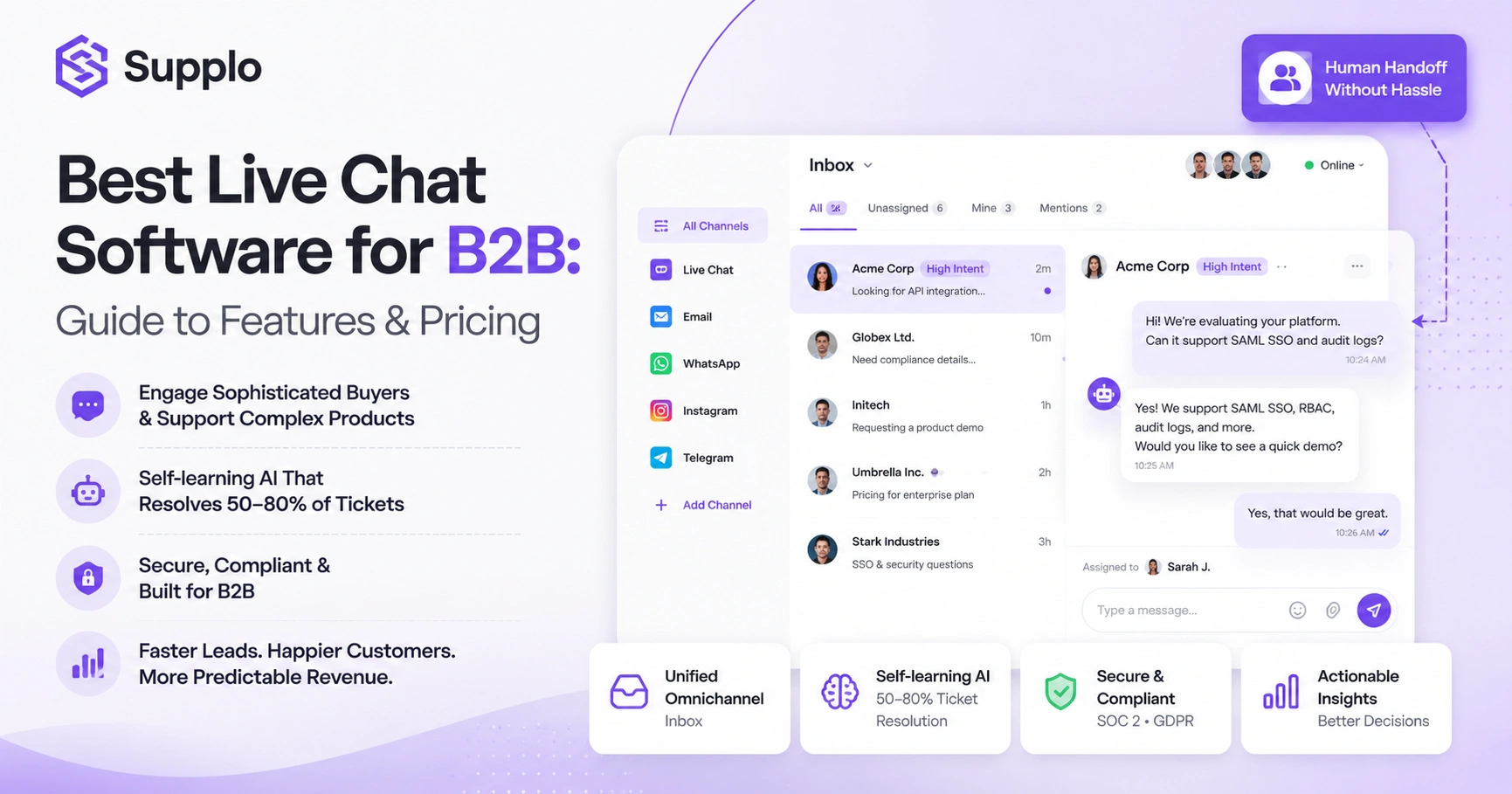
The baseline for B2B live chat software has shifted significantly. You'll need a tool that combines three things seamlessly: a shared inbox, omnichannel support (email, chat, WhatsApp, Instagram, Telegram, the works), and a self-learning AI that trains on your actual knowledge base and past conversations.
Standalone chat widgets that don't integrate with your support workflow? They'll bottleneck your team faster than you'd think. The best solutions focus on context retention, team collaboration, and transparent automation that doesn't hide from escalations.
A unified inbox that threads conversations from email, website, and social DMs into one timeline is absolutely crucial. You need AI that resolves repetitive tickets automatically but knows exactly when to hand off to a human without making the customer jump through hoops.
Real-time translation lets you support customers in any language without hiring multilingual agents, which is huge for global B2B teams. Clear escalation rules ensure your self-learning AI doesn't frustrate buyers by refusing to transfer when it should. Shared internal notes and assignment logic ensure the right person picks up where the last agent left off.
Supplo is not affiliated with any app or website. Please follow each app's terms and local regulations.
B2B Sales Chat Features That Actually Convert Leads
B2B sales chat isn't about answering hello with a canned response. It's about qualifying intent. The features that matter: proactive triggers based on page behaviour, the ability to instantly route high-value leads to sales reps, and conversational AI that can book meetings directly in the chat interface.
Here's the thing: a chatbot that only hands off after a lead fills out a form is already too late. The best B2B sales chat tools combine lead scoring with real-time human intervention when it matters most.
Look for proactive chat invitations triggered by specific page visits (pricing pages, case studies, integration docs, those are gold). CRM integration that logs conversations and automatically triggers follow-up workflows. Meeting scheduling directly within the chat eliminates that annoying email ping-pong. AI should qualify leads with a few smart questions before handing off to sales. And conversation history persistence means sales reps never have to ask, "What can I help you with?" every time a lead returns. Instagram DM integration for lead capture is also increasingly important these days.
B2B Support Chat Functionality: Balancing Automation with Human Expertise
The goal of B2B support chat isn't to eliminate your team, it's to free them up for the complex, high-value issues that actually need human judgment. Your AI should handle the top 50-80% of routine questions: password resets, order statuses, billing changes, that sort of thing. And when a customer asks for a human? The handoff needs to be seamless, context-rich, and not require the customer to repeat themselves.
A support chat that hides its automation or makes finding a human difficult? That erodes trust fast, especially in B2B, where relationships matter.
AI should learn from your knowledge base and past resolved tickets, rather than from generic scripts that produce vague answers. A clear handoff protocol is essential, in which the AI introduces the customer and shares a conversation summary so the human agent is up to speed instantly. Macros and saved replies empower your team to speed through common but non-automatable responses. Support for asynchronous follow-ups means customers don't have to sit on hold waiting. And multi-language support via real-time translation ensures your global B2B clients get help in their native language, including Telegram support integration.
Evaluating B2B Chat Solutions: A Practical Comparison Framework
When comparing B2B chat platforms, don't get distracted by feature lists. Focus on how they handle complexity. How is their AI trained, on a generic LLM or your actual content? How do they handle escalations? How does their pricing scale with your team?
A high per-seat cost model punishes growing teams. A flat workspace model keeps costs predictable. Also test responsiveness: how quickly does the AI answer, and how easy is it for a customer to reach a human when the AI fails?
Key evaluation criteria:
- AI training source: Does it learn from your knowledge base and past conversations, or just a generic prompt?
- Escalation experience: Is it a clean handoff or a frustrating game of "talk to the bot first"?
- Pricing model: Per-seat pricing inflates as your team grows; flat workspace pricing keeps costs under control.
- Omnichannel support: Does the platform unify email, chat, WhatsApp, Instagram, Telegram, and more into a single inbox?
- Setup time: Some tools take weeks to configure. The best ones let you get started in minutes.
What to Look for in B2B Conversational Sales Tools for Lead Generation
B2B conversational sales tools should qualify prospects before they ever speak to a rep. Look for AI that asks smart follow-up questions, scores leads based on response quality, and instantly routes high-intent conversations to the right salesperson.
The tool should also capture contact data automatically from the chat and sync it with your CRM. Avoid platforms that only trigger a pop-up and then wait. The best tools engage, qualify, and book meetings without friction.
What to look for:
- Smart lead qualification: AI asks questions that separate decision-makers from casual browsers.
- CRM sync: Lead data, conversation history, and next steps flow automatically into your pipeline.
- Embedded calendar booking: Leads can choose a meeting time without leaving the chat.
- Behaviour-based triggers: Initiate chat invitations based on page views, time on site, or return visits.
- Multi-channel capture: Leads coming from WhatsApp or Instagram DMs should be just as qualified as website chat leads.
The Role of a Shared Team Inbox in B2B Customer Chat Platforms
In B2B support, no single person knows everything. A shared team inbox ensures that when a conversation moves from chat to email to WhatsApp, everyone sees the full thread. Without it, customers end up repeating themselves, responses get delayed, and valuable context gets lost.
The inbox should support assignments, internal notes, and status tracking so your team works like a unit, not individuals passing hot potatoes.
Key features to look for:
- Threaded conversations that include chat, email, Instagram DMs, WhatsApp, and Telegram in one timeline.
- Assignment and re-assignment logic so conversations don't fall through the cracks.
- Internal notes visible only to your team (critical for collaborative problem-solving).
- Status labels (open, pending, resolved) so everyone knows where a conversation stands.
- Collision detection that prevents two agents from replying to the same customer at once in a unified inbox.
B2B Live Chat Security, Compliance, and Reliability Requirements
B2B businesses handle sensitive data, company financials, employee information, and proprietary integrations. Your live chat platform needs to be secure by default, not as an add-on. That means end-to-end encryption, SOC 2 compliance, and data residency options where needed.
Reliability also means uptime SLAs and no silent failures where messages go missing. If your chat tool goes down during a deal negotiation, that's not just a tech issue; it's a revenue issue.
Essential security features:
- End-to-end encryption for all chat messages and file attachments.
- SOC 2 and GDPR compliance built in, not a checkbox you pay extra for.
- Data residency options for companies that need to store data in specific regions.
- Message delivery confirmation so you know if a customer's message actually reached your team.
- Uptime SLA guarantees peace of mind during critical operations, alongside robust email ticketing integration.
How to Set Up a B2B Chat Solution for Your Team
Setting up a B2B chat platform doesn't have to be a month-long project. Here's a straightforward approach:
- Choose a platform that unifies your channels, email, website widget, WhatsApp, Telegram, Instagram DMs, into one inbox.
- Connect your knowledge base (if you have one) so the AI can learn from your documentation.
- Set up routing rules: Assign specific agents to specific products, regions, or departments.
- Invite your team and assign roles (agent, admin, viewer) based on access needs.
- Test with a few real customer scenarios before going fully live.
Within a few hours, not weeks, you should be up and running. The key is picking a platform that doesn't require a dedicated admin to maintain. Supplo is built for this: you can start with a free 14-day trial and be live the same day.
Why Pricing Models Matter More for B2B Live Chat Than You Think
In B2B, your support team scales with your customer base. That means per-seat pricing models punish you for growing. A tool that charges $99 per agent per month becomes a $5,000/month bill once you have 50 agents, and that's before you add AI resolution fees.
Look for a platform that charges a flat workspace fee and a transparent per-resolution cost, not per-seat or per-conversation. Supplo, for example, charges a flat $0.04 per AI resolution and prices per workspace, not per seat. Your bill doesn't balloon as your team expands.
Pricing model comparison:
- Per-seat pricing: Penalises team growth. You pay more as you hire more agents.
- Per-resolution fees: Often cheaper than per-conversation if your AI handles high volume.
- Flat workspace pricing: Keeps costs predictable even as your team doubles in size.
- Watch for hidden fees: Overage charges, setup fees, or fees for basic features like analytics.
- Transparent pricing: This means you can forecast support costs accurately each month. See our transparent pricing.
Troubleshooting Common B2B Live Chat Issues And What To Do When They Fail
Even the best B2B chat platforms have hiccups. Here are common issues and how to fix them:
- Inaccurate AI answers: Update your knowledge base and ensure the AI learns from past conversations, not from a generic script.
- Lost messages: Verify that each channel (WhatsApp, Telegram, Instagram, etc.) is properly authenticated and synced.
- Slow response times: Check if your AI is overwhelmed; adjust routing rules to prioritise urgent tickets.
- AI refusing to escalate: Review your handoff logic. The AI should ask, "Would you like me to connect you with a human?"
- Team members missing conversations: Ensure all agents are assigned to the correct inbox and have notifications enabled.
If your current chat tool keeps failing or gets stuck in siloed channels, it's time for a change. Supplo unifies your channels, trains on your content, and prices transparently.
Choosing the Best B2B Chat Platform for Your Business
The best B2B chat platform balances automation with control, scales without surprise bills, and unifies your channels without making your team learn yet another complex tool. Don't get seduced by feature lists that promise everything but deliver a mess of disconnected modules.
Focus on three pillars:
- Reliable AI that hands off cleanly when it should.
- A shared inbox that works across every channel.
- Pricing that doesn't punish you for growing.
Supplo checks all three boxes: self-learning AI, a unified inbox, transparent pricing at a flat $0.04 per AI resolution, and a free 14-day trial. It's the practical alternative to legacy tools that overpromise and overcharge.
- Prioritise platforms that unify email, chat, WhatsApp, Instagram, Telegram, and Facebook Messenger into a single inbox.
- Choose an AI that learns from your knowledge base and past conversations, not generic scripts.
- Reject per-seat pricing models that inflate costs as your team grows.
- Test the handoff experience. How easy is it for a customer to reach a human?
- Start with a free trial before committing to a long-term contract.
Stop overpaying for per-seat pricing and hidden AI fees. Supplo gives you transparent pricing at a flat $0.04 per AI resolution, a unified inbox, and a free trial to test it yourself. Join growing B2B teams that have made the switch. Get started at Supplo.
Key Takeaways
- B2B live chat requires specific features, such as omnichannel inboxes and smart AI, for complex, multi-stakeholder interactions.
- Genuine self-learning AI, trained on your knowledge base, is essential for high automation rates and accurate responses.
- Transparent, flat workspace pricing models offer predictability, unlike per-seat pricing that penalises growth.
- Strong security (SOC 2, GDPR, encryption) and reliability (uptime SLAs) are critical for handling sensitive B2B data.
- Seamless human handoffs and context retention across channels define effective B2B chat solutions.
FAQ
Is B2B live chat secure for handling customer data?
Yes, if you choose a platform with end-to-end encryption and SOC 2 compliance. B2B live chat tools should never store sensitive data in plain text. Supplo is not affiliated with any app or website. Please follow each app's terms and local regulations.
Why does my B2B chat AI sometimes give wrong answers?
Most likely because the AI wasn't trained on your actual knowledge base or past conversations, if your AI only uses a generic prompt, it will guess instead of know. Regularly update your knowledge base to improve accuracy.
How many agents do I need to handle B2B live chat effectively?
It depends on volume, but a shared team inbox with routing rules can help a small team handle high volumes. The right AI can resolve up to 80% of incoming tickets automatically, so your team focuses on complex issues only.
What should I NOT use B2B chat for?
Don't use B2B chat for sharing sensitive financial data or passwords in plain text, even if the platform is encrypted. Also, avoid using it for legal contract negotiations unless the platform explicitly supports secure document sharing.
Can I use a free trial to test the reliability of B2B chat?
Yes. Supplo offers a 14-day free trial to test AI accuracy, response times, and the handoff experience. This is the best way to evaluate reliability before committing.
Why do some B2B chat platforms fail during peak traffic?
It's usually because their infrastructure isn't built for B2B volumes. Choose a platform with uptime SLAs and scalable infrastructure. Supplo is built for global teams and handles peak traffic without slowdowns.
How do I troubleshoot a B2B chat platform that keeps losing messages?
Start by checking the API connection for each integrated channel. Re-authenticate WhatsApp, Telegram, Instagram, and other social channels. Then verify that your inbox is correctly set to thread conversations from multiple channels.
Compliance line: Supplo is not affiliated with any app or website. Please follow each app's terms and local regulations.