On this page
Let's be honest for a second. For years, the only way to handle more support tickets was to hire more people. You'd watch your ticket queue grow, sigh, and post another job listing. But here's the thing: that model doesn't hold up anymore.
Today's support environment moves too fast. Customers expect answers in minutes, not hours. And the cost of constantly adding headcount? It'll eat your budget alive before you know it.
This guide is for support managers, ops leaders, and founders who are tired of the hiring hamster wheel. If you're drowning in tickets but can't justify another hire, you're in the right place. We're going to walk through practical ways to scale customer support without hiring, using AI, automation, and smarter workflows that actually work.
Quick Answer
- Automate the boring stuff: Let AI agents handle those repetitive questions that eat up your team's day.
- Deflect before they ask: Give customers self-service options so they never need to open a ticket.
- Train your AI right: Feed it your knowledge base and past conversations so it gets better over time.
- Watch your pricing: Flat-rate workspace models beat per-seat or per-resolution pricing every time.
- Keep CSAT high: Efficiency means nothing if your customers are unhappy. Balance speed with quality.
Why Hiring Your Way Out of Support Volume Is a Losing Game
Here's the thing nobody tells you about scaling support through hiring: it's a trap.
Sure, adding another agent seems like the obvious solution. But that one hire comes with a whole ecosystem of costs. Recruitment fees. Onboarding time. Training materials. Management overhead. And let's not forget the cycle of hiring, training, losing, and re-hiring that keeps support teams spinning their wheels.
Meanwhile, your ticket volume keeps climbing. Maybe your product is growing. Maybe it's seasonal. Maybe you just launched a feature that everyone's confused about. Whatever the reason, the gap between your capacity and your demand keeps widening.
Think about the numbers for a second. A good human agent might handle 50 complex tickets in a day. An AI agent? It can process hundreds of simple queries without breaking a sweat. That's not a slight against your team, it's just math.
The real win here? Freeing your existing team to focus on the stuff that actually needs human attention. The complex refunds. The escalated complaints. The conversations that require empathy and judgment. Let the AI handle the routine stuff, and let your people do what they do best.
Automate Ticket Deflection Without Losing Trust
Let's clear something up right now. Ticket deflection isn't about dodging customer questions. It's about answering them before they even need to ask.
The smartest approach involves a self-learning AI agent that pulls answers straight from your knowledge base. It learns from past conversations. It improves over time. And, this is crucial, it knows when to hand things off to a human.
Done right, this can deflect up to 80% of your incoming tickets. But the key is maintaining trust. Customers need to know they can get a human when they really need one. No dead ends. No frustrating loops. Just a seamless handoff when the AI hits its limits.
Think of it like this: basic FAQ bots are one-trick ponies. They can answer What are your hours? and not much else. A contextual AI agent understands nuance. It adapts its responses based on the actual question. For an e-commerce brand, that means instantly handling returns and refund questions without bothering your team.
Ready to test your first AI-powered deflection?
Set up a free 14-day trial of Supplo. Import your knowledge base, connect a single channel (we recommend email or website chat), and watch the AI start resolving tickets within hours, no credit card required.
How a Self-Learning AI Agent Changes the Staffing Math
Here's where things get interesting. A self-learning AI agent doesn't just answer questions; it gets smarter with every single interaction.
It learns from your knowledge base. It studies past conversations. It even learns from the corrections your human agents make. Over time, it becomes an expert on your specific product or service.
This changes the entire economics of support. You can scale from 100 tickets per day to 10,000 without adding a single person to your team. Your human agents focus exclusively on the edge cases, the weird, nuanced situations that require actual human judgment.
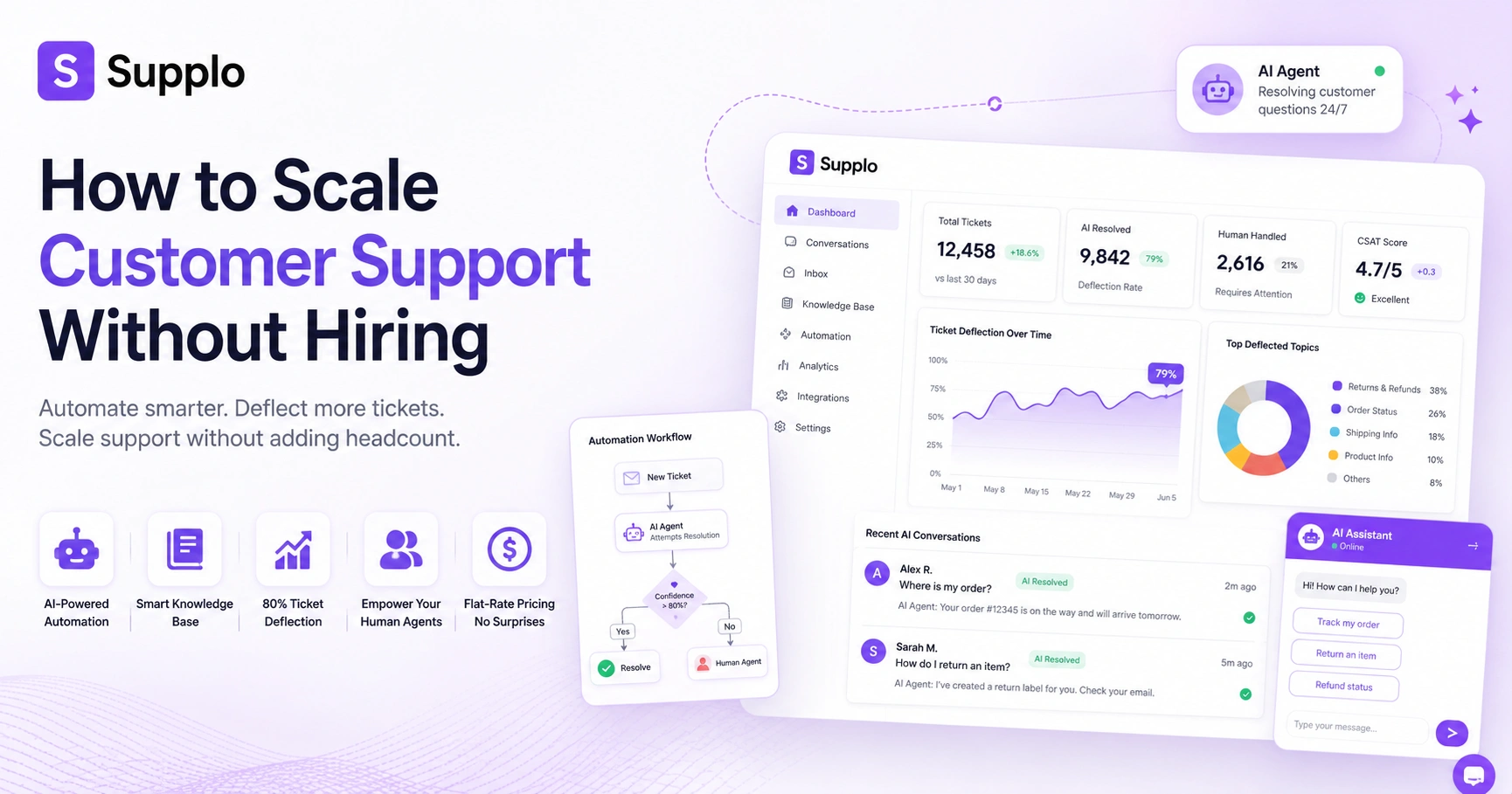
The learning loop looks like this: new tickets come in → AI attempts a resolution → human reviews and corrections if needed → AI incorporates the feedback → AI gets smarter for next time.
This self-learning AI agent is the key to breaking the cost-per-ticket ceiling. And when you pair it with flat-rate pricing, your support costs stay predictable even as your volume grows. No more surprise bills when ticket volume spikes.
Automate Customer Support Scaling: The Workflow
Scaling support with AI isn't magic. It's a process. Here's exactly how to make it happen:
- Step 1: Audit Your Current Ticket Volume. Look at your existing tickets. What questions come up most often? Which ones are simple enough for automation? Categorize everything by complexity and topic.
- Step 2: Import Your Knowledge Base. Feed your AI agent everything it needs to know, FAQs, product docs, troubleshooting guides, and even past ticket data. Many systems can import markdown, PDFs, and even Slack conversations.
- Step 3: Set Confidence Thresholds. Define the AI's boundaries. At 95% confidence, let it auto-answer. At 80%, it suggests an answer for human review. Below that, escalate automatically.
- Step 4: Connect Your Channels. Integrate the AI across all your customer communication channels. Email ticketing integration, website chat, WhatsApp, Telegram, and Instagram should all flow into a unified thread-based inbox.
- Step 5: Monitor, Refine, Repeat. This isn't a set-it-and-forget-it deal. Review performance regularly. Track resolution rates. Identify where the AI struggles and adjust its training accordingly.
Reduce Support Ticket Volume with AI Without Micromanaging the Bot
The goal here is simple: build an AI that gives complete, accurate answers in one shot, so customers don't need to follow up.
That starts with training. Feed your AI with specific data about your product or service. Make it an expert. When customers get a complete answer on the first try, they move on with their day. No follow-up needed. No second ticket created.
The best AI experiences are nearly invisible. Customers get their answers quickly and move on. No fuss. No friction.
Properly using the knowledge base integration is key. Generic answers won't cut it; your AI needs to understand your specific products and policies.
Beyond direct answers, sentiment analysis can be a game-changer. If the AI detects frustration in a customer's message, it can escalate to a human before a simple question turns into a complex, multi-ticket nightmare.
And don't underestimate translation support. Modern AI agents handle 50+ languages, which means fewer follow-up tickets from non-native speakers. Your global support gets better without adding night-shift agents.
AI for Customer Service Resolution: When to Let the Bot Handle It vs. Hand Off
Here's the art part of AI support: knowing when to step back.
Not every query belongs in the AI's hands. The trick is to define clear boundaries for when the bot handles tasks and when it hands off to a human.
Let the AI handle the routine stuff:
- Troubleshooting common issues
- Order status inquiries
- Password resets
- Frequently asked questions
But escalate anything that needs real empathy or judgment:
- Complex refunds or disputes
- Escalated complaints
- Emotionally charged conversations
- Legal concerns or sensitive issues
The handoff protocol matters too. The AI should summarize the entire conversation history before passing it to a human. Nothing frustrates customers more than having to repeat themselves. A good handoff preserves context so the human agent can pick up right where the AI left off.
Which Channels to Scale First: Email, Chat, WhatsApp, Telegram, Instagram
You don't need to automate everything at once. Start smart.
Email and website chat are usually the easiest entry points. They're more structured, and the urgency tends to be lower compared to live messaging channels. Get those right first.
Once your foundation is solid, expand to messaging platforms like WhatsApp customer support, Telegram, and Instagram DMs. The goal is to funnel everything into a unified inbox so your team has full context regardless of the channel.
A volume-plus-complexity matrix can help you prioritize. Which channels generate the most tickets? Which ones have the simplest questions? Start there and work your way up.
Affordable Support Software Alternatives That Don't Sacrifice Reliability
Hiring is the highest cost in support, but software matters too. Overpaying for legacy tools compounds the problem.
The ideal solution combines AI automation, a shared inbox, and multi-channel support at a predictable price. Look for flat-rate workspace pricing instead of per-seat models. This keeps your costs stable even as your team grows.
Watch out for hidden costs too. Setup fees. API limits. Storage overages. They add up fast.
And don't compromise on reliability. Check vendor uptime. Test their support response times. Validate AI accuracy before committing.
Supplo supports payments via Crypto, Binance Pay, Payeer, GCash, AmanPay, QIWI Wallet, DOKU, cards in Nigeria and South Africa, Skrill, and Payoneer so that you can pay from anywhere in the world. For transparent and predictable costs, explore flat pricing per workspace.
AI Customer Support Platform Comparison
Lots of AI support platforms make big promises. Not all of them deliver.
A realistic tool is transparent about its capabilities and limitations. It offers a straightforward setup. And it offers a free trial so you can test it on your actual tickets before committing.
When comparing options, focus on what actually matters:
- Resolution Rate: Not deflection, but actual resolution. What percentage of tickets does the AI fully resolve?
- Training Time: How fast can the AI become effective using your data?
- Channel Support: Does it integrate with all the channels you actually use?
- Pricing Structure: Per-seat, per-resolution, or flat-rate workspace? Flat workspace wins every time for scaling.
- Handoff Quality: How smoothly does the AI transfer conversations to humans? Is context preserved?
- Transparency: Does the platform openly discuss its AI's limits? That's a good sign.
During demos, ask to see the AI handle a real ticket from your own dataset. Anyone can demo with perfect data. You want to see how it handles the messy reality of your actual support queue.
How to Measure Success: Reducing Ticket Volume vs. Maintaining CSAT
Here's the hard truth: cutting ticket volume at the expense of customer satisfaction is a losing strategy. You might save money in the short term, but you'll damage your brand in the long run.
The real measure of success is balancing efficiency with quality.
Track these key metrics:
- AI Resolution Rate: Percentage of tickets fully resolved by AI without human help
- First-Contact Resolution (FCR): Issues resolved on the first interaction
- Average Handle Time (AHT): How long to resolve a ticket
- CSAT Score: How happy customers are with their support experience
- Escalation Rate: How often tickets need to move from AI to human, or from human to higher-tier support
A healthy system shows decreasing total ticket volume, stable or improving CSAT scores, and human agents handling only the most complex issues.
Review AI performance regularly. Get customer feedback on AI interactions. Use that data to keep improving.
Common Pitfalls When Scaling Helpdesk with AI and How to Avoid Them
AI implementation can go wrong in predictable ways. Here's what to watch for:
- Expecting Perfection from Day One. AI needs training, monitoring, and iteration. Give it time to improve.
- Automating Too Much Too Fast. Start with one channel. Get it right. Then expand.
- Inadequate Human Fallback. Always have a clear handoff process. Customers need to know they can reach a human.
- Ignoring AI Training. A generic bot trained on nothing will fail. Feed it to your specific knowledge base.
- Choosing the Wrong Pricing Model. Per-resolution pricing gets expensive fast. Flat-rate workspace models scale better.
- Poor Handoff Experience. Customers hate repeating themselves. Preserve conversation context.
- Neglecting Knowledge Base Maintenance. Keep your docs current. Outdated information leads to wrong answers.
Already tried a bot that failed? Here's the fix.
If your current AI agent is giving incorrect answers, it's likely a training or confidence-threshold issue. Supplo's self-learning AI improves with every correction. Start your free trial and see the difference in your first week.
Grow Customer Support Efficiently Without Headcount Creep
Ready to make this happen? Here's your checklist:
- Audit Your Current Volume. Know your ticket landscape before you start.
- Train Your AI on Your Knowledge Base. Feed it specific product and policy information.
- Set Confidence Thresholds. Define when the AI answers, suggests, or escalates.
- Connect Your Channels. Integrate everything into a unified system.
- Monitor Resolution Rate and CSAT. Track the numbers that actually matter.
- Iterate Weekly. Review, refine, and update based on performance data.
The goal is a system where AI handles the routine stuff, humans handle the exceptions, and your costs stay predictable. That's how you scale support without constantly adding headcount.
Scale your support team without growing your headcount.
The only way to scale support efficiently is with a tool that doesn't charge per seat. Supplo offers flat pricing per workspace, a self-learning AI agent, and a unified inbox for all your channels. Try it free for 14 days.
Key Takeaways
- Scaling customer support by continuously adding human agents is unsustainable due to escalating costs and inefficiencies.
- A self-learning AI agent can resolve up to 80% of routine tickets, freeing human agents to focus on complex, high-value interactions.
- Effective AI implementation requires careful training on your specific knowledge base, along with continuous monitoring and refinement.
- Prioritize a seamless human handoff mechanism to maintain customer trust and satisfaction when AI reaches its limits.
- Opt for flat-rate pricing models to ensure predictable costs and truly scalable support operations.
- Measure success by tracking both ticket volume reduction and CSAT scores to ensure quality service alongside efficiency.
FAQ
Is it legal/safe to use an AI agent for customer support?
Yes, as long as the AI is transparent about being a bot and the customer knows they can escalate to a human. Most jurisdictions require disclosure when a customer is interacting with an AI rather than a human. Supplo is not affiliated with any app or website. Please follow each app's terms and local regulations.
Why do some AI support bots fail to resolve tickets?
Most failures happen because the AI wasn't trained on the right data, either the knowledge base was incomplete, or the bot was too generic. A self-learning AI that improves from past conversations and agent corrections resolves this issue over time.
What's the difference between a one-time setup and an ongoing rental for AI support?
One-time setups are often basic chatbots with no learning capability. Ongoing rental models (like SaaS subscriptions) include continuous training, updates, and support. For scaling, the ongoing model is always better because the AI improves with every ticket.
What should I NOT use an AI agent for?
Do not use AI for sensitive conversations, such as refunds exceeding a certain threshold, legal disputes, or situations requiring empathy. Always have a human escalation path for these cases. The AI should handle routine, factual questions.
How do I troubleshoot if my AI agent is giving wrong answers?
First, check your knowledge base for outdated or conflicting information. Second, review the AI's confidence threshold; if it's too low, it answers questions it shouldn't. Third, train the AI on specific past tickets where it failed. Most platforms have a train button for exactly this.
Can an AI handle multiple languages for global support?
Yes, modern AI agents can translate and respond in 50+ languages. This is essential for global support, as it reduces follow-up tickets from non-native speakers and expands your support hours without adding night-shift agents.
How long does it take to set up an AI agent to scale support?
Most realistic tools take 1–2 hours to import your knowledge base, connect channels, and set thresholds. Full optimization, where the AI is resolving 80% of tickets, usually takes 2–4 weeks of monitoring and iteration.
Compliance line: Supplo is not affiliated with any app or website. Please follow each app's terms and local regulations.