On this page
Most teams treat customer support like a cost center. You hire agents, buy tools, and hope it keeps customers happy. That's not a strategy, it's an expense without a return.
This guide is for founders, ops leads, and support managers who want to shift their budget from a liability to an investment. Use this when you're justifying a new tool, planning headcount, or proving that your AI spend actually works. Don't use it if you're not ready to track real numbers; this is a measurement framework, not a theory.
Quick Answer
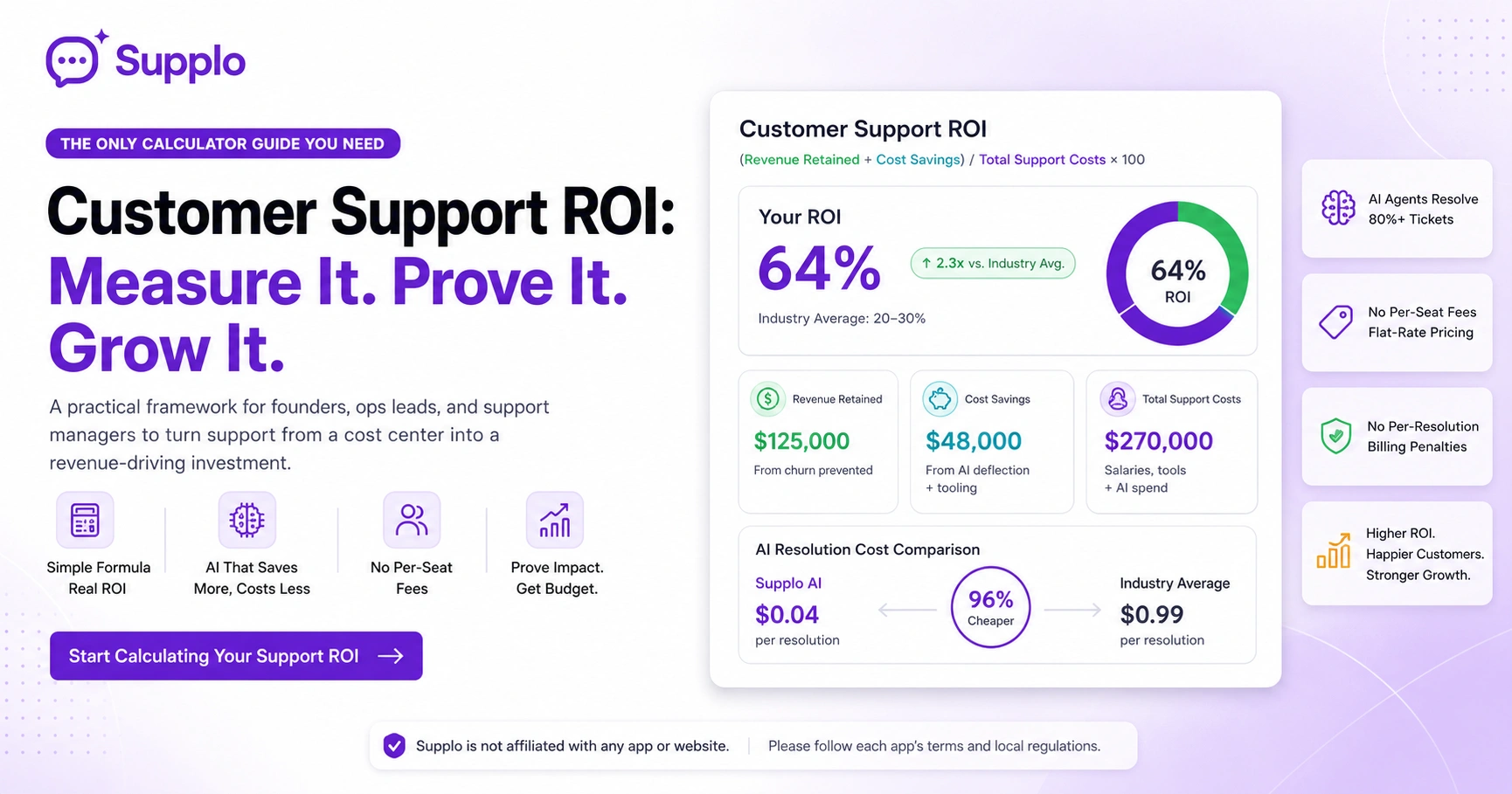
- Customer Support ROI = (Revenue Retained + Cost Savings) / Total Support Costs × 100.
- Revenue retained is the MRR you save by keeping customers who would have churned without support.
- Cost savings come from ticket deflection via AI and from switching to flat-rate tooling instead of per-seat billing.
- A healthy ROI is 20–30%. Top teams using AI and flat-rate pricing can exceed 100%.
- The biggest killer of ROI is per-resolution billing, which charges you every time the AI helps.
Supplo is not affiliated with any app or website. Please follow each app's terms and local regulations.
Why You Can't Ignore Your Support ROI Anymore
Here's the hard truth: if you can't calculate your customer support ROI, you can't defend your budget. Period.
Most support teams operate on a mix of gut feeling and ticket volume. That's not a strategy, it's a prayer. The businesses that measure performance ROI win every budget meeting. The ones that don't get cut. And honestly? The gap between "we think we're doing fine" and "we're actually bleeding cash" is usually just a few spreadsheets away.
- Support used to be a cost center. Now it's a retention lever, but only if you measure it.
- Without an ROI baseline, any software vendor can sell you a "productivity" story that might not apply.
- Small teams often think ROI math is too complex when it's really just three numbers and one subtraction.
- The real risk isn't measuring wrong; it's not measuring at all.
What Actually Counts as "ROI" in Customer Support?
Let's get clear on what we're actually measuring here.
ROI in customer support can mean wildly different things depending on whether you're optimizing for cost, speed, or customer lifetime value. For this guide, we define ROI simply as: (value generated from support) minus (cost of delivering support), divided by that same cost, multiplied by 100. It's a percentage, not a dollar figure.
- Value generated includes revenue saved from churn, upsell revenue, and ticket deflection.
- Cost includes salaries, tooling, AI subscriptions, and time spent per ticket resolution.
- Most teams over-index on costs and undercount revenue in the formula.
- If you're including churn reduction, use a conservative estimate based on your monthly churn rate.
So when you ask, "What is support team ROI?", the answer is: the percentage of your support investment that comes back as retained revenue or cost savings.
How to Measure Customer Support ROI with a Simple Formula
The formula is dead simple: (Revenue from retained customers + cost savings) / Total support costs. Your revenue retention comes from customers who would have churned without support intervention. Cost savings come from ticket deflection via automation, faster resolution times, and the elimination of per-seat fees. That denominator? All-in cost of team, tools, and AI spend.
- Track total support costs across salaries, software, and AI resolutions (flat billing like Supplo simplifies this).
- Identify at-risk accounts and estimate the revenue saved by fast, quality support.
- Add the cost savings from deflected tickets based on your AI resolution rate.
- Divide the sum by your total costs, then multiply by 100 to get a percentage.
If you're looking for how to calculate customer support ROI, this is the only formula you need.
A single agent generating $50,000 in retained revenue while costing $40,000 in salary and tools gives you a 25% ROI. That's a solid baseline.
The Two Numbers That Kill Your Support ROI Without You Noticing
Here's where most teams bleed money without realizing it.
Two metrics silently destroy your customer support investment return: per-seat fees and per-resolution billing. A per-seat fee makes every new hire a budget event, so you keep teams lean and response times suffer. Per-resolution billing charges you every time the AI helps, which punishes you for having a high-volume support operation. Both are death by a thousand cuts.
- A 10-person team paying $90/seat/month burns $10,800/yr before any resolution is reached.
- Per-resolution models charge $1+ per AI answer; high-volume teams bleed cash.
- Flat-rate billing (as used by Supplo and a few others) removes both drains.
- The real ROI killer is avoiding scaling support because it's too expensive per head.
To properly calculate ROI for the support team, you must include these hidden costs. They turn a profitable operation into a budget loser.
How to Use a Customer Service ROI Calculator Without Spreadsheet Panic
A customer service ROI calculator helps you enter your current support headcount, ticket volume, average handle time, and tool costs, then spits out a baseline. Then you adjust variables, such as AI deflections or tooling cost changes, to generate new projections. The key is to use realistic inputs; don't inflate what you think an AI agent can deflect.
- Start with your current real numbers: tickets, handle time, cost per ticket.
- Add the average handling cost per agent (salary + tools).
- Simulate a 30% deflection rate from AI if you're estimating automation impact.
- Run the same scenario with flat-rate pricing (like Supplo) vs. per-seat pricing.
- The output is your potential ROI percentage gain.
Don't overthink this. A simple calculator using your actual data beats a complex model using guesses.
Most teams skip this step and buy tools based on features rather than ROI. That's how you end up with a dashboard full of metrics but no profit improvement.
Calculating Support Team ROI: The People Side of the Formula
Your team is both your highest cost and your greatest lever. To calculate your support team's ROI, you need to know each agent's resolutions per hour, average handle time, and churn impact per handled ticket.
A high-performing team member might generate 50x their salary in retained revenue annually. But if they're drowning in repetitive tier-1 tickets, that ROI evaporates. And here's the kicker: per-seat billing makes adding team members a negative ROI decision, so you're stuck with an overwhelmed team that can't deliver quality support.
- Divide monthly retained revenue by total team cost for the per-agent ROI.
- Use ticket deflection data to show how many tickets the AI handled for the team.
- The worst ROI scenario? A team spending 80% of its time on password resets.
- Per-seat billing makes adding team members a negative ROI decision.
When calculating support team ROI, separate people costs from tooling costs. If your agents are too expensive per resolution, the fix is automation, not more hires.
Supplo's shared inbox features help teams manage tickets faster, reducing handle time without adding headcount.
AI Chatbot ROI vs. AI Agent ROI: Why the Difference Matters
Not all AI is created equal. And the difference matters a lot for your bottom line.
An AI chatbot is a scripted answer generator, useful for FAQs, but it's not truly autonomous. An AI agent (like Supplo's) learns from your knowledge base and resolves tickets without human handoff 80%+ of the time. The ROI difference is huge: a chatbot offers marginal time savings, while an AI agent reduces actual ticket volume. That's real cost reduction.
- Chatbots deflect simple queries but require a human to clean up misunderstandings.
- AI agents handle complex logic, updates, and multi-step issues independently.
- The ROI of an agent is measured in tickets resolved, not just conversations started.
- Chatbot ROI is a rounding error. AI agent ROI changes your support budget entirely.
If you're evaluating AI chatbot ROI vs. other automations, ask one question: "Does it resolve the ticket, or does it just start a conversation?" Resolving is revenue. Starting is overhead.
Check Supplo's flat-rate pricing to see how the ROI of an AI agent changes when you stop paying per seat.
Measuring AI for Support ROI (The 96% Cost Gap That Changes the Math)
When calculating ROI for an AI agent, the unit economics matter more than the features. Most leading platforms charge about $0.99 per AI resolution. Supplo charges roughly $0.04, that's 96% cheaper. That difference doesn't just improve your margin, it flips whether AI is cost-effective for small teams or just a luxury you skip.
- Per-resolution billing incentivizes the vendor to maximize volume rather than quality.
- Flat-rate subscriptions with a minor per-resolution cost give you predictable AI spend.
- Supplo's AI resolution cost of $0.04 makes even high-volume support affordable.
- The math: 10,000 AI resolutions at $0.04 = $400 vs. $9,900 elsewhere.
That's not a small difference; it's the difference between AI being a profit center or a cost center.
See how Supplo's AI agent stacks up against the market. The cost gap is real.
How to Benchmark Your Customer Support Investment Return Against Real Data
You need to know what "good" looks like before you can figure out if you're underperforming.
The average customer support investment return across SaaS companies is around 15–25% annual ROI, including churn reduction. Best-in-class teams using AI and flat-rate tooling can exceed 100%. To benchmark your numbers, look at your cost per ticket resolved, your average monthly churn prevented, and your revenue per retained account.
- Compare your cost per ticket against industry averages for your company size.
- Calculate your "cost to support at scale", and what happens if ticket volume doubles.
- Run a scenario where you replace a per-seat chat tool with a flat-rate platform.
- The benchmark you should care about most: cost per resolution, not cost per conversation.
Real data matters. That's why we publish customer case studies showing actual ROI improvements.
If your support performance ROI is below 15%, your setup is leaking money. Above 50%, you're outperforming most competitors.
The ROI Trap Most Teams Fall Into And How to Avoid It
The biggest trap is measuring ROI only on cost reduction and ignoring revenue retention. A cheap support team that loses accounts isn't saving you money; it's costing far more in lost lifetime value.
The second trap is comparing AI costs without factoring in human handoff rates. Even with a low deflection rate, the AI is still costing you. And honestly? Most teams buy tools based on what looks good in a demo, not what actually improves their numbers.
- Measure churn prevented by fast resolution times, not just ticket volume.
- Track first-response time and customer satisfaction score as ROI inputs.
- Avoid buying per-seat tools that penalize you for having a large enough team.
- A low-cost AI with a low deflection rate is worse than no AI.
When you measure support team ROI, include the full picture. Cutting costs at the expense of retention is a false economy.
If your ROI calculation shows a problem, don't throw more seats at it. Switch to a platform that doesn't punish you for scaling. Check Supplo's flat-rate pricing now.
A Quick-Start Playbook for Measuring Support Team ROI Today
Pull your last 90 days of ticket data. Count total tickets, total handle time, and your tooling cost. Estimate the monthly revenue from accounts that engaged with support at least once. Use the formula: (retained revenue + cost savings from AI deflection) / total support cost.
If you're not above 20%, your support setup is leaking money. Here's your five-step action plan:
- Collect resolution volume, handle time, and tooling spend.
- Estimate how much of your MRR is saved by support interactions.
- Account for any AI resolution at your actual cost, not hypotheticals.
- Compare ROI with and without a flat-rate platform like Supplo.
- Action: Run the numbers. If the ROI isn't there, change the inputs (tooling, staffing, AI).
This playbook works for any team size. You don't need a data analyst, just a spreadsheet and 30 minutes.
If you support customers on WhatsApp, track those conversations separately. High-volume channels need their own ROI view.
Turn Your Support ROI Calculation Into a Budget Argument
Once you know your support team ROI, use it to justify new tools or headcount. If your ROI is below 30%, you can argue for automation that lifts deflection without adding headcount. If it's above, you can prove that adding more support capacity actually increases revenue per dollar spent. Numbers win budget meetings.
- Present your ROI calculation as a % alongside your closest competitor's hypothetical numbers.
- Show the cost difference between per-seat billing and flat-rate billing using your actual volume.
- Use the AI resolution cost differential ($0.04 vs. ~$1) as a concrete savings line.
- End the argument with a specific platform recommendation that changes the math.
Stop calculating hypothetical ROI and start measuring real returns. Sign up for Supplo.io, a flat-rate support platform with AI resolution at $0.04 each: no per-seat fees, no surprise charges.
Key Takeaways
- Customer support ROI is a percentage, not a dollar amount. Use the formula: (Revenue retained + cost savings) / Total support costs × 100.
- Per-seat fees and per-resolution billing are the two hidden ROI killers. Flat-rate billing removes them.
- The AI resolution cost gap (Supply at $0.04 vs. others at $0.99) can flip your ROI from negative to positive.
- Benchmark your ROI against industry averages. A reading below 15% is a red flag. Above 50% is elite.
- Always measure revenue retention, not just cost reduction. A cheap team that loses customers is not an ROI win.
FAQ
What is the formula for calculating customer support ROI?
(Revenue retained + cost savings from automation) / total support costs × 100. Revenue retained is churn prevented by support interactions. Cost savings include ticket deflection via AI and reductions in tooling costs.
How do I calculate the ROI of an AI agent for my support team?
Track total AI resolution volume, multiply by your per-resolution cost, and subtract that from the cost of handling the same volume with human agents. Supplo's AI costs about $0.04 per resolution, making the ROI calculation overwhelmingly positive for most teams.
What's a good ROI for customer support?
A healthy ROI for support teams is 20-30% when including churn reduction and tooling costs. Top-performing teams with AI automation and flat-rate billing often exceed 100%. A score below 15% suggests your support stack or team's efficiency needs an overhaul.
How do per-seat fees affect my support team ROI?
Per-seat fees make every new hire a budget event, discouraging scaling. A 10-person team at $90/seat costs $10,800/year in tools alone, before AI spend. That flat cost drags down your ROI because it doesn't scale with the value it delivers.
Should I use a customer service ROI calculator before buying a platform? Yes. A good calculator shows you the delta between current and projected costs. Enter realistic numbers for ticket volume, handle time, and tooling. The output reveals whether the new platform generates real ROI or shifts costs.
Can I measure customer support ROI without having an AI agent?
Yes. You can still track retained revenue from human support interactions and compare against total agent costs. However, you'll miss the cost savings from ticket deflection, which is often the largest lever for improving ROI.
How often should I recalculate my support team ROI?
Quarterly is a good cadence. Ticket volume, tooling costs, and churn rates shift over time. If you make a major change (switching platforms, hiring more agents, adding AI), recalculate immediately to see the impact.
Compliance line: Supplo is not affiliated with any app or website. Please follow each app's terms and local regulations.