On this page
Let's be honest, if your support strategy still revolves around email forms while your customers are tapping that chat bubble on your Facebook page, you've already lost them. This guide is for business owners, startup founders, and support leads who need a reliable, scalable way to handle Facebook Messenger business customer support without the headaches or hidden costs.
Quick Answer
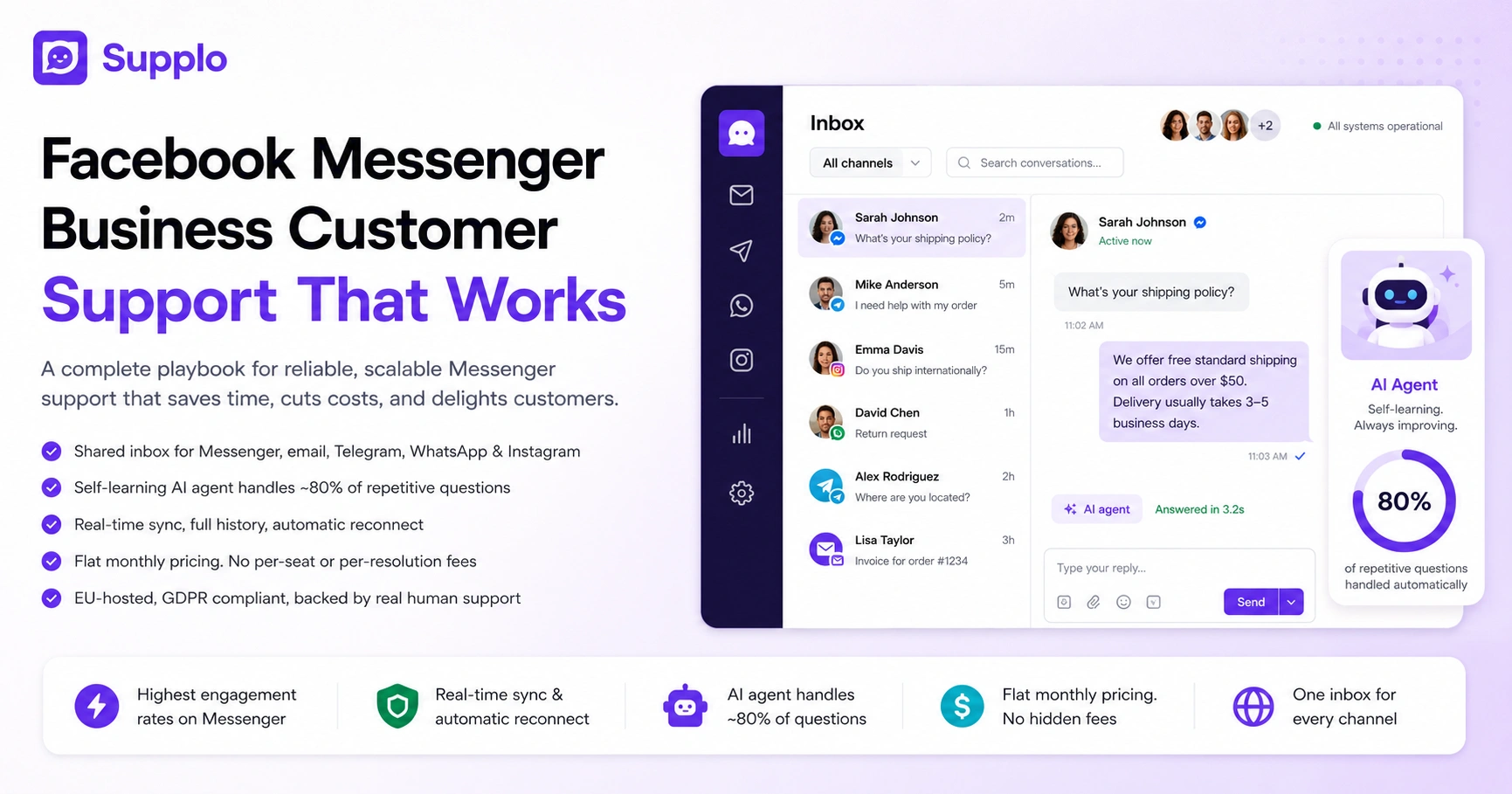
- Facebook Messenger has the highest engagement rates, and open rates absolutely dwarf email.
- A solid integration syncs messages in real time, keeps conversation history, and reconnects automatically when the API inevitably glitches.
- Stop managing Messenger separately. Use a shared inbox that pulls together Messenger, email, Telegram, WhatsApp, and Instagram DMs.
- Flat monthly pricing means no per-seat or per-resolution fees that penalize you for growing.
- A self-learning AI agent handles roughly 80% of repetitive questions, leaving your team for the stuff that actually needs a human.
Why Facebook Messenger for Business Customer Support Is Non-Negotiable Now
Your customers live in Messenger. Over a billion people use it monthly, and they expect businesses to be there too. If your support strategy depends on email forms or phone queues while your customers are clicking the chat bubble on your Facebook page, you've already lost them. A reliable Facebook Messenger business customer support setup isn't just nice to have; it's the baseline expectation for modern buyers.
Messenger open rates absolutely crush email open rates, making it the highest-engagement channel for support messages. Customers who start conversations in Messenger are more likely to convert than those who initiate via email. Without a dedicated Facebook Messenger business support platform, brands end up manually juggling DMs, missing messages, and creating slow response times. A shared inbox that centralizes Messenger alongside other channels eliminates chaos and delivers a single, consistent reply. For small businesses, Messenger support is often their first impression of reliability, or its absence.
A reliable Facebook Messenger business customer support setup isn't just nice to have; it's the baseline expectation for modern buyers.
How to Actually Use Facebook Messenger for Customer Service Without the Headaches
Using Facebook Messenger for customer service sounds simple: open the app, reply to messages. But as your volume grows, that approach becomes a nightmare. The right way uses a Facebook Messenger customer service software that routes every inbound chat into a shared inbox, lets your team collaborate on replies, and uses an AI agent to handle the repetitive questions automatically.
Steps:
- Stop answering the same questions manually. An AI agent learns from your knowledge base and responds instantly to common inquiries like "What's your shipping policy?" or "Where are you located?"
- Route conversations intelligently. Set up routing rules so Messenger messages go to the right team member based on keywords, customer segments, or product categories.
- Automate common workflows. Order status checks, return requests, and appointment scheduling can be handled without a human ever touching them.
- Use saved replies. Create canned responses for the 80% of questions that repeat, while still making them feel personal by adding the customer's name.
- Track your metrics. Use a platform that shows response times, resolution rates, and customer satisfaction scores to prove you're reliable.
- Troubleshooting tip: If your replies aren't appearing in Messenger, your integration is likely broken or outdated. Choose a platform that reconnects automatically and supports the latest Facebook Messenger API.
What a Real Facebook Messenger Business Integration Looks Like And What It Doesn't
A real Facebook Messenger business integration connects your Facebook Page's messaging to your support platform, so every message appears in your team's inbox automatically. That's it, but many integrations are half-baked. They miss messages, break during updates, or require constant re-authentication. A reliable integration pulls all conversations, including context and history, into one workspace without friction.
The integration should sync messages in real time, not on a five-minute delay; anything slower is unacceptable. It must preserve conversation history so your team doesn't ask a customer to repeat information they already shared. It should allow your team to reply directly from the support platform without logging into Facebook separately. A good integration supports rich media (images, videos, files) that customers send through Messenger. And it must stay connected reliably, not break silently when Facebook updates its API.
Supplo is not affiliated with any app or website. Please follow each app's terms and local regulations.
The Truth About Facebook Business Messenger Setup: How to Avoid the Traps
A typical Facebook Business Messenger setup involves connecting your Facebook Page to a support tool via an API or partner integration. But businesses fall into a few common traps: connecting multiple Pages to the wrong accounts, losing message history during setup, or using a tool that doesn't support Messenger's latest features. The right setup takes 10 minutes and requires no developer, just a few clicks.
Traps:
- Using a third-party wrapper. Choose a platform that supports the Facebook Messenger API directly, not a wrapper that introduces latency and extra failure points.
- Not testing the integration. Verify your setup works by sending test messages from a personal Facebook account to your Page. Confirm they appear in your support inbox.
- Losing customer context. Ensure the platform captures profile information (name, email, recent interactions) alongside each conversation.
- Accepting channel silos. Don't settle for "one inbox to rule them all," which actually separates channels. True integration brings Messenger, email, Telegram, and Instagram into a single unified view.
- Ignoring support. Confirm the platform's support team can help if the integration stops working, not a chatbot, but a real human.
- The right Facebook Messenger setup takes 10 minutes and requires no developer, just a few clicks.
Facebook Messenger Business Solutions That Don't Break the Bank
You've probably heard about Messenger solutions that cost a fortune per agent or per resolved conversation. That model punishes growth; the more your business succeeds, the more you pay. The smart alternative: a flat monthly rate with no per-seat or per-resolution fees. That's what Supplo offers, with AI resolutions priced at $0.04 each, roughly 96% cheaper than the category leaders.
Flat pricing means your bill doesn't balloon when you add a new team member or hit a record volume month. Per-resolution pricing is a hidden tax on efficiency; the better your team gets, the more you pay for the same work. Small teams need predictable spend, and flat monthly billing is the most predictable option in the market. Most "affordable" platforms hide costs behind agent tiers, seat limits, or feature unlocks. AI agent credits at $0.04 per resolution make automation affordable even for the smallest budgets.
Try Messenger support risk-free. Connect your Facebook Page to Supplo in under 10 minutes. See how the AI agent handles your top 5 support questions. Free trial, no credit card required. Start here.
Facebook Messenger Business Customer Service Software: What to Look for in a Support Platform
A Facebook Messenger business customer service software should do three things: collect every message from every channel into one inbox, let your team collaborate on replies in real time, and have an AI agent that learns from your support history to automate repetitive answers. Anything less is a distraction, not a solution. Look for a platform that also supports WhatsApp, Telegram, Instagram, and email so you don't have to manage five separate tools.
Checklist for choosing your platform:
- One shared inbox, no switching between tabs or tools, just one queue of conversations from Messenger, email, Telegram, and more.
- Real-time collaboration prevents two team members from accidentally replying to the same customer.
- An AI agent that self-learns from your existing knowledge base and conversations, requiring no data science team.
- Multi-channel routing, direct Instagram DMs, Facebook messages, and WhatsApp chats to the right person without manual sorting.
- Built-in analytics, response times, resolution rates, and customer satisfaction scores per channel.
- Email ticketing integration so every channel is covered.
How Small Businesses Finally Nail Facebook Messenger Small Business Chat
Small business owners wear every hat: founder, marketer, accountant, and support agent. A Facebook Messenger small-business chat setup needs to be so simple that the business owner can set it up in minutes and the whole team can use it without training. The best approach: a single platform that handles Messenger, Instagram, WhatsApp, and email, with automation to reduce repetitive work.
Automate the simple stuff: "What are your hours?" and "Where are you located?" don't need a human response. Set up a widget on your website that feeds into the same inbox as your Facebook Messenger, so there are no disjointed conversations. Use saved replies to respond to common inquiries in seconds, not minutes. Let customers switch channels mid-conversation (e.g., from Messenger to email) without losing context. Choose a platform with flat monthly pricing so your costs stay predictable as you grow.
Small business owners wear every hat. Your Messenger setup should be so simple that the whole team can use it without training.
The Startups Playbook: Facebook Messenger for Startups Business Support That Actually Scales
Startups need speed. A Facebook Messenger business support setup for startups should be ready in minutes, not weeks, and should handle the first 10 conversations as gracefully as it handles the 10,000th. The winning playbook: choose a platform with an AI agent that learns from day one and a pricing model that doesn't punish you for being successful.
The AI agent should start answering questions on day one by learning from your knowledge base, not after 1,000 conversations. Flat monthly pricing lets you invest in support capacity without worrying about per-resolution blowouts. Multi-channel routing, Messenger, Instagram DMs, Telegram, WhatsApp and email mean you don't have to build a new support workflow for every new channel you launch. Look for a platform that handles global payment methods and is built for international startup teams.
Why Reliability Is the Only Metric That Matters in Facebook Messenger Business Chat
You can have the fanciest chatbot, the prettiest inbox and the cheapest pricing, but if your Facebook Messenger business chat integration drops messages, fails to sync, or goes down during peak hours, none of it matters. Reliability is the foundation of every other metric: response time, resolution rate, and customer satisfaction. Without a reliable connection, you're building a house on sand.
A reliable integration reconnects automatically if the connection drops; you shouldn't have to manually reauthenticate. Message delivery confirmation so your team knows if a reply actually reached the customer. Uptime guarantees that are backed by real infrastructure, not just marketing copy. EU-hosted data (like Supplo) ensures compliance with GDPR while maintaining connection reliability. Real human support (not a chatbot) when the integration has an issue, because the integration is your business's front door.
Reliability is the foundation of every other metric: response time, resolution rate, and customer satisfaction.
Troubleshooting tip: If your Messenger integration stops working mid-day, check if your support platform has a status page. A reliable provider will have transparent uptime stats and a team ready to fix the issue.
If your current integration keeps dropping messages, it's time for a reliable alternative. Supplo's Facebook Messenger integration reconnects automatically, syncs in real time, and is backed by real human support. Test it with your live Page today: https://supplo.io.
Set Up Facebook Messenger Business Support That Works
You've read the playbook. Now it's time to act. Setting up Facebook Messenger business support that actually works means picking a platform that integrates reliably, automates intelligently, and costs predictably. Supplo is the only platform that combines live chat, a shared inbox, a self-learning AI agent, and multi-channel routing (email, Telegram, WhatsApp, Instagram, Facebook) in one workspace, billed at a flat monthly rate with no per-seat fees.
Your action plan:
- Start your free trial and connect your Facebook Page in under 10 minutes.
- Import your existing knowledge base and let the AI agent start learning immediately.
- Add your team members at no extra cost; flat pricing means every new hire is free.
- Configure routing rules so every Messenger message goes to the right person instantly.
- Set up automated responses for the top 5 questions your team answers every day.
Stop juggling separate inboxes and start using a single workspace for Messenger, email, Telegram, WhatsApp, and Instagram. Flat monthly billing, no per-seat fees, AI at $0.04 per resolution. Set up your Facebook Messenger business support now.
Key Takeaways
- Facebook Messenger business customer support is now a baseline expectation, not a bonus feature.
- A reliable integration syncs in real time, preserves history, and reconnects automatically.
- The best solutions use a shared inbox and a self-learning AI agent.
- Avoid per-seat and per-resolution pricing models that punish growth.
- One platform should handle Messenger alongside email, WhatsApp, Telegram, and Instagram.
FAQ
Is it legal to use Facebook Messenger for business customer support?
Yes, entirely. Facebook encourages businesses to use Messenger for customer support, and its Business API is designed for exactly this purpose. Just be sure to follow each app's terms and local regulations.
Why do my Facebook Messenger messages sometimes not go through?
Most failures happen because the integration between your support platform and Facebook's API is unreliable or outdated. Choose a platform that reconnects automatically and supports the latest API version.
Should I use a separate tool for each channel or one inbox for everything?
One inbox. Separate tools for Messenger, email, Instagram, and WhatsApp create chaos, message loss, and slow responses. A shared inbox centralizes everything and eliminates the guesswork.
How does an AI agent for Messenger actually work?
The AI agent learns from your knowledge base and past conversations. When a customer asks a common question, the AI responds instantly with the correct answer. If it can't answer, it escalates to a human with the full conversation history.
What if the AI gives a wrong answer?
The AI should be self-learning; it gets better with every conversation you confirm or correct. Start with simple, factual questions (e.g., hours, policies) and expand as the AI demonstrates its accuracy.
How much does a reliable Messenger support platform cost?
Most platforms charge per agent or per resolution, which gets expensive quickly. Supplo charges a flat monthly rate with no per-seat fees, and AI resolutions cost $0.04 each, roughly 96% cheaper than Intercom Fin.
Can I connect my existing Facebook Page without starting over?
Yes. A proper integration connects your existing Facebook Page and preserves your conversation history. You don't need to create a new Page or lose past chats.
Compliance line: Supplo is not affiliated with any app or website. Please follow each app's terms and local regulations.