On this page
You've heard the terms. Maybe you use them interchangeably. But here's the thing: help desk vs service desk isn't just semantics; picking the wrong one costs you time, money, and headaches. This article is for business owners, support managers, and IT leads who want to stop guessing. Whether you run a 10-person startup or manage internal IT for 200 employees, you'll walk away knowing exactly which setup fits your needs.
Supplo is not affiliated with any app or website. Please follow each app's terms and local regulations.
Quick Answer
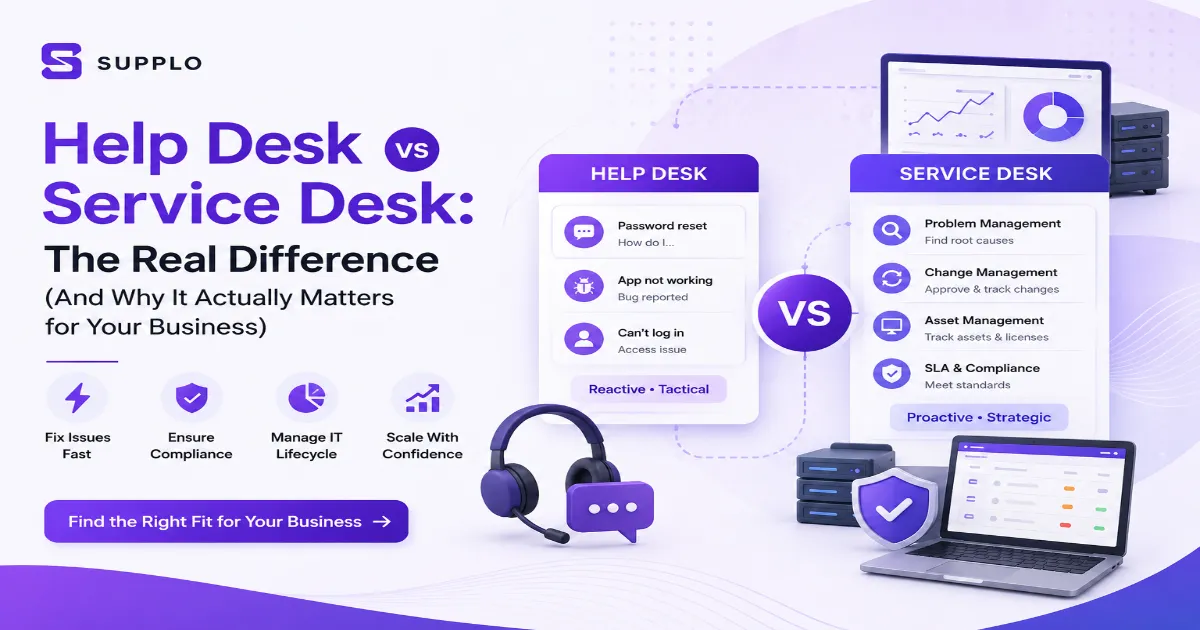
- Help desks are tactical – They fix immediate issues like password resets, bugs, and "how do I do this?" questions.
- Service desks are strategic – They manage the full IT service lifecycle, including problem management, change requests, and asset tracking.
- Pick a help desk if you have fewer than 50 users or run customer-facing support. Pick a service desk if you need compliance, audit trails, or complex workflows.
- Most teams start with a help desk and graduate to a service desk as they scale.
- Modern platforms blur the line, giving you speed and structure without enterprise pricing.
Help Desk vs Service Desk: What's the Actual Difference?
Let's clear this up right now.
A help desk is the fire department. When something breaks, a password needs resetting, an app crashes, a user can't log in, the help desk puts out the fire. It's reactive, fast, and focused on getting users back to work.
A service desk is the entire hospital. It handles fires (incidents), but it also manages building maintenance (change management), the root causes of recurring fires (problem management), and equipment inventory (asset management).
Think of it this way: A help desk answers "what broke?" A service desk answers, "How do we prevent it from breaking again?"
The scope is the difference. Help desks react to incidents. Service desks manage services from request to retirement.
In our experience, most small- to mid-sized businesses only need a help desk. But if you're in healthcare, finance, or any regulated industry, a service desk isn't optional; it's mandatory.
Breaking Down the Help Desk: The Tactical Frontline
The help desk is the most visible part of any support operation. It's the first line of defence when something goes wrong.
Who it's for: Small teams, customer support departments, and internal IT for companies with under 50 employees.
Key Help Desk Functions and Capabilities
A good help desk does these things well:
- Incident logging: Every request becomes a ticket, no more lost emails.
- Ticket routing: The right person gets the right issue automatically.
- Basic troubleshooting: Password resets, software bugs, and how-to questions.
- Status communication: Users know what's happening with their request.
- Canned responses: Save time on repetitive answers.
The goal of a help desk is speed. If a user can't log in, you fix it in minutes, not days. If a customer has a billing question, you answer it on the first contact.
A great help desk feels invisible. Users don't think about the tool; they want help fast. That's why a unified inbox for your team is essential. It keeps everything in one place: email, chat, social DMs, all without switching tabs.
Without a help desk, support becomes chaos. Emails get buried. Requests slip through cracks. Users start calling your personal phone.
The Service Desk: The Strategic Heart of IT Operations
The service desk does everything a help desk does, plus a whole lot more.
Who it's for: Enterprise IT teams, regulated industries, companies with 100+ employees who need process, not just speed.
Service Desk Responsibilities Beyond the Ticket
Here's what a service desk owns that a help desk doesn't:
- Problem management: Finding the root cause of recurring incidents. That server that crashes every Tuesday? The service desk figures out why.
- Change management: Approving and tracking changes to systems. "We're updating the database at 2 AM" is a change request, not a ticket.
- Asset management: Tracking every laptop, server, and software license from purchase to retirement.
- SLA management: Formal service-level agreements with penalties if breached.
- Audit trails: Every action logged for compliance (HIPAA, SOC2, ISO 27001).
Service desks usually follow the ITIL (Information Technology Infrastructure Library) framework. That's not required, but it helps when you need standardized processes across a large organization.
Here's the truth: service desks are expensive. They require dedicated managers, complex tools, and ongoing training. If you're a 15-person startup, you don't need one. If you're a 500-person company with compliance requirements, you can't afford to have one.
When Should You Use a Help Desk vs a Service Desk?
Now, the practical question is which one fits your business today?
Use a help desk when:
- You have fewer than 50 users or customers
- Your primary need is to fix things fast
- You run customer-facing support for a SaaS product
- Speed matters more than process
- Your team is 1-5 people handling tickets
Use a service desk when:
- You have 100+ employees or customers
- Compliance requires audit trails (HIPAA, SOC2)
- You manage a complex IT infrastructure
- Preventing downtime is more important than fixing it fast
- You need asset tracking and change management
The hybrid approach: Many teams run a help desk for customer-facing support and a service desk for internal IT. That works, but it means managing two tools. See how our all-in-one features stack up against Intercom for a simpler approach.
Most companies start with a help desk and graduate to a service desk as they scale. Don't buy the enterprise tool before you need it.
How to Choose a Service Desk or Implement a Help Desk for Your Business
Let's walk through a simple process to get this right the first time.
Self-Assessment: Aligning Your Support Desk with Your Business Needs
Step 1: List what breaks most often.
Write down the top 10 support requests from the last month. Are they mostly "how do I…" questions? Password resets? Or are they recurring system outages that require coordination across teams?
Step 2: Count your team size.
One or two people handling support? That's a help desk situation. More than five people coordinating on complex issues? You might need service desk features.
Step 3: Check your regulatory requirements.
If you need audit trails, change approval workflows, or asset tracking to pass an audit, you need at least some service desk capabilities.
Step 4: Look for "the right fit" features.
- Help desk checklist: Multi-channel ticket ingestion (email, chat, social), SLA tracking, basic reporting, collaboration tools, knowledge base.
- Service desk checklist: Everything above, plus asset management, change request workflows, problem management dashboards, and monitoring integrations.
The biggest mistake? Buying a service desk when you need a help desk. You'll pay 3-5x more for features you never use. The opposite mistake? Buying a help desk when you need a service desk, you'll outgrow it in a year and waste money migrating.
Compare pricing vs. the big guys to see what a modern help desk costs without the enterprise markup.
The Fastest Way to Get a Modern Support Desk Running (Without the ITIL Overhead)
You don't need a six-figure ITIL implementation to run an effective support team. You don't need per-seat pricing that punishes you for growing. And you don't need to choose between speed and structure.
Modern platforms like Supplo combine the best of both worlds.
Imagine this: A single dashboard that handles email, live chat, WhatsApp, Telegram, Instagram, and Facebook. An AI agent that resolves tickets for pennies, $0.04 each, about 96% cheaper than the big-name alternatives. A shared inbox that keeps your team aligned. All billed at a flat monthly rate, not per agent.
No feature bloat you don't need. No surprise overages when you get busy. No complex setup that requires a consultant.
It's the pragmatic middle ground. You get the speed of a help desk and the structure of a service desk without the headaches.
Need multi-channel support fast? Add Telegram, Instagram, and WhatsApp to your support desk in minutes.
When debating help desk vs service desk for your team, remember: most modern businesses don't need the full enterprise stack. They need something that works, scales, and stays affordable.
Real Talk: What Happens When You Pick the Wrong One
We've seen this play out too many times.
Pick a help desk when you need a service desk:
Your team drowns in recurring issues. The same server outage happens three times a month. You have no root cause analysis, so you keep treating symptoms. Your team burns out. Your users lose trust.
Pick a service desk when you need a help desk:
You pay $5,000/month for features you can't name. Your team spends more time managing the tool than answering tickets. Users email support directly because the tool is too confusing. Your support quality tanks.
Three signs you picked wrong:
- Your team spends more time managing the tool than helping users.
- You pay for features you don't use.
- Users bypass the system entirely.
The fix isn't necessarily a bigger tool. It's a better-aligned one.
How PVAPins automated their entire support desk is a real example of a team that switched from an overly complicated setup to one that actually worked.
Key Takeaways
- Help desks fix immediate issues; service desks manage entire service lifecycles.
- Your team size and compliance needs determine which one you need.
- Picking wrong costs you either wasted budget or recurring downtime.
- Modern platforms give you the best of both without the overhead.
The Right Support Desk Saves You 10+ Hours a Week.
Don't overthink the definition. Get the tool that works.
Supplo handles email, chat, WhatsApp, Telegram, Instagram, and Facebook from a single dashboard. AI resolves tickets for $0.04 each. Your bill is flat. No per-seat fees. No surprise overages.
FAQs
Can a small business use a service desk instead of a help desk?
Yes, but you'll likely overpay for complexity. A service desk is designed for larger teams with process-heavy needs. For most small businesses, a robust help desk with automation is the better, cheaper option.
What is the primary difference in cost?
Help desks are generally priced per agentper agent or flat. Service desks cost 2-4x more because they include asset management, change control, and audit trails.
Can I run a service desk without ITIL?
Yes. ITIL is a framework, not a requirement. Many modern service desks simplify ITIL processes into adjustable workflows. Start with incident and problem management; add change management only when needed.
Do help desks and service desks overlap?
Completely. A service desk includes a help desk function. The help desk is a subset of the service desk. If you buy a service desk tool, you can usually configure it to act as just a help desk.
Which one is better for customer support vs internal IT?
Customer support almost always needs a help desk (fast, multi-channel, simple). Internal IT for larger teams (50+ employees) often benefits from a service desk. For internal support with fewer than 50 employees, a help desk works fine.
Is the term "service desk" just a rebrand of "help desk"?
No, but they're often used interchangeably. True service desk management includes proactive problem management and service lifecycle, which a standard help desk does not.
What tools count as a help desk vs. a service desk?
Tools like Zendesk and Freshdesk are help desks. Tools like ServiceNow are service desks. Some platforms blur the line by offering both speed and structure.
Compliance note: Supplo is not affiliated with any app or website. Please follow each app's terms and local regulations.