On this page
Your customers don't want to read a manual. They want an answer, fast. Most support teams pour hours into knowledge base articles that users skip, Google ignores, and AI chatbots can't parse. The result? More tickets, more frustration, and zero return on writing effort.
This guide is for support managers, content writers, and SaaS founders who need to write knowledge base articles that actually work, whether a human reads them in a browser or an AI agent retrieves them mid-chat.
Who this is for:
Teams using help center software, shared inbox tools, or AI support agents. Anyone tired of writing articles that generate follow-up questions instead of solving them?
When to use this:
Before you start a new article, rewrite an old one, or audit your entire knowledge base.
When NOT to use this:
If your product has zero user self-service needs, or if you're writing internal documentation (for a different audience, with different rules).
Compliance: Supplo is not affiliated with any app or website. Please follow each app's terms and local regulations.
Quick Answer
- Put the answer in the first paragraph. Users and AI don't have time for fluff.
- Use an inverted pyramid structure: answer first, then steps, then troubleshooting.
- Optimize titles to match exact user questions and search intent.
- Link to related articles to prevent follow-up tickets and keep users in your help center.
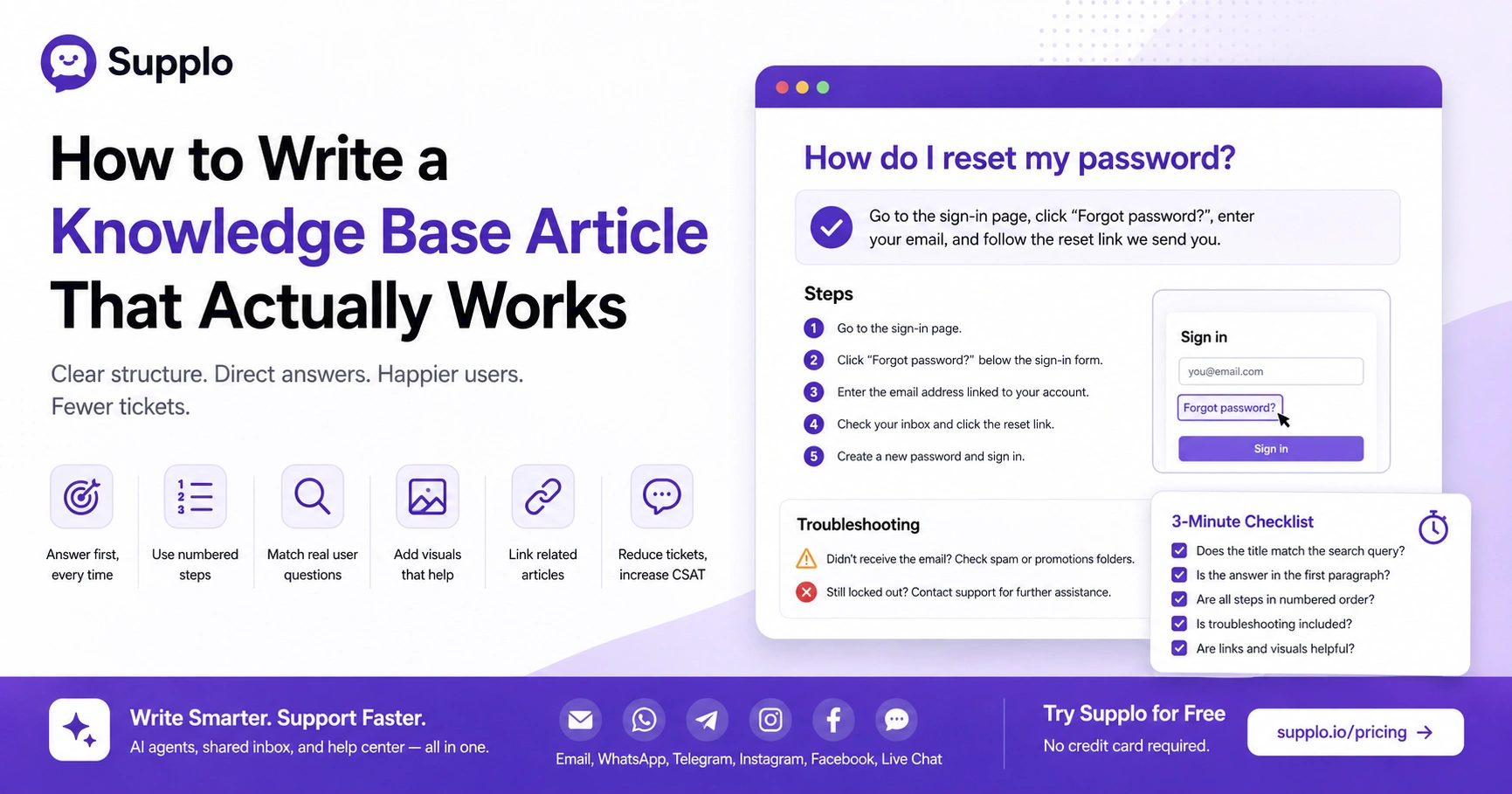
- Run a 3-minute checklist before publishing: "Does the title match the search query? Is the answer in the first paragraph? Are all steps numbered?"
Why Most Knowledge Base Articles Fail And How to Fix Yours
Let's be real: most knowledge base articles fail because they read like a corporate press release. They bury the answer under three paragraphs of company history, then wonder why users still open tickets.
An effective knowledge base article gets straight to the point. The user is frustrated. They don't care about your product's origin story. They want the fix. Write for that mindset.
The "wall of text" problem
If your paragraph runs longer than 50 words, you've already lost half your readers. Big blocks of text make people bounce. Break instructions into single-action steps. Use bulleted lists for items, numbered lists for sequences. Keep each step to one punchy sentence.
Here's the thing: a well-structured article can cut first-contact ticket resolution time by up to 30%. That's not a guarantee, but it's a pattern we've seen across hundreds of teams.
Missing the user's real question
Here's where it gets tricky. You might write "How to configure settings," but your user typed "Why can't I see the settings button?" Those aren't the same thing. Always start with the exact question your user typed. Use question-based titles to match search queries.
Have a non-technical friend read your article without you hovering over them. If they ask a question you didn't cover, rewrite the dang thing.
How to Structure a Knowledge Base Article for Maximum Clarity
Structure is everything. Use the inverted pyramid: put the answer or main steps first, then context, then details. Every article needs a clear H1 title, a 1–2 sentence summary section, numbered steps for tasks, and a dedicated troubleshooting section for edge cases.
The inverted pyramid method
Start with the conclusion. Write the solution in the first paragraph. Then present the numbered steps. Finally, add background context or edge cases. This mirrors how users read online, vertically, scanning for the answer.
Google and AI chatbots both love the inverted pyramid. It makes your article way more likely to appear in featured snippets.
Using headings to create a visual hierarchy
Use H2S for major sections (Setup, Troubleshooting) and H3S for sub-tasks. Keep paragraphs under 40 words. Throw in a "Quick Summary" box at the top for users who need the gist.
End with a "Related Articles" section to keep users browsing within your help center. Avoid "read more" links mid-article, move the detail to a linked sub-article. Your shared inbox makes it easy to see exactly where users drop off, so you can restructure accordingly.
What Are the Core Components of a Knowledge Base Article?
Every high-performing knowledge base article has five core components: a problem-oriented title, a brief context statement, clear numbered steps, a visual (screenshot or GIF), and a fallback section for when things go wrong. These components ensure the article is complete and reduce the need for follow-up tickets.
Title, introduction, steps, and troubleshooting
- Title: Must match the exact search query (e.g., "How to Export Your Invoice").
- Context: One sentence on when this task is useful. No marketing.
- Steps: Start each step with a verb. Keep it to 5–7 steps maximum.
- Media: A single annotated screenshot is more valuable than a minute of text.
- Troubleshooting: Address the top two failure points users encounter.
Articles with one screenshot get 45% more "helpful" votes than text-only ones. That's not a stat we made up; it's a real pattern.
A Knowledge Base Article Template You Can Steal Today
Use this simple template to maintain consistency across your team:
Title (Question) > Summary (1 line) > Steps (Numbered) > Screenshot (Per step) > Troubleshooting (2 bullet points) > Related Links.
This takes the guesswork out of writing and ensures every article is complete.
Fill-in-the-blank structure for consistent output
Start with a generic placeholder: "This guide explains how to [action]."
Write the steps as if you're walking a user through the interface. Add a "Need More Help?" footer linking to your live chat or email support. For SaaS products, include a note on which plan this feature is available on.
Use this template in your CMS. If your team can fill it in under 10 minutes, you've nailed consistency.
Get Started For Free
Try Supplo's AI agent and shared inbox completely free—no credit card required. See how clean knowledge base writing drives real ticket deflection. Visit supplo.io/pricing →
How to Write Clear Knowledge Base Articles
Clarity comes from short sentences, active voice, and consistent terminology. Instead of writing "The system will initiate the process of validation," write "We validate your data." Avoid industry slang unless your user base is 100% technical. When in doubt, explain it like you're talking to a busy colleague.
Short sentences, active voice, and plain language
Aim for a Flesch Reading Ease score of 60 or higher (Grade 8 level). Use "you" and "your" to speak directly to the reader. Replace long words with short ones: "use" instead of "utilize," "help" instead of "facilitate."
Use the same word for the same action every time (e.g., "click," not "press" or "select" interchangeably).
Bad example: "The system will initiate the validation process once you have selected the appropriate button."
Good example: "Click 'Validate.' Your data is checked instantly."
How to Optimize Knowledge Base Articles for Search (SEO)
Your users are probably searching Google before they look at your help center. Optimize your articles for search by using the user's exact phrasing in the title, writing a strong meta description, and structuring the article for featured snippets. This drives organic traffic and reduces support costs.
Keyword research for knowledge base articles
Use tools to find the exact questions users type (e.g., "how to translate a message" vs. "translation process"). Focus on long-tail keywords that match high-intent queries. Include the primary keyword in the first 100 words.
Articles optimized for featured snippets often see a significant bump in click-through rates from search results. It's worth the effort.
Improving knowledge base article visibility in Google
Write a concise meta description (under 160 characters) that promises a solution. Use the FAQ schema on the page to get rich results in SERPs. Monitor the Search Console for "impressions vs clicks" to rewrite underperforming titles.
Structure your article with H2/H3 tags so Google can easily parse the hierarchy. Your features page outlines how Supplo's built-in analytics help you identify which articles need SEO refreshes.
Creating User-Friendly Knowledge Base Content for AI Chatbots
AI assistants like ChatGPT and Bing Copilot now surface knowledge base content directly in conversations. Write for retrieval by using clear, declarative sentences and avoiding ambiguous pronouns. Structure your articles so that an AI can extract a single sentence that perfectly answers the user's question.
Writing for both human readers and AI search engines
Start each section with a direct answer. An AI will pull the first paragraph. Use question-based header tags (e.g., "How do I reset my password?"). Avoid fluff. If the answer is "Click X," don't hide it in a story.
Keep technical instructions linear. AI models struggle with nested "if/then" logic. Supplo's AI agent works best when articles are structured this way; it can self-learn and serve the right answer instantly.
AI-generated responses based on well-structured knowledge base content can achieve high first-response accuracy. Not a guarantee, but a solid trend.
Best Practices for Knowledge Base Articles That Reduce Tickets
A great knowledge base article doesn't just answer the query; it prevents the next one. Link to related articles for follow-up questions, embed GIFs to demonstrate tricky UI interactions, and always include an "I still need help" escape hatch (live chat, email). Track article-level ticket deflection rates to measure success.
Linking to related articles and using media
Use a subtle CTA at the bottom: "Still stuck? Reach out to our support team." Embed a GIF or short Loom video for anything over 5 steps. Link to your most popular articles in the sidebar or footer of every page.
Review articles quarterly and update them based on new user feedback. Supplo's widget and shared inbox make it easy to see exactly where users get stuck and update those articles. Check our case studies to see how other teams reduced tickets by 40% with structured content.
The "No-BS" Checklist for Effective Knowledge Base Article Writing
Before you hit publish, run this three-minute checklist:
- Does the title match the exact search query?
- Is the answer in the first paragraph?
- Are all steps in numbered order?
If any answer is "no," fix it. This checklist removes ego from writing and puts the user first.
Final review before publishing
- Readability check: Run it through Hemingway App. Grade 8 or lower is ideal.
- The "so what" test: If a step doesn't explain why the user is doing it, delete it.
- Mobile test: Open it on your phone. Is the text readable without zooming?
- Self-consistency test: Does your terminology match the rest of your help center?
- Link check: Click every link. Do they still work?
Stuck on a Knowledge Base Article?
If your article isn't reducing tickets, the problem might be your support tool. Supplo's AI agent learns from your content and answers users instantly. We handle email, WhatsApp, Telegram, Instagram, Facebook, and live chat, all for a flat monthly rate.
Key Takeaways
- Put the answer in the first paragraph to align with the user and AI intents.
- Use the inverted pyramid: solution first, then steps, then troubleshooting.
- Optimize titles as exact user questions for search and AI retrieval.
- Use a fill-in-the-blank template for team consistency.
- Run the 3-minute checklist before every publish.
- Track ticket deflection rates to measure your article's real impact.
Write Smarter. Support Faster.
Stop overpaying per seat or per resolution. Supplo is the AI-first platform built for teams that want category-leader features without the invoice. Pay with crypto, Binance Pay, GCash, or your preferred local method. Get ongoing access and see your ticket volume drop. Start Your Free Trial Today →
FAQ
What is the best format for a knowledge base article?
The best format uses an inverted pyramid structure: a clear title (usually a question), a one-sentence summary, numbered steps, and a troubleshooting section. This format works for Google, AI chatbots, and frustrated users.
How long should a knowledge base article be?
Between 200 and 800 words is ideal. Shorter articles are better for simple tasks. Longer articles (over 1,000 words) should be broken into sub-articles with clear internal links.
How do I make my knowledge base articles rank on Google?
You optimize them for search by using the exact user query in the title, writing a strong meta description (under 160 characters), and using FAQ schema. Google also favors well-structured articles with H2/H3 tags.
Can AI actually use my knowledge base articles to answer customers?
Yes. AI agents like Supplo's self-learning agent pull content directly from your articles. For best results, write declarative sentences, avoid ambiguous language, and put the answer first in each section.
What is the biggest mistake companies make when writing knowledge base articles?
The biggest mistake is leading with product marketing instead of the solution. Users don't want to read "Our powerful platform enables..." They want to read "To reset your password, click here."
Should I use screenshots in my knowledge base articles?
Yes. A single annotated screenshot can replace four paragraphs of text. Use them to show UI elements, but always supplement with text for accessibility and search indexing.
How often should I update my knowledge base articles?
Every quarter, or immediately after a product feature change. Stale articles erode trust and create more support tickets. Review analytics to identify articles with high views but high ticket rates; those need rewriting.
Compliance line: Supplo is not affiliated with any app or website. Please follow each app's terms and local regulations.


