On this page
Chat routing rules are essential for directing incoming customer messages to the right agent, team, or automated system. Without them, your support team risks overwhelmed queues, slow response times and an inconsistent customer experience. This guide will walk you through setting up efficient, AI-powered chat routing rules to maximize reliability and customer satisfaction, whether you're a small business or a growing enterprise.
This guide is for customer support managers, operations specialists and anyone looking to optimize their customer communication flow. Use it when you need to improve response times, reduce agent workload, or scale support efficiently. Avoid using it if your current chat volume is minimal and can be comfortably managed manually.
Quick Answer
- Chat routing rules automatically assign incoming messages based on predefined criteria.
- AI routing uses natural language processing (NLP) to understand intent and sentiment, dynamically sending chats to the best resource.
- Key setup steps include organizing teams, defining conditions, setting up fallbacks and rigorous testing.
- Benefits include faster response times, increased first-contact resolution and reduced agent burnout.
- Common mistakes to avoid are overcomplicating rules, neglecting fallback options and failing to test or review performance regularly.
What Are Chat Routing Rules and Why Do They Matter for Reliability?
Chat routing rules determine which support agent or system handles an incoming message. Without them, chats pile up in a single queue, customers wait too long and your team wastes time sorting tickets manually. A reliable routing system, whether rule-based or AI-driven, ensures the right person (or bot) handles every conversation the first time.
Simple rules use keywords, department, or customer tier to assign tickets. Advanced routing uses AI to detect intent, sentiment and language. Reliable routing prevents double-handling and dramatically reduces response times, boosting customer satisfaction. A shared inbox with routing logic keeps teams aligned without being overwhelmed.
How AI Chatbot Routing Actually Works
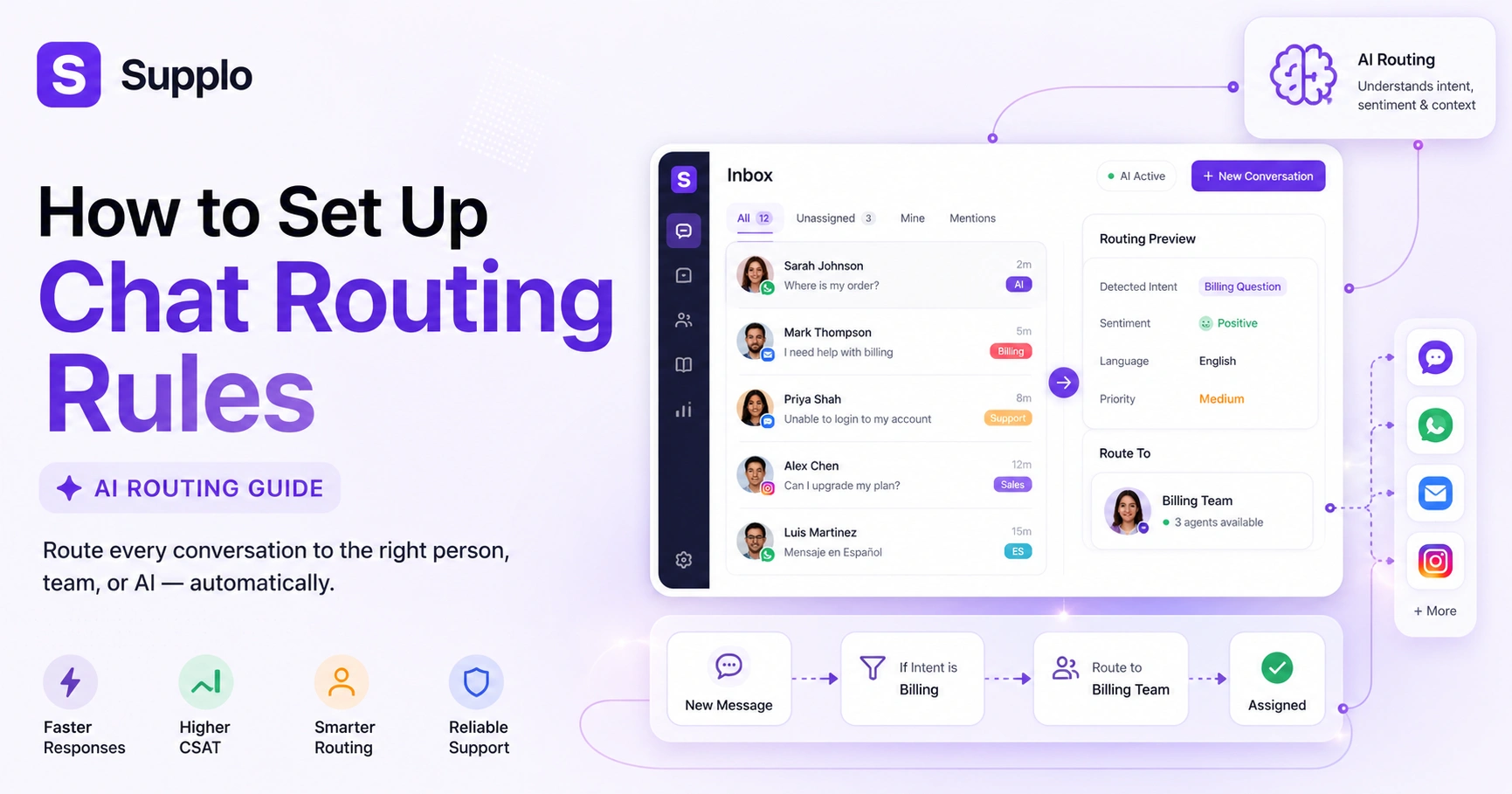
AI chatbot routing analyzes the incoming message's content and context before deciding where to route it. It can identify whether a query is a billing question, a technical issue, or a simple Where's my order? and route it, or resolve it, without a human ever touching it. The AI learns from your knowledge base and past conversations, becoming smarter over time.
AI routing uses natural language processing (NLP) to understand intent, not just keywords. It can pull customer history and CRM data to prioritize or escalate. Self-learning AI improves assignment accuracy without manual rule updates. The fallback: when AI can't route confidently, it hands off to a human with full context.
How to Set Up Chat Routing Rules in Your Customer Service Platform
Start by grouping your team by skill set or department, then create simple conditions that tell the system where each chat should go. Most platforms let you do this in a few clicks once your team structure is clear.
To set up chat routing rules in most platforms, start by organizing your team into groups (e.g., Sales, Support, Billing). Then define conditions, such as specific words, departments, or customer regions, that trigger a routing action. In a modern workspace like Supplo, you can unify email, live chat, WhatsApp and social DMs into a single shared inbox and route everything through a single set of rules.
Begin with a simple routing matrix: department → skill set → availability. Tag incoming channels (such as email, live chat widget, WhatsApp and Instagram) to route correctly. Test your rules with simulated conversations before going live. The setup should take minutes, not days. If it's more complex, the tool is the problem. Supplo's inbox unifies every channel, so routing rules apply consistently across all touchpoints.
Test your routing before you commit. Start a free 14-day trial at Supplo.io and see how chat routing rules work with a real shared inbox, no credit card required.
Smart Chatbot Routing: Automating the Easy Questions and Escalating the Hard Ones
Smart chatbot routing automatically resolves high-volume, low-complexity queries, such as order status or password resets. Only edge cases or conversations where the customer asks for a human are escalated to your team. This is where AI earns its keep: the bot handles up to 80% of incoming tickets and your agents handle only what needs a human touch.
Define easy queries as those with clear, fact-based answers in your knowledge base. The AI should escalate when it detects frustration, repeated questions, or sensitive topics. Always provide an I need a human button so customers never feel trapped. Smart routing improves first-contact resolution and prevents burnout for your team. Our AI agent learns from your knowledge base and resolves up to 80% of tickets.
AI Routing for Customer Service: Real-Time Logic vs. Static Rules
Static routing rules never change unless you manually update them. AI routing, on the other hand, adapts in real-time based on agent availability, customer sentiment, conversation history and even the time of day. Real-time logic means a high-priority client gets a senior agent immediately, while a simple FAQ query gets a bot response, no manual override needed.
Static rules work for simple setups but break under volume spikes. AI routing can dynamically re-route if the first agent is unavailable. Real-time logic also considers an agent's workload, not just their skill set. The best systems combine static rules for structure with AI routing for flexibility.
Dynamic Chat Routing: How to Route Based on Sentiment, Language and Urgency
Dynamic chat routing uses real-time signals, such as angry words, urgent phrases, or foreign-language detection, to route conversations instantly. For example, a frustrated customer typing in Spanish can be routed to a Spanish-speaking agent with a calm temperament. Dynamic rules ensure no high-stakes conversation sits in a general queue.
Sentiment analysis tags incoming chats as positive, neutral, negative, or angry. Language detection routes non-English queries to the appropriate bilingual agent or auto-translates them. Urgency-based routing prioritizes chats containing words like 'cancel', 'emergency', or 'refund'. Dynamic routing is especially critical for customer service teams using live chat across time zones. This dynamic capability also extends to channels such as WhatsApp customer support, enabling consistent routing across platforms.
Live Chat Routing Automation: Setup for a Shared Team Inbox
The direct answer: Consolidate your channels first, create a fallback rule, then layer in conditional logic based on department, language, or customer type. Test everything before going live.
To automate live chat routing, first consolidate all your channels into one shared team inbox. Then define a fallback rule (e.g., if no agent is available, the chatbot responds). Next, create conditional rules based on department, language, or customer type. Finally, enable automated responses for FAQs so your team doesn't have to answer "What are your hours?" fifty times a day.
Steps:
- Consolidate channels into one shared team inbox (email, chat, social DMs).
- Set up your AI to auto-resolve common questions.
- Create escalation rules for when the AI can't answer.
- Test with a few real scenarios before going full automation.
Supplo's inbox supports multiple channels in a single thread-based view, simplifying routing setup. Our email ticketing also integrates seamlessly, allowing unified routing across all communication types.
Common Chat Routing Mistakes That Break Reliability and How to Fix Them
The most common routing mistake is overcomplicating rules. Too many conditions create conflicts, delays and missed chats. Other pitfalls include failing to test after updates, ignoring time zone differences and forgetting to set a fallback rule when no agent matches. Keep rules simple, document every change and always have a backup option.
- Mistake: Routing every chat to a general queue.
Fix: Use skill-based assignments.
- Mistake: Not including a human handoff option.
Fix: Always offer a talk to a person button.
- Mistake: Setting rules and never revisiting them.
Fix: Review routing performance monthly.
- Mistake: Relying on AI without a fallback.
Fix: Every AI rule needs an 'if unclear' route to the human default.
If your routing rules keep failing, the tool might be the problem. Supplo handles 8 channels in one inbox with simple, reliable routing logic. Try it free for 14 days.
How to Test and Tune Your Chat Assignment Rules for Maximum Efficiency
After setup, test conversations from different channels and personas. Track how many chats reached the right person on the first try, how many had to be reassigned and how many were abandoned. Tune your rules by adjusting escalation thresholds, adding new conditions for edge cases and retiring rules that never trigger.
Measure first-contact resolution rate per routing rule. Use A/B testing to compare static vs. AI routing performance. Review chat transcripts monthly to spot routing gaps. Supplo's analytics dashboard shows routing performance per channel and agent. Simulating high-volume, multilingual and angry-customer scenarios is key to verifying your routing rules handle edge cases effectively.
When to Move from Manual to AI-Powered Ticket Routing
You should move to AI-powered ticket routing when your chat volume exceeds what your team can handle manually, typically around 50+ chats per day per agent. AI routing also makes sense if you're losing customers to wait times or long, inconsistent responses. The switch doesn't have to be all-or-nothing: you can start with AI for the top 5 query types and keep manual routing for everything else.
Volume threshold: 50+ chats/day/agent is the tipping point for automation. Consistency: If customers get different answers from different agents, AI routing helps standardize. The best AI tools (like Supplo) charge per resolution, not per seat, making automation cost-effective. AI routing also handles multilingual teams, time zones and complex escalations better than manual assignment.
Ready to build a routing system you can trust? Get started free at Supplo.io. Flat pricing per workspace, so your routing grows without the bill ballooning.
Supplo is not affiliated with any app or website. Please follow each app's terms and local regulations.
Key Takeaways
- Chat routing rules are fundamental for efficient customer support, ensuring messages reach the right resource.
- AI-powered routing significantly improves accuracy and speed by understanding customer intent and context.
- A robust routing system requires a clear setup process that defines teams, conditions and fallback rules.
- Smart chatbots automate routine queries, freeing human agents for complex issues and high-value interactions.
- Regular testing and tuning are crucial to maintain efficiency and adapt to evolving customer needs.
FAQ
What are chat routing rules?
Chat routing rules are conditions that automatically assign incoming messages to the right agent, team, or chatbot based on factors such as content, department, language, or customer tier.
Does AI routing work in real-time?
Yes, modern AI routing analyzes each message instantly using NLP and sentiment analysis, then routes based on current agent availability and customer context.
Can I combine static rules with AI routing?
Absolutely. Many teams start with static rules for department assignment and layer AI on top for intent and sentiment-based routing.
Will AI routing replace my support team?
No. AI routing handles repetitive, low-complexity queries so your team can focus on high-value, nuanced conversations. It's a force multiplier, not a replacement.
How do I test if my routing rules are working?
Running simulated conversations from different channels and personas, then checking your first-contact resolution rate. If conversations are often reassigned, your rules need to be tuned.
What happens if no routing rule matches a chat?
A reliable routing system always includes a fallback rule, such as sending unmatched chats to a general queue or the most available agent, so no customer ever gets stuck.
Is it hard to set up chat routing rules in a multichannel inbox?
Not if your platform unifies channels. With a shared inbox like Supplo, routing rules apply transparently across email, live chat, WhatsApp, Instagram, Telegram and Facebook Messenger.
Compliance line: Supplo is not affiliated with any app or website. Please follow each app's terms and local regulations.