On this page
In the fast-paced world of customer support, efficiency is key. Every minute spent toggling between duplicate conversations or deciphering fragmented customer histories is a minute not spent solving a problem. This is where ticket merging in Helpdesk becomes indispensable.
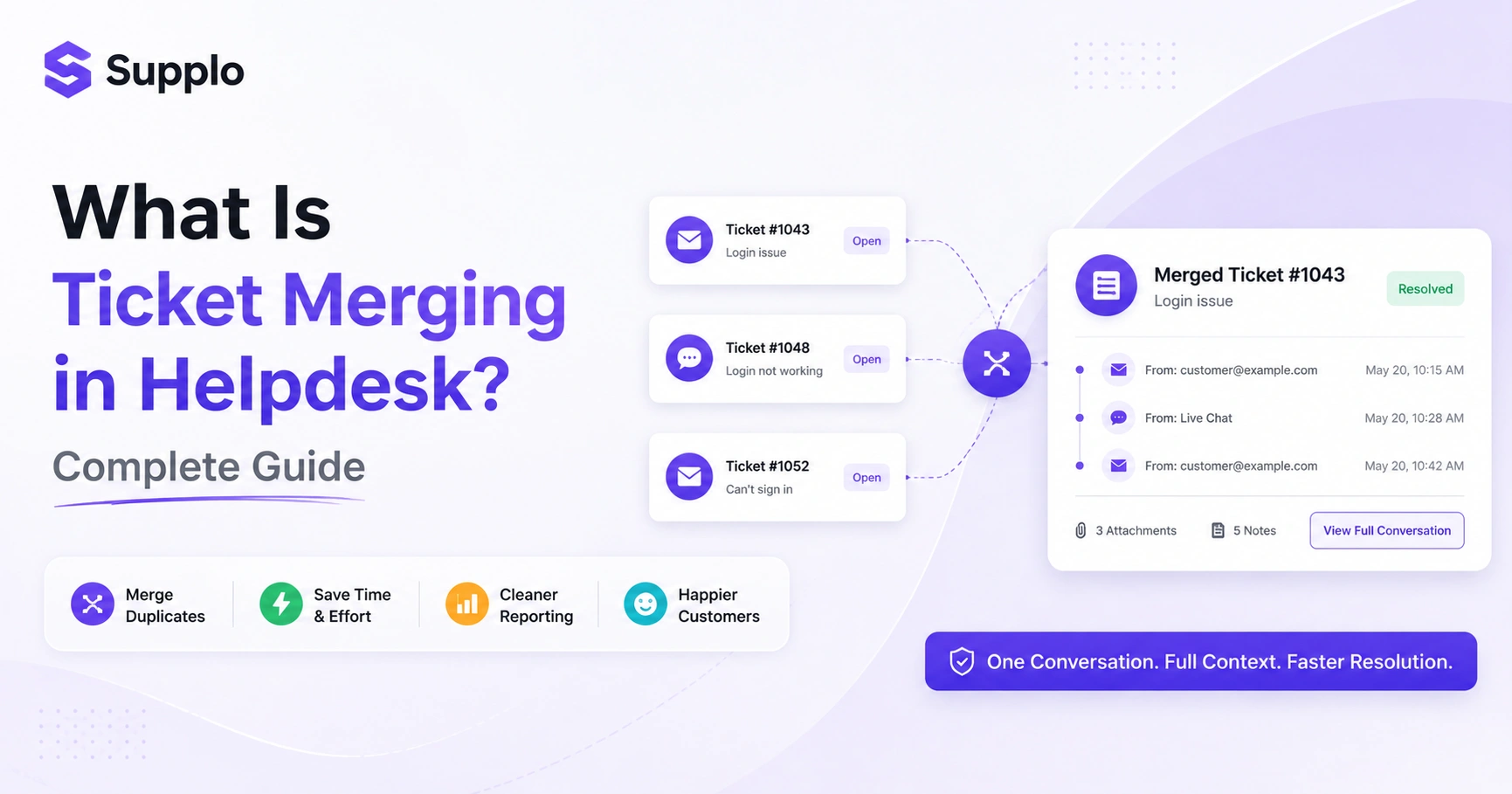
Ticket merging is the process of combining multiple support tickets from the same customer or issue into a single, unified thread. Instead of your team bouncing between five separate emails or chat messages about the same problem, you get one clean record with all the context. This isn't just about tidiness; it's about accuracy, speed and making sure nobody asks the customer, "What was your issue again?" for the third time. This guide will walk you through everything you need to know about this critical helpdesk function.
Quick Answer
- Ticket merging combines duplicate customer conversations into one thread.
- It reduces duplicate work and improves response times.
- Works via automatic rules (same email/subject) or manual selection.
- Benefits include faster resolution, cleaner reporting and better customer experience.
- Avoid merging tickets for different issues, even if they come from the same customer.
What Is Ticket Merging in Helpdesk? And Why It Matters for Your Team
Here's the simple answer: ticket merging is the process of combining multiple support tickets from the same customer or issue into a single, unified thread. Instead of your team bouncing between five separate emails or chat messages about the same problem, you get one clean record with all the context. This isn't just about tidiness; it's about accuracy, speed and making sure nobody asks the customer, "What was your issue again?" for the third time.
This powerful feature prevents duplicate replies and wasted effort from multiple agents. It preserves a full conversation history in one place, ensuring every agent has the complete customer context. Ultimately, it reduces customer frustration from having to repeat themselves, a common pain point in customer service. Ticket merging is an essential function for high-volume support teams handling multi-channel inquiries and a core feature of modern helpdesk software.
How Helpdesk Ticket Consolidation Works
Most helpdesk systems use automatic rules or manual triggers to consolidate tickets. They look for matching identifiers, like customer email, phone number, or a unique conversation ID, then stack the tickets chronologically. Some systems also allow you to merge tickets based on subject line keywords or predefined tags, giving you flexibility without losing data.
Automatic merge rules can be set based on conditions like the same sender or a similar subject line. For specific cases, agents can manually merge tickets by dragging and dropping or selecting them for combination. Crucially, notes, attachments, statuses and timestamps are preserved, maintaining the chronology of each interaction. An unmerge option is equally important for reverting accidental consolidations.
Top Benefits of Merging Support Tickets
Merging tickets reduces response time, eliminates duplicate work and gives your agents a single source of truth for every customer issue. It also artificially reduces your ticket count, making your team's KPIs look better and your actual workload lighter. The biggest win? Your customers feel heard because they don't have to repeat themselves.
The advantages of merging support tickets are numerous:
- Faster resolution: One thread means one context and one answer, leading to quicker problem-solving.
- Reduced agent burnout: Agents spend less time context-switching across duplicate issues.
- Cleaner reporting: Accurate metrics distinguish unique issues from repeat inquiries.
- Better customer experience: Customers appreciate not having to explain their problem repeatedly.
- Cost efficiency: Eliminating duplicate tickets lowers the overall per-ticket cost.
When Should You Merge Tickets? And When Should You Not?
Merge tickets when they're from the same customer about the same issue, even if they came through different channels like email and chat. But avoid merging tickets that are about different issues, even from the same customer; it muddies the water and makes tracking individual problems impossible. The golden rule: if the context serves one answer, merge; if it creates confusion, keep separate.
Merge when:
- The tickets are from the same customer, about the same issue, product, or a related follow-up.
- You have multi-channel duplicates (e.g., an email and a chat about the same bug report).
- A customer replies to an old, resolved ticket with additional information on the original issue.
Don't merge when:
- The tickets concern different issues, even though they are from the same customer.
- They involve different customers or unrelated product lines.
- You require separate SLA tracking for each interaction.
- A customer replies to an old resolved ticket with a new issue (this usually warrants a new ticket).
Helpdesk Solutions with Ticket Consolidation: What to Look For
Not all helpdesk software that merges tickets is built the same. You want a system that offers both automatic rules and manual merging, plus a clean undo option. Look for integrations that unify channels like email, live chat, WhatsApp and social DMs, because the best merging happens when all your conversations are already in one inbox. A clear audit trail and the ability to see merged history are non-negotiable.
When evaluating helpdesk solutions with ticket consolidation, prioritize these features:
- Auto-merge rules: Conditions based on customer ID, email, or subject.
- Manual merge: Simple UI like drag-and-drop or selection for combining tickets.
- Unmerge capability: Essential for correcting mistakes and splitting incorrectly merged threads.
- Multi-channel support: The ability to merge tickets from email, chat, WhatsApp, Instagram and more into a shared inbox that merges all channels.
- Audit log: Transparency to know who merged what and when, crucial for security and accountability.
The Pros and Cons of Ticket Merging You Need to Know
The pros are clear: clean data, faster resolution and happier customers. But there are cons worth noting. Merging can accidentally hide individual issues if you're not careful and it can mess up your reporting if you merge tickets that should have stayed separate. The key is to train your team on when to merge and when to hold off and to use a system that lets you easily undo.
Pros of ticket merging:
- Reduced duplicate tickets and conversation clutter.
- Accurate and complete context for agents.
- Improved agent efficiency and reduced workload.
- Cleaner KPIs and insights (fewer noise tickets).
- Lower operational costs due to streamlined processes.
Cons of ticket merging:
- Risk of losing individual issue tracking if misused.
- Potential for data loss or confusion if merged incorrectly.
- It can complicate SLA tracking if not handled meticulously.
- Requires clear team training to avoid errors.
How Merging Tickets Improves Support Ticket Management
Imagine a customer emails about a billing issue, then follows up on chat, then sends a WhatsApp message. Without merging, three agents might work on the same problem, creating chaos. With merging, all three conversations are combined into one ticket, the agent sees the full story and the customer gets a single, coherent answer. That's the difference between reactive support and proactive, efficient ticket management.
Here are real scenarios where merging tickets improves support ticket management:
- Scenario 1: Multi-channel follow-up: An email inquiry and a subsequent live chat from the same customer regarding the same issue are merged into a single thread, preventing redundant responses and accelerating resolution.
- Scenario 2: Agent shift change: As a shift ends, an agent can merge an ongoing conversation with any prior communications, ensuring the incoming agent has all the necessary history.
- Scenario 3: Resolving technical issues: A customer reports a bug via your chat widget integration but later provides more details via email. Merging these helps the technical team get a complete picture.
- Scenario 4: Account-related queries: If a customer initiates a returns request and then asks about their account status, these should generally remain separate unless they are intrinsically linked. If they're about the same return, then merging is appropriate.
- Scenario 5: Customer follow-up: A customer replies to a closed ticket asking for an update on the original issue. The system can automatically reopen and merge the new message, ensuring continuity.
Combined Support Tickets: Workflow for Your Team
Start by auditing your incoming tickets for duplicates, look for the same customer email, the same issue keywords, or the same order number. Then use your helpdesk's merge feature to combine them into a single ticket, ensuring the newest message remains the primary thread. Finally, tag the merged ticket so your team knows it has been consolidated and assign it to one agent for resolution. This clear workflow applies whether you're dealing with email, chat, or unified email and ticketing.
Here's a step-by-step workflow for combining support tickets:
- Identify Duplicates: Scan incoming tickets for identical customer identifiers (email or account ID) or similar subject lines/keywords. Utilize your helpdesk's search functions or automated rules for ticket deduplication.
- Select Tickets to Merge: Choose the primary ticket (the one you want to keep active) and the secondary ticket(s) to be merged into it. The newer conversation is often designated as the primary one.
- Confirm and Add Note: Execute the merge. Your system should retain all interaction history. Add an internal note explaining why the merge was performed.
- Assign to Agent: Assign the newly merged, comprehensive ticket to a single agent for handling. This prevents confusion and ensures ownership.
- Resolve and Close: Once the issue is resolved within the merged thread, mark the ticket as closed.
Common Mistakes When Consolidating Customer Service Tickets
The most common mistake is merging tickets from different issues into a single ticket, creating a Franken-ticket that's impossible to track. Another is failing to communicate the merge to the team, so agents end up working on the same ticket without knowing it. Avoid these by setting clear merge rules, using tags and training your team on the one issue, one ticket principle.
Here are common pitfalls and how to avoid them:
Mistake 1: Merging unrelated issues. This creates confusing, bloated threads that are hard to resolve and track.
- Avoid by: Establishing clear guidelines: merge only if the issues are identical or directly related.
Mistake 2: Forgetting to notify the team. If agents aren't aware that a ticket has been merged, they might continue working on the now-duplicate separate thread.
- Avoid by using clear internal notes and status updates and ensure your helpdesk prominently displays merge actions.
Mistake 3: Not using tags or custom fields. Without proper labeling, it's hard to track merged tickets or exclude them from certain reports.
- Avoid by: Implementing a Merged tag or a custom field to mark consolidated conversations.
Mistake 4: Ignoring the unmerge feature. If a mistake happens, being stuck with a bad merge can cause more problems than it solves.
- Avoid by: Ensuring your helpdesk offers an unmerge option and training staff on its use.
Mistake 5: Merging across different SLAs. If two tickets with different Service Level Agreements are merged, it can skew your performance metrics.
- Avoid by: Understanding how your helpdesk handles SLAs for merged tickets and setting rules accordingly.
Choosing the Best Merge Ticket Software: Key Features Beyond the Merger
The best merge ticket software does more than combine tickets; it gives you a unified inbox across email, live chat, WhatsApp, Instagram and Telegram, plus a knowledge base that learns from your merged conversations. Look for a system that offers flat pricing (not per seat), so your costs don't spike as your team grows. Supplo, for example, brings all your channels into one thread-based inbox, with an AI agent that learns from merged conversations and resolves up to 80% of incoming tickets automatically and at a flat $0.04 per resolution, not the $0.99 legacy tools charge.
Consider these key features when selecting helpdesk software that merges tickets:
- Unified inbox: Seamless integration of all communication channels (email, chat, social media) into a single, intuitive interface.
- Intelligent AI agent: Automates responses and resolutions based on past conversations, including merged tickets, improving efficiency.
- Knowledge base integration: A self-learning knowledge base that constantly improves by absorbing information from your support interactions.
- Transparent, flat pricing: Avoids per-seat fees that can make budgeting unpredictable as your team grows.
- Robust multi-channel support: The ability to merge conversations originating from any channel without data loss.
Why Merge Helpdesk Tickets? The ROI of a Clean and Unified Inbox
Merging tickets directly reduces the average handling time per customer, cuts duplicate work and improves your first-contact resolution rate. The ROI shows up in lower operational costs, higher agent satisfaction and better customer retention. When you're not paying agents to answer the same question twice, you're saving money and improving service quality at the same time. This translates to measurable benefits for your business and a cleaner, more efficient workspace.
The ROI of effective helpdesk ticket consolidation includes:
- Significant cost savings: Eliminating duplicate work directly lowers your per-ticket resolution cost.
- Increased time savings: Agents spend less time sifting through repeats and more time on high-value problem-solving.
- Improved customer retention: Faster, accurate responses lead to higher customer satisfaction and loyalty.
- Boosted agent morale: Reduced frustration from repetitive tasks leads to a more focused and productive team.
- Enhanced scalability: A well-organized, unified inbox can handle higher ticket volumes more efficiently as your business grows, especially with flat pricing for your support team.
Supplo is not affiliated with any app or website. Please follow each app's terms and local regulations.
Ready to try merging tickets in a tool that actually works?
See how Supplo combines email, live chat, WhatsApp, Instagram and Telegram into one clean inbox. Start free with a 14-day trial, no credit card needed.
Overwhelmed by duplicate tickets? Let AI handle the merge.
Supplo's AI agent automatically resolves up to 80% of incoming tickets and intelligently merges duplicates. If you're stuck with a mess, we'll help you clean it up.
FAQ
Can merging tickets cause me to lose data?
No, most modern helpdesk systems preserve all notes, attachments and timestamps when you merge tickets. But always check your system's audit log to be sure.
Is it legal to merge customer support tickets?
Yes, merging tickets is a standard operational practice. However, you must comply with your local data privacy regulations (such as GDPR or CCPA) regarding how you store and access customer data. Supplo is not affiliated with any app or website. Please follow each app's terms and local regulations.
What happens if I merge tickets from two different customers?
That's a mistake. It mixes up their data, creating a privacy risk. Most systems have safeguards, but you should always double-check before merging.
Can I unmerge tickets after merging?
Yes, many modern helpdesk platforms offer an unmerge feature. It's a lifesaver for accidental merges, but it's not universal; check before you commit.
Why does my helpdesk software not allow merging?
Some older or cheaper ticketing systems lack merge features. If you're consolidating customer service tickets regularly, you need a system that handles it natively.
Does merging tickets affect my SLA metrics?
It can, if not handled carefully. Merged tickets take on the timestamp of the primary ticket, which can affect SLA calculations. Use a system that tracks merged ticket history separately.
What's the difference between merging and linking tickets?
Merging combines tickets into a single record; linking keeps them separate while connecting them for reference. Use merging for same-issue duplicates, linking for related but different issues.
Compliance line: Supplo is not affiliated with any app or website. Please follow each app's terms and local regulations.


