On this page
Let's cut through the noise. You've probably seen Intercom's "$74/month" starting price and thought, "Okay, that's manageable." But here's the thing nobody tells you upfront: that number is basically a teaser. The moment you need automation, AI, or multi-channel support, which, let's be honest, is pretty much everyone, your actual bill takes a hike.
This article breaks down how much an intercom costs per month for real, exposes the fees they'd rather you didn't notice, and points you to a flat-rate alternative that could save you 80%. Because surprise invoices? Nobody needs those.
Whom this is for: Small-to-mid support team leaders trying to budget without getting whiplash from unpredictable billing.
Who can skip it: Teams with budgets that comfortably absorb $2,000+/month for a 10-person setup.
Quick Answer:
- Intercom starts at $74/month (Essential plan), but a real 5–10-person team with AI is looking at $1,000-$3,000+ per month.
- Fin AI costs $0.99 per resolution, which is 96% more than Supplo's $0.04 per resolution.
- Per-seat and per-resolution fees stack up quickly; flat-rate alternatives give you actual-cost predictability.
- You can switch from Intercom in under 30 minutes without losing your workflow.
- Supplo is not affiliated with any app or website. Please follow each app's terms and local regulations.
How Much Is Intercom a Month? Decoding the Sticker Price
Straight answer: Intercom's starting price is $74/month for the Essential plan, but that buys you one seat with minimal features. Once you add Fin (their AI agent), more team members, or multi-channel support, WhatsApp, email, the works, your monthly cost jumps to $500–$1,500+ for most small-to-mid teams. That "starting at" price is basically a foot in the door.
Here's what nobody tells you in the demo:
- Essential plan ($74/mo): 1 seat, basic chat widget, no AI, no automations. You're basically paying for a fancy chat bubble.
- Pro plan (~$436/mo for 10 seats): Now you get ticketing, workflows, and multi-channel, but Fin is still an extra cost.
- The real number: For a 5–10 person team using AI, you're rarely under $800/month. Often way higher.
Curious what you'd actually save? Try Supplo free for 14 days, no credit card needed. Set up your live chat, AI agent, and multi-channel inbox in minutes.
Intercom Plans and Pricing – What You Actually Get at Each Tier
Intercom offers three main plans: Essential, Pro, and Premium. Here's the short version: Essential is bare-bones; Pro adds the good stuff (automations, reporting, multi-channel), but still charges per seat and per AI resolution; Premium adds SSO and HIPAA but costs thousands monthly. Most small support teams need Pro but end up paying seat fees that multiply like rabbits.
The breakdown:
- Essential ($74/seat/month): Chat only. No ticketing. No AI. It's hard to recommend unless you're a solo founder with no automation needs.
- Pro (starts ~$39/seat/month, but requires 10+ seats minimum): Now we're talking, ticketing, campaigns, reporting. But the seat minimum means you're paying for 10 people even if you have 6.
- Premium (custom quote): Advanced security, priority support. Usually $100+/seat. Great if you need HIPAA, but overkill for most.
To use Intercom Fin, you must first be on the Pro plan, so the AI is a costly add-on rather than an included feature.
Intercom Fin Pricing & AI Cost – The Hidden Meter That Burns Budget
Here's where things get sneaky. Intercom bills Fin per resolution at roughly $0.99 each. Doesn't sound like much until you do the math. A team handling 2,000 AI conversations a month? That's $1,980, just for the AI. Not the seats, not the channels, just the AI.
What makes this even trickier: per-resolution pricing means your costs can spike unpredictably. Product launch? Seasonal sale? Black Friday? Your AI bill could double overnight. Supplo's AI agent costs $0.04 per resolution, making Fin roughly 96% more expensive per resolution.
Why it hurts:
- Fin requires the Pro plan first, so it's an add-on, not a feature you get out of the box.
- A "resolution" isn't a message; it's a solved conversation. The definition can be vague, which means your bill might be higher than you expect.
- Seasonal spikes (Black Friday, holiday launches) can wreck your budget without warning.
Supplo's flat-rate AI pricing removes the guesswork; you pay $0.04 per resolution, not $0.99.
The Real Intercom Cost Breakdown: Seats, Resolutions, and Add-Ons
An Intercom bill is rarely just the seat price. It's a layered cake of costs, and you don't realize how many layers there are until the invoice arrives.
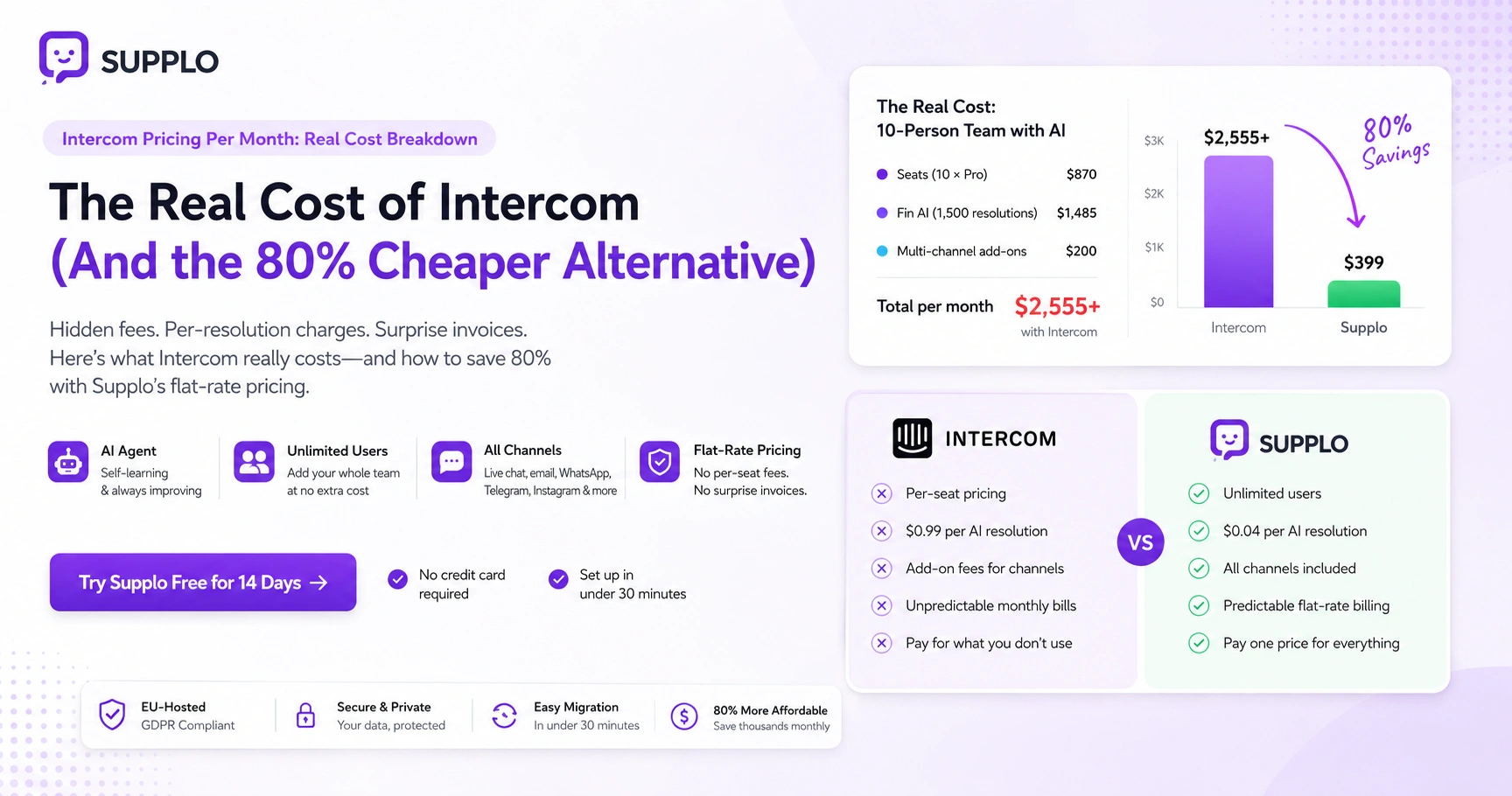
Here's a realistic example for a 10-person team:
- Seats: 10 users on Pro at ~$87/mo each = $870
- Fin AI: 1,500 resolutions at $0.99 = $1,485
- Multi-channel add-ons (WhatsApp, email routing): often extra or bundled at the Pro level, let's say $200
- Total real cost: $2,555/month
That doesn't include premium support upgrades or advanced reporting. And it's definitely not the $74/month they advertise.
How to Understand Your Own Bill:
- Count your active seats and multiply by per-seat cost (Pro = ~$39/seat with 10-seat minimum, but actual cost varies).
- Estimate your monthly Fin resolutions and check your usage over the last 3 months.
- Add multi-channel add-on fees (WhatsApp, email, etc.).
- Include premium support upgrades if applicable.
- Compare against flat-rate alternatives to see your potential savings.
Intercom vs Other Chat Pricing – Where the Value Breaks Down
When you compare Intercom to other chat pricing, the big difference isn't the features, it's the pricing model. Most competitors charge per seat or per agent. Intercom does that, plus layers on per-resolution AI fees. For small teams with high ticket volumes, that makes Intercom one of the most expensive options out there.
What to watch for:
- Per-seat pricing: Intercom charges per seat and per resolution. Many alternatives use either model.
- AI costs: Intercom Fin ($0.99/resolution) vs Supplo ($0.04/resolution). Do the math, it's not close.
- Multi-channel fees: Some competitors bundle all channels at one price. Intercom often charges extra.
- The takeaway: "When your AI bill surpasses your seat cost, the pricing model is working against your growth."
A "cheap" entry point can hide ballooning operational costs. Don't be fooled by the starting price; look at what you'll actually pay in month 3.
Compare Intercom Pricing to a Flat-Rate Alternative (Supplo)
Here's the pitch, but it's backed by numbers. Supplo offers a flat monthly rate for unlimited users, a self-learning AI agent, and multi-channel support (live chat, email, WhatsApp, Telegram, Instagram, Facebook)—no per-seat fees. No per-resolution meter ticking away in the background.
The comparison:
- Intercom (10-person team with AI): $2,000+/month, unpredictable billing
- Supplo (same team): One flat fee, AI resolutions at $0.04 each
Supplo includes:
- AI agent and shared inbox in one flat rate
- Multi-channel routing, WhatsApp, Telegram, Instagram, Facebook Messenger, email, live chat widget
- Translation capabilities built in
- No seat limits, add agents without increasing your base plan
- EU-hosted, flat-rate billing, no surprise invoices
To see a direct breakdown, compare Intercom and Supplo side-by-side.
Why Intercom's "Per-Resolution" AI Model Hurts Growing Teams
Per-resolution pricing sounds fair in theory. "You only pay for what you use." But here's the problem: as your team grows, your AI costs skyrocket. A product launch means more tickets. More tickets mean more resolutions. More resolutions mean a bigger bill.
The math works against you:
- Intercom, not you, defines resolution counts. Vague definitions can inflate your bill.
- Fixed budgets can't handle 2x–3x AI cost spikes during peak seasons.
- The model disincentivizes AI adoption; every new conversation costs money.
- Supplo's flat-rate AI removes this friction entirely.
Troubleshooting a Bill Spike:
- Check if your resolution count rose due to a product launch or seasonal event.
- Review Intercom's definition of a "resolution" (sometimes partial answers count).
- Calculate the percentage of your budget consumed by AI costs.
- If AI costs exceed seat costs, a flat-rate alternative makes more sense.
If your Intercom bill spiked last month, it's not your fault; it's the pricing model. Switch to Supplo and lock in flat-rate AI. Start your free trial and see the difference in your first week.
Landing Page Reality Check – What Intercom Doesn't Tell You in the Sales Demo
Intercom's landing page is beautiful. The features look impressive. The demo feels slick. But there's plenty they don't volunteer.
What they won't tell you upfront:
- The $74/month plan is essentially useless for any team needing automation or AI.
- You won't see Fin's per-resolution cost until you're already demoing Pro.
- Multi-channel routing is locked behind Pro or Premium.
- Add-ons such as premium support or advanced security aren't included in the standard pricing.
Intercom's demo is designed to impress, not to enlighten your finance team about per-resolution fees.
Transparency stops where the low price tag appears. If you need a flat-rate, all-in-one solution, the demo won't show it to you.
Is Intercom Worth the Monthly Cost for Small-to-Mid Support Teams?
Honest take: for teams with fewer than 20 agents, Intercom is often overkill. The per-seat and per-resolution model means you're either:
- Paying for capacity you don't fully use, or
- Getting penalized for growth you do experience
Neither is great.
When Intercom makes sense:
- You have more than 20 agents with dedicated ops budgets
- You absolutely need HIPAA compliance or SSO
- Your team is fine with variable monthly costs
When it doesn't:
- You're a small-to-mid team (under 20 agents)
- You want predictable month-to-month costs
- You don't need premium enterprise features
Decision Checklist:
- Do you have more than 20 agents? Intercom might scale better.
- Is your AI budget unpredictable each month? Consider flat-rate.
- Are you paying for channels you don't use? Review your add-ons.
- Could your team benefit from unlimited seats at a fixed price? Supplo fits.
The Smarter Monthly Investment – Predictable Pricing, No Surprise Invoices
A flat-rate model removes the anxiety from support budgeting. You pay one price for all features, live chat, shared inbox, AI agent, multi-channel routing, and top up only for AI resolutions at $0.04 each. No seat counting. No resolution caps. No hidden add-ons.
What Supplo's flat rate includes:
- Unlimited users across your team
- All channels (live chat, email, WhatsApp, Telegram, Instagram, Facebook Messenger)
- Self-learning AI agent
- Shared inbox with workflow automation
- Translation capabilities
- Knowledge base for self-service
Payment flexibility: Crypto, Binance Pay, Payeer, GCash, AmanPay, QIWI Wallet, DOKU, Nigeria and South Africa cards, Skrill, Payoneer.
Check Supplo's pricing page for a clear, no-nonsense breakdown.
How to Switch from Intercom Without Losing Your Workflow
Migrating doesn't mean starting from scratch. Supplo offers straightforward import paths for your knowledge base, chat history, and agent workflows. Both platforms support multi-channel routing and shared inboxes, so your team can maintain the same response cadence, just without the surprise invoices.
Typical migration time: 15–30 minutes for most teams.
Steps to Migrate:
- Export your Intercom knowledge base as HTML or CSV.
- Import it into Supplo's knowledge base (the AI agent learns from your existing content immediately).
- Recreate shared inbox rules and automation workflows.
- Connect your channels (WhatsApp, Telegram, Instagram) via Supplo's integrations.
- Test your AI agent with a few real tickets.
- Notify your team and start your free trial.
Check out PVAPins' case study for a real-world migration example.
Ready to stop guessing your monthly support costs? Supplo gives you one flat rate, unlimited users, and a self-learning AI agent. Sign up for free and migrate in less than an hour.
Key Takeaways:
- Intercom's $74/month starting price is misleading; real costs for small teams often exceed $1,000/month.
- Fin AI at $0.99/resolution is 96% more expensive than Supplo's $0.04/resolution.
- Per-seat and per-resolution models penalize growth; flat-rate pricing provides predictability.
- Supplo offers unlimited users, multi-channel support, and a self-learning AI agent at a flat rate.
- You can switch from Intercom in under 30 minutes without losing workflow or data.
FAQ
Can I try Supplo before switching from Intercom?
Yes. Supplo offers a free trial with no credit card required. You can test the AI agent, shared inbox, and multi-channel routing with your own contacts before committing.
How do I migrate my Intercom knowledge base to Supplo?
You can export your Intercom articles and import them directly into Supplo's knowledge base. The AI agent will immediately learn from your existing content.
Does Supplo support WhatsApp, Telegram, and Instagram?
Yes. Supplo connects to WhatsApp, Telegram, Instagram DMs, Facebook Messenger, and email, all in one inbox. There are no per-channel add-on fees.
What happens to my existing chat history during migration?
Supplo allows you to export and retain your chat history. The migration process is designed to preserve your team's workflow continuity.
Is Supplo EU-hosted?
Yes. Supplo is built and hosted in the EU, in compliance with GDPR standards for data privacy and security.
How is Supplo cheaper than Intercom?
Supplo charges a flat monthly rate for unlimited users and features, while Intercom charges per seat, per resolution, and per add-on. For a 10-person team with moderate AI use, Supplo is typically 80–90% less than Intercom.
Can I use Supplo for free before paying?
Yes. Start with a free trial to evaluate the platform. No credit card is required.
Is Intercom's per-resolution pricing fair for small teams?
It depends on your ticket volume. For teams with fewer than 1,000 AI conversations per month, it might be manageable. But for growing teams, costs can spike unpredictably. Flat-rate alternatives like Supplo avoid this risk.
Compliance line: Supplo is not affiliated with any app or website. Please follow each app's terms and local regulations.