On this page
Let's be real, your customers don't care about your average handle time. They care about one thing: how long they wait for that first reply. Live chat response time is the single strongest predictor of churn. Every extra minute of first-reply delay? That's another customer clicking away. If you fix nothing else this quarter, fix this.
Whom this is for: Support managers pulling their hair out. Small-to-mid teams stretched thin, solo operators who want faster customer service without begging for budget or headcount.
When to use these strategies: When your current response time creeps past 60 seconds on live chat. When your team juggles five different tools. When you're scaling and feeling every bit of drag.
When NOT to use these: If you're already hitting under 30 seconds on first replies and your channels aren't siloed, you probably need minor polish. Don't fix what isn't broken.
Quick Answer
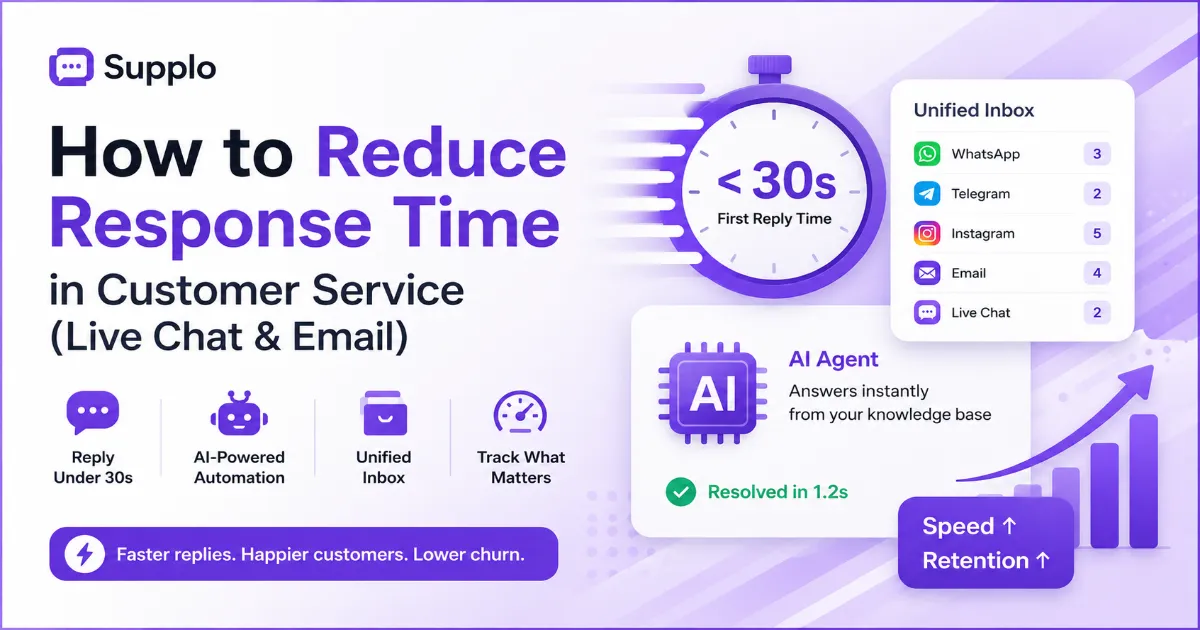
- Focus on First Reply Time (FRT): Under 30 seconds is the target for live chat; every extra second increases abandonment.
- Automate the obvious: Use a self-learning AI agent to answer the top 20 repetitive questions in milliseconds.
- Unify your inbox: Collapse WhatsApp, Telegram, Instagram, email, and live chat into a single workspace to eliminate context switching.
- Track the right metrics: FRT, Maximum Wait Time, and abandonment rate – not vanity stats like average handle time.
- Start today: Connect your channels, build a short knowledge base, and turn on AI-first routing.
Why Live Chat Response Time is the Only Metric That Matters for Retention
Your customers on live chat expect a reply within 30 seconds. Push that to 60 seconds, and satisfaction drops by roughly 40% based on industry benchmarks. Reducing average response time in chat doesn't just bump your CSAT score; it also directly boosts conversion rates in sales-oriented chats.
"We'll get back to you in 24 hours" doesn't cut it anymore. Real-time chat support is table stakes now. If your live chat customer service speed is slow, you're actively bleeding customers.
Fix response time, fix retention. Simple as that. It's the one lever that touches every other metric you care about.
The 3 Silent Killers of Live Chat Customer Service Speed (And How to Fix Them)
Most teams blame "too many chats" for slow response times. But the real culprits? They're invisible. Routing chaos. Context-switching between tools. Repetitive manual typing. Fix these three, and you remove the friction long before you need a bigger team.
Killer #1: Multi-tool chaos. Juggling a separate inbox for email, another for WhatsApp, and a third for Instagram DMs forces agents to constantly switch contexts. Every switch costs 10-15 seconds of lost focus. Fix: Use a unified inbox that shows all conversations side-by-side. No alt-tabbing.
Killer #2: No pre-qualification. Every incoming chat hits a human agent first, even the "what are your hours?" questions that a self-learning AI agent could answer instantly. Fix: Route all inbound chats through an AI first. Let it handle Tier-1 questions in under 2 seconds.
Killer #3: Manual typing for common replies. Agents retype the same shipping policy or reset the link ten times a day. It's mind-numbing and slow. Fix: Create canned responses for your top 10 FAQs. Saves 5-10 seconds per reply, and hours per week per agent.
How to Reduce Live Chat Response Time Without Hiring More Agents
You don't need more reps. You need a better workflow. The cheapest path to instant chat support? Route 60-80% of repetitive questions to an AI agent. Keep humans for the nuanced escalations. Result: your human team handles 80% fewer chats, so their response time drops to near-zero.
A shared inbox that unifies email, Telegram, and WhatsApp eliminates the "where did that message go?" delay. Canned responses save 5-10 seconds per reply, which compounds to hours per week per agent. And an AI chatbot response time? Milliseconds, not minutes, for common questions.
Want proof? Check out how real teams have done it in our case studies.
Curious how a unified inbox can drop your FRT? Try the approach, no commitment needed.
Real-Time Chat Support vs. Tickets: Why Speed Demands a Unified Inbox
If your email, live chat, and social DMs live in separate silos, you can't deliver real-time chat support. Period. Your agents are physically tab-switching, and that kills speed. A unified inbox gives every conversation the same priority and context, turning asynchronous messages into fast, threaded replies.
A unified view prevents agents from serving one customer on chat while missing a high-priority email. Multi-channel routing (WhatsApp, Telegram, Instagram DM, Facebook Messenger) must be consolidated into a single queue to maintain customer service efficiency. Real-time chat support works best when the agent can see the full customer history regardless of channel origin.
When every channel feeds into the same queue, no message slips through. That's the foundation of speed.
How an AI Agent Cuts Response Time by Automating the Obvious
A self-learning AI agent that answers from your knowledge base can reduce average response time from minutes to milliseconds for the top 20% of repetitive questions, such as password resets, order status, and business hours. It never puts a customer on hold, and it learns from corrections, getting faster over time.
AI customer service response time is typically 0.5–2 seconds for known queries. The AI reduces support response time for tier-1 questions, freeing humans to focus on complex cases. Can an AI agent improve response speed over manual handling? Roughly 20x for common intents.
In other words: let the robot handle the boring stuff. Your customers won't notice the bot; they'll only notice how quickly the reply came.
Chat Response Metrics You Should Actually Track (Not Vanity Stats)
Stop staring at "average handle time." Please. The metrics that matter for chat response metrics are First Reply Time (FRT) and Maximum Wait Time. FRT tells you how fast you are. The maximum wait reveals your reliability floor. Track these daily, not monthly.
- First Reply Time (FRT): Under 30 seconds is gold; under 60 seconds is acceptable for non-critical support.
- Abandonment rate: If more than 5% of customers leave before engaging, your speed is too slow.
- AI deflection rate: A high deflection rate means your AI customer interactions are successfully resolving tickets, which directly boosts human response speed.
Track these three, and you'll know exactly where your support speed stands and what to fix.
Why Customer Service Efficiency Drops at Scale (and How to Prevent It)
Customer service efficiency naturally degrades as volume grows. Why? Because manual processes break under pressure. The fix is layered automation: a self-learning AI agent that catches the low-hanging fruit, combined with a shared inbox that prevents any message from slipping through the cracks.
Efficiency drops because agents spend 30% of their time searching for answers across tools. AI for customer service efficiency means the agent has the answer pre-loaded based on the customer's intent. A flat-rate pricing model (like Supplo's) means you can scale automation without per-seat cost anxiety.
The moment you hit 100+ chats a day, manual processes will crack. Plan for it now.
The Quick Customer Response Strategy That Works
The fastest strategy is a two-tier system: AI answers the obvious in under 2 seconds, humans handle the rest with full context from a unified inbox. If the AI doesn't know the answer, it hands off the conversation with the transcript so the human never asks, "What seems to be the problem?"
Pre-route chats by intent: billing, technical, sales, each to the right queue instantly. Use conversational AI to gather details before the human joins (order number, account email). The quick customer response strategy relies on eliminating dead air: no "please hold while I check" moments.
When you combine AI-first intake with contextual handoffs, your response time plummets.
How Supplo's Self-Learning AI Agent Reduces Response Time on WhatsApp, Telegram & Email
Supplo's AI agent lives inside your knowledge base and learns from every correction. On WhatsApp customer support, Telegram support, Instagram DM, or email, it answers questions instantly, and when it's wrong, your team corrects it once, and it never makes the same mistake again. That means faster customer service response on every channel, not just live chat.
Supports WhatsApp, Telegram, Instagram DMs, Facebook Messenger, and email through a single inbox. Each AI resolution costs $0.04 (roughly 96% cheaper than alternatives like Intercom Fin). Billing is a flat monthly rate, with no per-seat fees or per-resolution meter.
This is the fastest way to reduce response time without hiring more people.
Customer Service Response Time Optimization: A 5-Step Setup You Can Do Today
You don't need a month-long deployment. You can reduce customer service response time today:
- Unify your inbox: Connect email, live chat, WhatsApp, Telegram, Instagram, and Facebook into one workspace.
- Build a knowledge base. Write short, scannable articles for the top 20 FAQs you answer daily.
- Turn on your AI agent. Enable the self-learning AI agent and let it answer from the knowledge base.
- Set up automatic routing: Route all inbound chats through the AI before reaching a human, by channel and intent.
- Train your team. Teach agents to let the AI handle Tier-1 and to correct it when needed.
That's it. Implement these five steps, and you'll see FRT drop from 2+ minutes to under 30 seconds within a week.
Ready to see it in action? Start your free trial at Supplo – no credit card, no per-seat surprises.
Common Pitfalls That Ruin AI Chatbot Response Time (And How to Avoid Them)
AI chatbot response time is only as good as your knowledge base. If your answers are vague, the AI will give vague replies. If you don't review "I don't know" logs, the AI won't learn. And if you deploy it without testing, it will guess and guess wrong.
- Pitfall #1: Old or incomplete knowledge base entries cause the AI to hesitate or hallucinate. Fix: Review your KB monthly.
- Pitfall #2: No fallback to humans when the AI can't answer, it should hand off, not leave the customer stuck. Fix: Always set a clear human takeover trigger.
- Pitfall #3: Skipping the "correction loop" always flags AI responses that customers rephrase or escalate. Fix: Use a shared inbox to flag and retrain.
Regularly audit AI customer interactions. One bad guess can erode trust, but with proper oversight, your AI becomes faster every day.
Key Takeaways
- First Reply Time (FRT) is the only speed metric that correlates with retention target under 30 seconds.
- Automate the obvious: a self-learning AI agent handles Tier-1 in milliseconds.
- Unify your inbox: channel silos kill speed more than volume does.
- Track FRT, Maximum Wait Time, and abandonment rate, ignoring vanity metrics.
- You can implement the 5-step setup today without new hires or budget blowouts.
FAQ
What is a good first reply time for live chat?
A first-reply time of under 30 seconds is considered excellent. Under 60 seconds is acceptable for non-urgent requests. Anything over 2 minutes leads to high abandonment rates.
Can an AI agent really reduce response time?
Yes. For common questions like order status or password resets, an AI customer service agent can reply in under 2 seconds. This frees your human team to handle complex issues, dramatically improving overall response speed.
What's the cheapest way to speed up customer service?
Unify your channels into one shared inbox first. Without that, agents waste time switching between tools. Second, build a knowledge base and let a self-learning AI agent answer the top 20% of repetitive questions.
Does live chat response time affect sales?
Absolutely. In sales-oriented chats, even a 60-second delay can significantly reduce conversion rates. Fast customer service response directly improves customer trust and purchasing confidence.
What metrics should I use to measure chat speed?
Track First Reply Time (FRT) and Maximum Wait Time at a minimum. Focus on abandonment rate and AI deflection rate to see if your automation is helping or hurting.
How do I know if my customer service is too slow?
Check your abandonment rate. If more than 5% of customers leave before connecting with an agent, your response time is too high. Compare your FRT to the last 30 days.
Will automating responses make my support feel robotic?
Not if you do it right. A self-learning AI agent that hands off seamlessly to a human when needed feels fast, not robotic. The key is having a clear "human takeover" trigger after the AI gathers context.
Compliance note: Supplo is not affiliated with any app or website. Please follow each app's terms and local regulations.