On this page
Every support team knows the feeling. Tickets stack up. Response times start slipping. And the only solution anyone seems to suggest is hiring more people. But let's be real, adding headcount is expensive, it's slow, and frankly, it's often a band-aid on a bullet wound. The real issue? Most of those tickets are the same questions, over and over, that a decent AI could handle in seconds.
Who this is for: Small-to-mid support teams (5–30 people) who want to cut ticket volume without growing payroll.
When to use: Your team fields the same refund, shipping, password-reset, and policy questions every single day.
When NOT to use: If you have zero knowledge base articles, or your product is so new that every ticket is a unique edge case humans need to figure out.
Quick Answer
- Deploy a self-learning AI agent to handle 20–40% of repetitive tickets autonomously (passwords, order lookups, ETAs).
- Centralize all channels (email, WhatsApp, Telegram, Instagram, Facebook) into one shared inbox, no more lost tickets.
- Build a living knowledge base that the AI references; update it weekly based on unanswered questions.
- Use skills-based routing so the right human gets the complex tickets, not the simple ones.
- Track AI resolution rate and deflection rate, not just total ticket count.
The Real Cost of Adding Headcount to Handle Support Tickets
Hiring more agents feels like the obvious answer when ticket volume spikes. But here's what nobody talks about: between salary, training, payroll taxes, and per-seat software fees, one new hire costs $45k–$60k annually. For small-to-mid teams, that math doesn't work. Worse, it hides the real problem; most tickets are repetitive questions that your existing team already knows by heart.
- The average blended cost of a single support ticket runs $5–$15, according to industry benchmarks (Gartner).
- Hidden costs include onboarding and ramp time, expect 3–6 weeks before a new agent is fully productive.
- Without structural changes, ticket volume grows 20–40% year over year for growing businesses.
- Flat-rate pricing avoids the per-agent trap: you pay for the platform, not for every person you add.
Here's the thing: if you don't address the root cause, you're just throwing bodies at a leaky bucket.
How an AI Agent for Support Cuts Repetitive Tickets Instantly
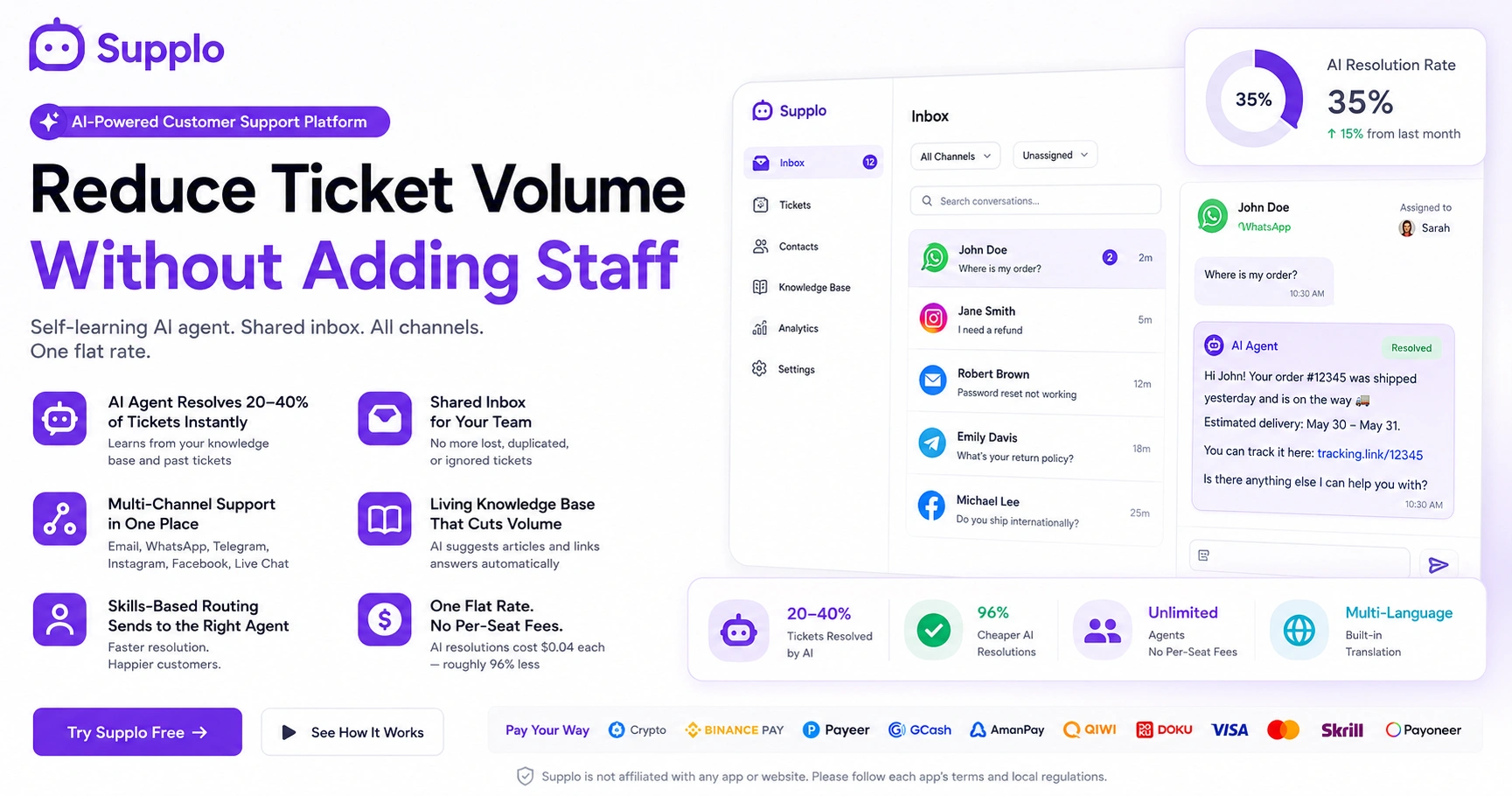
A proper AI agent for support doesn't just parrot back "what's my refund status." It actually learns from your knowledge base, past tickets, and customer context to resolve issues without a human touching them. Think password resets, order lookups, shipping ETAs, and policy questions, handled instantly. Most teams see 20–40% of inbound tickets resolved fully autonomously.
- Real-time slot: The AI resolves in under 10 seconds vs. 5–10 minutes for a human.
- AI triages: If it can't resolve, it routes the conversation with full history to the right agent.
- No per-resolution fees: Flat rate means volume spikes don't hit your wallet.
- Works across channels: Telegram, WhatsApp, Instagram, Facebook, email, and your web widget.
"In our first two weeks, the AI resolved 35% of all inbound tickets. That's 35% of our team's workload gone without hiring anyone.", Real team result (see case studies)
Why Automating Customer Service with a Self-Learning AI for Tickets Beats Static FAQs
Let's be honest, static FAQ pages are where good intentions go to die. People click once, don't find what they need, and immediately fire off a ticket. A self-learning AI for tickets is different. It improves each time it encounters an unfamiliar question, updating its responses based on resolved tickets and new knowledge base entries. After 6–8 weeks, it becomes a smarter, faster version of your best agent.
- Self-learning doesn't mean "training required." It learns from real conversations automatically.
- Detects knowledge gaps: The AI surfaces missing articles for humans to write.
- Handles multiple languages natively with a built-in translate feature.
- No chatbot script hell: It's generative, not a rigid flowchart with dead ends.
The result? Your automated customer service system gets smarter every day without extra work from your team.
The Role of a Shared Inbox for Customer Support in Reducing Team Friction
When tickets live in individual email inboxes, they get lost, duplicated, or ignored. It's just how it works. A shared inbox for customer support collapses all messages, email, chat, and social DMs into one queue. Agents see who's working on what, internal notes stay private, and nothing slips through. Friction drops. Response time drops. Repeat tickets drop.
- Assign and reassign tickets with one click; view status at a glance.
- Collision detection prevents two agents from replying to the same ticket.
- Internal notes for handoffs without messy CC threads.
- Bulk actions for repetitive follow-ups (e.g., "we're looking into it").
A shared inbox isn't a nice-to-have; it's the backbone of any ticket reduction strategy.
Centralize Customer Communication to Stop Tickets from Falling Through the Cracks
Fragmented communication tools create blind spots. Here's a common scenario: customers email you, DM on Instagram, message on WhatsApp, and start a live chat. If your team can't see it all in one place, someone gets ignored. Period. Centralize customer communication in a single workspace so every channel feeds into a single ticket system.
- Use WhatsApp, Telegram, Instagram DMs, Facebook Messenger, email, and your web widget in one view.
- A full conversation history means no need to ask customers to repeat themselves.
- Routing rules let you direct specific channels to specific teams or agents.
- AI agent intercepts first, then escalates with full context.
Nothing falls through the cracks when every channel is visible in one team inbox.
Build a Knowledge Base That Actually Reduces Ticket Volume Without Adding Staff
Most knowledge bases are written once and then forgotten in some dark corner of your website. An effective way to reduce ticket volume without adding staff knowledge base is to use living documentation, updated by AI when it detects new recurring questions, and surfaced proactively in chat and email responses. If customers can self-serve before they need to create a ticket, that's a permanent reduction.
- AI suggests missing articles based on unanswered tickets.
- Agents can publish quick answers to the KB with one click.
- Knowledge base auto-links to relevant AI agent responses.
- Track which articles deflect tickets vs. which are ignored.
Your knowledge base becomes a self-improving resource that cuts volume without adding staff.
Improve Agent Collaboration by Routing the Right Tickets to the Right People
When the billing specialist keeps getting shipping questions, and the support generalist handles refund escalations, everyone loses time. Improve agent collaboration by setting up skills-based routing: the AI reads the ticket, identifies intent, and instantly sends it to the right person or team. No manual triage needed.
- Route by channel, product line, issue type, or customer tier.
- Agents see ticket history and internal notes before replying.
- No more "who owns this?" Slack threads.
- Reduces average resolution time by 30% or more.
Skills-based routing turns your shared inbox from a chaotic free-for-all into a well-oiled machine.
Streamline Customer Queries with Multi-Channel Routing and One Flat Bill
Streamlining queries means one inbox, one AI agent, one knowledge base, and one predictable bill. Most platforms charge per agent, per channel, and per resolution. A flat-rate team inbox with multi-channel routing and an AI agent removes that complexity. No surprise overage charges when volume spikes.
- Channels included: email, live chat, WhatsApp, Telegram, Instagram, and Facebook.
- AI resolutions cost $0.04 each (roughly 96% less than comparable platforms).
- No per-seat fees: Add the whole team at no extra cost.
- Payment methods: Crypto, Binance Pay, Payeer, GCash, AmanPay, QIWI Wallet, DOKU, Nigeria and South Africa cards, Skrill, Payoneer.
See all features and pricing for details.
Compliance line: Supplo is not affiliated with any app or website. Please follow each app's terms and local regulations.
Track the Right Metrics – Not Vanity Numbers – to Prove Volume Is Dropping
Don't obsess over total ticket count if you're a growing business. That number will go up no matter what you do. Instead, track tickets per customer, first response time, and AI resolution rate. If AI handles 30% of tickets today and 40% next month, you're reducing volume without a single hire. That's the real win.
- AI resolution rate: Percentage of conversations resolved without human touch.
- Deflection rate: Customers who self-serve via the knowledge base.
- Reopened tickets: Signals if the resolution quality is dropping.
- Agent capacity gained: Hours freed from repetitive work.
Track these metrics, not raw numbers. They tell the real story of how AI reduces ticket volume without adding staff.
What Breaks Your Ticket Reduction Strategy Even with AI
AI isn't magic, let's get that straight. If your knowledge base is thin, your AI will fumble. If your routing rules are bad, agents waste time reassigning tickets. If you don't centralize communication, tickets still get lost. The most common failure is expecting AI to fix broken processes. Newsflash: it only amplifies what's already there, good or bad.
- Don't launch AI without at least 30–50 well-written knowledge base articles.
- Don't skip multi-channel routing: Misrouted tickets create duplicate work.
- Don't ignore feedback loops: Review AI miss rates weekly for the first month.
- "Set it and forget it" doesn't work: Review and refine monthly.
Troubleshooting: What to Do When Your AI Isn't Reducing Volume
- Check your knowledge base. Do you have fewer than 20 articles? Write more.
- Review the miss rate. Which questions does the AI get wrong? Add those answers.
- Audit your routing rules. Are complex tickets going to the right people?
- Look at channel coverage. Are you missing a channel where customers are active?
Worried your knowledge base isn't ready for AI? We'll help you build it.
If your KB is thin, the AI will tell you exactly what's missing. Get a shared inbox, AI agent, and multi-channel routing for one flat rate. No code. No per-seat fees.
How to Get Started with a Reliable AI Customer Support Platform Today
You don't need a complete overhaul. Start small. Connect your busiest channel (likely email or WhatsApp) to a shared inbox that includes an AI agent. Add your top 30 FAQs to the knowledge base. Let the AI handle first-line tickets. Within a week, you'll see which tickets vanish. Then extend from there.
Launching in 5 Days
- Day 1: Connect your channels. Link email, WhatsApp, or Instagram DMs to your new shared inbox for customer support.
- Day 2: Write your first 20–30 articles. Focus on your top 20 most-asked questions.
- Day 3: Turn on the AI agent. Let it auto-answer known questions from your knowledge base.
- Day 4: Monitor miss rate. Review which questions the AI couldn't answer; fill gaps.
- Day 5–7: Scale. Add more channels and refine routing rules.
Ready to cut ticket volume without hiring a single person?
Connect your busiest channel, write 20 articles, and let the AI agent handle first-line tickets. Start for free, test it with your own customers today.
Try Supplo Free →
Key Takeaways
- A self-learning AI agent can autonomously resolve 20–40% of repetitive support tickets within weeks.
- A shared inbox centralizes email, chat, WhatsApp, Telegram, Instagram, and Facebook messages into one queue, no more lost tickets.
- Flat-rate pricing means no per-agent fees or per-resolution charges; AI resolutions cost $0.04 each.
- Start in days by connecting your busiest channel and writing 20–30 knowledge base articles.
FAQ
How quickly can I reduce support ticket volume with an AI agent?
Most teams see a 20–40% drop in human-handled tickets within the first two weeks if they have at least 20–30 good knowledge base articles. The AI learns more over 6–8 weeks.
Will the AI agent mess up answers and make customers angry?
Only if your knowledge base is wrong, a properly configured AI agent cites sources and defers to a human when it can't find a confident answer. It's safer than an untrained human.
Do I need to hire a machine learning engineer to use a self-learning AI for tickets?
No. Modern AI agents work out of the box. You write the knowledge base, the AI learns from resolved tickets, no coding or model training required.
Which channels does multi-channel routing cover?
Email, live chat (web widget), WhatsApp, Telegram, Instagram DMs, and Facebook Messenger. All conversations appear in one shared inbox.
What happens if the AI can't resolve a ticket?
It routes the ticket, including the full conversation history and suggested answers, to the right human agent via the shared inbox. Nothing is lost or dropped.
Is this platform secure and private?
Yes. Supplo is EU-hosted, GDPR-compliant, and doesn't sell or train on your customer data. Your data stays yours.
Can I pay with crypto or international payment methods?
Yes. Supplo accepts Crypto, Binance Pay, Payeer, GCash, AmanPay, QIWI Wallet, DOKU, Nigeria, and South Africa cards, Skrill, and Payoneer.
Does the AI work in multiple languages?
Yes. The platform includes built-in translation, so your AI agent can automatically support customers in dozens of languages.
Compliance line: Supplo is not affiliated with any app or website. Please follow each app's terms and local regulations.