On this page
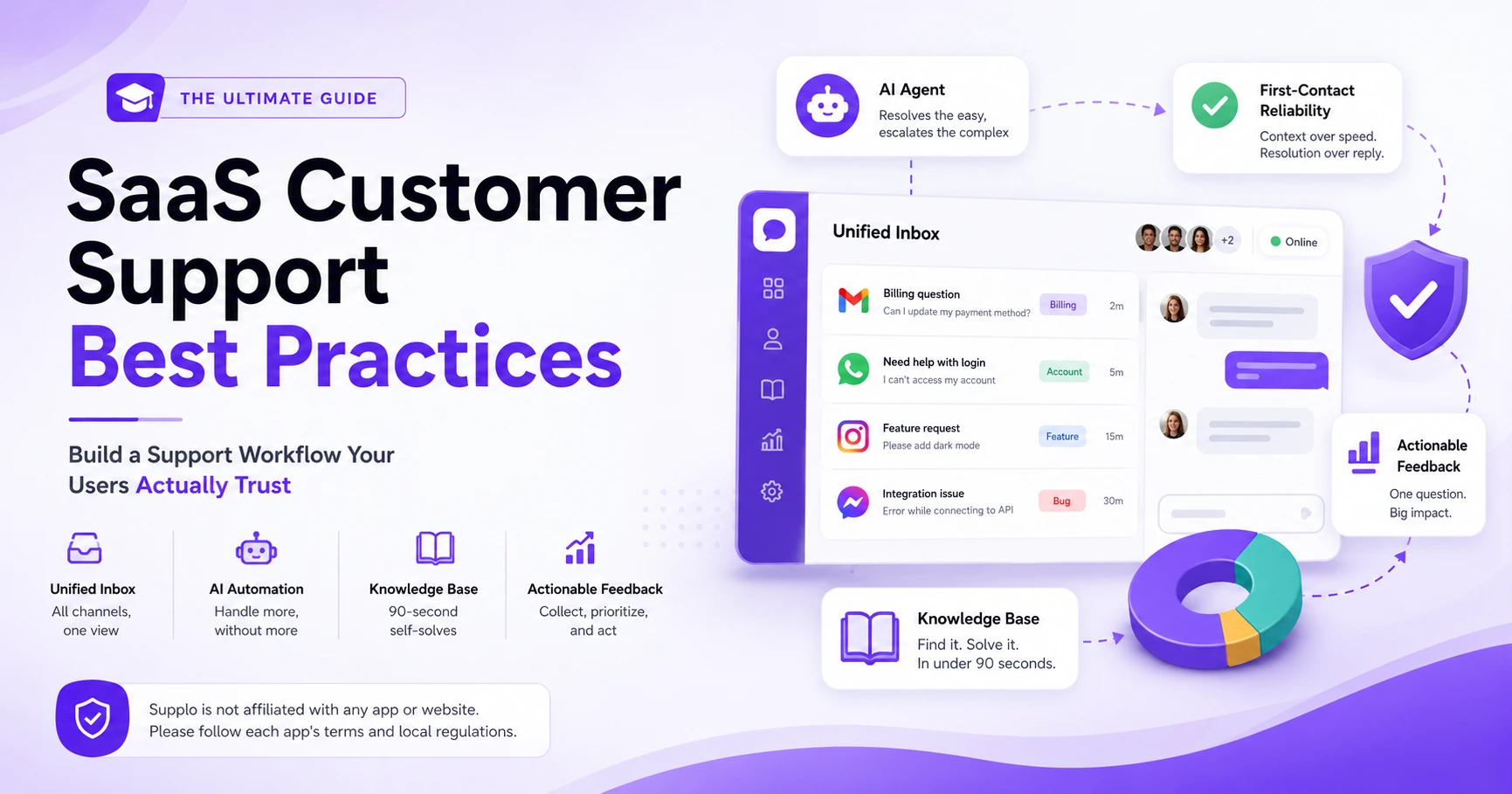
You can reply in 15 seconds. But if your answer doesn't solve the problem, you're just burning your customer's time. Reliable support doesn't start with speed; it starts with a workflow that ensures the first answer is the right one. This guide covers SaaS customer support best practices that set high-trust teams apart from those just chasing response badges.
Support managers, heads of customer experience, and founders at SaaS companies with 3–50 agents who need a scalable workflow without adding headcount or tool complexity.
When you're revising your support playbook, evaluating a new platform, or scaling from a startup to a growth-stage team.
If you're a solo founder handling 10 tickets a month, focus on product-market fit first. These practices are for teams where volume is starting to outpace manual effort.
Quick Answer
- Focus on first-contact reliability, not reply speed. Context matters more than clock speed.
- Triage before you ticket, route requests by urgency and skill set before they hit a human queue.
- Automate the boring stuff; let an AI agent handle password resets and FAQs; escalate billing or nuanced issues to humans.
- Merge your channels: a single shared inbox for email, chat, and social DMs eliminates missed messages.
- Use micro-surveys, one question at the point of resolution beats a twelve-question NPS survey sent days later.
- Treat your knowledge base like a front-line agent, make it searchable, up to date, and structured for 90-second self-solves.
Why "Fast" Isn't Your Real Goal – Focus on First-Contact Reliability
Chasing sub-30-second reply times often masks a deeper problem: agents resetting the conversation because they lack context. The real metric is first-contact resolution (FCR). In SaaS customer support, speed without accuracy destroys trust. Reliable, context-aware responses, even if they take an extra minute, build long-term customer confidence.
- Redefine your SLA from "time to first reply" to "time to first meaningful resolution."
- Use a centralized inbox that surfaces past ticket history before an agent types a single word.
- Avoid the trap of speed badges that incentivize agents to close tickets prematurely.
- Reliable replies reduce repeat contacts by 40% on average (industry data).
Supplo is not affiliated with any app or website. Please follow each app's terms and local regulations.
The Core of SaaS Help Desk Best Practices: Triage Before You Ticket
Not every bug report needs an agent immediately; not every billing question belongs in Level 2. A proper triage system sorts incoming requests by urgency and type before they hit a human queue. This is where SaaS help desk best practices start, automating the routing so agents only see what requires their specific expertise.
- Use AI tags to automatically categorize "Billing," "Feature Request," and "Bug Report."
- Set up conditional routing: high-value customers get priority queue placement.
- Cap daily ticket influx by auto-responding to known issues with knowledge base links.
- Deprecate the "all hands" queue; segment by agent skill set.
Automate the Repetitive, Humanize the Complex (AI Agent Workflow)
AI agents should handle password resets, login issues, and plan-based FAQs without a human touch. But the moment a query involves nuance, like changing payment methods mid-cycle or a multi-step integration error, escalate cleanly. This is the smart architecture for optimizing SaaS customer support workflows: let AI handle the 20% that takes 80% of your time, then route the rest to a human with the full chat history attached.
- Set resolution triggers (e.g., "I need to cancel my account") to auto-escalate.
- Use an AI agent that learns from closed tickets to improve over time.
- Allow AI to draft a summary for the human agent to reduce read-in time.
- Turn off AI for "high-risk" subjects, such as account deletion or PII requests.
Streamlining SaaS Support Processes Without Breaking the Bank
You don't need a six-figure support stack. The biggest efficiency gains come from process changes, not tool purchases. To streamline SaaS support processes, start by eliminating duplicate work: merge Slack support channels, email, and live chat into a single shared inbox. Then cut the tool count. A single platform with flat-rate billing removes the fear of "seat creep" as you grow.
- Audit your current tool stack: Are you paying for three overlapping platforms?
- Map the customer journey from "first contact" to "resolved," and remove any handoff.
- Replace per-seat pricing with a flat-rate model so you can hire freely.
- Use CRM integration to auto-populate customer data into ticket fields.
Want to test your current workflow under load? Try a free, public stress test of your support queue, no credit card needed. Start your free test.
Multi-Channel Shouldn't Mean Multi-Panic (Inbox Consolidation)
If your team toggles between Telegram, WhatsApp, Instagram DMs, and email to answer support questions, you've already lost reliability. A shared inbox that unifies all channels into one thread eliminates missed messages and context switching. This is a non-negotiable in SaaS support operations best practices: customers don't care which channel you prefer; they care that you remember the conversation.
- Set channel-specific SLA windows (e.g., WhatsApp replies within 5 minutes, email within 2 hours).
- Assign the same ticket ID across channels so history follows the user.
- Auto-close old conversations after 24 hours of inactivity to keep queues clean.
- Use rules to escalate only when a ticket is opened in two channels simultaneously.
For multi-channel routing across email, WhatsApp, Telegram, Instagram DMs, and Facebook Messenger, use a unified inbox to centralize everything.
Collecting SaaS Customer Feedback That's Actually Actionable
Sending a blanket NPS survey after every ticket is lazy. Collecting SaaS customer feedback means strategically placing micro-surveys at specific touchpoints: after a feature is used, after a bug fix, or after a support interaction. Ask one targeted question, not twelve. Then tag that feedback to the specific product area mentioned.
- Use post-resolution CSAT surveys with a single open text field for "what would improve this?"
- Tag feedback by source (support ticket vs. in-app prompt vs. chat).
- Set a weekly cadence to review feature-request trends, not individual complaints.
- Close the loop: email users who requested a feature when it ships.
Acting on SaaS Customer Feedback Without Dropping the Ball
Collecting feedback and ignoring it is worse than not asking at all. The key to acting on SaaS customer feedback is creating a feedback-to-roadmap cycle. Tag each request with a "weighted value" based on request frequency and customer tier. Then publish a bi-monthly changelog that references user requests implemented.
- Weight requests by "number of similar mentions" and "customer account size."
- Keep a public "under consideration" board to manage expectations.
- Assign an internal owner per feedback category (support, product, billing).
- Follow up with the original reporter when their feedback is shipped.
If your feedback pipeline collects dust instead of getting shipped, we built a better loop. See how a unified inbox + AI feedback tagging works in practice. Book a live demo →
Your Knowledge Base is a Support Agent
Your knowledge base shouldn't be a static PDF dump. It should be a living, AI-searchable library that answers the top 20% of questions. When you optimize your SaaS support workflow, every article should be written for a user who wants to self-solve in under 90 seconds. Use the KB as the first line of defense, route users there before they ever type a message.
- Structure articles by "Problem → Cause → Action" format, not feature documentation.
- Track search queries that return 0 results; those become new article candidates.
- Let your AI agent pull real-time KB snippets into chat responses.
- Update KB articles immediately after a software update or bug fix.
Build a robust knowledge base that serves as your first line of defense.
The Secret to SaaS Support Operations Best Practices?
Per-seat pricing creates a perverse incentive: you either cap agents or pay a tax for hiring. The secret to sustainable SaaS support operations best practices is flat-rate billing. You pay one predictable monthly number for the whole platform, live chat, inbox, AI, multi-channel, and then pay per AI resolution at a fractional cost (like $0.04 instead of $1+): no seat limits, no surprise invoices.
- Flat-rate pricing removes the headcount friction for scaling support teams.
- AI resolution costs at $0.04 per outcome are roughly 96% cheaper than comparable tools.
- Supports international payments including Crypto, Binance Pay, Payeer, GCash, AmanPay, QIWI Wallet, DOKU, Nigeria, and South Africa cards, Skrill, and Payoneer.
- No per-agent fees mean you can hire specialists without budgeting a seat tax.
Check out flat-rate pricing that scales with your team, not against it.
Does Your SaaS Support Workflow Pass the "Startup Test"?
Before you ship your workflow to production, run this stress test: simulate a burst of 50 support tickets in 5 minutes. If your system buckles, your SLA holds, or an agent needs to Google internal processes, you have a reliability gap. The best SaaS support workflows are designed for spike days, product launches, outage events, Black Friday, not just Tuesday afternoons.
- Test with real customer data (anonymized) to see how your AI agent handles edge cases.
- Verify that multi-channel routing doesn't create duplicate tickets.
- Confirm that billing questions are tagged and routed to finance, not product support.
- Schedule a monthly "chaos monkey" test where you deliberately break a channel.
See how a real team handled this transition: read the PVAPins case study and other case studies.
Your support workflow should scale on launch day, not break. Get ongoing access to a flat-rate, AI-first support platform with multi-channel routing, shared inbox, and a self-learning AI agent. Start your 14-day free trial →
Key Takeaways
- First-contact reliability is more important than reply speed; context always wins.
- Triage and automate the easy stuff; keep humans for nuance.
- Merge all channels into one unified inbox to eliminate context switching.
- Collect feedback via single-question micro-surveys and act on it with a weighted changelog.
- Choose a flat-rate billing model to scale support without seat-tax anxiety.
FAQ
Is it safe to automate customer support with AI for a SaaS business?
Yes, when done correctly. Keep AI on low-risk tasks, such as password resets and FAQ lookups. Escalate billing disputes and account changes to human agents. Always comply with local data regulations. Supplo is not affiliated with any app or website. Please follow each app's terms and local regulations.
Why do some AI support agents fail to resolve user issues?
They often lack context from previous conversations or access to your knowledge base. The fix is to integrate your inbox history and maintain a curated, searchable KB. An AI agent that learns from past tickets will resolve more issues on the first attempt.
Should I use one support dashboard or separate tools for each channel?
One dashboard. Using separate tools for email, chat, and social DM creates context switching and missed messages. A unified inbox with multi-channel routing ensures that all conversations appear in a single thread with full history.
What should I NOT use my support platform for?
Do not use your support platform to store sensitive PII beyond what's needed for ticket resolution, and never route payments, account deletion, or legal disputes through a simple bot or AI layer without human oversight. Always tag and escalate such requests.
How often should I update my knowledge base to keep it effective?
At a minimum, update your KB within 24 hours of any feature change, bug fix, or new pricing tier. Outdated KB articles cause more support tickets than they prevent. Treat outdated articles as a liability.
How do I collect user feedback without it feeling like a chore?
Use micro-surveys (one question) at the moment of resolution, not days later. Ask "Was this helpful? If not, what would've made it better?" Tag responses to specific product areas. Users are 3x more likely to answer a single question than a 10-question form.
What's the best way to act on feedback without overloading the product team?
Create a feedback-weighted board. Group similar requests, count frequency, and weight by customer size. Prioritize the top 10% of requests. Publish a public changelog showing which feedback was implemented. Close the loop with reporters.
Compliance line: Supplo is not affiliated with any app or website. Please follow each app's terms and local regulations.