On this page
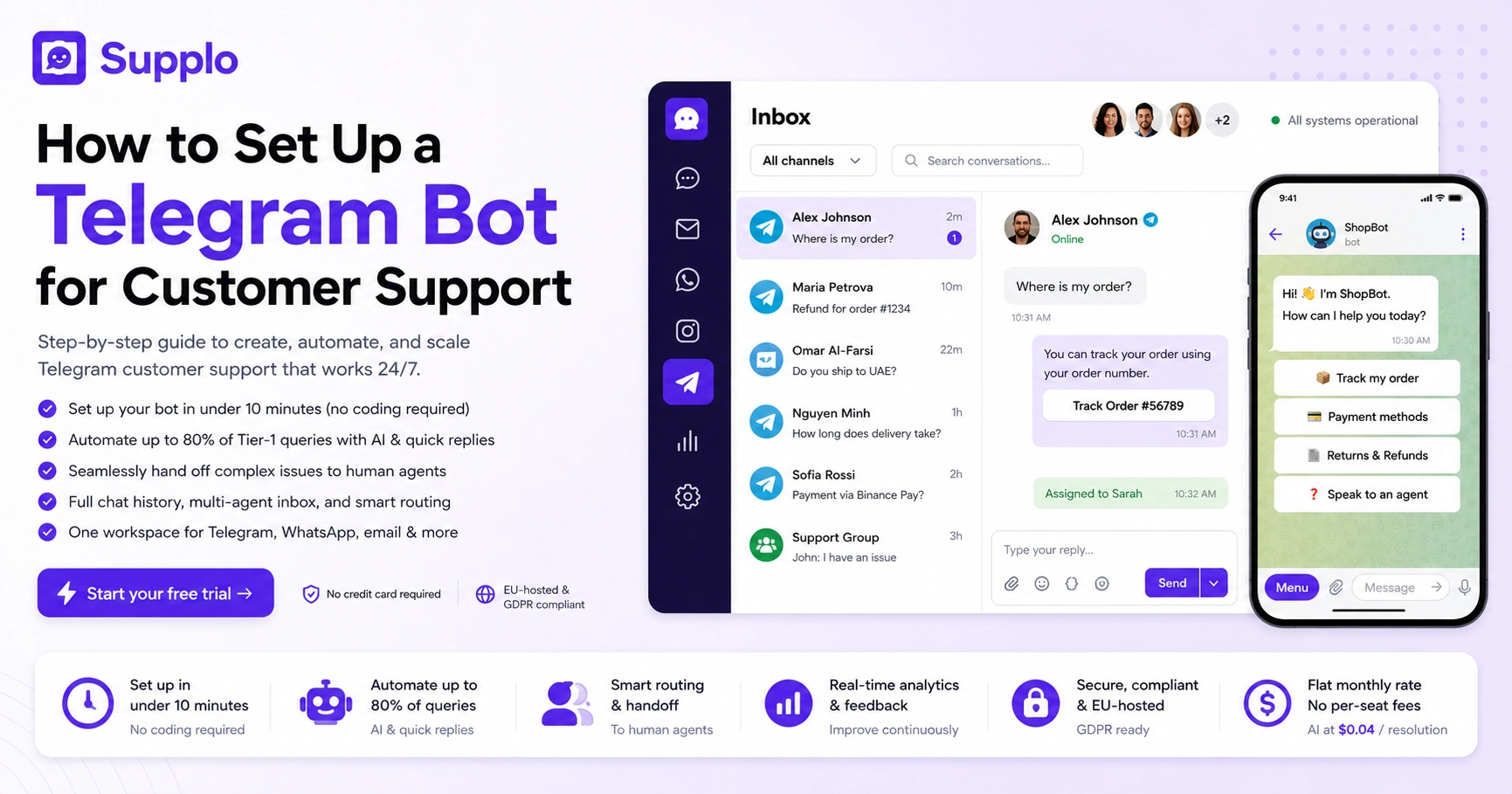
If your customers live in Telegram, your support team needs to be there too. Setting up a telegram bot for customer support setup is genuinely the fastest way to handle those Tier-1 questions that pop up at 2 AM, capture leads from group chats where people are already talking about your product, and escalate the messy stuff to humans, all without forcing anyone to leave the app they're already glued to.
Who this guide is for: Support team leads, e-commerce operators, SaaS founders, and customer success managers operating in markets where Telegram is dominant, Eastern Europe, Southeast Asia, the Middle East, and Latin America.
When to use it: When you have more than 50 support conversations per month coming from Telegram, or when your customers consistently ask, "Can I message you on Telegram instead?"
When NOT to use it: If your user base is entirely email-first and you have zero inbound Telegram queries. In that case, start with email ticketing first.
Quick Answer
- Set up a Telegram bot in under 10 minutes using @BotFather and a no-code platform, no Python or webhook coding required.
- Automate up to 80% of Tier-1 support queries with trigger phrases, quick reply buttons, and a connected knowledge base.
- For complex issues, route conversations seamlessly to human agents without asking the customer to repeat themselves.
- A reliable Telegram support setup uses a managed platform (like Supplo) to guarantee uptime, multi-channel inboxing, and flat-rate pricing.
Why Your Business Needs a Telegram Bot for Customer Support
Here's the thing: Telegram bots for customer support aren't some nice-to-have experiment anymore. If you operate in markets where Telegram dominates, Eastern Europe, Southeast Asia, the Middle East, Latin America, a well-configured bot is basically table stakes. It handles Tier-1 queries around the clock, scoops up leads from group conversations, and routes the tricky tickets to live agents without losing the thread. The real win? You stop losing customers to WhatsApp or email because they never have to leave the app they already trust.
Telegram now has over 800 million active monthly users. A lot of those people genuinely prefer it over email or picking up the phone. A Telegram bot can handle both inbound stuff (DMs, group mentions) and outbound flows like broadcasts or order updates.
Compared to traditional support platforms, a Telegram-first setup cuts friction hard because nobody has to download a new tool. Plus, it plays nice with crypto and local payment mentions: use Telegram to confirm payments via Binance Pay, Payeer, or GCash.
A platform like Supplo's Telegram support setup is part of a broader multi-channel inbox that also handles WhatsApp, email, and Instagram, so your team works from one pane instead of four.
What You Need Before You Start Setting Up a Telegram Bot for Customer Support
Three things: a Telegram account, a bot token from @BotFather, and a customer support platform that can bridge Telegram chats to your team. You don't need to code. Most modern platforms handle bot creation and webhook wiring for you.
What to prepare:
- A Telegram account (any personal or business account works).
- A bot token from @BotFather (free, takes 2 minutes).
- A clear decision on whether the bot will be public (anyone can chat) or invite-only.
- A rough idea of which queries you want automated versus escalated.
- Understanding Telegram's 4,096-character message limit per single bot response.
Are you self-hosting a bot framework (Node.js, Python) or using a no-code platform? For most teams, a no-code platform wins on speed and reliability.
How to Create and Configure Your Telegram Bot for Business Support
Start by messaging @BotFather on Telegram, send /newbot, and follow the prompts. You'll get a unique API token; treat it like a password. Next, paste that token into your support platform's Telegram channel settings.
- Create the bot: Open Telegram, search @BotFather, send /newbot. Choose a name and username (must end in "bot").
- Copy your token: @BotFather replies with your API token. Store it in a secure place, never in version control.
- Configure in your platform: Paste the token into your support platform's Telegram channel settings. Platforms like Supplo skip manual webhook configuration entirely.
- Set bot commands: Use /setcommands in @BotFather to define common commands: /start, /help, /order, /support, /track.
- Customize the welcome message: Your /start message should greet, state what the bot does, and list key commands. First impressions matter.
- Enable inline mode (optional): Users can type @yourbot in any chat for quick lookups.
- Disable privacy mode for groups: If your bot needs to read all messages in group chats, set privacy mode to "disabled" so it can see every message.
Use Telegram's official Bot API documentation as your technical reference for webhook setup and message formatting.
How to Automate Customer Service with Telegram Using a Business Chat Bot
Automation in Telegram support breaks into three layers: trigger phrases, command-based responses, and predictive AI.
Layers:
- Trigger phrases: Match common questions like "tracking," "refund," or "hours" to canned replies. This handles the 20 most common queries instantly.
- Custom keyboard buttons: Use Telegram's custom keyboard to guide users through flows. Example: "Select your issue: [Billing] [Technical Support] [Order Status]".
- Predictive AI: Integrate a self-learning AI agent that reads context without rigid keywords. It understands intent, so "I haven't gotten my package" hits your shipping FAQ even without the word "tracking."
The goal is 80% containment before a human ever types. Real-world example: an e-commerce bot auto-answers "Where is my order?" by looking up tracking data via API, completely automated.
Test your bot, for free, before you commit. You don't need a credit card to see how Telegram automation feels in practice. Create a bot token via @BotFather and plug it into a platform like Supplo. You'll get live message routing, a shared inbox and AI responses, all running in minutes.
Essential Telegram Bot Features for Support Teams: Auto-Reply, Quick Replies, and User Segmentation
Auto-reply rules are the backbone of Telegram support automation: match exact phrases or regex patterns, assign specific responses, and set business-hours routing.
Auto-reply rules: Three tiers exist:
- Exact match: "Shipping" triggers shipping info.
- Regex match: Patterns like "order \d{5}" trigger order lookup.
- AI match: Semantic matching for natural language queries.
Quick replies: Telegram's pre-set reply buttons that speed up common answers. Examples: "Our hours are 9–6 EST," "Visit our help center," or "Rate this conversation."
Tag customers by language, product type, or VIP status. Three ways to segment:
- By Telegram user ID (individual tagging).
- By group membership (channel vs. private chat).
- By custom data passed from your shop (order value, account tier).
Combine auto-reply with Telegram's /privacy and /cleardata commands to comply with GDPR. Capture the user's language from Telegram's language_code field to route to the right agent.
Advanced Telegram Bot for Customer Service: Multi-Agent Handoff and Escalation Rules
Look, a bot can't handle everything. When a query exceeds confidence thresholds, like a refund dispute or technical bug, the bot should hand off cleanly to a human agent without making the customer repeat themselves.
Escalation rules to set:
- Message count: After 3 bot replies, auto-escalate.
- Keyword match: Words like "manager," "complaint," or "lawsuit" trigger human handoff.
- User location: Route based on the user's timezone or country.
- Sentiment flags: Negative sentiment detected in user messages escalates to senior agents.
Multi-agent features:
- Round-robin assignment distributes tickets evenly.
- Skill-based routing sends billing issues to billing agents and tech-to-tech agents.
- Supervisor override for escalations.
The handoff message should include full chat history, user tags, and sentiment flags. Platforms like Supplo build this into a shared inbox that handles Telegram alongside email and WhatsApp, so agents see the Telegram thread alongside all other channels in one pane.
If no agent picks up in 2 minutes, auto-send a holding message: "Thanks for your patience, an agent will be with you shortly."
How to Handle Telegram Bot Integration for Customer Care with Your Existing Stack
Integration means making your Telegram bot talk to your helpdesk, CRM, or e-commerce backend, not just send canned messages. The goal is bi-directional sync without writing glue code.
Common integrations:
- E-commerce: Webhook calls to Shopify or WooCommerce for order lookups.
- Knowledge base: API pulls from your KB to answer product questions.
- Ticketing systems: Bi-directional sync with Jira, Linear, or your existing helpdesk.
How to wire it:
- Set up a webhook endpoint in your bot platform that sends a POST request to your backend when a specific command is run.
- Use Telegram's answerCallbackQuery to update buttons dynamically (e.g., "status: shipped").
- Connect your bot to a shared inbox that handles Telegram, email, and WhatsApp. Supplo displays Telegram conversations alongside email tickets in a single pane.
Avoid API rate limit errors by caching common responses in-memory for 30 seconds. Use OWASP API security best practices for securing webhook endpoints.
Privacy, Security, and Compliance: Running a Telegram Business Chat Bot Safely
Telegram bots can see every message sent to them; treat that as a security boundary. Use HTTPS-only webhooks, store tokens in environment variables (never in version control), and avoid logging raw message content unless necessary.
Security checklist:
- Use HTTPS-only webhooks (no HTTP endpoints).
- Store bot tokens in environment variables, never in code repositories.
- Enable bot privacy mode: the bot only sees messages that start with a / or are directly addressed to it.
- Avoid logging raw message content, mask user details (phone numbers, addresses) from bot logs.
- Set a data retention policy: delete conversation data after ticket closure.
Compliance note: Supplo is not affiliated with any app or website. Please follow each app's terms and local regulations. Telegram's own terms prohibit using bots for spam, harassment, or unauthorized commercial bulk messaging. Clearly disclose to users when a bot is reading their messages and provide an opt-out option.
For regulated industries, follow GDPR guidance from the European Data Protection Board and review Telegram's Terms of Service for bots and developers.
How to Train Your Telegram Bot for Customer Service with a Knowledge Base
A Telegram bot is only as good as the content it can pull from. Instead of hard-coding every answer, connect your bot to a searchable knowledge base, a library of articles, FAQs, and how-tos.
How it works:
- When a user asks a question, the bot searches the KB via API or built-in AI.
- It returns the top match with a summarized answer and a link to the full article.
- When you edit a KB article, the bot updates instantly, with zero code changes.
Best practices for Telegram-optimized KB:
- Each answer must be under 4,096 characters and scannable (in bullet points or short paragraphs).
- Use semantic matching (not just keyword), "refund doesn't work" should hit the refund policy article.
- Test with 50 sample queries before going live; refine answers that return no match.
If you use a platform with a self-learning AI agent that reads context without rigid keywords, it automatically improves responses based on resolved tickets and KB content, no manual tuning needed.
Using Telegram Bot Advanced Features for Support
Growth breaks a static bot. Advanced Telegram support setups include analytics dashboards, canned response libraries, and feedback collection.
Metrics to track:
- Messages per day and per agent.
- Bot resolution rate (percent of conversations handled completely by bot).
- Agent handoff rate (percent escalated to humans).
- Average reply time (bot vs. human).
- User satisfaction scores.
Tools that scale:
- Canned responses: Save agents 30–40% typing time with pre-written answers for common phrases.
- Feedback collection: Use Telegram's inline keyboard buttons to present a 1–5 rating after every bot-resolved conversation.
- Alerts: If bot containment drops below 60% in a day, review top failing intents.
A bot that answers 80% of queries in under 10 seconds is good. A bot that also tells you where it failed is better. For a detailed comparison showing how Supplo differs from Intercom on pricing and AI containment, check the transparency report on the pricing page.
Troubleshooting Common Telegram Customer Service Automation Issues
Most Telegram bot breakdowns fall into four buckets: broken webhooks, rate-limited API keys, incorrect privacy mode, or stale bot tokens.
Troubleshooting checklist:
- Webhook issues: Check your webhook URL via Telegram's getWebhookInfo API; if it returns an error, your platform isn't receiving messages. Ensure your webhook responds in under 30 seconds.
- Rate limits: Telegram caps error retries after 24 hours. If you see 429 errors, you're sending too many messages per second (the limit is 30 per second per chat).
- Privacy mode: If your bot ignores messages in groups, you forgot to turn it off. Set it to "disabled" only if the bot needs to read all group messages.
- Stale token: If messages stop flowing entirely, regenerate your token in @BotFather and update your platform immediately.
- Token leak: If your bot token is exposed in a client-side app or GitHub, regenerate it immediately.
If your bot fails, it's not you, it's the setup. Webhook errors, rate limits, and multi-agent collisions are common when you piece together a DIY bot. Skip the duct tape. Supplo handles fallback queues, token rotation, and team routing automatically, so your Telegram support never goes dark at 2 AM.
See the difference →
Why Most Setup Guides Are Wrong, What a Reliable Telegram Bot for Business Support Actually Looks Like
Most guides tell you to code a bot from scratch in Python and deploy it on a free cloud tier. That's fragile and not scalable. A reliable Telegram business bot runs on a dedicated platform with guaranteed uptime, automatic token management, and a team inbox that doesn't break when you add a second agent.
Reliability benchmarks:
- Message delivery within 500ms.
- No dropped events during webhook failures.
- Automatic retry on webhook downtime.
- Message queuing if your API is down.
What a real setup looks like:
- A platform that handles 99.9% uptime.
- Automated token rotation and fallback queues.
- Multi-channel inboxing, Telegram, WhatsApp, email, Instagram, Facebook, in one workspace.
- Case studies of teams that moved from self-coded bots to a managed platform show consistent response times under 5 seconds and zero lost messages.
The business cost of an unreliable bot: every dropped message is a missed support ticket, and potentially a lost customer. A flat monthly rate with no per-seat fees, unlike traditional platforms, means you scale support without growing headcount linearly.
One workspace for Telegram, WhatsApp, email, and live chat. Stop juggling four tabs. Supplo combines Telegram customer service, email ticketing, WhatsApp support, Instagram DMs, and Facebook Messenger into a single inbox with one flat monthly rate: no per-seat fees, no per-resolution meter. AI resolutions cost $0.04 each, roughly 96% cheaper than legacy alternatives.
Start on the right platform →
Key Takeaways
- A Telegram bot for customer support can be set up in under 10 minutes using @BotFather and a no-code platform.
- Automate up to 80% of Tier-1 queries with trigger phrases, quick reply buttons, and a connected knowledge base.
- For complex issues, route conversations to human agents without asking the customer to repeat themselves.
- Reliable Telegram support requires a managed platform; DIY setups fail on webhook recovery, multi-agent routing, and uptime guarantees.
- Supplo combines Telegram, email, WhatsApp, and Instagram into one inbox, with flat-rate pricing and no per-seat fees.
FAQ
Is it legal to use a Telegram bot for customer support?
Yes, as long as you follow Telegram's Terms of Service and all local data protection regulations. Disclose clearly that a bot is interacting with users and never collect or store sensitive personal data without explicit consent. Supplo is not affiliated with any app or website. Please follow each app's terms and local regulations.
Why does my Telegram bot sometimes not respond to messages?
The most common reasons are: the webhook URL is invalid or unreachable, the bot's privacy mode is blocking group messages, or you've hit Telegram's API rate limit. Use Telegram's getWebhookInfo endpoint to check the status of your webhook.
Can I use a one-time Telegram bot token for a permanent support setup?
No. Bot tokens from @BotFather are long-lived but can be revoked. Always use a permanent token and store it securely. One-time or rental tokens don't exist in Telegram's architecture; if someone offers you a "rental bot," they're likely violating Telegram's terms.
What should I NOT use a Telegram business bot for?
Do not use a Telegram bot for processing payments (use dedicated payment systems), sharing verified account credentials, or sending unsolicited bulk messages to strangers. These activities violate Telegram's anti-spam policies and may result in your bot being banned.
My bot stops working after adding a second agent. Why?
Standalone bots don't natively support multi-agent handoff. You need a support platform (like Supplo) that routes Telegram messages to a shared inbox. Without one, each agent sees only their own chat, and messages collide.
Can I run Telegram customer service automation without coding?
Absolutely. Platforms like Supplo let you create, configure, and manage Telegram bots through a dashboard, no code required. You still need to generate the bot token via @BotFather, but that's a 2-minute process.
How do I collect feedback inside a Telegram bot?
Use Telegram's inline keyboard buttons to present a 1–5 rating after a conversation. Store the response via webhook to your analytics dashboard. Keep it optional and quick, two taps max.
Compliance note: Supplo is not affiliated with any app or website. Please follow each app's terms and local regulations.