On this page
Training a customer support AI bot doesn’t require a data science degree or a massive budget. What it does take is clear knowledge, real data, and a tool that won’t nickel-and-dime you for every attempt. That’s the gap Supplo fills. This guide walks you through every step to train a reliable, cost-effective support AI that handles the repetitive tickets so your team can focus on the complex ones.
Who is this guide for?
- Small- to mid-sized business owners are tired of paying per-seat fees.
- Support managers who want to improve first-response time without hiring more agents.
- Solo operators and early-stage startups need a professional support experience.
When to train a support AI bot with Supplo:
- When your support team spends 40%+ of their time answering the same basic questions.
- When you need a unified inbox across email, live chat, WhatsApp, and social DMs.
- When you want to test AI without a long-term contract or per-resolution meter running.
When NOT to train a support AI bot with Supplo (yet):
- If your support volume is under 20 tickets per week. A shared inbox alone may suffice.
- If your support requires heavy human empathy or judgment for every single ticket.
Compliance line: Supplo is not affiliated with any app or website. Please follow each app's terms and local regulations.
Quick Answer
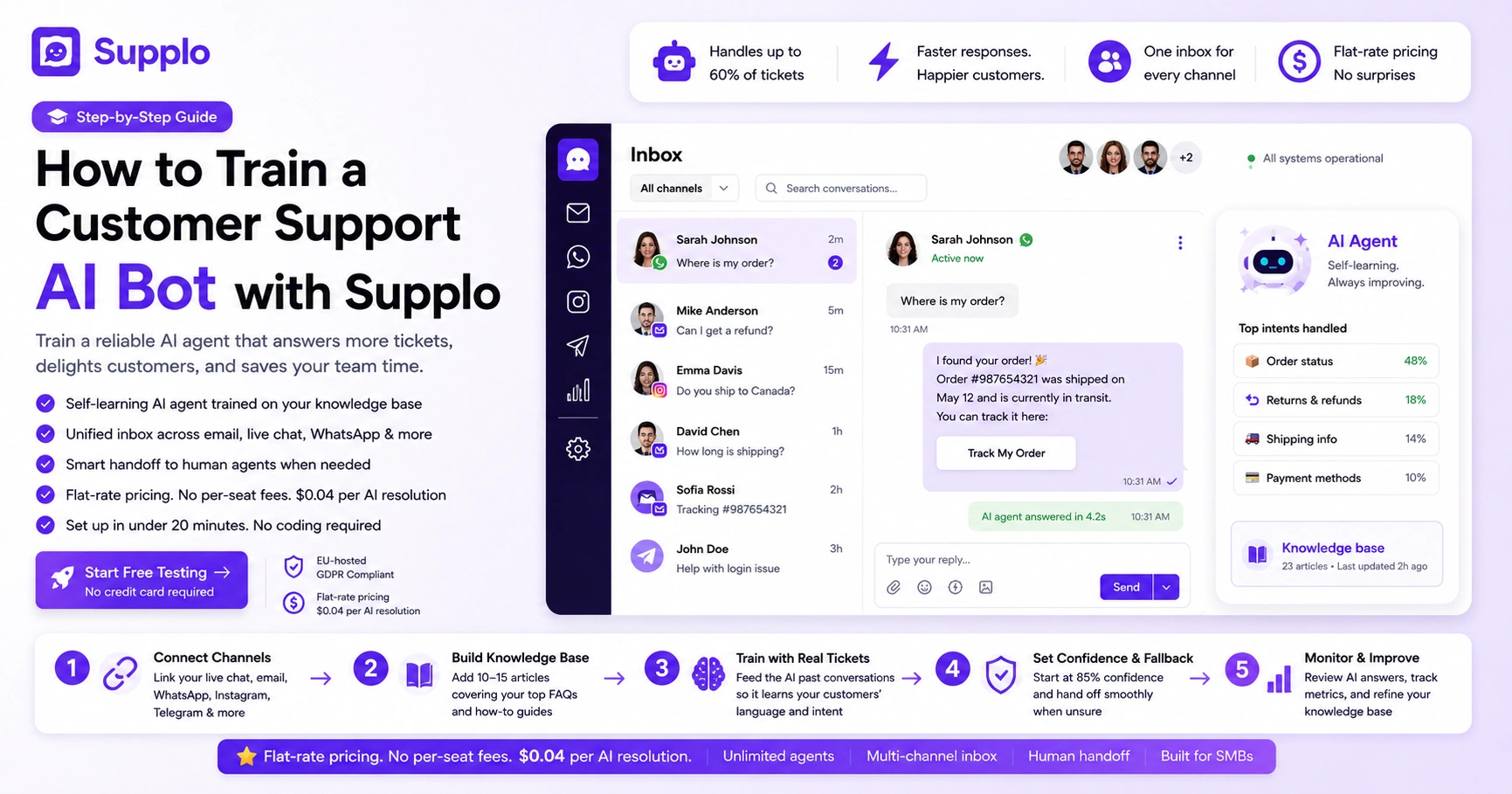
- Start with 10-15 knowledge base articles covering your top FAQs (password resets, refunds, shipping).
- Set the confidence threshold to 85% or higher so the bot only answers when it’s very sure.
- Feed the AI real past tickets (remove customer PII) to accelerate learning.
- Monitor the handoff rate daily and update your knowledge base when it exceeds 50%.
- Review AI responses weekly in the shared inbox and mark good/bad answers to refine the bot.
What Makes Supplo’s AI Agent Different for Training?
Unlike platforms that charge per-resolution or per-agent seat, Supplo trains its AI on a flat-rate subscription. You pay $0.04 per AI resolution, roughly 96% less. This changes the AI training game because you can afford to experiment, fail, and retrain without the meter running. The AI isn't a black box; it learns directly from your knowledge base and past tickets.
- No per-seat fees mean your entire team can review and edit AI answers without paying extra.
- The AI agent lives inside the same “Inbox” workspace, so feedback loops are instant. This is Supplo’s shared inbox.
- Supports multi-channel training (WhatsApp, Telegram, Instagram, Email) from one source of truth.
- Built for SMBs who want category-leader features (AI, shared inbox) without the enterprise invoice.
Connect Your Channels Before You Train
Your AI bot is only as smart as the data it sees. Before writing a single answer, connect your customer channels inside Supplo. This allows the AI to learn the specific phrasing and common questions from each platform, whether it’s the casual tone of Instagram DMs or the formal structure of email. Training a disconnected bot wastes time.
- Link your live chat widget first; it’s the highest-volume channel for most SMBs.
- Connect WhatsApp and Telegram if you handle time-sensitive support. For example, WhatsApp customer support is often where quick order status queries land.
- Add your email ticketing system so the AI can see historical ticket patterns.
- Route Facebook Messenger and Instagram through the same inbox for unified data.
Feed Your Knowledge Base: The Brain of Your AI
Supplo’s AI Agent relies on your knowledge base to answer questions. You don’t need 50 articles; start with your top 10 FAQs. Write clear, direct answers in the first or second person (e.g., “To reset your password, go to Settings”). Avoid marketing fluff. The AI will mirror your tone, so short and useful is better than long and vague. You can upload PDFs, text, or copy-paste directly.
- Prioritize articles about refunds, shipping, account access, and common “how-to” questions.
- Use the built-in translator feature (Supplo supports multiple languages) if your audience is global.
- Tag your articles for easy AI retrieval.
- Review your top 10 closed tickets from last month, and write KB articles for them first.
Checklist for your first knowledge base:
- Write a “How to reset my password” article (direct, 3 steps max).
- Write a “How to check order status” article.
- Write a “How to request a refund” article.
- Write a “How to contact human support” article.
- Upload these to your Supplo knowledge base.
- Test the AI with a real question from each article.
Write the Fallback Script When the AI Gets Stuck
No AI knows everything. When your Supplo bot doesn’t have a confident answer, it needs a graceful fallback. Write a short script that says: “I’m not sure about that, let me connect you with a human.” This is critical for reliability. A bot that guesses wrong destroys trust. Set the fallback to trigger a handoff to your live chat queue.
- Keep the fallback message polite but direct.
- Avoid “I’m sorry” in every fallback; it can feel robotic.
- Include a CTA like “You can also email us directly” if live chat is offline.
- Test this script on your live widget before going live.
Ready to check if your knowledge base is ready? Head over to Supplo’s pricing page and train your bot in 30 minutes—no credit card required for testing.
Train on Real Tickets
The fastest way to train your AI is to feed it real past tickets. Export your last 100 support conversations (remove customer PII) and upload them as example “questions and answers.” The AI learns patterns, not just keywords. This is where Supplo’s flat-rate pricing shines; you can iterate daily without cost anxiety.
- Look for tickets that had clear, final resolutions.
- Avoid ambiguous tickets where the customer was angry or the issue was unique.
- Update the training set weekly for the first month.
- Let your team mark “good” and “bad” AI answers directly in the inbox.
Real-world example: One SMB, PVAPins, trained their bot on past email tickets and saw a 50% deflection rate within two weeks. Check their story on the case studies page.
Set the Confidence Threshold
Supplo allows you to set a confidence threshold, basically, a “how sure do you want the AI to be before it answers?” Start high (85-90%) so the bot only answers the easy, obvious questions. As you add more training data, you can lower it to 70-75% to handle more queries. A high threshold initially protects your brand from wrong answers.
- Monitor your “handoff rate” in the dashboard.
- If the handoff rate is too high (90%+), add more KB articles.
- If the handoff rate is too low (under 50%), check if the AI is answering incorrectly.
- Adjust the threshold weekly based on ticket volume and complexity.
Troubleshooting checklist for confidence threshold:
- Set the threshold to 85% on day one.
- After one week, check your handoff rate. Is it above 70%? If yes, add 5 more KB articles.
- After 2 weeks, lower the threshold to 75% if the handoff rate is below 50%.
- Monitor for 24 hours. If you see wrong answers, raise it back to 80%.
Best Practices for Training a Customer Support AI Bot on a Budget
You don’t need a data scientist. Start with just 10-15 knowledge base articles and let the AI learn from real traffic. Supplo’s flat monthly rate means you can afford to let the AI make mistakes during training. Focus on “deflection” first: get the bot to handle password resets and order status queries before tackling complex technical issues.
- Use the built-in analytics to see which questions the AI fails at most often.
- Train in batches: 20 questions a day for 5 days is better than 100 in one go.
- Leverage Supplo’s “Translate” feature if you serve multilingual customers.
- Pay for resolutions at $0.04 each, budget $50/month for heavy testing.
Common Mistakes When Training AI for Support Tickets And How to Fix Them
The biggest mistake is overwriting your knowledge base articles. Long paragraphs confuse the AI. The second is not updating the training data regularly. Your product changes, so your AI’s answers must, too. The third mistake is ignoring the “feedback loop” where your human agents correct the bot.
- Mistake: Writing KB articles in third person (“The user must…”). Fix: Write in second person (“You must…”).
- Mistake: Forgetting to update the fallback script. Fix: Test the fallback every week.
- Mistake: Training on outdated ticket data. Fix: Archive tickets older than 90 days.
- Mistake: Not using the “confidence threshold” slider. Fix: Keep it at 85% for the first month.
Stuck on a specific training problem? Supplo’s support team works inside the same tool you use. Sign up for a flat-rate plan and get direct help tuning your AI.
Is Your AI Actually Helping?
Track three metrics: Deflection rate (how many tickets the AI resolves without human touch), Customer satisfaction after AI interaction, and Handoff rate (how often the AI passes to a human). If deflection is under 20%, your training needs work. If CSAT is low, check if the AI is too robotic. Supplo’s inbox gives you all this data.
- Set a baseline for your team, measure current human-only CSAT before turning on AI.
- Aim for a 40-60% deflection rate within 30 days of initial training.
- Monitor “AI confidence” scores per question to identify weak spots.
- Adjust training data based on which questions have the lowest confidence.
Key metrics dashboard (what to look at weekly):
- Deflection rate: Target 40-60% within a month.
- Handoff rate: If above 70%, add more KB articles.
- CSAT after AI: Should match or exceed your human-only CSAT.
- Cost per resolution: You’re paying $0.04. If the bot answers 500 questions, that’s $20. Compare that to the cost of human agents handling those tickets.
Why Reliability Matters More Than Features for SMB Support Teams
Your customers don’t care if your AI is “smart”; they care if it answers correctly. A reliable bot that handles the basics well beats a flashy bot that hallucinates. Supplo’s approach (flat rate, per-resolution billing, human handoff) is built for reliability over hype. You trade complexity for consistency, which is exactly what small teams need.
- Reliability reduces escalations and keeps your team focused on complex issues.
- A bot that answers wrong 20% of the time creates more work than it saves.
- Flat-rate pricing removes the fear of “experimenting” with AI.
- Supplo’s “no-code” setup means you fix problems, not configure features.
Reliable AI support shouldn’t cost more than a coffee subscription. Check Supplo’s pricing and see how SMBs train better bots for less.
Key Takeaways
- Start small: 10-15 KB articles, 85% confidence threshold, and real past tickets.
- Use the shared inbox feedback loop to refine the AI daily.
- Monitor deflection rate (target 40-60%) and adjust training data based on weak spots.
- Supplo’s flat-rate and $ 0.04-per-resolution models let you experiment without financial worry.
FAQ
How long does it take to train the Supplo AI agent for the first time?
You can get a basic version running in less than an hour if you have 10-15 knowledge base articles ready. Full optimization usually takes 2-3 weeks of daily adjustments based on real traffic.
Can the Supplo AI handle multiple languages?
Yes. Supplo includes a built-in translation feature. You write your knowledge base once, and the AI will respond in the language the customer is typing in, but you must train it on the core language first.
Will the AI replace my human support team?
No. A well-trained AI handles the repetitive 40-60% of tickets, allowing your humans to focus on complex, emotional, or high-value issues. Your team becomes more effective, not redundant.
What happens if the AI gives a wrong answer?
You can review every AI reply in the shared inbox and mark it as “good” or “bad.” Bad answers train the AI to avoid that response. You can also set a high confidence threshold (85%+) to minimize wrong answers.
Is Supplo compliant with data privacy regulations?
Supplo is EU-hosted and designed with privacy in mind. Supplo is not affiliated with any app or website. Please follow each app's terms and local regulations.
Can I train the AI on past email tickets?
Yes. You can export past resolved tickets (remove customer PII) and upload them as example Q&A pairs. This is the most effective way to train the AI on your specific customer language.
Do I need a technical background to train the bot?
No. Supplo’s training process is no-code. You write answers in plain English, upload documents, or copy-paste from existing help articles. If you can write an email, you can train the AI.
Compliance line: Supplo is not affiliated with any app or website. Please follow each app's terms and local regulations.