On this page
If you’ve ever explained your problem to a chatbot, then called a phone line and repeated everything to a different agent, you’ve experienced the pain of bad support routing. That’s the exact problem that omnichannel customer support aims to solve.
This guide is for support team leads, customer success managers, and founders of small- to mid-sized businesses who want to deliver fast, coherent service without increasing headcount. Use this when your team is juggling multiple channels (email, chat, social DMs), and you’re seeing dropped conversations or frustrated customers. Do not use this approach if you only have one support channel and rarely receive inbound queries; a simple email inbox will suffice.
Compliance line: Supplo is not affiliated with any app or website. Please follow each app's terms and local regulations.
Quick Answer
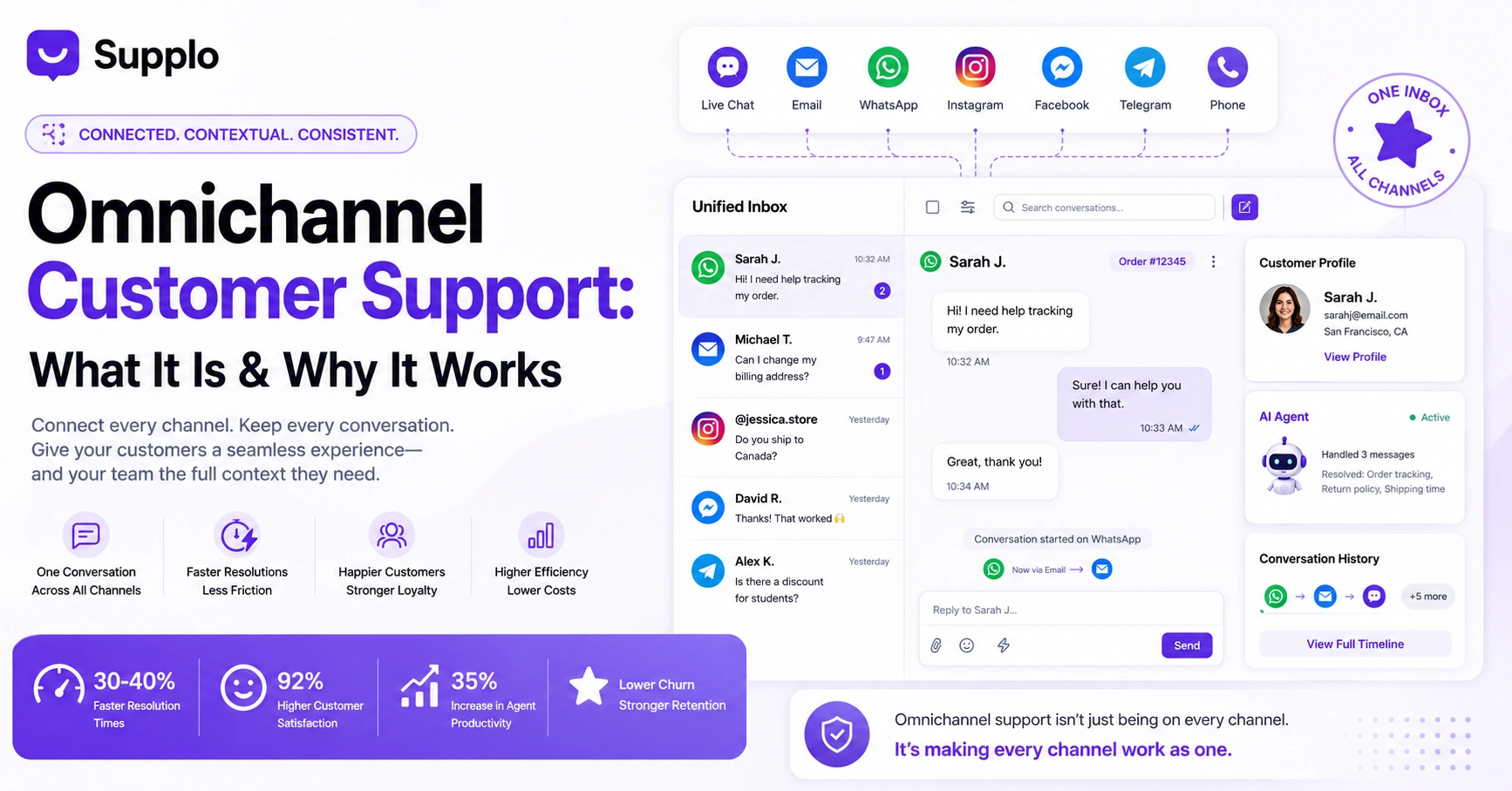
- Omnichannel customer support connects every channel (live chat, email, WhatsApp, Instagram, Facebook, phone) into a single, shared conversation thread.
- Customers never repeat their story; the agent sees the full history regardless of how the customer reaches out.
- The core requirement is a unified inbox that consolidates all messages into one chronological timeline.
- It’s not the same as multichannel support, where each channel operates in isolation.
- For small teams, it can reduce average handle time by 30–40% and eliminate app switching.
Omnichannel Customer Service: Meaning, It’s Not Just Being Everywhere
What does omnichannel customer service actually mean? It means creating a single, unified experience across every channel your customers use, including live chat, email, social media, and phone. Unlike multichannel, where each channel operates in a silo, omnichannel connects everything. A customer can start a conversation on WhatsApp and continue it on email without repeating themselves.
The core principle is continuity, not just presence. A true omnichannel approach shares context between channels in real-time. It treats the customer journey as a single thread rather than separate fragments. And it requires a centralized platform, like a shared inbox, that logs every interaction.
Omnichannel customer support means the system connects the dots, so your customer doesn’t have to.
Omnichannel vs Multichannel Support: The Real Difference With Examples
Multichannel support means you have a phone line, an email address, and a live chat, but they don’t talk to each other. A customer might explain their issue to a chatbot, then call in and have to re-explain everything. That’s a multichannel setup.
Omnichannel solves this by keeping the conversation thread alive across those same channels.
Multichannel support results in a broken context flow where the customer must repeat their issue across separate apps with no unified history, such as when an agent cannot see a previous email during a phone call. In contrast, omnichannel support offers a continuous context flow and low customer effort because history is preserved in a single, unified inbox, enabling seamless communication, such as continuing an Instagram DM conversation via email.
The difference is coordination versus collection. An omnichannel strategy requires a central nervous system for your support data.
Multichannel is a collection of tools. Omnichannel is one tool that integrates all channels.
Why Use Omnichannel Support? The Core Business Advantages
You use omnichannel support to reduce customer frustration and lower operational costs. When customers don’t have to repeat themselves, resolution times drop. When your team has full context in one inbox, agent efficiency goes up.
Key business advantages include:
- Reduced churn: Customers feel heard, not passed around.
- Higher first-contact resolution: Context is preserved across channels.
- Consistent brand experience: Avoids giving contradictory answers on chat versus email.
- Data-driven improvements: A unified view of conversations helps you spot recurring issues faster.
Every time a customer repeats their story, you lose trust. Omnichannel eliminates that friction.
Benefits of Omnichannel Customer Support for Your Team and Customers
For customers, the biggest benefit is convenience; they can reach you on their preferred platform without losing their place in the queue. Start a conversation on Facebook Messenger at 10 AM, send a follow-up via email at 3 PM, and the agent sees the full thread.
For your support team, the benefit is sanity. They get a single inbox that unifies all conversations (chat, email, social DMs). No more app-switching. No more manual note-keeping.
- Customer benefit: Start on Facebook Messenger, finish on WhatsApp, no context lost.
- Team benefit: Assign, tag, and resolve from one workspace instead of five.
- Efficiency benefit: AI agents can handle routine questions that were previously scattered across siloed channels.
- Scalability benefit: Adding a new channel is plug-and-play, not a new integration project.
How to Define and Build a Customer Support Omnichannel Approach
Start by defining your channels based on where your customers actually spend time, not where you want to be. Once you pick your channels (e.g., email, live chat, WhatsApp), you need a unified inbox platform that consolidates them into one thread per customer.
Here’s a five-step roadmap:
- Audit your customer base to find the top 3 channels they use most.
- Choose a platform that supports those channels natively (no clunky integrations).
- Set up routing rules so conversations automatically flow to the right agent.
- Train your team to use the shared inbox rather than individual apps.
- Measure success by tracking resolution time and customer effort score.
Test a unified inbox with live chat, email, and social DMs, no credit card required. Get started at supplo.io.
The Critical Role of a Unified Inbox in an Omnichannel Strategy
The shared inbox is the engine of omnichannel support. It pulls messages from email, live chat, WhatsApp, Telegram, Instagram DMs, and Facebook Messenger and collects them into a single chronological thread. Your agents never bounce between tabs.
A unified inbox:
- Provides full conversation history, no matter the originating channel.
- Enables agent assignment without losing context from DMs or emails.
- Powers automations like auto-replies based on channel type.
- Ensures you never miss a message across platforms.
Without a unified inbox, you don’t have omnichannel; you have more inboxes.
A unified inbox is the single source of truth for every customer conversation, regardless of where it starts.
Integrating Voice and Messaging Channels (WhatsApp, Telegram, Instagram, Facebook)
To make omnichannel work, your platform needs to handle messaging channels natively. Integration shouldn’t mean building custom code; it should be a single toggle in your dashboard.
- WhatsApp Business API support allows for verified business accounts and rich media replies. Learn more about WhatsApp customer support.
- Telegram support enables encrypted messaging directly from your inbox. Check Telegram support at Supplo.
- Instagram and Facebook DMs often live in separate tabs in Meta. An omnichannel tool pulls them into one stream.
- Email ticketing remains the backbone for formal queries and should be fully threaded.
How an AI Agent Powers a Reliable Omnichannel Experience
An AI agent sits on top of your omnichannel inbox and handles repetitive questions automatically, whether they come from live chat, email, or WhatsApp. It learns from your knowledge base and past conversations and escalates only complex issues to a human.
A self-learning AI agent that lives in your inbox:
- Maintains context across channels; a chat started on the web widget can be continued via email.
- Provides seamless human handoffs with a full summary to the next responder.
- Reduces load on small teams drastically, especially during off-hours.
- Sees the same history your team does, enabling accurate escalation.
When your AI agent and human agents share the same inbox, escalation feels like a handoff, not a handover.
Common Pitfalls of a Bad Multichannel Setup And How to Fix Them
The biggest pitfall is treating omnichannel as just an integration project. Many teams add a chatbot and a social inbox separately, creating fragmentation.
Pitfall: Chatbot and human inbox are separate, context is lost on handoff. Fix: Use a platform where the AI agent is native to the inbox.
Pitfall: Instagram DMs are handled by a different person than email tickets are handled. Fix: Route all conversations into a single queue with visibility for all agents.
Pitfall: Adding new channels without cleaning up old ones. Fix: Audit and sunset low-volume channels quarterly.
Pitfall: Agents switching between five apps because the “unified” inbox misses channels. Fix: Choose a platform with native integrations for all your channels.
Stop siloed support. If your team is bouncing between five apps, switch to a single inbox. Supplo connects WhatsApp, Telegram, Instagram, Facebook, email, and live chat. See the pricing
How to Choose an Omnichannel Platform That Won’t Break Your Budget
Most omnichannel platforms charge per agent or per resolution, which gets wildly expensive as your team or customer base grows. Look for a platform that offers a flat monthly rate with no per-seat fees and very low AI resolution costs.
What to check when evaluating platforms:
- Avoid platforms that charge extra for “advanced” features like social inbox or AI; these should be standard.
- Check native support for the channels you need. No third-party add-ons should be required.
- Look for EU-hosted options if data privacy is a concern.
- Watch out for hidden fees like “resolution fees” on AI chatbots that can spike your bill.
A reliable omnichannel platform should deliver category-leading features (shared inbox, AI agent, multi-channel routing) at a predictable cost, without penalizing you for growth.
Reliable omnichannel, predictable cost. Get category-leading features (shared inbox + self-learning AI + multi-channel routing) without per-seat fees. AI resolutions cost just $0.04 each. Explore Supplo’s flat-rate plans.
Key Takeaways
- Omnichannel support connects every channel into a single shared conversation thread, so customers never repeat themselves.
- The critical difference from multichannel is context continuity, not channel count.
- A unified inbox is the technical foundation of any omnichannel strategy.
- An AI agent that lives in the same inbox ensures efficiency and accurate escalation.
- Avoid platforms with per-seat fees or hidden resolution costs, look for flat-rate pricing with native integrations.
FAQ
What is the simplest definition of omnichannel customer support?
It’s a support strategy where every customer interaction (chat, email, social DM, phone) is connected to a single timeline, so the customer never has to repeat themselves.
What’s the difference between omnichannel and multichannel support?
Multichannel means you offer several channels that don’t share information. Omnichannel means those channels are linked; when a customer switches from chat to email, the agent sees the full history.
Does omnichannel support require a lot of expensive software?
Not necessarily. Platforms like Supplo offer a unified inbox, live chat, and native integrations with WhatsApp, Telegram, Instagram, and Facebook in one flat-rate plan, without per-seat fees.
How does an AI agent fit into an omnichannel strategy?
The AI agent sits in the same inbox as your team. It handles routine questions across any channel and escalates to a human only when needed, keeping the conversation thread intact.
What are the main benefits of omnichannel for small support teams?
Faster resolution times, less frustration for customers, and lower operational costs because you don’t need multiple tools or a larger team.
Can I use omnichannel support for WhatsApp and Instagram simultaneously?
Yes, provided your support platform natively integrates with both apps. Supplo, for example, connects WhatsApp, Telegram, Instagram DMs, and Facebook Messenger all into one inbox.
Is omnichannel support worth it if I only have two channels?
Absolutely. Even with two channels (like email and live chat), connecting them eliminates the “I already emailed, but now I’m chatting” problem. It’s about thread continuity, not channel count.
Compliance line: Supplo is not affiliated with any app or website. Please follow each app's terms and local regulations.