On this page
Setting up WhatsApp for customer support sounds simple enough, until you realize a personal number won't cut it for a real team. Sure, it works fine for texting your buddy about dinner plans. But routing customer conversations across multiple agents, keeping context intact, and hitting response SLAs? That's a whole different game.
This guide walks you through exactly how to set up WhatsApp Business for customer support. No fluff, no skipped steps.
Who this is for: Support team leads, ops managers, and founders building a legit customer service channel on WhatsApp.
When to use this guide: You've got one or more agents who need to answer WhatsApp chats without sharing a single phone or login.
When not to use this guide: You're a solo freelancer handling every chat yourself from one device. In that case, the free WhatsApp Business app is more than enough.
Quick Answer
- Download the WhatsApp Business app if you're flying solo on one phone.
- Go with the WhatsApp Business API if you have multiple agents or need integrations with your CRM or support inbox.
- Connect the API to a shared inbox like Supplo, so every WhatsApp message lands alongside email, live chat, and social DMs.
- Get your message templates pre-approved by Meta before launch; otherwise, you'll hit delivery blocks.
- Never run customer support from a personal WhatsApp number. Use a dedicated business line with two-step verification. Period.
Why Your Support Team Needs a WhatsApp Business Account
Here's the thing: a regular WhatsApp account was built for one-on-one chats, not customer service queues or team inboxes. A WhatsApp Business account gives you business profiles, quick replies, labels, automated away messages, and, most importantly, the ability to pass conversations between teammates without breaking encryption or losing context.
If you're running any revenue-generating support operation, you need the business tier. Period.
Business profiles let you display hours, address, website, and catalog items directly in the chat. Labels (new order, pending payment, resolved) replace the chaos of unread badges. Quick replies save your team from having to type the same return policy or tracking info 40 times a day. The API path unlocks multi-agent access and tool integrations; the app path keeps you locked to one device.
Switching to a Business account is the single most impactful decision for reliability. You cannot train a team on a personal account, full stop.
Download and set up the WhatsApp Business App
For solo operators or very small teams who want business features on one phone, grab the WhatsApp Business app from your app store. Verify your business number (it must be a number you can receive SMS or voice calls on), complete your business profile, and set your away hours. This is the fastest way to start using business messaging today, but you're locked to one phone and one device.
- Use a dedicated business number. Do not mix your personal WhatsApp with customer chats.
- The app supports up to 4 agents if they share the same phone (not ideal as you scale).
- You cannot run the Business app and the regular WhatsApp app on the same number.
- Enable two-step verification immediately. Losing access to your business number is a support disaster.
Quick Start Checklist
- Download WhatsApp Business from your app store.
- Verify your dedicated business number via SMS or voice call.
- Complete your business profile (hours, address, website, catalog).
- Set away messages and automated replies for after-hours.
- Enable two-step verification.
Want to test WhatsApp Business features without the headache of API setup? Sign up for a free Supplo account and connect your WhatsApp Business API in minutes, no coding, no webhook config. Start free at https://supplo.io.
The WhatsApp Business API Setup for Teams
The API is the only path that lets multiple agents answer WhatsApp chats from their own devices within a shared inbox, without sharing a phone or a login. You'll need a Business Service Provider (BSP) to obtain Meta's API access approval. Once that's done, you can route every incoming message into a platform like Supplo's WhatsApp Customer Support, where your team can see the full conversation history, assign chats, and reply from desktop or mobile.
- Meta requires an approved business to go live via a BSP; you cannot just call the API directly.
- You get a 24-hour customer service window after each message to reply for free.
- Template messages (pre-approved by Meta) are required for proactive outreach or appointment reminders.
- Your BSP handles the technical webhook setup; you point it at your support platform.
The API is the only way to scale. The free app is a temporary fix for teams that grow beyond one person.
How to Integrate WhatsApp with Your CRM or Support Inbox
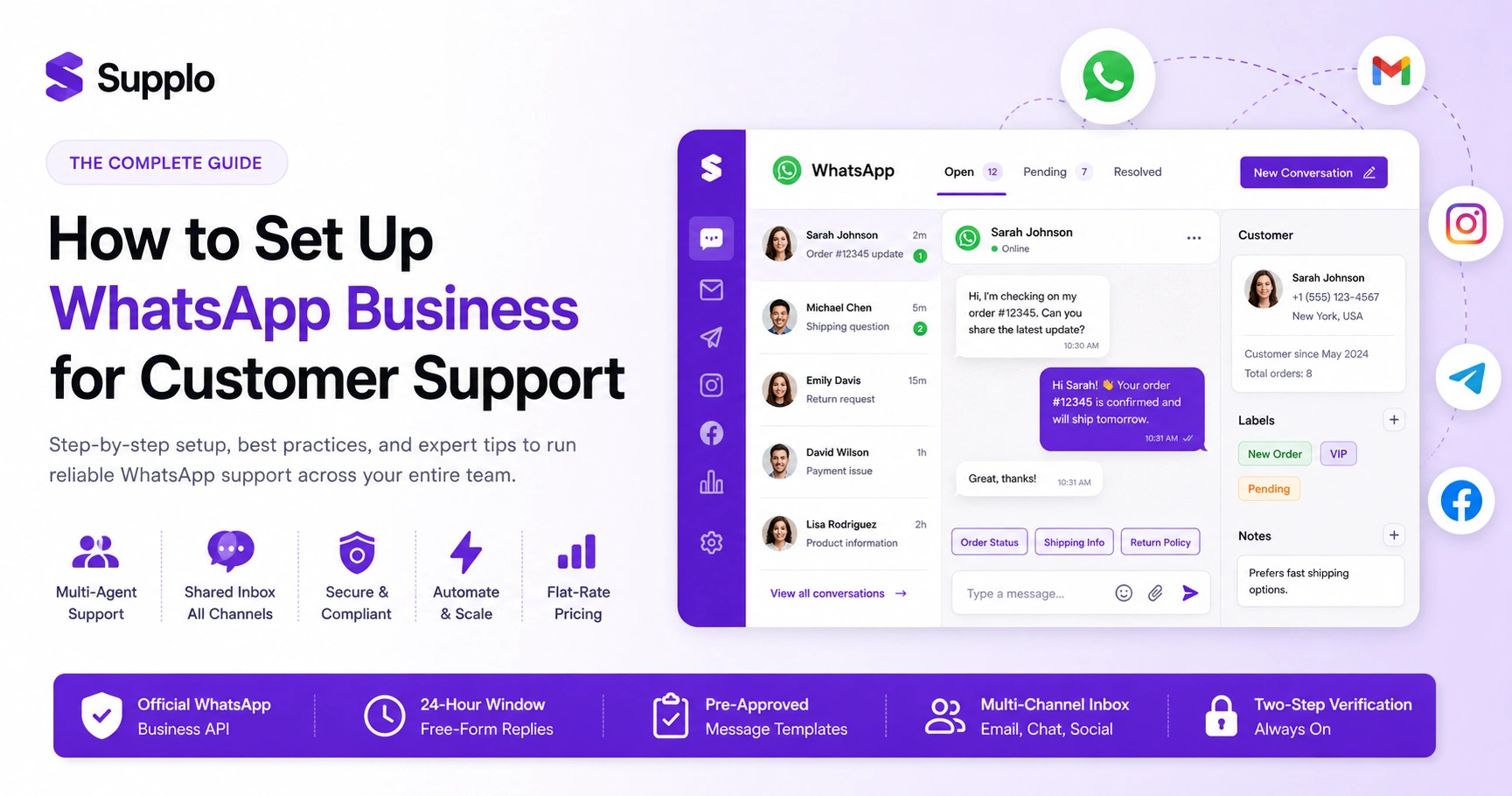
Integration means every WhatsApp message lands in the same queue as your email, live chat, and social DMs. No tab switching. No missed messages because a chat came in while you were on Slack. With Supplo, for example, you connect your WhatsApp Business API via a simple OAuth flow, and every conversation is immediately visible in the shared inbox alongside Telegram, Instagram, and Facebook messages.
- Look for a platform that supports multi-channel routing so WhatsApp chats get the same automated assignment rules as emails.
- You want message history to persist, not just live conversations, but past customer context.
- A proper integration includes clickable customer profiles, not just raw phone numbers.
- Test the media passthrough: customers will send screenshots, receipts, and voice notes.
A multi-channel inbox turns WhatsApp into just another tab in your daily workflow.
Setting Up Automated Replies and Messaging Templates for Customer Service
WhatsApp customers expect fast replies. Automated away messages and quick replies handle the first 30 seconds of any interaction. For API users, Meta requires pre-approved template messages for any outreach that starts before the customer messages you. Templates must pass Meta's content review, which can take a few days, so build your common ones (order confirmation, shipping update, payment receipt) before you launch.
- Away messages trigger outside your business hours and can include a brief expected response time.
- Quick replies are searchable shortcuts inside the app or API, great for return policy links or hours of operation.
- Template messages need a clear purpose: account update, payment update, or marketing (which has stricter rules).
- If you use an AI agent like Supplo's, it can generate contextual replies that stay within the 24-hour window.
Template Pre-Approval Checklist
- Identify your top three use cases (order status, shipping, payment receipt).
- Write transactional, not promotional, content.
- Submit templates through your BSP dashboard for Meta review.
- Wait for approval before launching proactive messages.
Managing WhatsApp Support Across Multiple Agents and Channels
The biggest reliability risk with WhatsApp support is a single point of failure: one phone, one agent, one login. To run WhatsApp support safely across a team, you need a platform that lets you assign chats, see who's replying, and transfer conversations without losing history. A shared inbox designed for multi-channel support solves this by pulling WhatsApp into the same workspace as your email and other channels.
- Avoid the "shared phone" strategy: two agents fighting over the same device is a reliability nightmare.
- Use status tags (open, pending, resolved) so nothing falls through the cracks.
- Collision detection prevents two agents from replying to the same customer simultaneously.
- A proper platform logs every action for audit and accountability.
You can route WhatsApp, email, Telegram, Instagram, and Facebook into one inbox with the right platform. View multi-channel features.
WhatsApp Business vs. WhatsApp API – Which One Do You Actually Need?
If you're a solo freelancer or run a single operation from one phone, the free WhatsApp Business app works. The moment you add a second person or a second channel, you need the API. The app caps you at one device and forces you to share a phone. The API routes messages into any platform you choose and scales with your team. There's no middle ground.
- The Business app supports up to four agents sharing the same phone, but that's just four people fighting over the same screen.
- The API has a 24-hour free-form reply window; the app has the same window but no template requirement for proactive messages.
- API users pay a per-conversation fee to Meta (negotiated through your BSP); the app is free but limited.
- If you have multiple agents or need email, chat, and social in one inbox, skip the app and go straight to API integration.
More than one agent? Go API. One phone, one person? Keep the app.
Common WhatsApp Business Setup Pitfalls and Solutions
Most teams fail because they don't pre-approve templates, they try to use a personal number already registered with regular WhatsApp, or they underestimate how long Meta's review takes. Another common failure: setting up the API without a proper support platform and trying to manage raw webhook responses. Each of these is avoidable with a little planning and the right tooling.
- You cannot migrate an existing WhatsApp personal account to Business without losing the chat history.
- Template rejection is usually due to the content sounding salesy. Keep templates purely transactional.
- Without a shared inbox, API messages pile up as raw JSON, which isn't helpful for customer service.
- Missing two-step verification on the business number is an account disaster waiting to happen.
Troubleshooting Quick Fixes
For troubleshooting common issues: if a template is rejected, rewrite it using purely transactional language without any pricing offers. If you cannot verify your number, ensure you are using one that is not already registered with regular WhatsApp. If API messages are not appearing, confirm the webhook URL in your BSP dashboard. Finally, if two agents are replying to the same customer at the same time, enable collision detection in your shared inbox.
Templates keep getting rejected, or your API setup keeps stalling? A proper support platform handles the Meta approval flow for you, so you can skip the bureaucracy and get back to helping customers. Get help with API setup at https://supplo.io/features/
What Should Free WhatsApp Business Customer Support Actually Cost?
The Business app is free. The API has a per-conversation fee from Meta (varies by region, roughly $0.005 to $0.08 per conversation depending on your country and conversation category). On top of that, your BSP or support platform charges for the inbox, routing, and multi-agent features. Supplo, for example, bundles API fees into a flat monthly rate per team, no per-seat or per-resolution meters, so you know exactly what you pay.
- Meta's fee applies per conversation, not per message, so a single support thread counts as a single charge.
- Marketing conversations cost more than service conversations; label them correctly.
- Some platforms charge per active agent; others charge per resolution or per bot interaction.
- A flat-rate platform eliminates the surprise of scaling, especially for growing support teams.
If you're paying per agent or per resolution, your bill grows as your team grows. A flat rate keeps costs predictable.
Final Checklist for a Reliable WhatsApp Support Channel
Before you launch, confirm that your number is dedicated and verified, that your templates are approved, that your support platform is connected, and that your team knows the handoff process. Test the flow: send a message from a test phone, watch it land in your inbox, assign it, reply, and close it. If the loop works cleanly, you're live; if it doesn't, fix the routing before you announce the channel to customers.
- Dedicated business number (not personal, not shared).
- WhatsApp Business API approved through a BSP.
- Shared inbox connected (email, chat, WhatsApp, all in one view).
- Pre-approved template messages for common scenarios.
- Team trained on assignment and transfer rules.
- Two-step verification is enabled on the business number.
Running a support team across WhatsApp, email, Telegram, and Instagram? Supplo puts them all in one inbox at a flat rate, no per-agent fees, no surprise bills. See the difference yourself. See plans at https://supplo.io/pricing/.
Key Takeaways
- Use the WhatsApp Business app only for solo operations; switch to the API for any team.
- Integrate the API with a shared inbox to avoid app switching and missed messages.
- Pre-approve templates to keep messages compliant and deliverable.
- Avoid shared phones; use a multi-agent platform for chat assignment and collision detection.
- Flat-rate pricing eliminates cost surprises as your team scales.
FAQ
Is it legal to use WhatsApp Business for customer support?
Yes, as long as you follow Meta's commerce and messaging policies, respect regional privacy laws (GDPR in the EU, for example), and only message customers who have opted in or initiated a conversation. Reminder: Supplo is not affiliated with any app or website. Please follow each app's terms and local regulations.
Can I use my personal WhatsApp number for a Business account?
You cannot run the Business app and the regular app on the same number simultaneously. You can migrate a personal number to Business, but you will lose the personal chat history.
Why are my WhatsApp message templates being rejected?
Meta rejects templates that sound spammy, promotional, or incomplete. Keep them purely transactional, order updates, shipping confirmations, appointment reminders, and avoid any pricing offers or generic greetings.
Can I have more than one agent replying on WhatsApp?
Not with the free Business app unless they share the same physical phone. The API, connected to a multi-agent platform like Supplo, lets any number of agents reply from their own devices inside a shared inbox.
What happens to customer data when I switch platforms?
You own the customer conversations. When you disconnect the API from one platform, the chat history lives in the previous platform unless you export it. Always export your data before migrating.
Does WhatsApp Business support video calls for support?
Yes, the Business app supports voice and video calls. The API does not include call routing; it is primarily for text and media messaging within the 24-hour customer service window.
How do I handle a customer who messages after hours?
Set an away message in the Business app or via the API to acknowledge the message, set expectations for a reply time, and route it to your team's queue for next-day handling.
How long does Meta take to approve message templates?
Approval typically takes 24–72 hours, but it can take longer during peak periods. Submit templates before you plan to launch.
Can I integrate WhatsApp with a CRM?
Yes, through the API. A shared inbox platform like Supplo connects WhatsApp directly to your CRM for customer context, history, and routing.
What is the 24-hour customer service window?
After a customer sends a message, you have 24 hours to reply with free-form text. After that window, you can only send pre-approved template messages. If the customer replies again, the window resets.
Compliance line: Supplo is not affiliated with any app or website. Please follow each app's terms and local regulations.