On this page
This guide is for support team leads, operations managers, and solo founders who want to automate customer support replies without sacrificing quality or trust. Implement these steps to configure autoresponders that handle predictable queries, deflect tickets, and free up your team for complex issues.
Use this guide if you manage a growing support volume. Do not use it if you primarily handle high-stakes, sensitive escalations that require full human oversight under the law.
Quick Answer
- Map your triggers first: Audit 30 days of tickets to identify the top 10 repeat questions before touching any settings.
- Choose a flat-rate platform: Avoid per-resolution pricing that creates financial disincentives to automate during surges.
- Start with AI in suggestion mode: Let the AI draft replies for 2 weeks before enabling auto-send for low-risk queries.
- Test every channel separately: Email SPF/DKIM, chat widget compatibility, and mobile formatting all differ.
- Prevent infinite loops: Always add a "handoff to human" button and never automatically reply to auto-replies.
What Automated Replies Actually Do and Shouldn't Do for Support
Let's get one thing straight. Automated replies handle the boring stuff, order confirmations, password resets, and store hours. They're designed for the predictable, the repetitive, the "I've answered this 50 times today" kind of questions.
What shouldn't they handle? Escalations. Nuanced complaints. Anything requiring actual empathy. The whole point isn't to replace your team, it's to give them breathing room for the conversations that actually matter.
- Deflection vs. resolution: Automated replies deflect simple queries; humans resolve complex ones. Know the difference before you start.
- Common misuse: Blasting an angry customer with a generic "Thanks for reaching out" script? That's how you lose people.
- The "first response" trap: A faster auto-reply doesn't always mean a better experience. Sometimes speed means you're annoying them faster.
- Why reliability matters more than speed: A broken auto-reply creates ghost tickets that go completely unanswered. Nobody wins.
Compliance line: Supplo is not affiliated with any app or website. Please follow each app's terms and local regulations.
The 4 Types of Automated Support Replies You Need in Your Stack
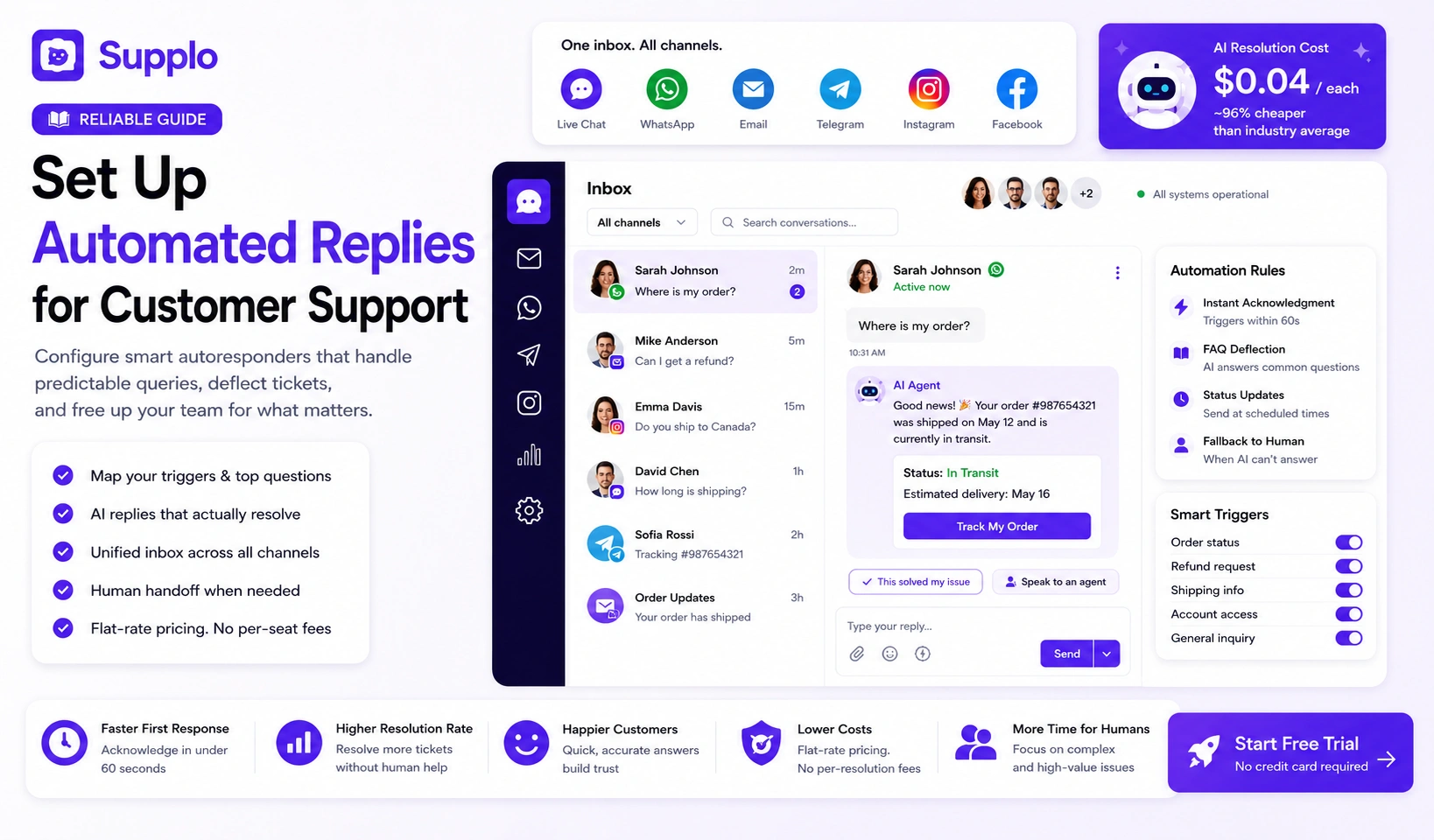
Not all auto-replies are created equal. A proper stack includes: instant acknowledgment, FAQ-based deflection, status updates, and fallback to a human. Miss any of these four, and you've got a reliability gap, the kind that frustrates customers and quietly drives up churn.
- Acknowledgment autoresponders: Must trigger within 60 seconds of inbound message. Sets expectations immediately.
- Deflection autoresponders: Use a knowledge base to answer before a human ever touches the ticket.
- Update autoresponders: Scheduled replies that prevent those dreaded "is anyone there?" follow-ups.
- Escalation fallback: When the AI can't answer, and it will happen, it must route cleanly. No ghosting allowed.
A broken auto-reply is worse than no reply. It creates trust debt that takes multiple human conversations to repair.
Map Your Support Triggers Before You Configure Anything
Here's the thing most people skip: the trigger logic. You can have the fanciest autoresponder in the world, but if your triggers are wrong, you're just automating chaos.
Before you touch a single setting, list every inbound channel you use. Then list every common question you get. Group them into two buckets: "auto-answer" vs "auto-route." This map is your configuration blueprint, don't skip it.
- Audit 30 days of support tickets and identify the top 10 repeat questions.
- Tag each question: Can an AI fully resolve it, or does it need human eyes?
- Map inbound sources separately: Email autoresponder rules differ from chat widget rules, don't assume they're the same.
- Identify off-hours: Configure different auto-replies for after 6 PM or weekends.
- Answer this: For each question, what exact keyword or phrase triggers the correct response?
This map prevents the most common failure: triggering the wrong auto-reply for the wrong channel.
Choose an Autoresponder That Won't Break at Scale
Most autoresponder failures come down to one thing: bad pricing models. Tools that charge per resolution or per seat create a weird incentive; teams get stingy, turn features off, and the whole system cracks under pressure.
Choose a platform with unlimited seats and a flat rate. That way, you never face the dreaded "should I turn off the AI?" conversation when volume spikes.
Supplo does exactly this. The AI resolution cost is $0.04 each, 96% cheaper than the industry average from legacy tools, so that you can scale auto-replies without a budget shock.
- Per-seat metering kills reliability: Teams under-configure to save money—every single time.
- Per-resolution metering kills AI use: You throttle the bot when ticket volume spikes, exactly when you need it most.
- Flat-rate platforms (like Supplo) remove the financial disincentive to automate.
- Look for multi-channel autoresponder support: email, chat, WhatsApp, Telegram, Instagram, and Facebook. Supplo supports all of them natively.
How to Configure Your Support Autoresponder in Under 30 Minutes
Start with your most-used channel, usually email or chat widget. Write three templates: instant acknowledgment, FAQ match, and fallback-to-human. Configure triggers by keyword or topic. Test with a real ticket from a test account. Then duplicate the logic to WhatsApp, Telegram, and Instagram.
- Write templates in plain language; drop the corporate jargon nobody likes.
- Set delay timers: Instant for chat, 1–2 minute delay for email to avoid spam filters.
- Tag every auto-reply as "auto," so your team knows it was not human-sent.
- Use Supplo's knowledge base to power auto-replies; it learns from resolved tickets over time.
- Test on mobile and desktop; formatting differs between channels, don't assume it looks good everywhere.
Supplo's shared inbox applies the same auto-reply rules across all channels from a single dashboard, without separate configuration per channel.
How to Deploy AI for Support Replies Without Losing the Human Touch
Here's the smart way to do this: don't let the bot run wild on day one.
Start with "suggestions only" mode. The AI drafts a reply, but a human clicks send. Do this for two weeks. Audit every suggested reply. Only then, and only for low-risk queries like store hours or shipping status, switch to auto-send.
Supplo's AI agent learns from your resolved tickets and improves over time, so the auto-replies get more accurate without manual tweaking.
- Begin in suggestion mode for 2 weeks; audit every suggested reply for accuracy.
- Define a confidence threshold: If AI is <90% sure, do not auto-send.
- Add a "handoff to human" button in every auto-reply so customers can opt out.
- Use translation features (Supplo includes native translation) for multilingual auto-replies.
The best AI auto-reply is the one the customer mistakes for a human, because it's helpful, not because it's deceptive.
Troubleshooting Broken Autoresponders
Auto-reply failures usually boil down to three things: bad trigger logic, API disconnect, or email authentication issues.
Start simple. Did the message arrive at all? Check your inbound channel first. Then check your trigger conditions. If email auto-replies stopped working, verify SPF/DKIM records; this is the #1 culprit. For chat, check that the widget loads correctly.
- Most common failure: Trigger keyword mismatch (typo or case sensitivity).
- Email autoresponder fails: SPF record not set, so replies get blocked by spam filters.
- Chat widget fails: Ad blocker or VPN is blocking the widget script.
- API timeout: Third-party integrations (like Shopify or Stripe) drop the connection.
Supplo logs every failed auto-reply trigger in the activity feed so you can see exactly where the chain broke, and fix it in seconds instead of hours.
Getting trigger failures or silent replies? Most auto-reply bugs are caused by per-channel configuration drift. Supplo centralizes all trigger rules into a single shared inbox. If your code fails, our logs show you why. Get a higher acceptance rate.
Automated Email Replies for Support – Getting the Timing Right
Email auto-replies have a completely different rhythm than chat. Instant email replies look spammy. Delayed ones feel like you're ignoring them.
Optimal timing: send an acknowledgment within 2 minutes. Only auto-resolve after 5 minutes of customer inaction. Use an out-of-office toggle for after-hours that sets expectations without promising immediate response.
- Auto-acknowledgment: "We got your email; expect a reply within 4 hours."
- Auto-resolution: Only for yes/no queries; confirm with the customer before closing.
- Avoid auto-replies to auto-replies (infinite loop prevention, this is more common than you think).
Use Supplo's email ticketing to route auto-replies from multiple inboxes into a single shared thread, so no more lost customer messages across separate email accounts.
Timing is the forgotten variable in auto-reply configuration. Too fast looks robotic; too slow looks negligent. Two minutes is the sweet spot for email.
The Real Cost of Automated Replies
Here's what nobody tells you: the cost isn't the monthly subscription. It's the hidden per-resolution fee that scales with volume.
If you pay per AI reply, scaling your auto-replies becomes a budget decision. Not a reliability decision. That's a problem.
Supplo flips this: unlimited seats, a flat monthly rate, and $0.04 per AI resolution, roughly 96% cheaper than legacy competitors. That means you can auto-reply to every inbound message without having to watch the meter. Supplo's pricing is flat-rate, and we accept Crypto, Binance Pay, Payeer, GCash, AmanPay, QIWI Wallet, DOKU, Nigeria and South Africa cards, Skrill, and Payoneer.
- Calculate your current per-resolution cost; multiply by your monthly ticket volume. You might be shocked.
- Hidden cost: Time wasted configuring per-channel autoresponders separately.
- Hidden cost: Churn from auto-replies that don't resolve because the AI was throttled.
- Flat-rate platforms eliminate the "should I turn off the bot?" dilemma during surges.
Stop paying per resolution. Get unlimited auto-replies for a flat rate. Supplo costs $0.04 per AI resolution, 96% cheaper than legacy players. Pay once, automate everything, no per-seat fees. No surprises.
Quick Start – Set Up Autoresponder Today (With the Right Tool)
You can test automated replies in under 10 minutes with Supplo's free trial, no credit card, no per-seat limit. Create a knowledge base of 5 answers, connect one channel (email or chat widget), and configure the AI agent to auto-reply to matching queries.
- Sign up for the Supplo free trial at https://supplo.io.
- Create 5 knowledge base articles (most common queries).
- Connect your email or embed the widget.
- Turn on the AI agent in suggestion mode.
- Send a test message; watch the AI draft an auto-reply.
- Tweak trigger keywords until accuracy feels right.
See it work before you decide. If it doesn't fit your workflow, you haven't lost anything but 10 minutes.
Test automated replies right now, no credit card needed. Start your free Supplo trial today. Connect one channel, configure 5 auto-replies, and see it in action. No commitment. https://supplo.io
Key Takeaways
- Map your top 10 repeat support questions before configuring any trigger logic.
- Use a flat-rate autoresponder platform (no per-seat or per-resolution fee) to avoid throttling automation during ticket surges.
- Start with AI in "suggestion mode" for 2 weeks; only switch to "auto-send" for low-risk queries.
- Test every auto-reply trigger on mobile and desktop; check SPF/DKIM for email deliverability.
- Centralize all channel rules in one shared inbox to prevent configuration drift and ghost tickets.
Disclaimer
Automated replies are powerful when configured correctly, but they must comply with each platform's terms and local regulations. Always follow GDPR guidelines for automated processing. Never use auto-replies for sensitive data like passwords or payment details. Supplo is not affiliated with any app or website. Please follow each app's terms and local regulations.
FAQ
Is it safe to use automated replies for customer support? Yes, as long as you follow each platform's terms and local regulations. Supplo is not affiliated with any app or website. Please follow each app's terms and local regulations. Never use auto-replies for sensitive data (such as passwords or payment details).
Why do my auto-reply triggers keep failing? Most failures are trigger keyword mismatches (typos, case sensitivity) or API disconnections. Check your trigger rules and ensure your email SPF/DKIM records are set up correctly.
Can I use the same auto-reply rules for email, WhatsApp, and chat? Yes, but only if your platform supports multi-channel unified routing. Supplo applies the same logic across all channels from a single inbox, with no separate configuration per channel.
How many auto-reply templates should I create? Start with 5–10 for your most common queries. You can expand as you see which questions repeat. Over-automating before you have data creates confusing customer experiences.
Do auto-replies hurt customer satisfaction? Only if they're poorly configured. Instant, generic auto-replies for complex issues frustrate customers. Use auto-replies only for predictable, low-stakes queries.
What's the difference between an autoresponder and an AI agent? A static autoresponder sends a fixed message in response to a trigger. An AI agent (like Supplo's) learns from resolved tickets and can answer nuanced variations of the same question over time.
Should I auto-reply on weekends? Yes, but set expectations clearly. An auto-reply that says "We'll get back to you Monday" is better than silence. Supplo's scheduling lets you toggle auto-reply behavior by time of day.
Compliance line: Supplo is not affiliated with any app or website. Please follow each app's terms and local regulations.


