On this page
Getting support team headcount right is critical for customer satisfaction and financial health. This guide is for customer support leaders, operations managers, and small business owners who need a practical, reliable method to determine optimal staffing levels. You'll learn how to accurately calculate agent workload, forecast future needs, and understand how automation can reshape your team's composition.
It helps you ensure your team isn't overloaded, leading to burnout and poor customer experiences, nor underutilized, wasting valuable budget. This methodology is particularly useful when experiencing growth, launching new products, or integrating new support channels.
Quick Answer
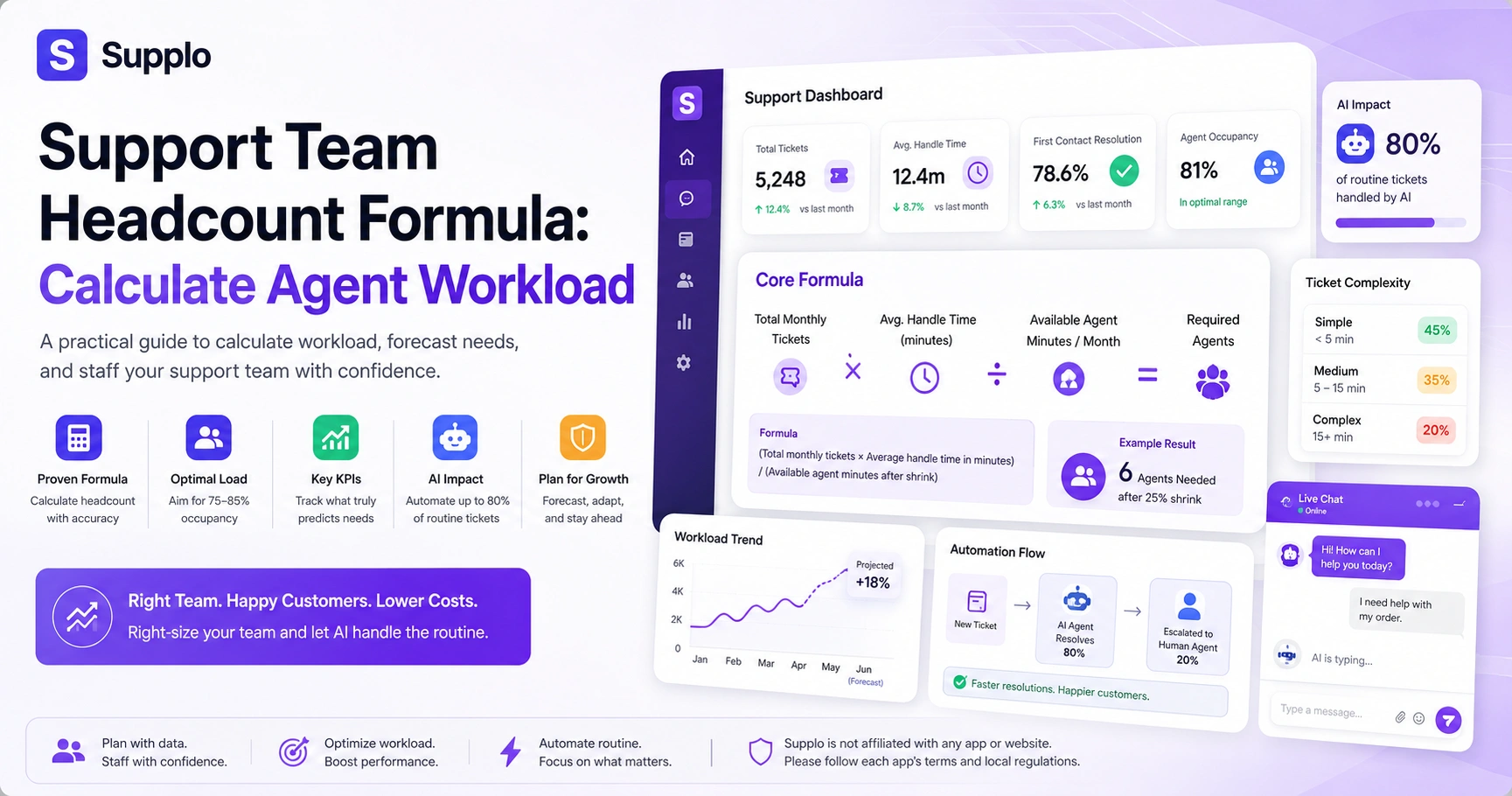
- Core Formula: (Total monthly tickets × Average handle time in minutes) / (Available agent minutes per month).
- Adjust for Shrink: Subtract 20-30% of an agent's available time for meetings, training, and breaks.
- Benchmark Occupancy: Aim for 75-85% agent time actively spent on tickets to balance efficiency and well-being.
- Key KPIs: Monitor ticket volume, average handle time, first contact resolution, average response time, and agent occupancy.
- AI Impact: Automation can resolve up to 80% of routine tickets, freeing human agents to focus on complex problem-solving.
Why Getting Headcount Wrong Costs You More Than You Think
Getting headcount wrong on the low end means burned-out agents, longer response times, and churned customers. Getting it wrong on the high end means wasted budget that could fund better tools or higher pay. Most teams don't know their true baseline because they rely solely on volume, rather than factoring in handle time, complexity, and shrink.
Understaffing by just one full-time agent can cost more than the agent's salary in lost revenue due to poor customer experience. Overstaffing often creates idle agents and masks inefficiencies that should be fixed rather than being funded. The real cost of headcount miscalculation includes rehiring, retraining, and morale damage. Teams that review headcount quarterly reduce reactive hiring by a measurable margin. This helps ensure your support costs remain controllable, providing a true competitive advantage.
- Supplo is not affiliated with any app or website. Please follow each app's terms and local regulations.
The Core Formula: How to Calculate Support Agent Workload
Here's the simplest, most reliable formula you'll ever use: (Total monthly ticket volume × Average handle time in minutes) / (Available agent minutes per month). That gives you a raw headcount number. But you need to adjust for shrink, meetings, training, admin, breaks, which usually run 20–30% of an agent's week.
Total monthly ticket volume refers to inbound tickets, not the replies you send. Average handle time includes time spent writing, researching, and follow-up touches. Available agent minutes = (Work days per month × Hours per day × 60) after subtracting shrink. For example, 5,000 tickets multiplied by an average handle time of 12 minutes equals 60,000 minutes. Divided by 10,080 available agent minutes (based on typical work hours per month), this would indicate approximately 6 agents are needed. This is a starting number, not the final, accurate answer; channel mix and complexity adjust it.
Breaking Down How Much Work a Support Agent Can Handle
A full-time support agent can usually handle 40–60 standard tickets per day in a chat-heavy environment, or 25–35 in an email-focused workflow where each ticket requires deeper research. But these ranges vary widely by product complexity and by whether the team uses a shared inbox that reduces context switching. Chat-centric support agents handle higher volume but lower complexity per interaction.
Email or ticket-heavy roles cap lower due to asynchronous depth and longer response times. Agents on multichannel support (email, chat, and social) experience a 15–25% drop in productivity. The biggest variable is how much time agents spend searching for answers versus writing responses. Self-learning AI and knowledge bases can raise that number by reducing search time.
Calculating Support Agent Workload in Practice
Start by running a 30-day report from your inbox or ticketing tool to get total ticket volume, average first response time, and average handle time. Then bucket tickets by complexity: simple (under 5 min), medium (5–15 min), and complex (15+ min). Multiply each bucket's count by its handle time, add them together, and divide by your team's monthly available minutes to get a weighted workload number.
Here's the practical breakdown:
- Pull 30-day ticket data, including handle time and channel source, from your customer support platform.
- Categorize tickets into three complexity tiers with clear definitions. Use average handle time as a guide: simple (less than 5 minutes), medium (5-15 minutes), and complex (over 15 minutes).
- Calculate the weighted total: (simple ticket count × average simple ticket handle time) + (medium ticket count × average medium ticket handle time) + (complex ticket count × average complex ticket handle time).
- Determine available minutes per agent after a 25% shrink factor for non-ticket activities.
- Divide the total weighted handle time by the available minutes per agent, then round up to the nearest whole agent.
- Add a 10–15% buffer for seasonal spikes or unexpected volume fluctuations.
This process gives you a much more granular and accurate picture than a simple average of ticket volume. For example, multichannel automation, like that found on Supplo, combines platforms such as WhatsApp, Telegram, Instagram DMs, and email, which can affect handling times across channels.
Test your numbers for free.
Got your current ticket volume and handle time? Plug them into a real shared inbox with a 14-day free trial at supplo.io and see how AI handles routine tickets, freeing your team for the complex cases that matter.
Optimal Support Agent Load: What the Data Says About Burnout vs. Efficiency
The sweet spot for agent occupancy, the percentage of time actually spent on tickets, is between 75–85%. Below 70%, agents are underutilized; above 90%, burnout and turnover spike. Optimal support agent load isn't about squeezing every minute; it's about creating a buffer for thinking time, training, and unexpected spikes.
Occupancy rates above 85% correlate with higher agent attrition within 6 months. Teams with occupancy below 75% often have automation gaps or inefficient routing. Optimal load leaves room for continuous improvement and coaching. Seasonality, product launches, and bug waves should be planned for a buffer, not treated as emergencies. Buffer time also reduces the risk that agents will skip quality steps when pressure builds.
How to Measure Support Team Productivity Without Gaming the Metrics
Don't measure just tickets closed per hour; that rewards agents for rushing. Instead, use a balanced set that includes first contact resolution, customer satisfaction score, and handle time. The best way to measure support team productivity is to track trends over months, not day-to-day targets, and to normalize by ticket complexity.
Tickets closed alone is a vanity metric that encourages cutting corners. Combine closed tickets with customer satisfaction score and first-contact resolution rate. Track trend lines over 30/60/90 days instead of weekly snapshots. Normalize for complexity: a complex ticket shouldn't count the same as a password reset. Use quality assurance scores alongside productivity data to spot false efficiency.
5 Key Support Team KPIs That Actually Predict Headcount Needs
The five KPIs that matter most are: ticket volume per month, average handle time, first contact resolution rate, average response time, and agent occupancy. Together, they tell you whether you're understaffed, overstaffed, or efficient. Key support team KPIs should be reviewed monthly, not annually, and compared against industry benchmarks for your channel mix.
- Ticket volume is your baseline, but handle time adjusts it for reality.
- The first-contact resolution rate tells you whether agents have the tools they need.
- Average response time is the customer's view of your capacity.
- Agent occupancy reveals whether you're running lean or burning out.
- Add channel-based segmentation to avoid blending chat and email into meaningless averages.
How to Track Support Team Efficiency with Your Current Stack
Most teams already have the data in their shared inbox, ticketing tool, or CRM. Track support team efficiency by exporting handle time, resolution rate, and response time weekly and looking for patterns. If you're using a unified inbox, you can see cross-channel performance without flipping between tabs.
Export weekly data from your existing tool and build a simple dashboard. Compare handle time across channels to spot where tools can help. Look for high-handle-time tickets and check if answers exist in your knowledge base. If response times are climbing, it's a leading indicator that headcount needs to be reviewed. Efficiency improvements can come from better routing as easily as from more people. Using a shared inbox like Supplo can significantly streamline this process and provide a unified view of data.
Measuring Support Agent Performance: The Qualitative Side You Can't Skip
Numbers don't tell the whole story. Measuring support agent performance means also evaluating communication clarity, empathy, problem-solving ability, and adherence to process. A fast agent who leaves customers confused isn't productive; they're generating follow-ups that inflate volume.
Use recorded conversations or ticket reviews to assess quality, not just quantity. Sample 3–5 tickets per agent per week to catch drift early. Pair coaching with performance scores; don't punish low scores without support. Good agents can mask bad systems; low performance may mean poor training or tooling. Customer satisfaction score and ticket reopens are the cleanest indirect quality measures. A robust knowledge base can significantly empower agents to resolve issues more effectively, influencing quality metrics.
See where your team can improve.
If your handle time feels high or response times are climbing, try a shared inbox with self-learning AI for free. Start your 14-day trial at supplo.io, no credit card needed. Pricing stays flat per workspace, no seat surprises.
Support Agent Capacity Planning for Growth
Support agent capacity planning for growth means forecasting 6–12 months based on current ticket growth rate, planned product launches, and channel expansion. If your team grows 10% in headcount but tickets grow 30%, you need to invest in efficiency tools or automation, not just more agents.
Use the average monthly ticket growth rate from the last 6 months as your baseline. Add known events, such as feature launches, campaigns, or seasonal peaks. Factor in new channels: adding WhatsApp or Instagram DMs increases volume per user, model two scenarios: all-hires versus automation-assisted. Capacity planning should be updated quarterly, not annually, to stay useful.
When AI Changes the Math: How Automation Reshapes Your Headcount
Automation doesn't eliminate the need for headcount, but it changes the ratio. If a self-learning AI agent resolves up to 80% of incoming tickets automatically, your human team handles only the remaining 20%, typically the complex, high-skill cases. That means you need fewer agents overall, but the ones you keep need stronger problem-solving skills and the ability to handle escalation.
AI handles routine tier-1 tickets; humans handle complex, sensitive, or high-value tickets. With automation, the agent workload calculation shifts from total tickets to the number of escalated tickets handled by humans. Teams using AI need fewer agents per 1,000 tickets, but in higher-value roles. Human agents become escalation specialists and quality reviewers, rather than ticket machines. Automation also reduces shrink by giving agents an AI co-pilot for faster answers.
Plan your capacity with confidence.
Whether you need 2 agents or 200, supplo.io gives you the tools to know your numbers and the automation to let your team do their best work. Start free today—pricing at $0.04 per AI resolution, not $0.99. Pay by Binance, GCash, Skrill, and more.
FAQ
What is the formula for calculating support team headcount?
The formula is: (Total monthly tickets × Average handle time in minutes) / (Available agent minutes after shrink). Adjust for complexity and channel mix for a realistic number.
How many tickets can a support agent handle per day?
A standard range is 40–60 chat tickets or 25–35 email tickets per day, depending on complexity, tooling, and whether the agent uses a unified inbox. Automation can push these numbers considerably higher.
How do you accurately measure support agent workload?
Use a weighted model that separates ticket complexity, pulls handle time from your tool, and bakes in shrink (meetings, training, admin). Running a 30-day sample gives you a reliable baseline.
What is the optimal support agent load to prevent burnout?
Target an agent occupancy rate of 75–85%. Below that, you're underutilized above 90%, and burnout and turnover spike sharply. Leave a buffer for thinking time and unexpected volume.
How do AI agents change headcount planning?
AI can automate up to 80% of routine tickets. This means fewer agents for the same volume, but the remaining agents handle more complex, high-value tickets. Headcount planning shifts from quantity to role composition.
What are the most important KPIs for support team headcount?
Ticket volume, average handle time, first contact resolution rate, average response time, and agent occupancy. These five KPIs together predict staffing needs more reliably than any single metric.
How often should you recalculate support team headcount?
Quarterly is the minimum. Faster-growing teams should check monthly. Replan after any major change: a product launch, a new channel, a campaign spike, or an automation rollout.
Compliance line: Supplo is not affiliated with any app or website. Please follow each app's terms and local regulations.