On this page
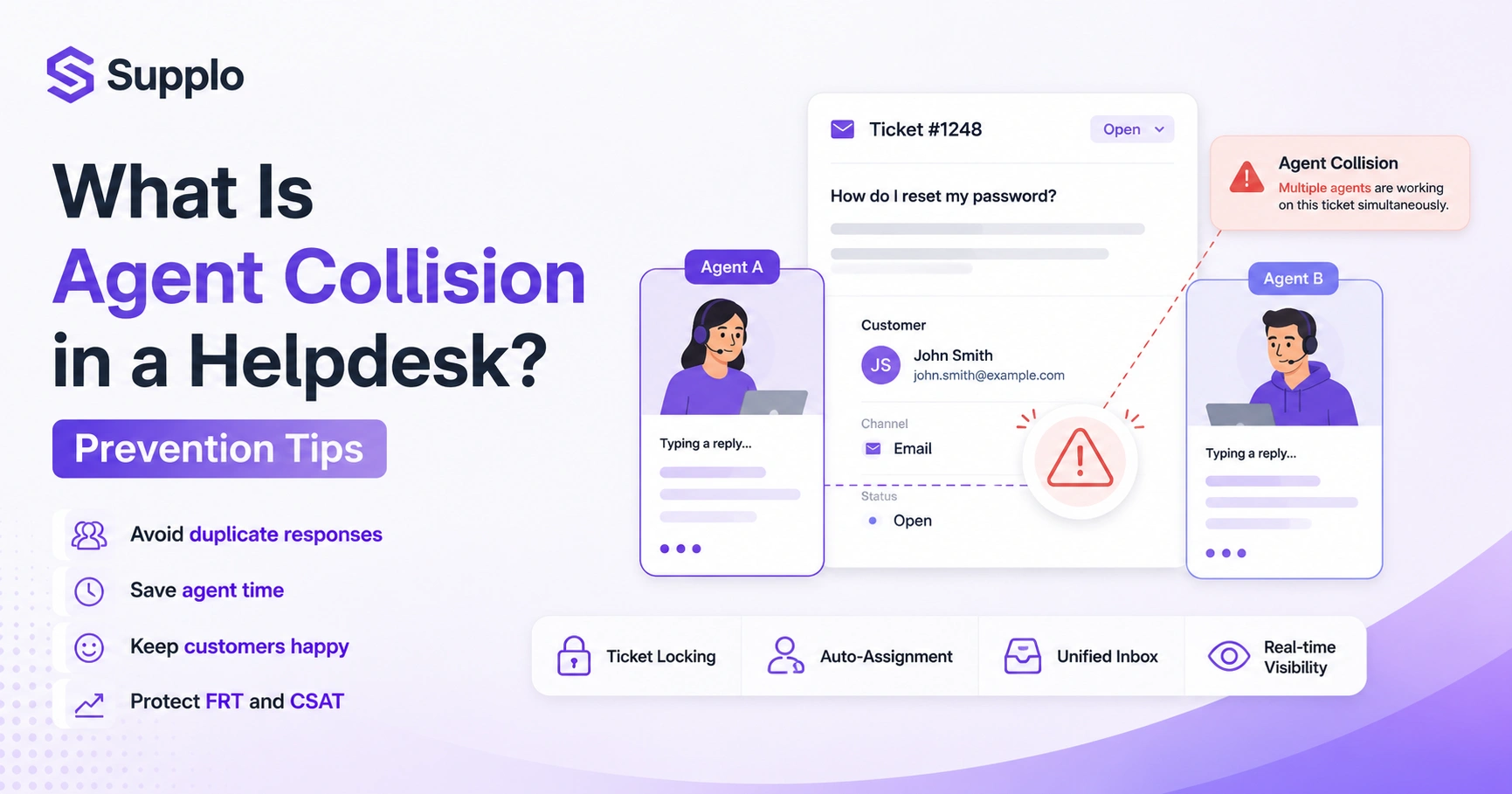
You know that awkward moment when two people answer the same question at the same time? That's an agent collision in a helpdesk and it's surprisingly common. It happens when two or more support agents unknowingly work on the same customer inquiry simultaneously. The result? Duplicate responses, wasted time and confused customers who wonder if they're talking to a team or a circus.
Quick Answer
- Agent collision occurs when multiple agents work on the same customer inquiry simultaneously.
- It leads to duplicate responses, wasted agent time and confused customers.
- Common causes include a lack of real-time presence indicators and a lack of unified inboxes.
- Prevent it by enabling ticket locking, auto-assignment and consolidating channels into a single, shared workspace.
- Its impact includes artificially inflated First Response Times (FRT) and lower Customer Satisfaction (CSAT) scores.
What Is Agent Collision in a Helpdesk?
Let's get straight to it. Agent collision in a helpdesk occurs when two or more support agents work on the same ticket at the same time without knowing the others are there. It wastes your team's time, frustrates customers with duplicate responses and kills first-reply accuracy. In simple terms, it's the digital version of two people grabbing the same phone receiver.
Agent collisions occur most often in shared inboxes where tickets are auto-assigned but visibility lags are high. It is different from ticket-stealing or queue-jumping; a collision is unintentional and system-induced. Multi-channel help desks increase the risk of collisions because conversations occur across different surfaces. The core problem isn't the agent; it's the lack of real-time presence indicators in the helpdesk software.
How Agent Collision Hurts Your Customer Support
Customer service agent collisions don't just annoy your team; they directly damage your brand's reliability. Duplicate responses make you look uncoordinated, while double-handling delays resolution for other tickets. The ripple effect includes higher handle times, lower CSAT scores and increased agent burnout.
Customers who receive two identical replies often lose trust or ask to escalate, adding unnecessary friction. Time wasted on collisions could be spent on complex or revenue-impacting tickets. Agent collision effects compound on busy days when every second counts, common during product launches or incidents. Measuring collisions in your helpdesk gives you a clear benchmark for how much your team's efficiency is leaking.
Common Scenarios of Agent Overlap in Multi-Channel Helpdesks
Agent overlap doesn't follow a single pattern; it shows up differently across your channels and workflows. Common scenarios include two agents replying from email at the same time, one agent typing on live chat while another answers via the widget, or an agent responding on WhatsApp while a colleague picks up the same thread on your shared inbox. Each scenario wastes time and confuses the customer.
- Email + live chat collision: A customer emails in, then uses chat and two agents pick up the same query.
- WhatsApp agent collision: A conversation pops up on WhatsApp Web and your multi-channel helpdesk simultaneously.
- Instagram DMs vs. shared inbox: The same question appears in two places and two agents answer independently.
- Telegram vs. widget: No real-time sync means both agents respond without seeing each other's status.
The Hidden Impact of Agent Collision on First Response Time (FRT) and CSAT
Agent collision doesn't just double responses; it artificially inflates your First Response Time by forcing agents to re-read and re-work tickets that already have a reply. The customer sees a slower overall resolution while your team burns energy fixing duplicate work. Over time, this quietly drags down your CSAT scores without an obvious cause.
Duplicate replies can cause customers to re-explain themselves, creating a negative feedback loop. Support teams often misattribute collisions to agent performance rather than to system design. Collision-driven delays affect your entire queue, not just the tickets involved. Real-time presence and auto-lock features in your helpdesk directly protect FRT and CSAT.
How to Prevent Agent Collision in a Ticketing System
Preventing agent collision starts with setting up automatic ticket locking, real-time availability indicators and a unified inbox. The best systems prevent two agents from opening or replying to the same ticket at the same time. You can also introduce assignment rules and visibility policies that flag in-progress tickets.
- Enable collision detection; most modern help desks have a toggle for this feature.
- Use auto-assignment with round-robin or skill-based routing to reduce manual selection.
- Train agents to check ticket status before replying (it sounds obvious, but it's often skipped).
- Audit your helpdesk logs weekly to spot collision patterns you might not have noticed.
- Supplo's shared inbox, for example, keeps every conversation thread under one history so agents always see what's been done. You can further enhance this by using an AI agent to automatically resolve common queries, reducing the risk of human-agent collisions.
Preventing Agent Collision on Live Chat and WhatsApp: The Biggest Risks
Live chat and WhatsApp are the highest-risk channels for agent collision because conversations are instant and visible to multiple agents at once. On WhatsApp, the lack of built-in helpdesk controls means your team may reply from two accounts simultaneously. The fix comes from using a multi-channel helpdesk that centralizes all chats into one inbox with real-time occupancy status.
- WhatsApp agent collision spikes when you have more than two support agents handling the same number.
- Live chat collision happens when the widget is assigned to a team, not an individual agent.
- Always route inbound chats to a single thread with a timer that locks the ticket once an agent answers.
- Multi-channel helpdesks that integrate WhatsApp and live chat natively eliminate the guesswork.
What Tools Create Automatic Visibility to Avoid Multi-Channel Support Agent Collision
Tools that offer real-time presence, automatic ticket locking and cross-channel thread merging are your strongest defense against multi-channel agent collision. Look for helpdesk platforms that provide a unified inbox, consolidating every conversation regardless of channel. The goal is to remove who is working on this? question entirely.
- Real-time visibility of agent typing prevents overlap on live channels.
- Automatic locking of an open ticket prevents a second agent from entering.
- Unified inbox (email, chat, WhatsApp, Telegram, Instagram DMs) ensures no channel is orphaned.
- Audit trail features log every reply, making collisions easy to identify after the fact.
Configuring Your Helpdesk to Prevent Agent Overlap
Grab a cup of coffee, we're walking through the practical setup: Start by enabling ticket locking in your helpdesk settings. Next, configure auto-assignment rules that push tickets to agents based on their current workload, not just who's logged in. Finally, set up a shared inbox that groups all messages for a given customer into a single thread, regardless of channel. Test with a real conversation to confirm visibility works.
- Step 1: Check whether your helpdesk has a toggle to prevent dual assignment.
- Step 2: Enable presence indicators so agents can see who is in a ticket before clicking in.
- Step 3: Set routing rules based on channel, language, or skill, not random pickup.
- Step 4: Train your team on the one ticket, one agent until the policy is resolved.
- Step 5: Monitor collision logs weekly and adjust rules during peak hours.
You can preview Supplo's approach to intelligent routing and transparent pricing to see how these features come together.
Test your first collision-free conversation for free.
Stop guessing whether your helpdesk is ready. Start a 14-day free trial of Supplo. You'll experience a unified inbox with real-time agent visibility, preventing overlap before it happens. No credit card, no pressure. Start free trial →
When Agent Collision Slips Through: How to Recover Without Upsetting the Customer
Even the best configuration has an off day. If an agent collision happens, own it: the second agent should apologize briefly and hand off cleanly without duplicating the answer. Use internal notes to log the collision and adjust assignments afterward. Customers care more about a seamless handoff than perfection. If you stay coherent, they won't even notice the slip.
- Never send a duplicate response; it signals disorganization.
- The second-arriving agent should defer to the primary agent with a brief, warm handoff.
- Use an internal collision log to identify recurring patterns in your workflow.
- Collisions involving sensitive billing or account details require extra care to avoid confusion.
Supplo is not affiliated with any app or website. Please follow each app's terms and local regulations.
If a collision keeps happening despite your best setup, it's not your team; it's the tool.
When your helpdesk doesn't have collision detection or a unified inbox, no amount of training will fix the root cause. Supplo locks tickets automatically, unifies every channel and costs a flat rate per workspace, not per seat.
Why a Unified Inbox Is the Best Foundation for Multi-Channel Agent Collision Prevention
You can build all the rules you want, but if your team still jumps between separate inboxes for email, WhatsApp, live chat, Instagram DMs and Telegram, collision is inevitable. A unified inbox merges all channels into a single chronological thread, so agents never wonder if someone else has already picked up the ticket. It's the architectural backbone of collision prevention.
- A unified inbox eliminates the need for agents to check other tabs before replying.
- Agent availability is visible across all channels in a single dashboard.
- Collisions drop significantly because the ticket lifecycle is centralized.
- Supplo's shared inbox combines email, chat, WhatsApp, Telegram and Instagram DMs into one view without extra tabs.
Key Takeaways
- Agent collision is an unintentional overlap in support efforts that harms efficiency and customer trust.
- Multi-channel helpdesks are particularly vulnerable without proper systems in place.
- Real-time visibility, automatic ticket locking and presence detectors are crucial for prevention.
- A unified inbox is the most effective way to eliminate agent collision across all support channels.
- When a collision occurs, a clean agent handoff minimizes customer frustration.
Stop managing inboxes. Start managing conversations.
The Agent collision disappears when your team works from a single shared inbox. Supplo brings together WhatsApp, Telegram, Instagram DMs, live chat and email into a single thread-based inbox, with self-learning AI that answers most incoming tickets for you. Flat pricing, fast setup and no seat-based surprises. Get started for free.
FAQ
What exactly is agent collision in a helpdesk?
Agent collision occurs when two or more support agents work on the same ticket simultaneously, often because the helpdesk doesn't display real-time activity. It leads to duplicate responses, wasted time and confused customers.
How does agent collision affect first response time?
Agent collision artificially increases FRT because duplicate replies waste time and force agents to clean up overlapping work. This delays responses for other tickets and slows the entire queue.
Can agent collision hurt my CSAT scores?
Yes. Customers who receive duplicate answers or feel their issue is being shuffled often rate support lower. Consistent handling without collision builds trust and drives higher satisfaction.
How do I prevent agent collision on WhatsApp?
Centralize WhatsApp conversations into a unified inbox with real-time occupancy status. Avoid having multiple agents access the same WhatsApp number from different devices without a helpdesk layer that locks active conversations.
What's the difference between agent collision and ticket stealing?
Ticket stealing is when an agent intentionally takes a ticket assigned to someone else. A collision is unintentional and usually occurs when a system lacks visibility locks. Both hurt efficiency, but a collision is easier to fix with the right helpdesk settings.
Is agent collision more common on live chat or email?
Live chat is more prone to collisions because multiple agents can see the same incoming chat request at once. Email collisions also occur when inboxes aren't synced in real time.
How do I measure agent collision in my helpdesk?
Look for tickets with two or more first-reply timestamps within a short window (e.g., under 2 minutes). Support logs showing back-to-back replies from different agents to the same customer are a dead giveaway of collision.
Compliance line: Supplo is not affiliated with any app or website. Please follow each app's terms and local regulations.


