On this page
Look, we've all been there. You're staring down an inbox that's somehow multiplied overnight; tickets are piling up and half of them have already been passed between three agents who can't figure out who should handle them. It's chaos dressed up as customer support.
If that sounds familiar, you're in the right place. AI ticket routing logic is the thing that can finally break that cycle, automatically sending every ticket to the right person the first time, no manual sorting required. This guide is built for support teams who want to stop firefighting and start building something that actually works. Whether you're a team of three or three hundred, the principles here will help you route smarter, not harder.
Quick Answer
- AI ticket routing uses intent, sentiment, skill and capacity to assign the right agent on the first try, eliminating manual sorting.
- Reliable routing requires fallback rules, confidence scoring and regular model retraining on actual ticket history.
- Best results come from a hybrid approach: AI handles first-pass routing and auto-resolution; humans override or escalate when needed.
- Flat per-workspace pricing avoids the cost surprises of per-seat platforms, making AI routing practical for growing teams.
What Is AI Ticket Routing Logic and Why Does It Matter for Reliability?
Here's the simplest way to think about it: AI ticket routing logic is the brain behind your helpdesk. It reads an incoming ticket, the language, the urgency, who the customer is, what they've asked about before and instantly decides where that ticket should go. To the billing team. To a senior tech. Straight to an automated reply if the answer's already in your knowledge base.
When it works well, it's almost invisible. Customers get the right person immediately, agents only see tickets they can actually help with and you stop hearing about "that ticket that got lost somewhere."
When it doesn't work well? That's when customers get bounced around, response times balloon and your team burns out trying to clean up the mess. Reliable routing is what separates a helpdesk that feels effortless from one that feels like a second job.
- Reliable routing means the AI consistently interprets "billing" correctly even if a customer says "charge" or "payment" instead.
- It factors in agent skills, current workload and even timezone so tickets land on the right desk on the first try.
- Good logic handles escalation cleanly: if a query is too complex or sensitive, it routes to a human without delay.
- The best systems learn from past routing decisions and get smarter over time, reducing misroutes.
- Reliable routing is what separates a helpdesk that feels chaotic from one that feels effortless, for you and your customers.
The Core AI Routing Rules That Decide Where a Ticket Goes
Think of routing rules as the guardrails that keep your ticket flow from veering off a cliff. Some are simple: "If the word 'refund' appears, send it to billing." Others get more nuanced: "If this is a VIP customer with a frustrated tone, speaking Portuguese, route them to a senior agent who's available in the next 15 minutes."
The strength of your rule stack determines everything. Get it right and tickets glide through. Get it wrong and you're constantly reassigning and apologizing.
- Keyword and intent mapping: Train your model on your actual ticket history so it recognizes synonyms and slang unique to your product.
- Skill-based routing: Match tickets to agents certified in the relevant topic, not just the agent with the lightest queue.
- Priority and urgency scoring: Use sentiment analysis and customer tier to assign higher scores to tickets that need immediate attention.
- Time and timezone rules: Route after-hours tickets to a rotating on-call agent or queue them for morning in the customer's local time.
- Fallback logic: Every rule needs a default; if the AI can't confidently decide, it should escalate to a human instead of guessing.
How AI Support Ticket Assignment Actually Works
Let's walk through what actually happens when a ticket comes in. It's faster than you think, usually just a few seconds, but each step matters.
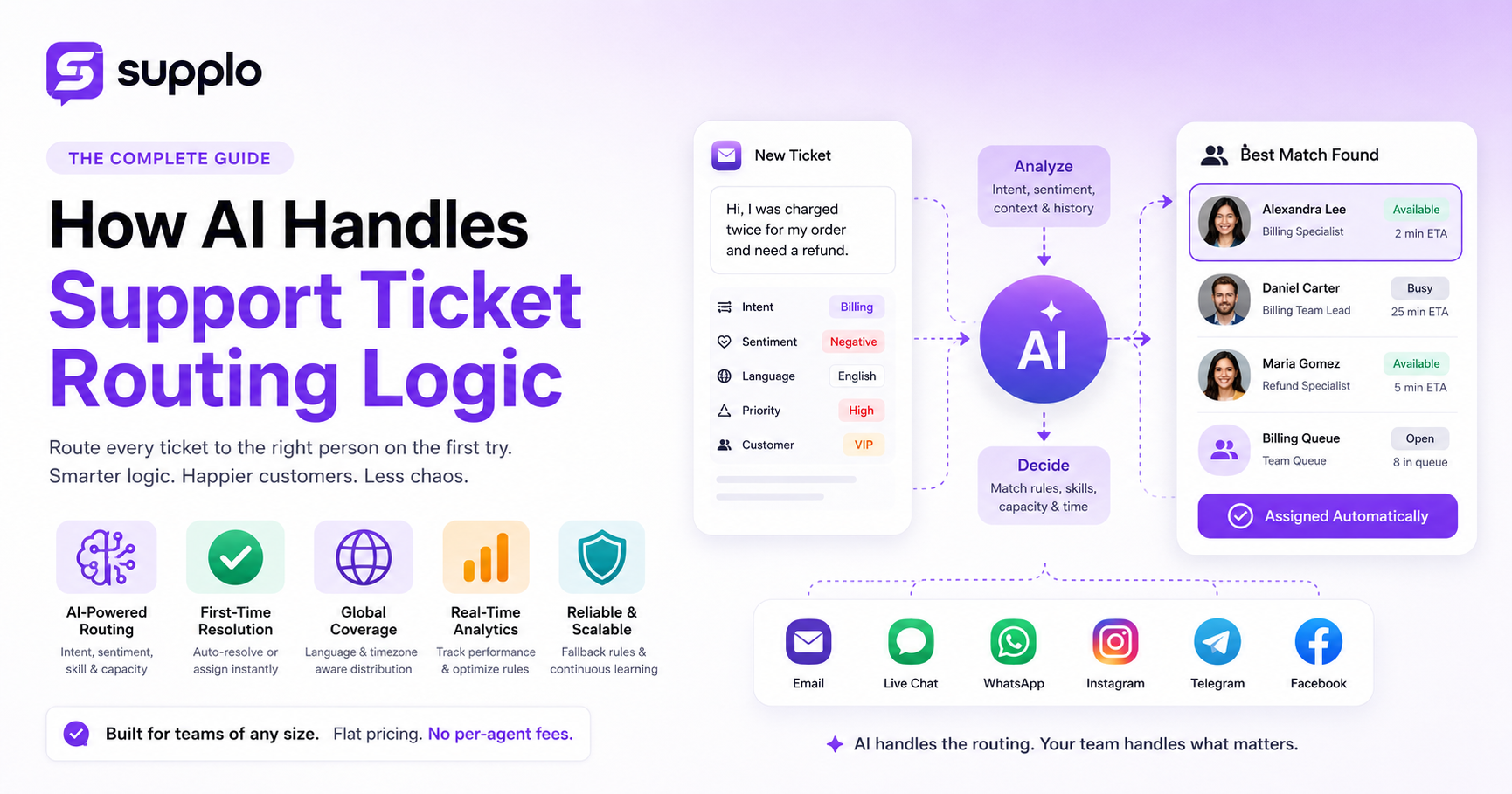
When a customer submits a ticket, the AI first parses the message to extract intent, urgency, language and any attachments or links. Then it cross-references your existing knowledge base and customer history to see if a solution already exists. If it does, the AI resolves it automatically. If not, the ticket is assigned to the best-match agent using your routing rules as the map. The whole thing takes seconds, but each step has a decision point that can break if not set up carefully.
- Step 1: Ingestion, The ticket arrives via email, chat widget, WhatsApp, or any integrated channel.
- Step 2: Parsing and enrichment, AI extracts key data: customer name, ticket category, sentiment score, language and previous interaction history.
- Step 3: Matching. The system checks your routing rules against the enriched data to find the most appropriate agent or queue.
- Step 4: Assignment or auto-resolve. If the AI finds a clear knowledge base match, it resolves the ticket. Otherwise, it alerts the assigned agent with context pre-loaded.
- Step 5: Feedback loop. After resolution, the system logs whether the routing was correct and learns from any reassignments.
Smart Ticket Routing vs. Manual Assignment: Which One Wins?
Manual assignment gives you total control, but let's be real, it doesn't scale. A single human can only sort so many tickets before fatigue and bias creep in. And even the best agent has bad days where they misroute something obvious.
Smart ticket routing, powered by AI, handles hundreds of tickets at once with consistent logic, no mood swings and no coffee breaks. The real question isn't whether to automate; it's whether you trust your routing logic enough to let it run without constant human oversight.
- Manual assignment relies on one person's memory and judgment, which varies throughout a shift.
- Smart routing processes language, intent and customer history simultaneously, something no human can do at scale.
- Manual assignment works fine for small teams (under 5 agents) but falls apart as volume grows.
- Smart routing reduces average assignment time from minutes to seconds and that delta compounds across hundreds of tickets.
- The best approach is a hybrid one: let AI handle first-pass routing and escalation, then give your team the ability to override.
Building Your Auto Ticket Distribution Framework for a Global Team
If your team spans multiple time zones and these days, most do, you need a framework that accounts for language, timezone and local expertise, not just who has the lightest queue.
Start by mapping your coverage windows. Then program your AI to distribute tickets so no region gets bottlenecked. For example, route English tickets to North America during their business hours, then auto-queue them to APAC if unresolved after four hours. Translation built into the inbox means any agent can handle any language without adding lag.
- Language routing: Route by detected language first, then by skill; a Spanish-speaking L1 agent is better than a non-Spanish L2 agent.
- Timezone-aware queues: Assign after-hours tickets to a follow-the-sun queue so there's always someone awake.
- Channel differentiation: A WhatsApp message might need faster response than an email; configure routing priorities per channel.
- Escalation paths: Define exact rules for when a ticket jumps from L1 to L2 to senior support, with time-based triggers.
- Load balancing: Allow your AI to redistribute tickets when one agent or team is overloaded, preventing burnout and backlogs.
Common AI Ticket Routing Pitfalls That Break Reliability and How to Fix Them
You're going to hit some bumps. That's normal. The key is knowing what usually goes wrong so you can catch it before your customers do.
The most common pitfalls are overreliance on keyword matching (which can miss context, such as sarcasm or typos), failing to set fallback logic and ignoring sentiment signals. A ticket that says "great, another billing error" is urgent; a keyword-only system may categorize it as "general feedback." Fix these by training your model on real conversations and giving it multiple input signals (sentiment, intent, customer history) before making a routing decision.
- Pitfall 1: Keyword-only routing. It misses nuance. Fix by adding sentiment analysis and intent classification models.
- Pitfall 2: No fallback rule. If the AI can't decide, the ticket gets lost. Fix by always routing uncertain tickets to a human triage queue.
- Pitfall 3: Outdated routing rules. Your product changes, your policies change; your routing rules should too. Audit every quarter.
- Pitfall 4: Ignoring customer history. A repeat complainer needs different treatment than a first-time user. Route based on context.
- Pitfall 5: Routing without capacity checking. Assigning a ticket to an agent already at max capacity creates delays. Build workload awareness.
Best Tools for AI-Powered Ticketing and Helpdesk Automation
Here's where things get practical. The market has shifted from expensive per-seat platforms toward flat-rate AI workspaces that bundle routing, live chat and multichannel inbox together. The best tools give you configurable routing rules, a shared team inbox and a self-learning AI agent that resolves tickets on its own, all without nickel-and-diming you per agent. A flat workspace price means your routing logic can run at full capacity without surprise license fees.
- What to look for: Configurable routing rules, multichannel support (email, chat, WhatsApp, Instagram, Telegram) and built-in AI that learns from your knowledge base.
- Pricing trap to avoid: Per-seat pricing punishes you when your team grows; flat per-workspace pricing keeps routing costs predictable.
- Key feature: A centralized inbox where routed tickets appear with full context so agents don't have to chase history across tabs.
- Translation support: If your routing sends a ticket in Japanese to an English-speaking agent, the tool should translate automatically.
- Supplo fits this brief, offering AI-driven routing, live chat, multichannel inbox and transparent flat pricing without per-agent fees.
How to Test and Optimize Your Intelligent Ticket Assignment Over Time
You can't set routing rules once and walk away. Reliable routing requires continuous testing. Run A/B comparisons between your AI routing and manual routing for the first month, measuring misrouting rate, average first response time and reassignment frequency. Use those metrics to tighten your rules, add new triggers and retrain your model on fresh ticket data. Optimization is a cycle, not a one-time setup.
- Start with shadow mode: let the AI route tickets silently while humans handle real assignments, then compare decisions afterward.
- Track the misroute rate (tickets reassigned within 24 hours of initial routing) and aim to keep it under 5%.
- Monitor first-response time by team and channel; if one queue is consistently slower, adjust its routing priority.
- Review reassignment reasons monthly; if tickets keep bouncing from billing to support, your rules are missing a category.
- Retrain your AI model quarterly using the last 90 days of tickets to keep it aligned with current customer language and product changes.
Real-World Outcome: What Happens When AI Routing Works Reliably
When AI ticket routing is reliable, first-contact resolution jumps, customers stop repeating themselves and your support team actually enjoys their day because they only see tickets they can help with. No more "wrong desk" transfers, no more angry customers because of a 45-minute wait for the wrong agent. The support inbox becomes quiet, in the best way possible, because most tickets are resolved before a human ever sees them.
- Customers win: They get routed to the right person immediately, often with a solution already presented by the AI before assignment.
- Agents win: They receive only tickets that match their skill set, enabling them to solve problems faster with less context switching.
- Managers win: Real-time analytics show exactly where bottlenecks form and you can adjust routing rules without touching infrastructure.
- Business wins: Lower per-ticket cost, higher CSAT and less team turnover, because burnt-out agents become ex-agents.
- Scale wins: When a new channel or product line launches, reliable routing absorbs the volume without hiring a new team.
AI Helpdesk Automation Setup Checklist for Immediate Improvement
If you're building an AI routing system from scratch or improving one that's underperforming, follow this checklist: configure clear routing rules based on intent and skill, set fallback logic for uncertain tickets, enable sentiment scoring and connect every support channel to a single inbox. Test with a week of real tickets before full deployment, then monitor misroute rates for the first month. Done right, you'll cut assignment time in half and improve CSAT without adding a single agent.
- Define 3–5 core ticket intents (billing, technical, general, account, feedback) and map each to a primary routing rule.
- Assign agents to skills-based queues, not just team names.
- Set up fallback: any ticket with confidence below 85% goes to a human triage queue.
- Enable sentiment analysis and prioritize negative-sentiment tickets during routing.
- Integrate all channels (email, chat, WhatsApp, Instagram, Telegram, Facebook) into one shared inbox with unified routing.
- Run a one-week shadow test comparing AI routing vs. manual routing outcomes.
- Establish a monthly review cadence for misroute rates and rule adjustments.
FAQ
Is it safe to let AI route support tickets without human oversight?
Yes, as long as you set fallback rules. The AI should assign confidently only when its confidence score is high. Any ticket below that threshold should route to a human triage queue for manual review. Supplo is not affiliated with any app or website. Please follow each app's terms and local regulations.
Why would my AI routing rules fail to assign tickets correctly?
The most common reasons are that your rules rely only on keywords without context, you haven't trained your model on your actual ticket history, or you're missing fallback logic. A rules engine can't read between the lines unless you feed it examples.
Can I use AI routing for one-time projects or events?
Yes. AI routing works especially well for high-volume spikes, such as product launches or sales events. Configure temporary rules for event-specific intent keywords, then archive or adjust them afterward. Most platforms allow you to save rule sets as templates.
What should I NOT use AI ticket routing for?
Don't use automatic AI routing for tickets involving sensitive legal issues, complex account security escalations, or anything that requires a human judgment call on compliance. Route these to a manual queue by default.
How do I troubleshoot a ticket that keeps getting misrouted?
Check the ticket's assigned intent category first; the AI probably misread a keyword. Then review your rules for conflicting conditions (e.g., two rules matching the same keyword). Adjust the offending rule and retrain your model on that specific ticket as a correction example.
Do I need to configure routing differently for social media vs. email?
Yes. Social channels like Instagram DMs or WhatsApp often expect faster, more conversational responses. Set shorter SLA timers for social channels and route them to agents trained in social support tone and response speed.
Can I route tickets in multiple languages with AI?
Most modern AI routing systems can automatically detect and route by language. If your model is trained on multilingual data, it can assign tickets to agents who speak that language. Some platforms also offer automatic translation so any agent can handle any language.
Compliance line: Supplo is not affiliated with any app or website. Please follow each app's terms and local regulations.


