On this page
Every customer has hit that wall. You type out a detailed problem, hit send and bam: Thanks for your message. We’ll get back to you soon. Zero context. Zero help. Or worse, you get stuck in a loop where every channel forces you to restart the same story from scratch.
Those auto-replies don’t just miss the mark. They actively erode trust.
Let’s cut through the noise. If you want to set up auto-replies that don't annoy customers, you need to treat automation like a live human, polite, helpful and smart enough to know when to bow out.
Who this guide is for: Customer support managers, team leads and business owners who want to automate without ruining the customer experience.
When to use this guide: When you’re setting up a new system or overhauling one that’s triggering complaints.
When NOT to use this guide: If you want a set-it-and-forget-it solution. Sorry, but good auto-replies need regular care.
Quick Answer
- Acknowledge immediately with context, use the customer’s name, or reference their issue.
- Set clear expectations for response time (say 15 minutes, not soon).
- Offer a next step, link to a knowledge base article, a human agent, or a quick reply shortcut.
- Write like a person; lose the jargon and the "Dear valued customer" script.
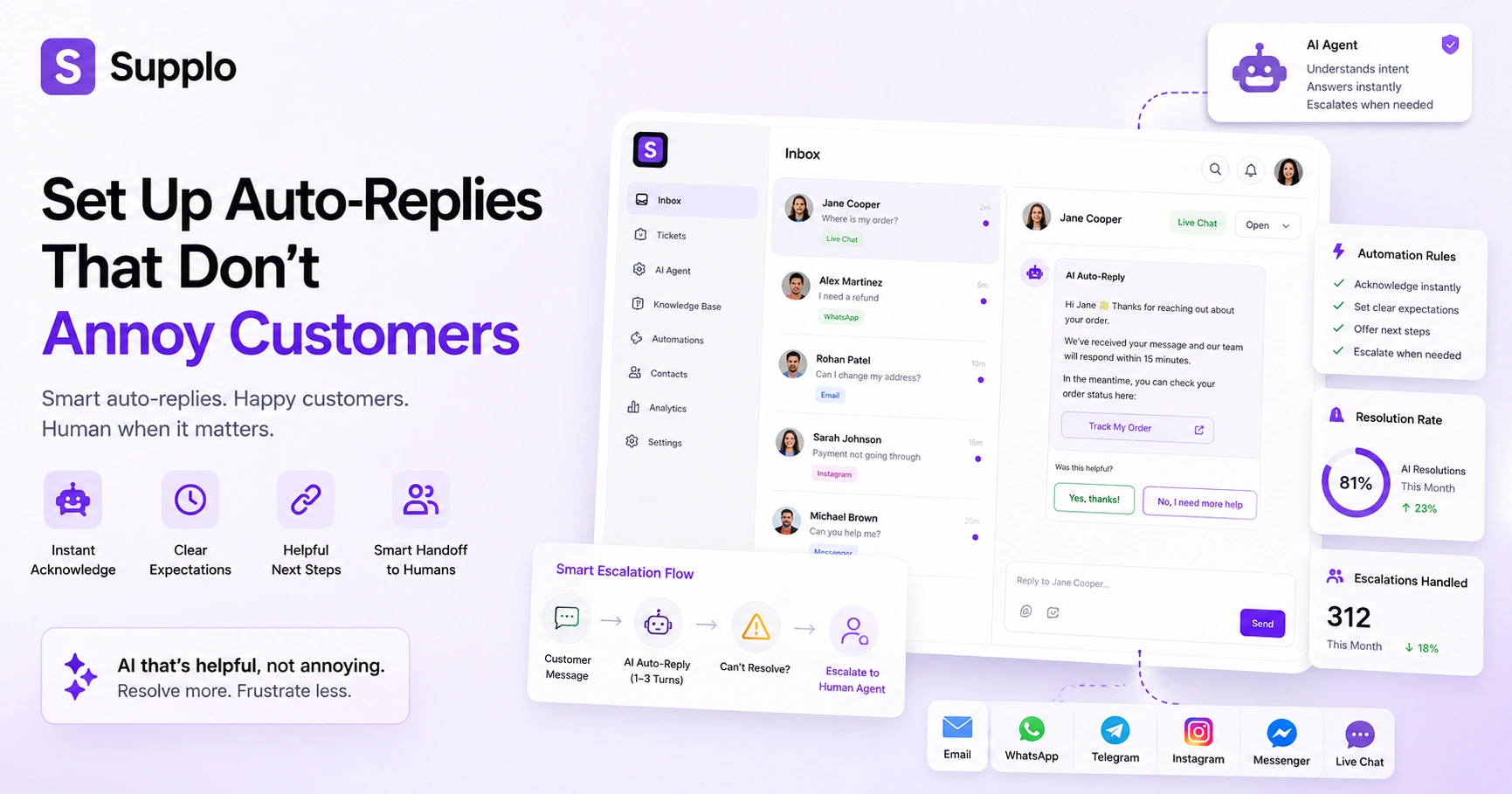
- Define a hard stop: if the AI can’t resolve in 3 back-and-forths, route to human hands.
Why Do Most Auto-Replies Annoy Customers And How to Fix It?
Most auto-replies annoy customers because they feel like a script stuck on repeat. You send a detailed query and the bot spits back a generic Thanks for reaching out. Frustrating, right? The fix is context, using intent detection and a well-fed knowledge base so the auto-response feels like an actual answer, not a dead end.
Common violations:
- Over-repetition: Same message every time, no matter what the customer actually said.
- Ignoring the customer’s actual question: Sending, we’ll get back to you when a specific answer would have worked.
- Long delays before a human takes over: Leaving the customer stuck in a robot spiral of dead ends.
70% of customers say a bad automated interaction damages trust faster than a slow human one.
Context is king. An effective auto-reply references the customer’s history, product, or prior conversation. Use intent detection to differentiate between Where’s my order? And I want a refund and respond accordingly.
The 5 Golden Rules of Effective Auto-Replies for Customer Service
Effective auto-replies hit five marks: they acknowledge immediately, set accurate expectations, offer a real next step, match your brand’s voice and hand off cleanly when needed. A well-crafted auto-response buys your team time without making the customer feel dismissed.
Rules:
- Acknowledge in under 2 seconds with the customer’s name or account context.
- Set a clear timeline. We’ll reply in 15 minutes, not soon.
- Give a next action, not a dead end, offer a link to a knowledge base article, or a direct line to a human.
- Write like a person, use contractions, avoid jargon and drop the Dear valued customer script.
- Define a hard stop; if the AI can’t resolve in 3 turns, route to a human immediately.
A well-crafted auto-response buys your team time without making the customer feel dismissed.
How to Configure Auto-Replies for Customer Support
Configuring auto-replies that actually work starts with a solid knowledge base. Feed your AI agent your most common Q&As, then map trigger conditions (keywords, time of day, ticket priority) to specific responses. Here’s the step-by-step for doing it in a modern shared inbox like Supplo, no code required.
Step 1: Audit your top 20 support tickets and write clear, concise answers for each.
Step 2: Set up auto-responder triggers based on channel (email, live chat, social DM) and message intent.
Step 3: Train your AI agent on past conversations to improve accuracy. Learn how to train your AI agent on past conversations.
Step 4: Test the auto-reply flow as a customer by sending a test ticket from each channel.
Step 5: Review a small batch of automated resolutions weekly and tweak your knowledge base accordingly.
If your tool supports it, use it."Did this answer your question?" button so customers can self-correct.
Best Practices for Auto-Replies: When to Automate and When to Step In
Automating everything is a recipe for annoyed customers. Best practices dictate that simple, predictable queries are safe to automate. Complex, emotional, or account-specific issues need a human touch immediately.
Automate these:
- FAQs (hours, shipping, returns policy)
- Order status updates
- Appointment reminders
- Password reset help (first line)
Don't automate these:
- Refund requests or billing disputes
- Escalated complaints or angry messages
- Sensitive account changes (e.g., email changes)
- Conversations with profanity or anger markers
Best practice for auto-replies in high-stakes moments: Always include a talk to a human escape hatch. Use AI sentiment analysis to detect frustration and automatically flag escalated tickets for human review.
The Auto-Responder Setup You Need for Email, Live Chat and Social DMs
A reliable auto-responder setup centralizes all channels in a single thread-based inbox. For email, use autoresponders with smart ticketing; for live chat, use an AI widget that answers from your knowledge base; for social DMs, use channel-specific triggers that pull from the same AI brain.
Email: Set up an auto-responder that sends a confirmation with the ticket ID and estimated response time.
Live chat: Use a website widget with conversational AI that answers instantly or routes to a human. A unified thread-based inbox keeps all conversations in one place.
WhatsApp and Telegram: Enable auto-replies with media support (images, voice notes) and language translation.
Instagram DMs and Facebook Messenger: Configure smart automated messages that acknowledge and offer menu-based options.
All automated responses and human replies live in one place to avoid context switching.
How to Avoid Annoying Auto-Replies with Conversational AI
The best way to avoid annoying auto-replies is to make them sound human and genuinely helpful. Conversational AI learns from your past conversations to match tone, answer accurately and even apologize when needed. It’s the difference between a robot script and a smart automated message.
How it works:
- AI detects intent (e.g., "I want a refund" vs. "Where’s my package?") and responds accordingly.
- It uses your knowledge base to pull real answers instead of generic we’ll get back to you messages.
- AI auto-replies reduce ticket volume by resolving common issues without human intervention, but only if they’re well-trained.
The best way to avoid annoying auto-replies is to make them sound human and genuinely helpful.
Smart automated messages include optional buttons or quick replies to keep the conversation moving, so customers don't feel like they're talking to a wall.
How to Manage Auto-Responders in a Multichannel Workspace
Managing auto-responders across four or more channels can feel chaotic, but a unified inbox solves the problem. Supplo pulls WhatsApp, Telegram, Instagram DMs, Facebook Messenger, email and your website chat widget into one thread. You set one auto-reply rule once and it adapts to each channel's format, so customers get consistent help no matter where they message.
One workspace, one set of rules: Configure auto-replies once and they apply to all connected channels.
Channel-specific customization: WhatsApp supports rich media; Telegram supports large groups; Instagram has quick reply limits and your AI adjusts automatically.
Auto-reply configuration for each channel: Time delays, away messages and language translation differ by platform.
Visibility: See which auto-replies are firing across all channels from a single dashboard.
For detailed setup guides, check out multichannel automation for WhatsApp, Telegram, Instagram DMs and Facebook Messenger auto-replies.
Smart Automated Messages: Using AI to Detect Urgency and Escalate
Smart automated messages go beyond static responses; they read the room. An AI that detects urgency (multiple messages, angry language, or a help trigger) can escalate to a human immediately, even mid-auto-reply. This prevents the annoying loop of receiving a cheerful "Thanks!" When your account was just hacked.
How it works:
- AI sentiment scoring: Detects angry, urgent, or confused tones and flags those tickets for human response.
- Escalation logic: If a customer says "cancel" or "refund" in any channel, the auto-reply pauses and routes the request to a human.
- Time-based escalation: If a ticket sits unresolved after an auto-reply, it escalates to the next available agent.
- VIP prioritization: Smart automated messages can also prioritize VIP customers or subscription-based accounts for faster service.
Pair this with a live chat widget featuring conversational AI to handle the initial response and detect when to hand off.
What Happens When Your AI Auto-Reply Gets It Wrong?
No AI is perfect, but reliability comes from having a solid fallback. If your auto-reply gives an incorrect answer or confuses the customer, the system should immediately escalate to a human agent, log the error and allow you to update the knowledge base. That's how you turn a mistake into a learning moment.
Common failures:
- Wrong answer from a stale knowledge base.
- Misread intent (e.g., I want to return, confused with I want to reorder).
- Language mishandling.
Troubleshooting steps:
- Check your knowledge base's freshness.
- Review sentiment triggers.
- Test intent recognition with sample tickets.
- Always include the "Did this answer your question?" button so customers can self-correct.
- Supply logs unresolved queries so you can retrain the AI agent without losing context.
Compliance line: Supplo is not affiliated with any app or website. Please follow each app's terms and local regulations.
Is your current auto-reply annoying customers? Switch to an AI that learns from mistakes. → See How Supplo Handles Escalations
Why a Reliable Auto-Reply Setup Funnel Back to Human Support
A reliable auto-reply setup doesn't replace your support team; it buys them time. By automating up to 80% of simple tickets, your team can focus on the complex, high-value conversations that build loyalty. The goal is a seamless handoff: AI handles the basics, humans handle the relationships.
The best auto-reply setups are designed to fail gracefully: If the AI can't answer, it hands off cleanly with full context. Human agents get a transcript of the auto-reply exchange so they can pick up without being annoying.
Pricing matters: Flat per-workspace pricing means you don't pay per seat, so adding human agents as you scale doesn't break your budget. The ultimate reliability metric: how often does your AI resolve without a human and how satisfied are customers after the handoff?
A reliable auto-reply setup doesn't replace your support team; it buys them time.
Ready to automate customer support without the frustration? Supplo's AI agent resolves tickets at a flat $0.04 per resolution. Start free. → Get Started at Supplo.io
Key Takeaways
- Effective auto-replies acknowledge, set expectations and offer a next step; they don’t trap customers in loops.
- Best practice is to use intent-based AI that pulls answers from your knowledge base and hands them off to a human after 2–3 failed attempts.
- Manage all auto-replies across email, WhatsApp, Telegram, Instagram and live chat from one shared inbox to avoid context switching.
- Reliable setups are reviewed weekly and designed to escalate when the AI can’t resolve common pitfalls, including over-automating (every query gets an auto-reply, even highly sensitive ones) and stale knowledge bases.
FAQ
Are auto-replies legal for customer service?
Yes, auto-replies are legal as long as you comply with local regulations (e.g., GDPR for EU customers, CAN-SPAM for US email). Always include an opt-out option for email and respect do-not-contact lists. Supplo is not affiliated with any app or website. Please follow each app's terms and local regulations.
Why do my auto-replies keep failing or getting ignored?
Auto-replies fail when they’re too generic, trigger-happy, or ignore the customer’s actual message. If customers repeatedly ignore or unsubscribe, review your trigger logic. The fix is usually to add intent detection and make the auto-reply feel personalized.
Should I use one-time auto-replies or a continuous automated message setup?
One-time auto-replies (like We got your email) are good for acknowledgement. Continuous automated messages work better for ongoing conversations, think a chat widget AI that resolves multiple questions over several turns. For most support teams, a mix of both is ideal.
What should I never use auto-replies for?
Never use auto-replies for sensitive account changes (password resets, billing cancellations), legal disclosures, or anything that requires identity verification. Auto-replies also shouldn’t handle angry or escalated complaints; always route those to a human immediately.
How do I troubleshoot an auto-reply that's giving wrong answers?
First, check if your knowledge base is up to date and clear. Second, review the customer’s intent; your AI may have misread it. Third, test the trigger with a sample ticket from the same channel. Most AI tools, including Supplo’s AI agent, log errors so you can retrain.
Can auto-replies handle multiple languages correctly?
Yes, but only if your tool supports translation. Supplo translates messages so you can auto-reply in English to a Spanish customer and vice versa. Always test language detection for accuracy.
What's the biggest mistake businesses make with auto-replies?
Treating auto-replies as a set-it-and-forget-it feature. The best setups are reviewed weekly, updated as your products change and designed to escalate to a human when the AI can’t help.
Compliance line: Supplo is not affiliated with any app or website. Please follow each app's terms and local regulations.


