On this page
Let's be real, managing customer inquiries at scale is tough. As your support volume grows, winging it isn't an option anymore. You need a system that actually works, and helpdesk tagging is the backbone of that system.
This guide walks through helpdesk tagging best practices for support managers and ops folks who want to streamline workflows without overcomplicating. Whether you're running a five-person team or scaling fast, these strategies will help you get more done with less effort.
Quick Answer
- Design a lean tag system: Start with 10–15 core tags across issue type, priority, and channel.
- Automate 80% of tagging by using keyword rules and AI to reduce manual effort.
- Leverage tags for workflow automation: Auto-assign tickets, trigger escalations, and suggest knowledge base articles.
- Audit tags regularly: Prevent tag bloat by reviewing usage monthly and archiving unused tags.
Why Helpdesk Tags Are the Backbone of Ticket Organisation
Think of helpdesk tags as your ticket's ID card. They're labels you attach to categorise, prioritise, and route requests. Tags tell you what's broken, how urgent it is, and where it came from, all at a glance.
Without a solid tag system, your shared inbox turns into a swamp of unsorted requests. Agents waste time hunting for context, and customers wait longer. But with the right tags? You can filter, report, and automate your way to faster responses.
Here's what tags actually do for you:
- Instant filtering: See all billing tickets in one click
- AI routing: An AI agent can triage tickets by tag before a human touches them
- Better reporting: Spot which issues are spiking before they become crises
- Less duplicate effort: Agents immediately see if a ticket relates to an existing thread
- SLA enforcement: Priority tags trigger timers automatically
Tags aren't just labels; they're your team's secret weapon for staying organised.
How to Design a Helpdesk Tag System That Actually Scales
Here's the thing most teams get wrong: they start with 50 tags and wonder why nobody uses them. The fix? Start small. Aim for 10–15 core tags, not 50. Over-tagging creates noise, and noise leads to tag bloat.
Build your tags around three dimensions:
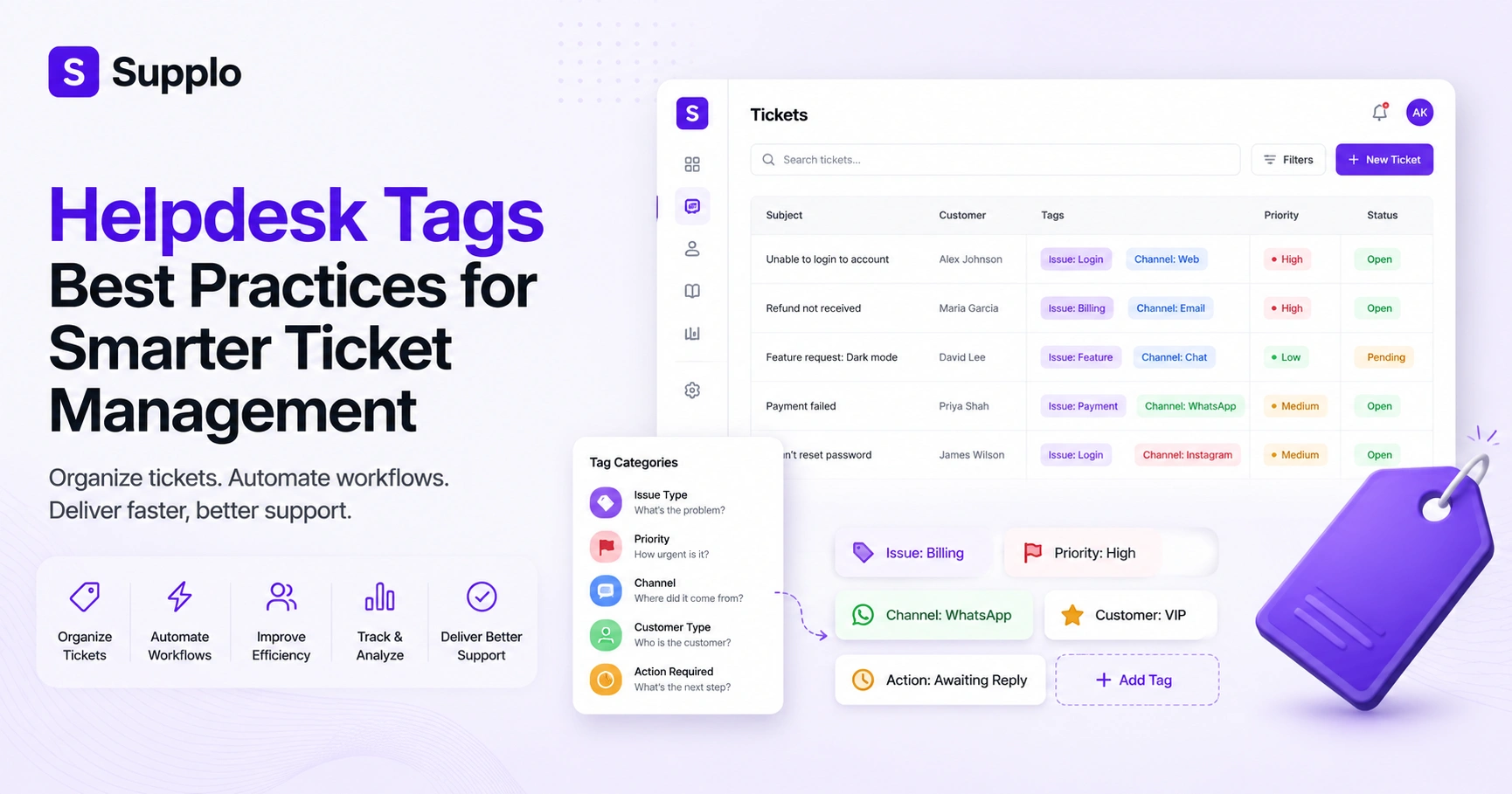
- Issue type: What's the problem? (bug, feature request, billing)
- Urgency: How fast does this need fixing? (urgent, low priority)
- Source: Where did it come from? (email, chat, WhatsApp)
Use a consistent naming convention. Something like Issue: Billing or Channel: Instagram. Colour coding helps, too; make urgent tags red so they pop.
Pro tips for keeping tags under control
- Limit agent-created custom tags to prevent sprawl
- Document your tag taxonomy in your knowledge base so everyone's aligned
- Review tag usage quarterly, and retire anything used less than five times per month
- In Supplo, tags sync across email, widget, WhatsApp, Telegram, and Instagram, so your system works globally
The goal is consistency, not completeness. You can always add tags later; removing them is way harder.
Ready to put these tagging best practices into action? Set up your tag system in minutes, no credit card required.
The 5 Types of Support Ticket Tags You Should Be Using
Not all tags are created equal. The five essential categories for organising support tickets are:
- Issue-based – What's broken? (bug, feature request, account issue)
- Priority-based – How urgent? (critical, high, low)
- Channel-based – Where'd it come from? (email, chat, Instagram DMs)
- Customer-type – Who is this customer? (VIP, new user, enterprise)
- Action-based – What needs to happen next? (awaiting reply, needs QA)
Each category serves a different purpose, and together they give you a 360-degree view of your support load.
How each tag type helps in practice
- Issue tags help you spot recurring bugs and feed product development feedback
- Priority tags trigger SLA clocks and auto-escalations, so urgent stuff doesn't slip
- Channel tags reveal which platform generates the most tickets, which is helpful for resource allocation
- Customer-type tags let VIP or onboarding tickets jump the queue
- Action tags like awaiting reply prevent tickets from falling through the cracks
Your shared team inbox with tags becomes a powerful tool for customer triage when these categories are applied consistently.
How to Automate Helpdesk Tagging Without Losing Accuracy
Automation is where tags become truly powerful. Your helpdesk software can auto-tag based on keywords, sender domain, channel, or even sentiment.
Here's a real example: a ticket containing a refund can automatically receive the Category: Billing and Priority: High tags. No humans needed.
The trick is balance. Over-automating leads to false positives (oops, "cancel my subscription" gets tagged as a cancellation when the customer actually wants help). Under-automating leaves agents tagging manually, slowing everything down.
What to automate
- Keyword-based rules: cancel triggers Topic: Cancellation
- AI sentiment detection: Attach Frustrated or Delighted tags based on tone
- Channel auto-tagging: WhatsApp messages get Channel: WhatsApp automatically
- Workflow triggers: Priority: Urgent tickets auto-assign to the most senior agent
In Supplo, you can build rules that tag, assign, and even reply in one step. Start with simple rules, then refine as you learn what works.
Helpdesk Ticket Tagging Strategy for Multi-Channel Support
Today's customers reach you through email, live chat, WhatsApp, Telegram, Instagram DMs, and Facebook Messenger. Each channel has its own rhythm, and your tagging system needs to account for that.
Why channel tags matter
- Track which channels need more staffing
- See where response times lag
- Identify which channels generate the most complex issues
Tag each incoming ticket with its originating channel. Then use those channel tags to apply different SLA rules; social media might need a 1-hour response, while email can handle 4 hours.
Practical tips for multi-channel tagging
- Analyse channel volumes weekly. If Instagram DMs spike, shift resources accordingly
- Use channel tags to spot integration-specific bugs (e.g., WhatsApp errors)
- Keep all channel tags visible in one place
Supplo's single-thread inbox keeps everything unified, so you don't have to jump between platforms to see the full picture.
Organising Helpdesk Tickets with Tags for Faster Resolution
Tags are your ticket filing cabinet. When every new ticket gets tagged on arrival, you can sort, filter, and assign with a single click.
Here's the real benefit: a well-organised tag system reduces first-response time because agents don't need to read the entire ticket to understand what it's about. They see the tag, get the context, and act faster.
Ways to organise better with tags
- Create a tag dashboard view in your helpdesk for quick triage
- Use tags to group related tickets into a single thread (e.g., batch: invoice-issue)
- Train agents to apply at least one tag before closing a ticket
- Tags survive across replies and reassignments, making shift handoffs smoother
With Supplo, tags stay consistent no matter who's working the ticket, so agents can improve helpdesk workflow without starting from scratch each time.
Common Helpdesk Tag Management Mistakes and How to Fix Them
The biggest mistakes? Tag bloat, inconsistent naming, and not using tags to drive action. When agents see 80 tags in a dropdown, they skip tagging altogether.
Fix these common errors:
- Mistake: Synonyms such as "bug" and "issue" are used interchangeably. Fix: Merge them into one.
- Mistake: Tags that describe the agent instead of the ticket. Fix: Remove tags such as "John's task".
- Mistake: No tag for no action needed. Fix: Add a Closed: No Action tag to track incoming noise.
- Mistake: Over-relying on manual tagging. Fix: Automate 80% of tags with rules.
How to enforce governance:
- No tag can be created without approval
- Audit your tags monthly. If nobody's used one in 30 days, archive it
- Supplo is not affiliated with any app or website. Please follow each app's terms and local regulations.
Effective tag governance helps you avoid the pitfalls that plague legacy systems. Keep it lean, keep it consistent.
How Tags Improve Helpdesk Workflow and Agent Efficiency
Tags aren't just for sorting; they're fuel for automated workflows. When a ticket is tagged Priority: Urgent and Issue: Account Locked, your system can automatically assign it to the security team, send a canned response, and set an SLA timer.
This eliminates manual steps so agents can focus on solving problems, not sorting tickets.
What tags can trigger:
- Auto-assignment: Send tickets to the right team or agent instantly
- Conditional logic: If Issue: Billing and Priority: High, escalate to management
- Efficiency reports: Track average resolution time per tag
- Queue sorting: Agents can tackle high-priority items first
Supplo's AI agent takes this further by auto-tagging and even resolving common issues without human involvement. That's real helpdesk agent efficiency, not just faster sorting, but actual problem resolution.
Best Practices for Helpdesk Knowledge Base Tags
Your knowledge base and tags should talk to each other. When your ticketing system and knowledge base use the same tag taxonomy, magic happens.
How it works:
- A ticket arrives tagged Issue: Password Reset
- Your helpdesk automatically surfaces the related knowledge base article
- Agents find answers faster, and customers can self-serve via chatbot
Tips for knowledge base tagging:
- Create a master tag library for both tickets and articles
- Use tags to trigger article suggestions in your chat widget
- Tag articles by difficulty level: beginner, advanced, expert
- Keep it lean, every article gets 3–5 tags maximum
In Supplo, the AI learns from both tickets and your knowledge base to auto-suggest answers. That means less searching, more solving.
Measuring the Impact of Your Helpdesk Tag System
A tag system is only as good as its measurable outcomes. If you're not tracking the right metrics, you won't know if your system is working or just adding noise.
Key metrics to track:
- Average time to first response per tag
- Resolution rate per tag
- Percentage of tickets that go untagged (target: under 10%)
How to generate useful reports:
- Run monthly tag health reports: count of unique tags used, usage frequency
- Track first-response time by tag to see which issues are slowest
- Measure tag-based automation success: how many tickets were resolved without human touch
Don't forget to ask your team:
- Do tags help or confuse agents?
- What's missing from your current taxonomy?
- Are there tags nobody uses?
Use these insights to refine your tag taxonomy quarterly. Continuous improvement beats set-it-and-forget-it every time.
Key Takeaways
- Prioritise a small, consistent set of tags focused on issue, priority, and channel.
- Automate tagging wherever possible to save agent time and improve accuracy.
- Use tags to drive intelligent routing, assignment, and escalation through automated workflows.
- Regularly audit your tag system to prevent tag bloat and ensure ongoing relevance.
- Integrate tags throughout your support ecosystem, from tickets to knowledge bases, for maximal impact.
Stop wrestling with tag bloat and manual sorting. Supplo unifies email, chat, WhatsApp, Telegram, Instagram, and Facebook into one tagged inbox. Pricing is flat per workspace; your bill won't balloon as you scale. Start your free trial today.
FAQ
What are the best practices for helpdesk tagging for beginners?
Start with 10–15 core tags categorised by issue type, priority, and source. Use a naming convention like "Issue:" or "Priority:", and avoid synonyms. Review tag usage monthly and retire unused tags for optimal helpdesk tag management.
How do helpdesk tags improve ticket resolution speed?
Tags let agents instantly see the context of a ticket; there's no need to read every line. They also power automation that routes urgent tickets to the right team, potentially significantly reducing first-response time when organising helpdesk tickets with tags.
Why do some helpdesk tags fail to organise tickets effectively?
Tags fail when there are too many, naming is inconsistent, or agents don't use them. The fix is to enforce a governance policy, limit the creation of custom tags, and automate tagging where possible to avoid tag bloat.
Can Helpdesk tags be used to automatically categorise support tickets?
Yes, modern helpdesk software like Supplo uses keyword rules and AI to auto-tag tickets upon arrival. You can trigger tags based on message content, sender, channel, or sentiment to automate helpdesk tagging.
What's the difference between helpdesk tags and categories?
Tags are flexible keywords (multiple per ticket), while categories are fixed folders (one per ticket). Use tags for granular sorting and categories for high-level grouping. Both can work together to improve the helpdesk workflow.
How do I train my team to use a helpdesk tag system?
Document your tag taxonomy in a shared knowledge base. Run a one-hour training session covering naming conventions, when to tag, and common mistakes. Audit usage weekly for the first month to ensure adoption.
Are helpdesk tags compliant with data privacy regulations?
Tags should not include personal data like full names or payment info. Stick to issue types, priority levels, and channel sources. Supplo is not affiliated with any app or website; please follow each app's terms and local regulations.
Compliance line: Supplo is not affiliated with any app or website. Please follow each app's terms and local regulations.


