On this page
Let’s be real, hunting for affordable support tools can feel like a chore. You want something that works, doesn’t break the bank, and your team can actually use without a PhD in tech. The good news? There are solid options out there. This guide cuts through the noise, telling you exactly what to look for and what actually delivers.
Quick Answer
- The best customer support software under $100/month combines live chat, email and social messaging in a unified inbox with flat workspace pricing; no surprise fees when you add a team member.
- AI resolution at a fixed per-resolution cost keeps your support budget predictable without sacrificing quality. Think cents per answer, not dollars.
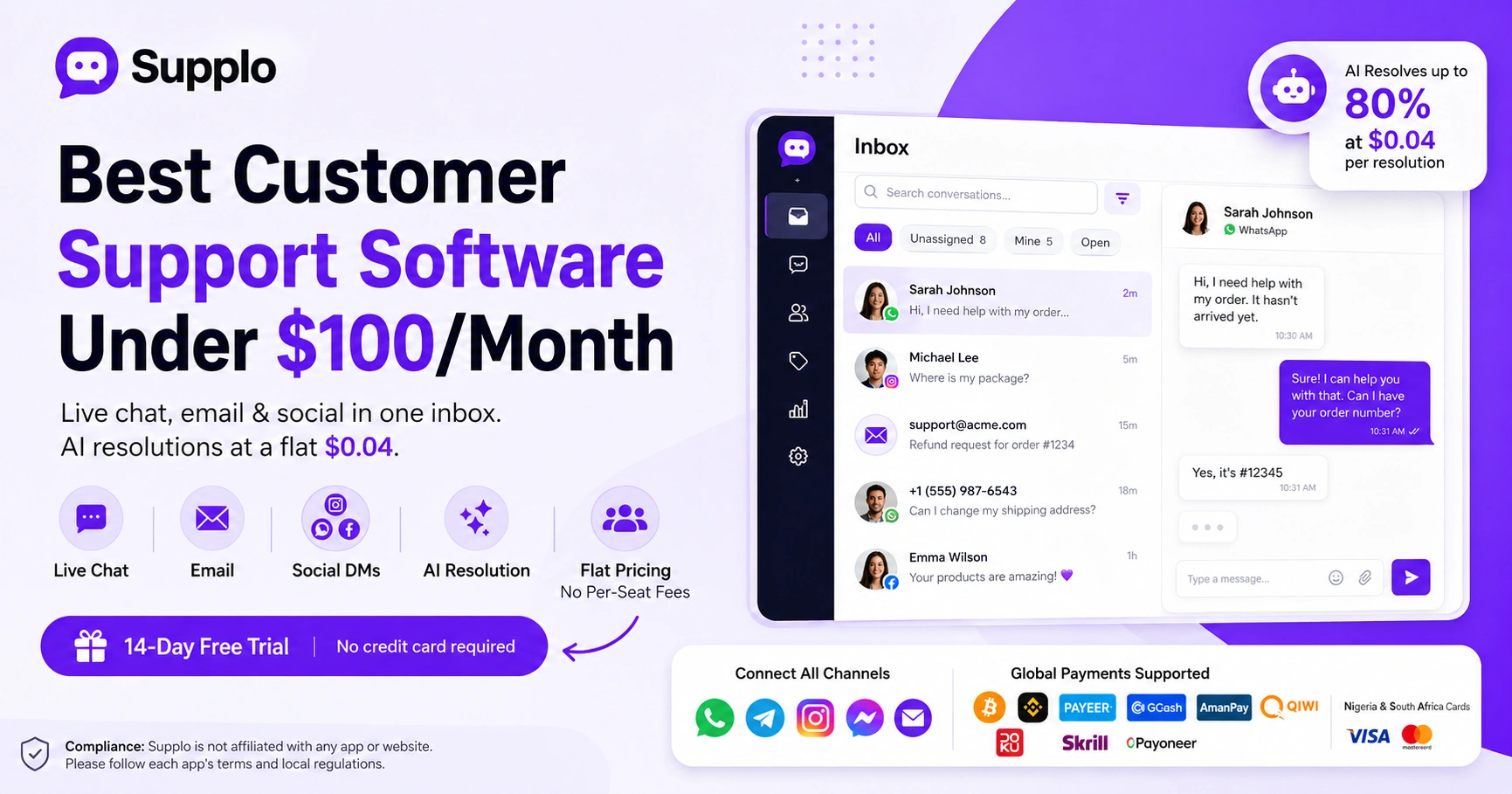
- Global teams benefit from built-in multilingual translation and payment support for various methods, including crypto, Binance Pay, Payeer, GCash, AmanPay, QIWI Wallet, DOKU, Nigeria and South Africa cards, Skrill, and Payoneer.
- Always test with a free trial that includes all features, a true reliability check before committing. Don't sign up for a stripped-down demo and hope for the best.
What Makes a Customer Support Tool Reliable
Honestly, reliability in a support tool isn't just about the uptime percentage on their marketing page. It’s about practical, everyday stuff: how fast your team can actually answer a chat, whether messages from Instagram and email show up in the same conversation thread and how quickly a new hire can start helping customers.
- Real reliability looks like this: message queuing that doesn’t drop a single WhatsApp or Instagram DM, even during a flash sale or product launch.
- A reliable shared inbox preserves context. You see the full history before replying, no more asking “what did the customer say again?”
- Under $100, reliability also means transparent pricing. No per-seat spike that doubles your bill the day you hire a second agent.
- The most overlooked reliability factor? API stability. If your chat widget goes down, your support does too.
- Look for tools that offer a 14-day trial so you can test message delivery, latency, and team handoffs under real conditions.
Live Chat Software Under $100: Which Features Actually Matter for Small Businesses
For under a hundred bucks, you want live chat software that does more than look pretty. We're talking real-time visitor tracking, automated triggers to say “Hey, need help with that?” and a solid mobile app for after-hours replies. Avoid tools that nickel-and-dime you for basic chat history or cap how many conversations your team can juggle at once.
- Live chat under $100 should include a website widget you can brand without needing a developer to hold your hand.
- Real-time typing previews and canned responses save agents seconds per chat, and those seconds really add up over a week.
- A mobile app is non-negotiable. The best affordable tools let your team reply from their phones exactly as they do on their desktops.
- Watch out for “active agent” limits. Some cheap plans let you have many users, but only one can be logged in at a time. That’s a trap.
- Prioritize tools with built-in message rating or CSAT surveys. Free, direct feedback is hard to beat.
Cheap Live Chat Solutions vs. Budget Shared Inboxes: What’s the Difference?
Here’s the main difference: cheap live chat solutions are hyper-focused on website visitors. Budget shared inbox software pulls email, social DMs, and messaging apps into a single-threaded view. If your customers reach you from more than one channel and let’s be honest, they do, a shared inbox is almost always the smarter buy.
- A shared inbox under $100 replaces the need for separate tabs for Gmail, Facebook, and Instagram. Everything lands in one queue.
- Cheap live chat solutions often limit you to web visitors only, leaving email and social messages orphaned.
- Budget shared inbox tools usually include basic ticket tagging and assignment, which directly reduces reply time.
- The catch: some cheap inboxes lack chat widgets entirely. Double-check that the tool covers both chat and inbox if you need both.
- For teams already living in their email, a shared inbox provides continuity that pure live chat can’t match.
Affordable Website Chat Software That Doesn’t Sacrifice Security or Speed
Good news: affordable website chat software can still meet modern security standards. You need to know where to look; SSL encryption, SOC 2 compliance and data residency options are the benchmarks. Speed matters as much. A widget that adds 3 seconds to your page load is costing you conversions. The best budget options load in under a second and encrypt every message.
- Check that the chat provider encrypts data in transit and at rest. Many cheap tools conveniently skip the latter.
- Page speed impact matters. A lightweight widget script (under 50 KB) won’t mess up your Core Web Vitals.
- GDPR compliance is a must, even for small businesses serving European customers. Budget tools can be compliant if you choose carefully.
- Ask about data retention policies. Some low-cost providers delete chat history after 30 days unless you upgrade.
- Always test the widget on a phone. A chat button that breaks the mobile layout is not affordable at any price.
Budget Live Chat for Small Business: When AI Makes Sense and When It Doesn’t
AI-powered live chat can be a game-changer for repetitive questions, cutting ticket volume and freeing up your team. But only if the AI is trained on your actual content. The best AI under $100 handles up to 80% of common questions and hands off to a human the moment it gets confused. Avoid tools that claim full autonomy without context; they usually frustrate customers.
- Self-learning AI that pulls from your knowledge base and past conversations delivers far better answers than generic bots.
- A flat per-resolution price (e.g., $0.04) keeps costs predictable rather than spiking when volume increases.
- AI should support multilingual translation so you don’t need separate agents for each language.
- If your support team focuses on complex account issues, AI can still help by routing and prequalifying tickets.
- Always check how the AI handles off-hours: does it deflect the customer or escalate to email for a next-day reply?
Low Cost Team Inbox Software: How to Unify Email, Chat and Social DMs Without Breaking $100
Low-cost team inbox software should combine email ticketing, website chat, WhatsApp, Telegram, Instagram DMs, and Facebook Messenger into a single, threaded inbox. The goal is zero channel switching. For under $100 a month, you should be able to connect at least 5 channels and assign conversations to specific team members.
- Email ticketing inside a shared inbox means no more lost threads in Gmail. Every email becomes a tracked, assignable conversation.
- WhatsApp and Telegram integration is increasingly non-negotiable for global small business support.
- Instagram DM and Facebook Messenger support prevent social messages from falling through the cracks.
- A good low-cost unified inbox includes collision detection, so two agents don’t accidentally reply to the same customer at once.
- Look for tools that let you set working hours and auto-respond after hours. Customers appreciate knowing when to expect a reply.
What to Look for in a Low-Price Chat for Websites
This is a big one. Many low-price chat solutions lure you in with a cheap base plan, then whack you with per-agent fees, per-ticket fees, or charges for basic features like chat history. The best affordable plans are flat per-workspace and include AI resolution at a fixed cost, with no per-seat surprises when you add your third or fourth team member.
- Per-seat pricing punishes growing teams: hiring one more person can double your monthly bill.
- Avoid per-resolution fees above $0.50. They scale faster than you expect if your support volume grows.
- Some budget tools hide essential features, such as canned responses or integration access, behind higher tiers.
- Check if the free trial includes all features. A limited trial means you can’t fully evaluate reliability.
- Flat workspace pricing is ideal because your bill stays the same regardless of how many agents you have.
Shared Inbox Under Budget: Real Talk About Limits, Integrations and Growth
Let’s keep it real: a shared inbox under $100 a month usually has some limits on connected channels or API calls. But the best ones still let you integrate your CRM, Shopify, or Slack without paying extra. The key is finding a tool that scales with your team, not one that forces an upgrade the moment you hit 500 conversations a month.
- Integration limits are common. Confirm your budget inbox connects to the tools you already use (Slack, Stripe, Shopify).
- Some shared inbox software limits attachment size or long message threads; test with your actual email volume.
- Growth-friendly tools let you add agents without changing your pricing plan, so hiring doesn’t hurt your budget.
- Reporting under $100 may be basic, but you should still get access to response time and conversation volume metrics.
- The best affordable inboxes offer public API access for custom workflows without locking it behind an enterprise plan.
Which Tool Wins for Global Teams on a Tight Budget?
The reliable winner for global teams under $100/month is a unified workspace that combines AI agent resolution, a multichannel inbox, flat workspace pricing, and no per-seat expansion fees. Supplo fits this description perfectly: it handles email, live chat, WhatsApp, Telegram, Instagram, and Facebook Messenger in a single thread, resolves up to 80% of tickets with AI at a flat $0.04 per resolution, and costs the same whether you have 2 or 12 agents. Start with a free 14-day trial to see it in action.
- Supplo’s AI agent learns from your knowledge base and past conversations, delivering accurate, context-aware replies.
- Multilingual translation is built in; no separate language tool subscription needed.
- Payment flexibility includes crypto, Binance Pay, Payeer, GCash, AmanPay, QIWI Wallet, DOKU, Nigeria and South Africa cards, Skrill and Payoneer.
- The shared inbox keeps all customer conversations threaded, even across channels.
- Pricing is flat per workspace, not per seat, so your bill stays under $100 as your team scales.
How to Test the Best Affordable Customer Support Software Risk-Free
The smartest way to evaluate support software under $100 is to sign up for a 14-day free trial that includes all features, with no restricted plans and no credit card required. Seriously, don't settle for a demo. Set up your live chat widget, connect your email and invite your team to test real conversations. Measure response time, message delivery reliability and how easy it is to hand off between teammates.
- A true free trial includes AI features, integrations and multichannel support, not just a stripped-down demo.
- Focus on setup speed. The best tools let you connect WhatsApp and install the chat widget in under 15 minutes.
- Test mobile responsiveness. Reply to a customer from your phone and see how the thread looks on your desktop.
- Check AI accuracy. Send a few real customer questions and track whether the bot gives a correct or helpful reply.
- Use the trial to evaluate payment integrations if you accept global payments. Crypto, Binance Pay, Payeer, GCash, AmanPay, QIWI Wallet, Nigeria and South Africa cards, Skrill, and Payoneer are all available.
Want to test the best customer support software under $100/month risk-free? Sign up for your 14-day free trial at Supplo, no credit card needed, all features included. Set up your live chat, connect your channels and see how reliable and affordable support can be.
Key Takeaways
- The best customer support software under $100 combines live chat, email and social messaging in a unified inbox with flat workspace pricing.
- AI resolution at a fixed per-resolution cost keeps your support budget predictable.
- Global teams benefit from built-in multilingual translation and diverse payment options.
- Test with a 14-day free trial that includes all features to ensure reliability and fit for your team.
FAQ
Is it safe to use budget customer support software?
Yes, as long as the tool provides SSL encryption, data encryption at rest and clear data retention policies. Always check for SOC 2 compliance or GDPR adherence and avoid providers that share or sell customer chat data.
Why do some cheap live chat tools fail to deliver messages?
Message delivery issues usually stem from poor API infrastructure or aggressive rate limiting. Reliable budget tools use stable server connections and queue messages properly so nothing drops, even during traffic spikes.
Is flat workspace pricing better than per-seat pricing?
For growing teams, yes. Flat workspace pricing means hiring new agents doesn’t increase your monthly bill. Per-seat pricing can double or triple your costs as you add team members, making it harder to stay under $100/month.
What should I NOT use a cheap shared inbox for?
Avoid using shared inbox software for handling sensitive financial data, legal documents, or HIPAA-protected health information unless the tool explicitly states compliance certifications. Most budget tools are designed for general customer support, not regulated data handling.
Can AI in affordable chat software actually help?
Yes, if the AI is trained on your knowledge base and past conversations. It reliably answers common questions such as order status, business hours, and return policies. It should also hand off to a human when it doesn’t know the answer.
Does affordable customer support software support multiple languages?
The best budget tools include built-in translation so you can support customers in any language without hiring separate agents. Always confirm whether translation is native or requires a third-party integration.
What happens to my chat history if I cancel a budget tool?
Most reliable providers let you export chat history before cancellation. Always check whether the free plan or trial allows data export, some cheap tools delete history immediately upon cancellation.
Compliance line: Supplo is not affiliated with any app or website. Please follow each app's terms and local regulations.