On this page
A reliable customer service chatbot isn't just some flashy tech toy; it's genuinely one of the most practical tools you can set up for your business. It handles the repetitive stuff so your team can focus on the conversations that actually need a human brain. Whether you're running a small shop solo or managing a support team of twenty, this guide walks you through how to build a chatbot for customer service step by step, no fluff, no mystery, just actionable steps.
Quick Answer
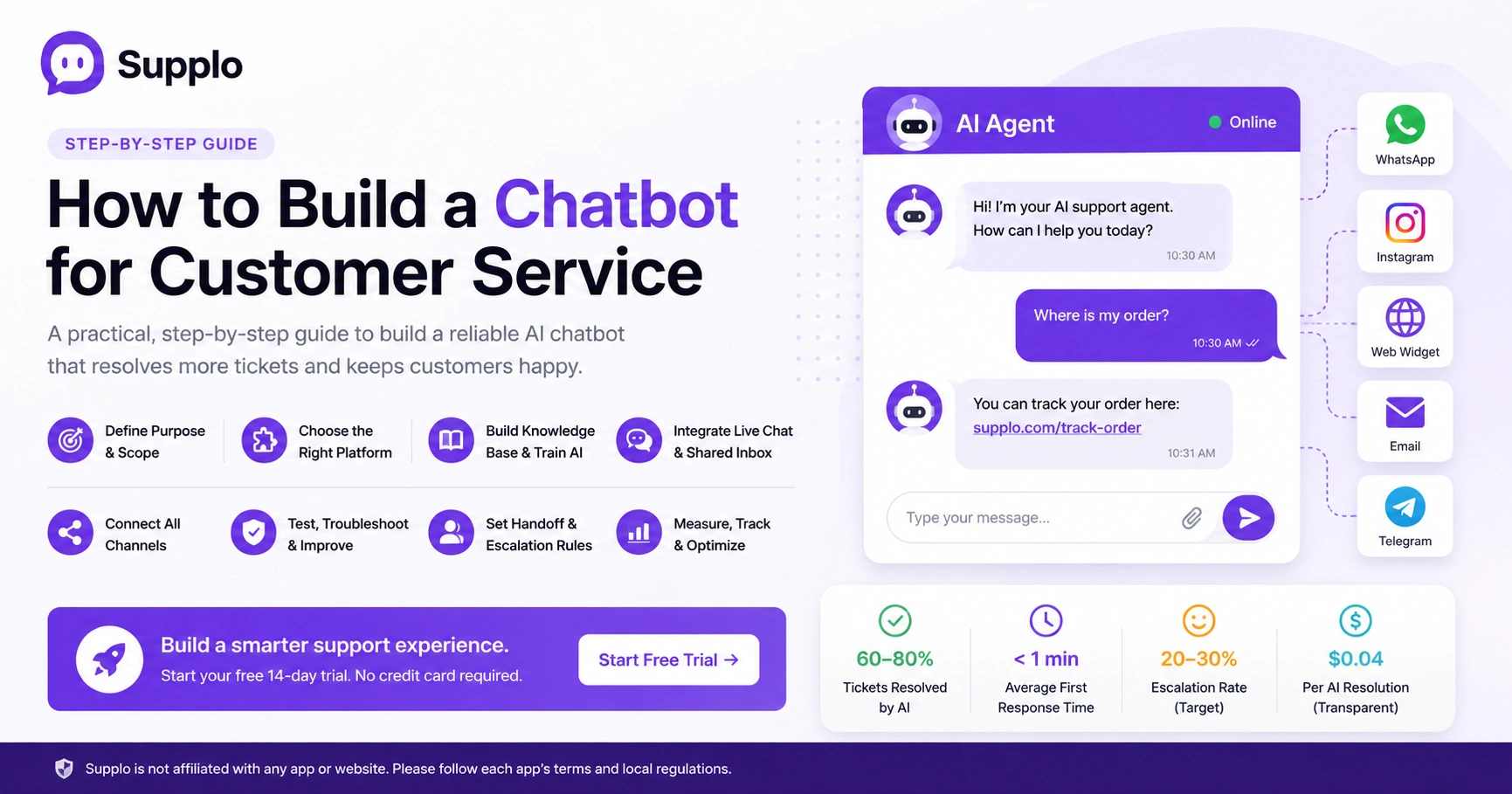
- Nail down exactly what your bot should do.
- Pick a platform that won't make you cry.
- Feed it a solid knowledge base.
- Hook it up to live chat and a shared inbox.
- Connect all your channels (WhatsApp, Instagram, email, web)
- Test the heck out of it before going live.
- Set clear handoff rules for when humans need to step in.
- Track what matters so you can keep improving.
Why Building a Reliable Customer Service Chatbot Matters More Than Ever
Look, customers have zero patience these days. They expect an answer now, not in three hours when your team gets around to it. A chatbot that works consistently is your best defense against support burnout; it instantly takes repetitive questions off your plate.
- Customers remember bad bot experiences. One confusing interaction and they're gone. A reliable bot builds brand loyalty by actually solving problems on the first try.
- The "bot fails, customer gets frustrated, escalates to human" loop is a time suck. Avoid it by building something that works right out of the gate.
- A well-trained bot can handle 60–80% of your support volume. But only if it's accurate and doesn't need constant manual correction.
- Trust is fragile. One bad bot interaction can push a customer straight to a competitor.
Define Your Chatbot's Purpose and Scope: Rule-Based vs. AI
Before you write a single line of code or configure anything, sit down and decide what this bot is actually for. A rule-based bot works fine for simple FAQs, store hours, return policies, that kind of thing. But if you need to handle nuanced questions or scale across multiple languages, you want an AI-powered bot.
Most teams (honestly) end up with a hybrid: let the AI handle the heavy lifting, but keep rules in place for critical workflows like payments or refunds.
- Map out your top 10 support questions. Those are your bot's training material. If you don't know what customers ask most, you're guessing.
- Rule-based bots are cheap but fragile. They break the second a customer asks something slightly unexpected.
- AI bots learn from your knowledge base and past conversations. They get smarter over time without you having to rewrite everything manually.
- The real goal? Your bot should resolve the issue entirely, no human needed. When it can't, it needs a clean handoff process.
Choose the Right Platform for Your Business: No-Code vs. Custom
Here's the good news: you don't need a developer to build a solid customer service chatbot. Modern platforms like Supplo let you configure an AI agent in minutes, connect your knowledge base, set some response rules and you're live. For most small to mid-sized businesses, no-code is faster, cheaper and way more reliable than building from scratch.
- Evaluate platforms on ease of setup, AI training capabilities and multichannel support (web, WhatsApp, Instagram, email).
- Avoid tools that charge per resolution or per seat. Look for flat, predictable pricing. Nothing kills ROI faster than surprise fees.
- Make sure the platform has a shared team inbox so humans can step in when needed. (Spoiler: they will need to sometimes.)
- A custom-built bot gives you total control but requires ongoing maintenance and developer time. Most teams don't need that headache.
Build Your Knowledge Base and Train Your AI Chatbot
Your chatbot is only as smart as the knowledge base you feed it. Garbage in, garbage out; it's that simple. Gather your FAQs, product documentation and past conversation logs, then organize them into clear, scannable articles.
- Learn how Supplo's knowledge base feature works → Supplo Knowledge Base.
- Use real customer questions (not internal jargon) to structure your knowledge base entries. Your customers don't speak your internal acronyms.
- A good AI chatbot can learn from both uploaded documents and live conversations it resolves.
- Train the bot in the languages your customers actually speak. Translation features can bridge gaps automatically.
- Monitor "bot didn't understand" reports weekly. Add missing answers and improve coverage over time. This isn't a "set it and forget it" thing.
Integrate Your Chatbot with Live Chat and a Shared Inbox
A chatbot without a live chat fallback is basically a gamble. You need a system where the bot handles the easy stuff and, when things get complicated, passes the conversation to a human with the full conversation history. A shared team inbox makes sure no ticket falls through the cracks, whether it started via email, WhatsApp, or your website widget.
- Read more about our shared team inbox → Supplo Team Inbox
- The human handoff should be seamless. The agent can see everything the bot and the customer have already discussed. Nobody wants to repeat themselves.
- Don't let the bot "hide" from customers. Show a clear "talk to a human" option at all times.
- A unified inbox means your team manages all channels from one screen, not a dozen browser tabs.
- Set rules: if the bot fails to resolve after three tries, automatically route to a human agent.
Connect Your Channels: WhatsApp, Instagram, Email, Widget
Customers expect to reach you wherever they already hang out, not just your website. A great chatbot works across WhatsApp, Instagram DMs, Telegram, email ticketing and your live chat widget. The key is that all conversations funnel into one thread, so your team never has to switch platforms.
- Connect your WhatsApp channel here → Supplo WhatsApp Customer Support.
- See how Instagram DM support works → Supplo Instagram DMs.
- WhatsApp and Instagram are non-negotiable for global customer service. Your bot needs to live there.
- Email ticketing is still critical for more formal or detailed support requests.
- Your website widget should be the first place customers see your bot, fast-loading and unobtrusive.
- Each channel can have slightly different bot behavior. Quick replies for WhatsApp, more detailed answers for email. Makes sense, right?
Supplo is not affiliated with any app or website. Please follow each app's terms and local regulations.
Test, Troubleshoot and Improve Your Bot's Accuracy
Launching your bot isn't the finish line; it's the starting point. Run it through your team's most common support scenarios, then use the "confidence score" reports to see where it's guessing wrong. A reliable bot improves over time, but only if you actively feed it better data.
- Create a test script of 20–30 real customer questions. Run them through the bot before going public.
- Review the bot's "unknown" responses weekly. Add those answers to your knowledge base.
- A/B test bot greetings and response styles to see what drives higher customer satisfaction.
- Track the resolution rate (bot-resolved vs. handed off) as your primary reliability metric.
Ready to test your AI agent? Start a free 14-day trial and see how Supplo's AI agent handles your real customer questions, no credit card required.
Set Up Human Handoff and Escalation Rules
Even the best AI bot can't handle every conversation. You need clear rules for when a human should take over, such as when a customer asks for a refund, mentions a security issue, or types "talk to a person." The handoff should be instant and include the full conversation transcript so the agent doesn't ask the customer to repeat themselves.
- Set triggers: specific words (like "complaint," "manager," "cancel") automatically route to a human.
- Allow customers to request a human at any time, preferably with one click.
- Your team inbox should show priority levels. Urgent escalations get faster attention.
- After handoff, the bot should step back. Let the human take full control.
Why Most AI Chatbots Fail And How to Build One That Doesn't
The most common reason chatbots fail? They were built on bad assumptions, like hoping the bot will "just figure it out" without proper training. Others rely on outdated pricing models that charge per resolution, making them cost-prohibitive as volume grows.
- Bots fail when they try to answer everything instead of clearly stating their limits.
- A bot that doesn't learn from mistakes will keep making the same errors.
- Hidden costs (per-seat pricing, per-resolution fees) kill the ROI of automation.
- The best bots are transparent: "I'm an AI agent. If I can't help, I'll connect you with a person."
If your current bot is unreliable or overpriced, it might be time to switch. Get a flat $0.04 per resolution for AI-handled tickets, with transparent handoff. Start your free trial now.
Measuring Success: Key Metrics for a High-Performance Support Bot
You can't improve what you don't measure. Track bot resolution rate, average handling time (should drop for resolved tickets) and customer satisfaction scores. Also monitor false positives, where the bot thought it answered correctly, but the customer still needed a human, because those kill trust fast.
- Bot resolution rate: the percentage of tickets resolved without human intervention.
- Customer satisfaction for bot-handled conversations vs. human-handled ones.
- Average first response time: should be near-instant for bot answers.
- Cost per resolution: compare bot costs (flat fee) vs. human agent costs.
- Escalation rate: how often the bot hands off to a human. Aim for 20–30% initially.
FAQ
Is it legal to build a chatbot for customer service?
Yes, it's legal. Supplo is not affiliated with any app or website. Please follow each app's terms and local regulations. Generally, you own the bot and the conversations, but you must comply with privacy laws such as GDPR or CCPA when storing customer data.
Why do some chatbot codes stop working after a few days?
Most "dirty" code is stolen or poorly configured and gets flagged by security systems. Reliable solutions use real API keys and legitimate integrations, which don't expire abruptly.
Should I build a one-time-use bot or a long-term rental bot?
Long-term rentals (like a SaaS platform) are far better because they include support, updates and ongoing training. One-time bots require you to handle maintenance and troubleshooting yourself.
What should I NOT use a customer service chatbot for?
Never use it to handle payments without a secure payment gateway, or to give medical, legal, or financial advice. Also, avoid using it as a replacement for human empathy in sensitive situations, such as complaints about billing errors.
How do I troubleshoot a chatbot that keeps giving wrong answers?
Check your knowledge base quality first; vague or incorrect articles are the top cause of bot errors. Then review the bot's confidence threshold; if it's too low, the bot will guess too often. Raise the threshold to make it hand off to a human more readily.
Can I build a chatbot without any coding experience?
Absolutely. Platforms like Supplo let you configure an AI agent with zero code; paste your knowledge base and configure handoff rules. It's designed for non-technical support teams.
How do I know if my chatbot is actually saving my team time?
Compare average handling time before and after the bot launch. Also track ticket volume per agent; if it drops, your bot is absorbing volume. The bot resolution rate is your strongest indicator of ROI.
Compliance line: Supplo is not affiliated with any app or website. Please follow each app's terms and local regulations.