On this page
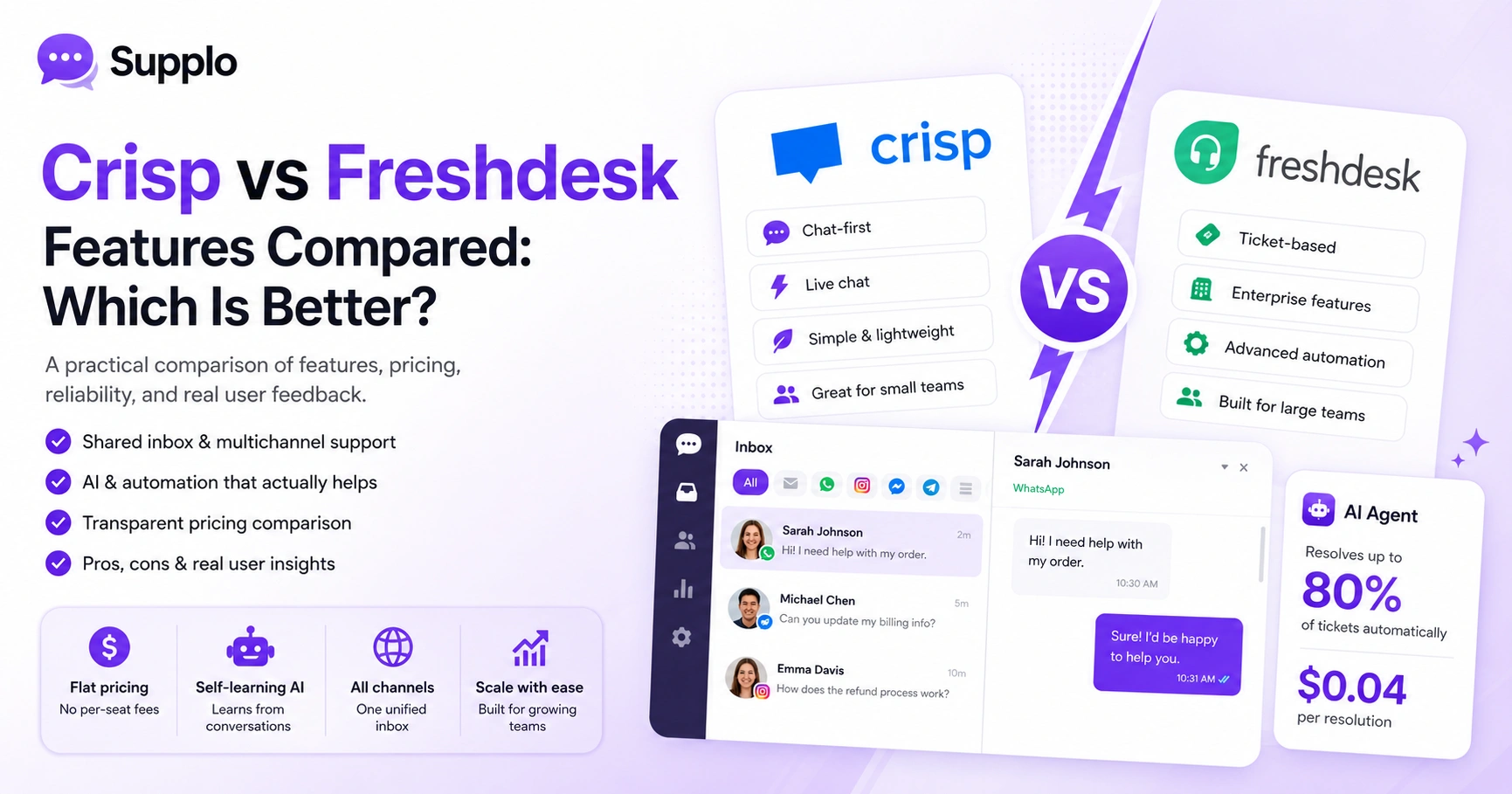
Let's be real, choosing between Crisp and Freshdesk feels like picking between two imperfect options. One's chat-first and lightweight, the other's built for enterprise chaos. Neither offers transparent pricing or a unified inbox that most growing teams actually need. This comparison of Crisp vs Freshdesk features cuts through the hype so you can see what each tool really delivers and where both come up short.
This guide is for customer support managers, founders and ops leaders who want practical answers, not marketing fluff. We're here to help you figure out which platform works for your team, when each tool shines and where they tend to disappoint.
Quick Answer
- Crisp: Great for tiny teams doing live chat, but costs climb fast per agent, and the AI can be hit or miss.
- Freshdesk: Packed with features for big enterprises, but that power comes with complexity and hidden price hikes.
- Supplo: A practical middle ground, unified inbox for every channel, self-learning AI at a flat $0.04/resolution and predictable workspace pricing. Built for teams that want efficiency without the surprises.
Crisp vs Freshdesk: Which Help Desk is More Reliable for Your Support Team?
When you're comparing Crisp vs Freshdesk, reliability goes way beyond is the server up? It's about trusting the tool actually to work when a customer needs help and trusting the pricing not to spike next month. Both platforms are established, sure, but users consistently flag different frustrations. Crisp feels light but lacks depth in reporting. Freshdesk can feel bloated and gets expensive faster than you'd expect. For small teams on a real budget, neither feels like a perfect fit.
Crisp excels at real-time chat and keeps things simple, but it struggles with ticket workflows and anything complex. Freshdesk brings serious enterprise-grade features, but smaller teams often drown in options they don't need. Both fall short on transparent AI pricing; your bill can balloon as tickets pile up.
Why Reliability Actually Matters in Customer Support Software
Reliability isn't just uptime stats. It's predictable costs. AI that actually answers questions correctly. Channels that sync without manual work. And a system that grows with you, not against you. When your help desk is genuinely reliable, your team spends less time fighting the tool and more time helping customers.
Crisp vs Freshdesk Features: A Head-to-Head Breakdown
On paper, both tools cover the same ground: live chat, email ticketing, knowledge bases, automation. But dig in, and the differences are pretty stark. Crisp is built for conversations, fast, chat-first, casual. Freshdesk is built for structure, tickets, workflows and hierarchy. A shared inbox that actually merges everything? Both claim it, but the execution varies hugely, especially when you throw Instagram DMs or WhatsApp into the mix.
Shared Inbox & Multichannel Support
Freshdesk leans on classic ticket-based inboxing. Crisp goes with a live-chat style. Neither gives you true unified threading across every channel without workarounds or paid add-ons. That means conversations can fragment fast across platforms.
AI & Automation Features
Freshdesk's AI (Freddy) costs extra per resolution. Crisp includes AI, but consistency is hit-or-miss on complex questions. Both rely heavily on your static knowledge base, so if your KB is outdated, sorry, the AI will be too.
Knowledge Base Functionality
Both offer self-service portals to deflect common questions. Moving content between them isn't seamless, though. If you're switching, expect some manual cleanup.
Reporting & Analytics
Freshdesk offers deep analytics at higher tiers, making it great for large operations. Crisp keeps it simpler, but ops managers might find it lacking. Figure out what level of data you actually need before committing.
Crisp vs Freshdesk Pricing: Which Tool Actually Saves You Money?
Pricing is where both platforms lose the most goodwill. Crisp has a free plan but charges per operator and pushes paid AI. Freshdesk also starts free, but it charges seat-based pricing that quickly moves into Growth and Pro territory. Neither offers a flat, per-resolution AI cost, meaning your bill scales with both agents and tickets. For growing teams, that's a headache you don't need.
Crisp's paid plans start around €25/month per operator. A team of five hits €125+ before AI add-ons. Freshdesk's free plan is tight; the good stuff sits at $49–$79 per agent per month. Both charge extra for advanced automation and AI. A flat-rate workspace model? That's the kind of predictability most teams actually want.
For current pricing, check Crisp's and Freshdesk's pricing pages.
Crisp vs Freshdesk Reviews: What Users Really Think
Scroll through G2 or Capterra, and a clear pattern emerges. Crisp wins points for ease of use and conversational support. Freshdesk gets praise for ticketing depth but criticism for complexity and creeping costs. Common complaints? Crisp's weak reporting and Freshdesk's steep learning curve. Both get dinged for opaque pricing and making cancellation difficult without a sales call.
Crisp users say simple setup and a great chat widget, but also limited reporting and AI that misses context. Freshdesk users mention powerful automation but also feature bloat and pricing creep. Support response times also frustrate smaller teams on basic plans. For broader comparisons, check G2 review comparisons for help desk software.
Crisp vs Freshdesk Integrations: The Ecosystem That Works Best
Integrations can make or break your workflow. Crisp connects with Shopify, HubSpot and social channels, but its API documentation is thinner. Freshdesk has a massive marketplace (1,000+ apps), but many useful ones sit behind higher pricing tiers. For most small to mid-sized teams, what matters isn't the number of integrations; it's whether WhatsApp, Telegram, Instagram DMs and Facebook Messenger actually work out of the box.
Crisp has native social channel integrations, including WhatsApp customer support and Facebook Messenger. Freshdesk often needs marketplace apps for social channels, often at extra cost. Both support Zapier, which helps but adds complexity. Crisp's API works but is limited for deep custom flows. Freshdesk's is more flexible but less intuitive.
Crisp vs Freshdesk for Small Business: Which One is Better?
For small businesses, the real question is whether to prioritise chat speed or structured ticketing. Crisp is easier to get started with and cheaper at first, but its AI gets shaky at higher volumes, and adding agents quickly raises costs. Freshdesk offers more structure but overwhelms lean teams with features they won't touch. Neither grows with you cleanly. A small business needs a tool that's powerful out of the box and doesn't punish you as you scale.
Crisp works well for 1–3-person teams doing conversational support. Beyond that, the inbox gets noisy. Freshdesk is overkill for most small businesses; setup takes weeks, and many features go unused. Both lack transparent AI pricing by resolution. A flat-rate workspace model removes per-agent anxiety, which is ideal for growing small teams.
The Most Common Crisp and Freshdesk Pain Points That Aren't Talked About Enough
Beyond pricing and features, both tools share some uncomfortable realities. Data migration between them is not trivial; exporting from one and importing into the other usually requires manual work or paid third-party tools, both struggle with AI accuracy for nuanced product support, leading to frustrated customers and higher hand-off rates. And neither handles true omnichannel inboxes well; messages get siloed or need manual stitching.
- Data portability: Exporting your knowledge base or conversation history from either tool is deliberately difficult. Switching feels like a punishment.
- AI limitations: Both platforms' AI agents can only answer from rigid KBs. They don't learn from past conversations.
- Channel fragmentation: Instagram DMs, Telegram, and WhatsApp don't always thread into a single clean view.
- Sales pressure: Both companies make it hard to downgrade or cancel without a retention call.
Not sure if your current help desk is costing you too much?
Start a free, no-commitment 14-day trial of Supplo.io. Import your knowledge base, connect your channels and see how our AI handles your real support questions, no credit card needed.
The Best Crisp Alternative & Alternative to Freshdesk: A Single, Reliable Solution
If you're looking for a real alternative to both Crisp and Freshdesk, one that fixes the reliability, pricing and unification issues, Supplo is built for exactly that. It brings live chat, a shared team inbox, self-learning AI and multichannel automation into one workspace. The AI agent resolves up to 80% of incoming tickets automatically at a flat $0.04 per resolution, not the $0.99 per resolution legacy tools charge. And it hands off cleanly to your team when a human is needed.
How Supplo Compares Directly to Crisp & Freshdesk
Supplo offers a unified multichannel support experience: Email, website chat widget, WhatsApp, Telegram, Instagram DMs and Facebook Messenger all in one thread-based view. Our AI agent learns from your knowledge base and past conversations, improving over time without you having to update it constantly. Support customers in any language with built-in translation, no separate tool needed. Our flat pricing per workspace means no per-seat fees, no surprise bills. Your cost stays predictable as your team grows. Start with a free 14-day trial, no credit card required. For a direct comparison, check Supplo vs Crisp.
What to Look for When You Switch Without Losing Data or Uptime
Switching help desks doesn't have to mean downtime or data loss. The key is choosing a platform that makes migration straightforward, ideally with import tools for knowledge base articles, conversation history and customer contacts. Test AI accuracy on your actual support questions before committing. Make sure every channel your customers use is supported, not just the ones on the roadmap. A 14-day trial is usually enough to validate these criteria.
Look for platforms that offer direct import from Crisp or Freshdesk or flexible CSV/API-based import. Test the AI agent with 10–20 of your most common support questions before fully migrating. Verify that WhatsApp, Telegram, Instagram and Facebook Messenger native integrations are included, not add-ons. And check that the new tool doesn't require per-seat pricing, because that penalises growing teams.
If your current AI keeps missing context, it's time for a change.
Test Supplo's self-learning AI with your most common tickets. It learns from your past conversations, not just a static KB. Flat pricing at $0.04 per resolution, no per-seat fees.
Crisp vs Freshdesk vs Supplo: Which is Better?
If you need a simple chat widget for a small blog, Crisp might still work, just budget for its per-operator pricing and limited AI. If you need deep ticketing workflows for a large enterprise, Freshdesk can handle it, but expect feature fatigue and rising costs. For everyone else, small to mid-sized teams that want reliable, transparent, multichannel support without surprises, Supplo is the practical choice. It blends conversational ease with structured email ticketing, honest AI pricing and a flat workspace fee.
Crisp: Best for very small teams or chat-only support; watch for per-operator costs and AI limits.
Freshdesk: Best for large enterprises with dedicated IT support; watch for complexity and pricing tiers.
Supplo: Best for growing teams that want unified multichannel support, self-learning AI and flat pricing.
The bottom line? Crisp and Freshdesk are capable tools, but both have reliability gaps in pricing and AI accuracy that Supplo directly addresses.
Ready for help desk pricing you can actually trust?
Join teams that switched from Crisp and Freshdesk to Supplo, one workspace, every channel, honest AI and a flat rate that stays flat. Start your free trial today.
Compliance Notice: Supplo is not affiliated with any app or website mentioned in this article. Please follow each app's terms and local regulations.
Key Takeaways
- Reliability: Goes beyond uptime to include predictable costs, consistent AI and seamless integrations.
- Pricing Transparency: Both Crisp and Freshdesk have opaque AI and per-seat pricing, leading to unpredictable bills.
- Feature Focus: Crisp is chat-first and simple; Freshdesk is ticket-first and robust but complex.
- AI Limitations: Both platforms' AI agents often rely solely on knowledge bases, potentially missing context.
- Migration Challenges: Switching tools can be difficult due to intentional limitations on data portability.
- Supplo Alternative: Offers a unified inbox, self-learning AI at a flat $0.04/resolution and workspace-based pricing to address these common pain points directly.
FAQ
Is it safe to use Crisp or Freshdesk for customer support?
Both platforms are generally safe for standard customer support; they encrypt data in transit and at rest. However, neither is SOC 2 certified at any pricing tier, so if you handle sensitive customer data (such as medical or financial details), verify their compliance for your specific plan. You can research SOC 2 compliance standards for more information.
Why do some support features fail in Crisp vs Freshdesk?
Failures usually stem from configuration issues, such as incomplete knowledge-base training for the AI or channel-specific restrictions (e.g., Instagram API changes). Always test a new help desk on actual customer conversations before fully switching.
Should I pick Crisp or Freshdesk for my small business?
For a very lean team (1–3 people) focusing on chat, Crisp is easier. For structured email and ticket management, Freshdesk offers more rigour. But if you want both without per-seat costs, a dedicated alternative like Supplo avoids the trade-off entirely.
What should I NOT use AI customer support for?
AI support should not be used for sensitive account recovery, legal notifications or fraud-related queries without human oversight. Always design a clear hand-off path to a human for these edge cases.
Can I easily switch from Crisp or Freshdesk to another tool?
It depends on the target platform. Some tools offer direct import from Crisp or Freshdesk. Others require CSV exports and manual work. Choose a platform that prioritises migration support, preferably with a trial period to test before committing.
One-time vs rental pricing, which is better for help desk software?
Subscription (rental) pricing is the standard for SaaS tools and ensures you get updates, support and security patches. One-time payments are rare for help desks and often mean limited support and no future updates. Prioritise transparent subscription models with flat fees rather than per-seat or per-resolution markups.
Why do AI answers sometimes fail in both Crisp and Freshdesk?
Both platforms' AI often only learns from your knowledge base articles. If your KB is incomplete, outdated or written rigidly, the AI will give poor answers. The best AI agents also learn from past conversations, so look for a tool that improves automatically over time, not just from manual uploads.
Compliance line: Supplo is not affiliated with any app or website. Please follow each app's terms and local regulations.