On this page
Running a customer support team can feel like a losing battle against rising costs. Every new agent, every additional channel, and every solved ticket can add another line item to your monthly bill. This article is for business owners, customer service managers, and finance teams looking for a sustainable, scalable solution to manage support expenses without compromising service quality.
We'll explain why traditional pricing models quickly become a budget nightmare and introduce you to a transparent, truly flat alternative.
Quick Answer
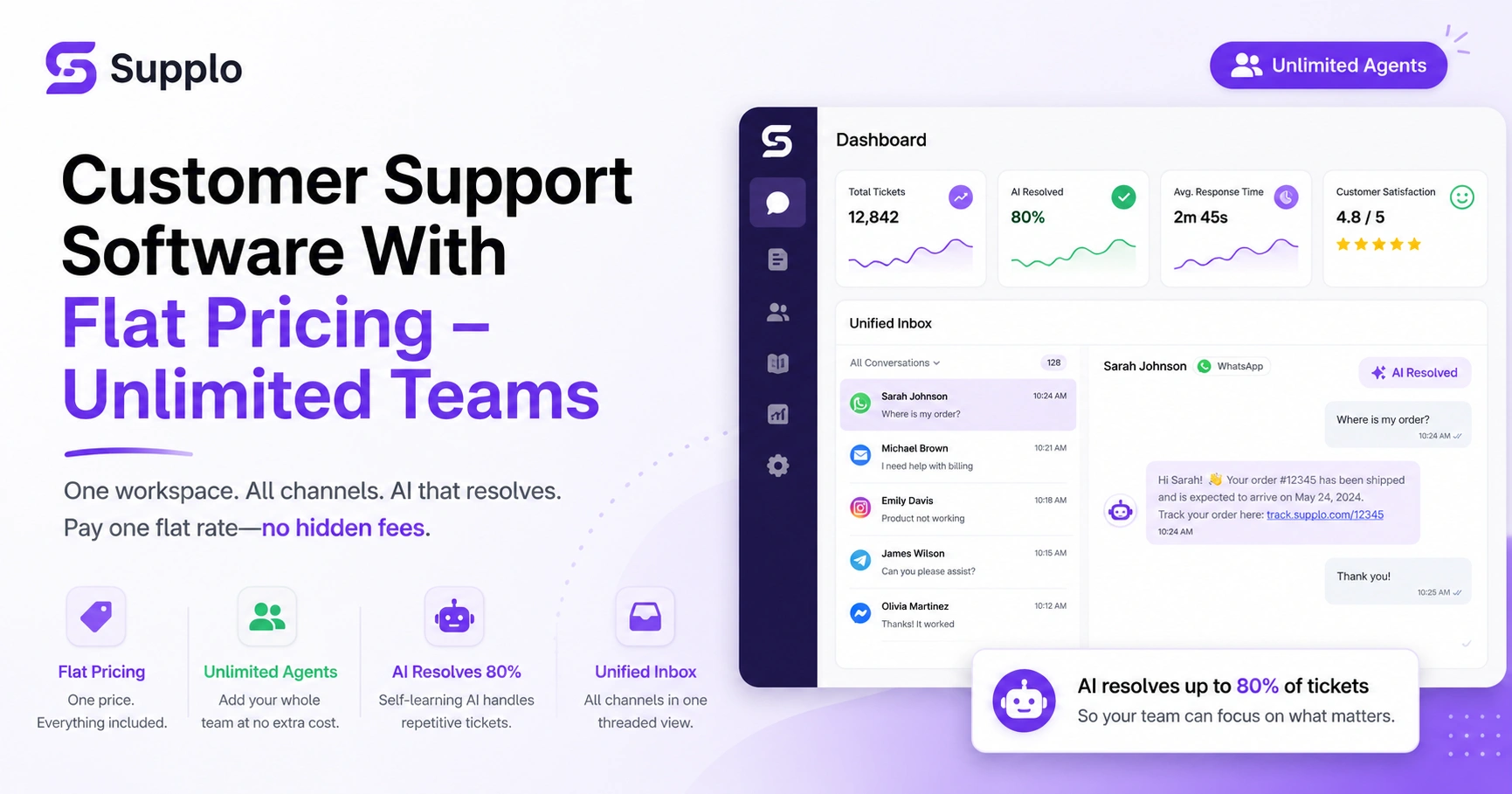
- Flat pricing covers everything: Pay one fixed rate per workspace, not per agent, per resolution, or per channel.
- Self-learning AI automates up to 80% of tickets, handling repetitive questions so your team can focus on complex issues.
- Unified inbox for all channels: Email, website chat, WhatsApp, Telegram, Instagram, Messenger in one thread-based view.
- Unlimited agents at no extra cost: Add your whole team without a surprise bill.
What Flat Pricing Actually Means for Customer Support Software
Flat pricing in customer support software means you pay a single predictable rate per workspace, not per agent, per resolution, or per channel. It's the only model that gives you unlimited team members, unlimited conversations, and full AI automation for a fixed cost. That's radically different from per-seat or per-resolution models that punish you for growth or success.
The difference between per-seat, per-resolution, and per-workspace billing
Per-seat billing forces you to limit your support team or pay more as you hire; flat pricing removes that cap. Per-resolution models (like the $ 0.99-per-solution legacy tools charge) treat each successful customer interaction as a new expense. Per-workspace pricing covers all channels, all agents, and the AI- no surprises at the end of the month.
Why traditional affordable customer support software gets expensive fast
Most budget-friendly support software isn't; it just hides costs behind volume tiers. As your business grows and your support needs expand, these models quickly make your affordable solution prohibitively expensive. You end up paying more for the very success you're trying to achieve.
How to Find a Low-Cost Customer Service Platform That's Actually Reliable
A low-cost customer service platform isn't reliable just because it's cheap; it's reliable when it delivers consistent uptime, accurate AI responses, and transparent pricing without hidden fees. Look for self-learning AI, a unified inbox that integrates email, chat, and social channels (WhatsApp, Instagram, Telegram, Messenger), and a clear cap on costs. Avoid platforms that boast about low initial prices but charge per agent or per resolution as you scale.
Red flags in cheap customer service solutions
Reliable platforms publish their uptime SLAs and AI accuracy benchmarks. Poorly designed cheap solutions may offer a low upfront cost but lack the infrastructure for consistent performance or transparent reporting. True low cost means the price covers all channels, not just email.
What reliability looks like at $0.04 per resolution
Reliability at a low cost means an AI agent that can confidently resolve up to 80% of tickets for only $0.04 each. That's significant savings without compromising quality. Flat per-workspace pricing is the most reliable indicator of total cost of ownership, as it ensures you won't incur additional charges for successful AI resolutions.
Why Unlimited Agents Customer Support Pricing Is a Game Changer for Growing Teams
Unlimited agents customer support pricing lets you add team members without renegotiating your plan or paying per seat. It transforms support from a variable cost that balloons with every hire into a fixed expense you can budget around. For startups, agencies, and mid-market teams, this means you can scale your support coverage without needing finance approval every time you onboard a new agent.
Scaling your team without a surprise bill
With unlimited agent pricing, you have no more Who gets a seat? debates; bring on your whole CS team, QA, and senior agents. You can train new hires without worrying about license costs during ramp-up. This flexibility is ideal for seasonal spikes or project-based support without contract changes, allowing you to collaborate across time zones without paying for overlapping shifts.
How per workspace pricing support software eliminates budget friction
Per workspace pricing support software provides a single, predictable bill regardless of how many agents you add. This eliminates the budget friction that often comes with growing teams, making it easier to plan and expand your customer support operations.
A Day in the Life of a Cost-Effective Help Desk (With Real Workflow Examples)
A cost-effective help desk powered by self-learning AI and a unified inbox handles the majority of repetitive tickets automatically, like password resets, order status checks, or shipping updates, while routing complex issues to your human team. The agent sees a complete thread history across email, website chat, WhatsApp, Instagram, Telegram, and Messenger, so there's no context switching. The result: your team focuses on high-value conversations instead of triage.
Incoming tickets from email, chat, WhatsApp, Instagram, Telegram
Imagine your support day starting with the AI handling 80% of overnight tickets and flagging only the escalations for the first shift. Midday, an agent responds to a WhatsApp complaint, with the AI suggesting a relevant knowledge base article. This ensures no channel is left unmanaged and no ticket gets lost in a separate tool.
AI resolves 80% automatically; team handles the rest in a unified inbox
In a truly cost-effective setup, your team reviews AI performance, adds new FAQ entries, and fine-tunes responses during the afternoon. At the end of the day, a dashboard shows resolved tickets, average handle time, and the remaining queue. This optimized workflow ensures your team maximizes efficiency and focuses on critical customer interactions.
The Hidden Costs of Cheap Customer Service Solutions
Many cheap customer service solutions lure you in with a low monthly base rate, then surprise you with per-agent overage fees, per-resolution charges, channel add-ons or integration costs. Over the course of six months, your total spend can double or triple without warning. The real cost is the time wasted on unreliable automation, poor support and painful migration when you outgrow the tool.
Setup fees, integration charges and overage penalties
Per-resolution models charge every time the AI solves a ticket, rewarding success with cost. Popular legacy tools often charge separately for chat, email and social channels. Free plans restrict the number of agents, tickets, or responses, forcing an upgrade quickly. The best way to avoid these hidden costs is to choose a transparent model, such as flat per-workspace pricing.
Why free trials often lock you into per-seat contracts
Data migration out of these platforms can be expensive or impossible without losing conversation history. Be wary of free trials that lead directly into per-seat contracts, as this model will quickly become expensive as your team grows.
Benchmarking Budget-Friendly Support Software: What to Compare
When evaluating budget-friendly support software, compare the total monthly cost at your expected agent count and ticket volume, not just the introductory price. Factor in AI resolution rates, supported channels, multilingual capabilities, and the cost of integrations. The cheapest option on a feature grid often becomes the most expensive when you factor in limitations in scale, automation, or channel support. Compare per‑workspace, per‑seat, and per‑resolution pricing at 5, 10, and 20 agents to truly understand total cost.
Feature parity vs. hidden limitations
Be sure to verify that AI learning actually improves over time (self-learning vs. static rules). Many platforms claim to have AI, but they may only offer basic automation rather than dynamic self-learning that improves with use.
Support channels, AI accuracy and true scalability
Check whether WhatsApp, Telegram, Instagram and Messenger are included or extra. Look for flat pricing that covers all features, no Pro or Enterprise tiers that add basic capabilities to get you started. Ultimately, true budget friendliness means no surprise charges for scaling or access to essential features.
How To Migrate to a Scalable Customer Support Platform Without Downtime
Migrating to a scalable customer support platform with flat pricing doesn't have to be disruptive. Start by exporting your knowledge base articles and conversation history from your current tool. Then, import them into the new platform, connect your email and chat widget, and add your social channels. Run both systems in parallel for a few days to verify data integrity before cutting over; most reliable platforms, including Supplo, offer migration support to make the switch seamless.
Data export, knowledge base transfer and inbox history
Export macros, saved replies and routing rules from your existing tool. Re‑create your knowledge base in the new platform to train your AI agent. Then connect email (via forwarding or API), the website chat widget, and social channels.
Switching from legacy tools to flat per workspace billing
Test the unified inbox with a small batch of real customer conversations. Deprecate the old tool once you confirm all workflows and automations run smoothly. Supplo is not affiliated with any app or website. Please follow each app's terms and local regulations.
The Cost-Effective Stack: AI Agent + Unified Inbox + Flat Pricing
The most cost-effective help desk stack combines three things: a self-learning AI agent that resolves up to 80% of incoming tickets automatically, a unified inbox that consolidates email, website chat, WhatsApp, Telegram, Instagram, and Facebook Messenger, and flat per‑workspace pricing that covers all of it. No per‑seat charges, no per‑resolution fees, no hidden channel add‑ons. That stack keeps support affordable today and scalable tomorrow.
Self-learning AI that gets smarter over time
The AI agent learns from your knowledge base and past conversations to improve accuracy. This means your AI gets more efficient and effective over time, constantly reducing your team's workload.
Multichannel inbox that doesn't charge per channel
A unified inbox means your team works from one thread, not six separate tools. This includes chat, email, and social channels, all at no extra charge. Flat pricing means you can add your entire support, sales, and success team without cost friction. Translation capabilities enable support for customers in any language without the need for human translators.
Is Unlimited Support Team Pricing Right for Your Business?
Unlimited support team pricing is ideal if you have more than two support agents, frequently hire or contract seasonal help, or run a business where support volume varies month to month. It's especially valuable for e‑commerce stores, SaaS companies, agencies and nonprofits that need to scale support quickly without budget surprises. If you're currently paying per seat and your team has grown beyond five agents, you're likely overpaying.
Signs you've outgrown per-seat billing
You've outgrown per-seat billing if you're constantly debating who gets access to the support software. If you find yourself delaying new hires or limiting access for temporary staff due to licensing costs, it's a clear sign you need a more flexible pricing model.
Industries that benefit most: e-commerce, SaaS, agencies, non-profits
Unlimited agent pricing is good for startups that add support hires as they scale. It's perfect for agencies managing multiple client inboxes, and non-profits and social enterprises benefit from predictable budgeting. Any business with seasonal spikes (e.g., holiday retail) avoids expensive plan upgrades with this model.
Your First 7 Days With Supplo's Per Workspace Pricing Support Software
In your first seven days with Supplo, you'll set up your knowledge base, connect the AI agent to learn from it, link your email and website chat widget, and add WhatsApp, Telegram, Instagram, and Facebook Messenger. Your entire team can join without any per‑seat cost. By day seven, the AI should be handling a meaningful portion of incoming tickets, and your team will be operating from a single, unified thread-based inbox rather than six separate platforms.
Setting up the knowledge base and AI agent
- Day 1: Create your workspace, upload knowledge base articles, set up the AI agent.
Connecting email, chat widget and social channels
- Day 2–3: Connect email forwarding and install the chat widget on your website.
- Day 4–5: Add social channels (WhatsApp, Telegram, Instagram DMs, Messenger).
Inviting your whole team at no extra cost
- Day 6: Invite your team, no limit, no extra charge.
Watching the AI handle tickets while you focus on growth
- Day 7: Review AI resolution stats, refine answers, and watch your inbox shrink.
Ready to see flat pricing in action? Start your 14‑day free trial at supplo.io, no credit card required, zero commitment. Invite your entire team, connect your channels, and watch the AI handle tickets from day one.
The Hidden Costs of Cheap Customer Service Solutions
If you're tired of surprise overage bills and per‑agent fees, switch to flat pricing. Get a custom cost comparison at supplo.io/pricing and see exactly how much you'll save.
Don't let your support software control your budget; you should control it. Join thousands of teams using Supplo's per‑workspace pricing. Start your free trial today and get unlimited agents, a unified inbox and self‑learning AI, all at one flat rate.
FAQ
What is flat pricing for customer support software?
Flat pricing means you pay a single fixed rate per workspace, not per agent, per resolution or per channel. All features, all team members, and all conversations are included at a single predictable monthly cost.
How does per‑workspace pricing save money compared to per‑seat billing?
With per‑seat billing, your cost grows every time you add a support agent. Per‑workspace pricing covers unlimited agents, so you can grow your team without your software bill growing with it.
Is low‑cost support software reliable enough for a growing business?
Yes, if the platform includes self‑learning AI, a unified inbox and transparent (flat) pricing. Avoid tools that hide costs behind per‑resolution fees or channel add‑ons. The best low‑cost platforms focus on automation to offset lower price points.
What channels should a cost‑effective help desk cover?
A truly cost effective help desk should include email, live chat, WhatsApp, Instagram DMs, Telegram and Facebook Messenger, all from one inbox. Paying per channel erases cost savings. Supplo is not affiliated with any app or website. Please follow each app's terms and local regulations.
Does flat pricing include AI automation?
In the best platforms, yes. Supplo's flat-per-workspace pricing includes the self‑learning AI agent at no extra cost, with no hidden per‑resolution or per‑automation fees.
What happens if I need to scale from 5 to 50 agents?
With flat per‑workspace pricing, you invite more team members: no plan upgrade, no cost increase, no contract renegotiation. The price stays the same.
Compliance line: Supplo is not affiliated with any app or website. Please follow each app's terms and local regulations.