On this page
Duplicate support tickets are a silent killer of efficiency in customer support. They occur when similar customer issues repeatedly enter your system, whether through follow-ups, cross-channel messages, or internal miscommunications. Left unaddressed, duplicates clutter your inbox, inflate response times, and frustrate both agents and customers.
This guide is for customer support managers, team leads, and operations specialists looking to streamline their ticketing system. You'll learn how to identify, merge, and ultimately prevent duplicate tickets using a combination of smart workflows and advanced AI. By the end, you'll have a clear framework to handle duplicate support tickets, reducing your workload and improving customer satisfaction.
Quick Answer
- Duplicate support tickets are identical customer issues that are entered into your system multiple times.
- They lead to wasted agent time, slower response rates, and customer frustration.
- AI-powered tools can automatically detect, flag, and merge duplicates across various communication channels.
- Effective duplicate management requires a unified inbox, clear team rules, and a self-learning AI.
- The goal is to maintain customer context while consolidating issues for a cleaner, more efficient system.
What Are Duplicate Support Tickets and Why Are They a Problem?
Here's the thing: duplicate support tickets happen more often than most teams realise. They pop up when the same customer issue enters your system multiple times, whether from repeated emails, follow-ups, or cross-channel messages. And they're not just annoying; they actively hurt your support operation. Duplicates clutter your inbox, inflate response times, and frustrate both agents and customers who see the same answers. Left unchecked, duplicates can double your workload without actually improving service quality. Understanding their root cause is the first step toward fixing them.
So where do duplicates come from? Often, customers send multiple emails or messages across chat, email ticketing, and social media before getting a reply. Internal duplication happens when multiple team members create tickets for the same incoming message. Each duplicate wastes agent time switching contexts, re-reading, and re-typing answers. Duplicates also skew support metrics, making your team look busier or slower than they really are, and they increase the risk of inconsistent replies, which hurts customer trust. The true challenge is knowing when and how to handle duplicate support tickets effectively.
Manual vs. Automated: How to Identify Duplicate Customer Inquiries Efficiently
Let's be real, manually spotting duplicates is a pain. It relies on human pattern recognition and searches by email, subject line, or customer name, which are slow and error-prone. Automated systems, on the other hand, use AI to detect duplicates in real time by scanning message content, sender info, and conversation history. For teams handling more than a few hundred tickets a week, manual identification becomes unsustainable. Automation doesn't just catch exact matches; it finds similar inquiries that humans might miss.
Look for software with semantic matching that groups tickets by meaning, not just keywords. You can set up rules to flag potential duplicates based on sender email, phone number, or customer ID. Using time-window grouping, tickets from the same customer within a certain period are likely duplicates, and this approach is also effective. Train your AI on past duplicate examples to improve detection accuracy over time, but always keep a human review step for flagged duplicates to avoid merging unrelated issues. This blend of AI duplicate ticket handling with human oversight is crucial.
How to Merge Duplicate Support Tickets in Your Inbox
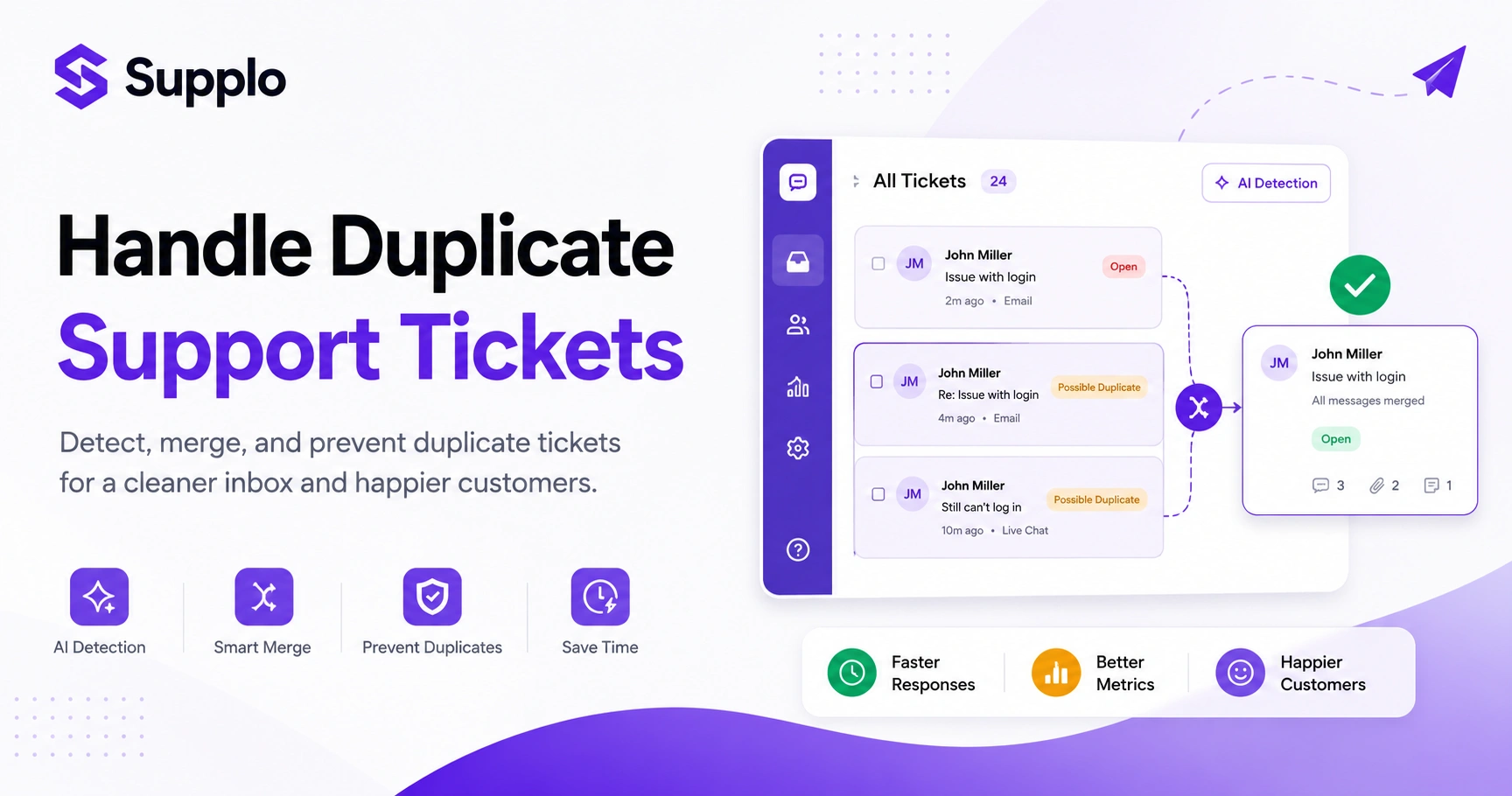
The most reliable way to merge duplicate tickets in a modern inbox is to use a tool with built-in consolidation features. Start by selecting the duplicate tickets you want to combine, then choose the primary ticket that holds the most complete information. The system should merge all replies, attachments, and internal notes into one thread, then automatically close the duplicates. This keeps your inbox clean without losing any customer context.
How to Merge Duplicate Tickets:
- Identify Duplicates: Scan your inboxes or use AI to flag potential duplicates.
- Select Tickets: Choose all related tickets to be merged.
- Designate Primary Ticket: Pick the oldest or most comprehensive ticket to be the main thread.
- Review Before Merging: Check each duplicate for unique attachments, messages, or unread replies that need attention.
- Execute Merge: Use your help desk's merge function. The system should consolidate all communications.
- Notify Customer (Optional but Recommended): On the primary ticket, send a brief message confirming receipt of all follow-ups and noting their consolidation.
- Close Duplicates: The system should automatically close the remaining duplicate threads.
Always pick the oldest or most complete ticket as the primary to preserve the full conversation timeline. Ensure merge actions automatically CC relevant agents to keep everyone in the loop. Schedule a weekly cleanup to audit and merge any lingering duplicates in your system in Supplo's unified inbox.
A Quick Framework for Your Support Team
A solid consolidation framework helps your team decide when to merge, tag, or leave duplicates alone. Start by grouping all inbound messages by customer ID or email address, then review the issue summary: if the same problem appears, merge them. If it's a related but different issue, tag it and link the tickets instead. The goal when consolidating customer issues is to reduce noise without collapsing legitimate, distinct issues into a single one.
Create a shared team definition of what constitutes a duplicate (e.g., the same issue, customer, or product). Use a merge or link rule: merge only if the core issue is identical; otherwise, link tickets for visibility. Tag tickets with issue categories (billing, technical, feature request) to speed up consolidation. Assign one person per shift to handle consolidation to ensure consistency, and review your framework quarterly based on team feedback and pattern changes.
How AI Automates Duplicate Ticket Resolution and Saves You Hours
Here's where things get interesting. AI processes incoming tickets as soon as they arrive, comparing them against your knowledge base, conversation history, and active tickets in real time. When it detects a duplicate, it can either merge it automatically or flag it for review, reducing manual triage time to nearly zero. The best AI agents also draft replies based on existing resolved tickets, so your team doesn't have to start from scratch every time. This turns a tedious manual process into a background operation that runs itself.
AI ticket consolidation uses semantic analysis to catch duplicates even when customers phrase issues differently. Automated duplicate ticket resolution can cut resolution time by eliminating redundant responses. The AI can group duplicate tickets under a single parent thread and update the customer without agent involvement. Self-learning AI gets better over time by learning from what humans accept or reject. This frees your team to focus on unique, complex issues that require human empathy and critical thinking. Supplo's AI agent can automatically resolve up to 80% of incoming tickets.
See it in action → Try Supplo free for 14 days, no credit card required. Let our AI agent scan, flag, and merge duplicates in real time while you focus on the customers who need a human touch. Start your free trial.
Smart Duplicate Ticket Management: What to Look for in AI Support Software
Not all AI ticket consolidation tools are built the same. Look for software that offers real-time duplicate detection, automated merging with human override, and a clean unified inbox that shows you the full customer history. It should also learn from your team's actions, accepting or rejecting merges, so the system improves over time. The ideal tool doesn't just reduce duplicates; it prevents them from clogging your workflow in the first place through smart duplicate ticket management.
Ensure the platform supports all your channels, including email, chat, WhatsApp Customer Support, Instagram, and Telegram. Check for a flat pricing model so you aren't penalised as your ticket volume grows. Look for a shared inbox that shows duplicate flags and merge suggestions inline. Verify that the AI can handle multilingual queries effectively. Prioritise platforms with transparent AI behaviour: it should tell you why it flagged something as a duplicate.
How to Combine Duplicate Tickets Without Losing Customer Context
The biggest risk when merging tickets is losing important details, like a specific attachment or a change in customer tone that signals frustration. Always preserve the full conversation history, including timestamps, agent notes, and any escalations. Tag the merged ticket with a note that additional threads were consolidated, and ensure internal notes from each ticket remain visible to the assigned agent. Context is what makes one feel thoughtful rather than robotic when combining duplicate tickets.
Use a ticketing system that appends messages to existing threads rather than overwriting them. Keep a merged tickets field that lists each original ticket ID for future reference. Train agents to scan the entire merged thread before replying, especially the most recent messages. Avoid auto-merging for escalation tickets where the tone or urgency may have shifted. If using AI, set confidence thresholds so the agent reviews mid-confidence merges before finalising.
Common Pitfalls When Consolidating Duplicate Tickets
Teams often merge too aggressively, collapsing related but distinct issues into one ticket and confusing the conversation. Others hold off merging entirely, leaving inboxes cluttered with noise. A balanced approach means merging only when issues are truly identical and using links or tags for related problems. Another common mistake is failing to update the customer after a merge, leaving them wondering whether their follow-up was ignored. In email ticketing systems, these issues are particularly prevalent.
Common Pitfalls and Solutions:
- Over-merging: Never merge tickets with unresolved escalations or high-priority flags. Use linking for related but distinct issues.
- Blind trust in AI: Don't assume AI is perfect; always keep a human in the loop for complex or sensitive merges.
- Merging different customers: Never merge tickets from different customers, even if the issue looks identical.
- Ignoring time sensitivity: Be careful with time-bound tickets (like billing disputes) where merging could reset timelines.
- Lack of audit: Regularly audit merged tickets to catch errors and improve your merging rules.
If your current system is dropping context or merging incorrectly → Supplo's AI respects your rules. Set confidence thresholds, review flagged duplicates, and override when needed. Start free and connect your inbox in minutes.
Supplo is not affiliated with any app or website. Please follow each app's terms and local regulations.
The Real Cost of Not Having a Resolution for Duplicate Tickets
Every duplicate ticket you ignore costs you time, money, and customer goodwill. Agents waste minutes per duplicate re-reading and re-typing, which adds up to hours or days per month. Customers who repeatedly see the same answer or receive no answer to a follow-up feel unheard and may churn. Multiply that across your entire support volume, and duplicates can quietly eat 20 to 30% of your team's productive time. A proper resolution for duplicate tickets isn't optional; it's a direct driver of efficiency and retention.
Each duplicate inflates your average response time, hurting your support score. Duplicates create double work, increasing the cost per ticket without improving service. Customers who receive inconsistent replies from different agents lose trust in your brand. Over time, duplicate-cluttered inboxes lead to missed escalations and unhappy customers. A flat-rate pricing model in your support software makes this cost predictable, rather than ballooning with your ticket volume.
Best Practices for Maintaining a Clean Ticket System Long-Term
Keeping your ticket system clean starts with standardising how your team captures customer information. Use mandatory fields for issue type, customer ID, and priority level to make duplicate detection easier. Schedule regular audits, train your AI consistently, and review merged tickets quarterly to refine your rules. A clean system isn't a one-time fix; it's an ongoing habit that your tools and team build together to manage duplicate tickets efficiently.
Require customers to log in or provide an email before submitting a ticket to reduce anonymous duplicates. Use canned responses for common issues so the AI can auto-close duplicate tickets faster. Monitor duplicate flag rates weekly to spot patterns (e.g., a broken page that generates many tickets). Integrate your knowledge base so the AI can resolve duplicate entries by linking to existing articles. This proactive approach helps your team to manage duplicate tickets effectively.
Your AI-Duplicate-Ticket-Handling Toolkit
To build an effective duplicate-handling system, start with an AI agent that scans and merges tickets in real time, a unified inbox that surfaces duplicates clearly, and a set of rules your team agrees on. Set up automatic merging for low-risk duplicates (same customer, same issue, within 24 hours) and flag medium-confidence matches for review. The right toolkit turns duplicate management from a chore into a background process that handles itself using AI-driven duplicate-ticket-handling capabilities.
Use software like Supplo that combines an AI agent, a shared inbox, a knowledge base, and multichannel support on a single platform. Define rules: exact subject match + same customer = auto-merge; similar content + new customer = flag for review. Create a workflow: AI detects → flags or merges → agent reviews → customer gets a single consolidated reply. Monitor your duplication rate and adjust AI confidence thresholds monthly. Keep your knowledge base up to date so the AI can provide accurate answers to auto-resolve duplicates and deliver excellent WhatsApp customer support.
Ready to clean up your support inbox for good? Join thousands of teams using Supplo's flat-rate AI support platform. Handle duplicates across email, WhatsApp, Instagram, Telegram Support, and live chat from one shared inbox. Pay per workspace, not per seat. Crypto, Binance Pay, Payeer, and more are accepted. Start your free trial today.
FAQ
How do I know if two support tickets are duplicates?
Look for the same customer ID, email, or phone number combined with a matching issue description. AI tools can also compare ticket content semantically to detect duplicates, even when customers use different words.
Can merging tickets cause me to lose customer data?
Only if your system overwrites rather than appends, use a tool that preserves all messages, attachments, and internal notes from each merged ticket. Always keep a merged tickets field with original IDs for reference.
Why does my AI sometimes flag tickets as duplicates when they aren't?
AI learns from patterns, so false positives occur when messages share keywords or similar phrasing but represent different issues. Adjust your confidence thresholds and review flagged tickets manually until the model improves.
Is it safe to auto-merge duplicate tickets without human review?
For low-risk cases, same customer, exact match issue, within a short time window, auto-merge can work. For higher-stakes or ambiguous matches, always keep a human in the loop to avoid errors.
Can AI handle duplicate tickets from different channels, like WhatsApp and email?
Yes, modern AI support tools can detect duplicates across email, live chat, WhatsApp, Instagram, Telegram, and more by unifying them into a single thread-based inbox. This gives you a complete view of the customer.
What should I do if a customer sends the same issue multiple times in anger?
Merge the tickets into the original thread, reply once to acknowledge all follow-ups, and flag the ticket for escalation if the tone suggests frustration. Avoid ignoring duplicates from upset customers; it worsens the experience.
How often should I audit my duplicate ticket management process?
Review your duplicate detection rules and merged tickets at least monthly. If your team sees new patterns, adjust your AI thresholds or create new rules immediately. Clean systems require regular maintenance.
Compliance line: Supplo is not affiliated with any app or website. Please follow each app's terms and local regulations.