On this page
Customer support is often a race against the clock, where efficiency and clarity are paramount. A well-organized support system allows agents to focus on solving problems rather than sifting through disarray. This guide explains how to use labels in customer support to achieve that organization, covering everything from core concepts to advanced multichannel strategies and common pitfalls. It's for support managers, team leads, and agents looking to streamline their help desk operations.
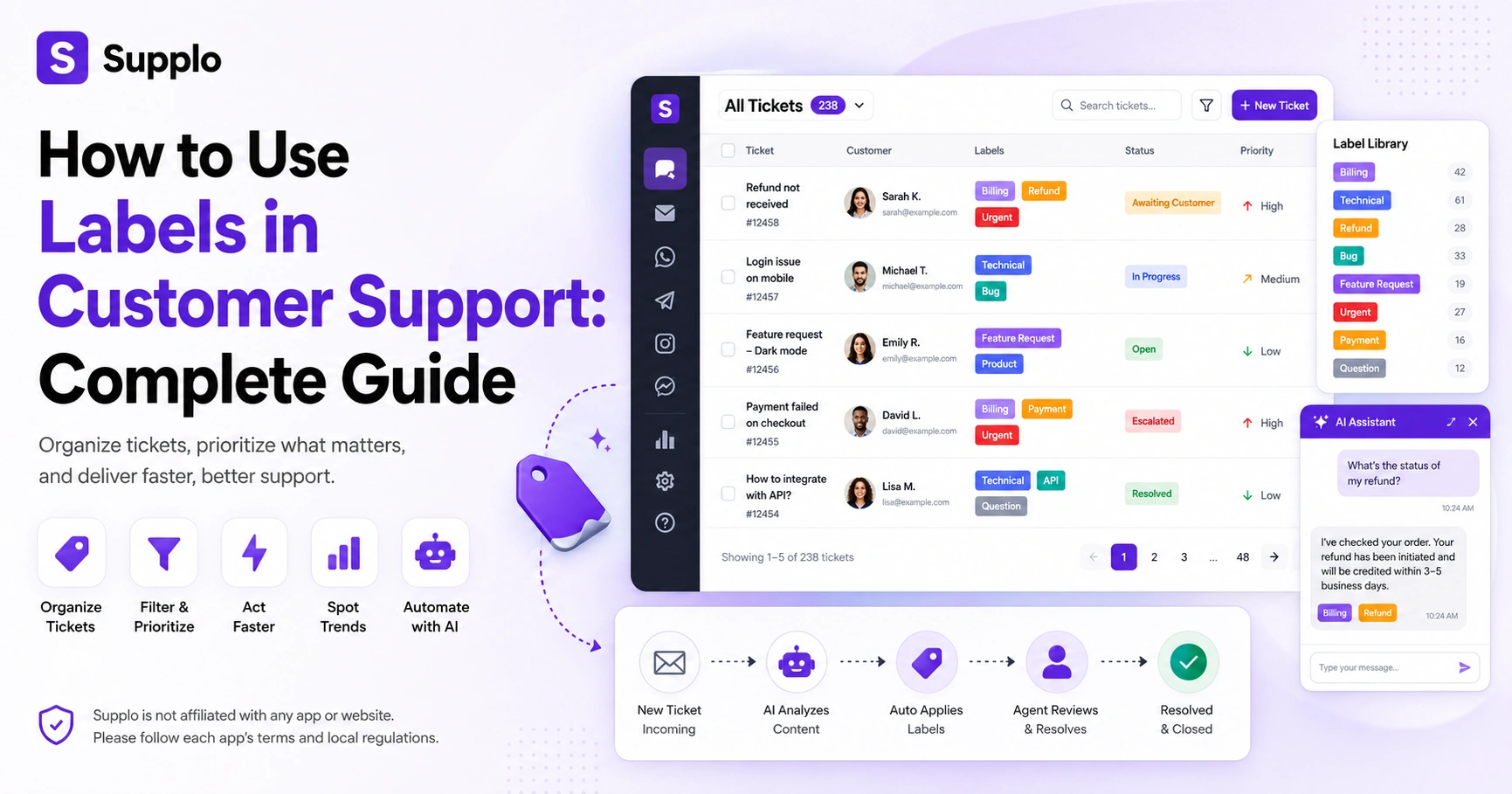
Supplo is not affiliated with any app or website. Please follow each app's terms and local regulations.
Quick Answer
- Labels help teams categorize tickets by urgency, issue type, and required action for faster filtering and prioritization.
- Start with a minimal set of 10-15 core labels and expand only when clear patterns emerge from your incoming tickets.
- The key to a scalable labeling system is consistent use, which often means automating label application wherever possible.
- Avoid label inflation and redundancy; regularly audit and prune unused or overlapping labels to maintain clarity.
- For multichannel support, use a universal label system, adding channel-specific tags only when necessary for distinct workflows.
Why Labels Matter for Customer Support Teams And What Happens Without Them
Without a reliable labeling system, your support inbox becomes a black hole, tickets pile up, nothing gets prioritized, and your team wastes time digging for context. Labels give you instant visibility into what's happening, what's urgent, and what's slipping. They're the foundation of every organized support operation, whether you're a team of two or fifty.
Without labels, agents can spend up to 20% of their day just figuring out what a ticket is about, rather than resolving it. Labels let you spot trends fast. If a bug spikes on Monday after a release, you know exactly where to redirect engineering attention. Proper labeling prevents ghost tickets: issues that go unresolved because no one flags them for follow-up. Labels also make reporting possible: you can't measure average resolution time for billing tickets if you never label them.
Let's be honest, nobody joins support because they love sorting tickets. But here's the thing: a good label system is like having a second brain. It remembers what you'd forget, surfaces what you'd miss, and helps your team move faster without burning out. That's the real win.
The Difference Between Labels, Tags, and Categories, and When to Use Each
Labels, tags, and categories aren't interchangeable, even though most tools use the terms loosely. Categories are broad buckets (billing, technical, sales), tags are flexible keywords for specific issues (refund request, API error), and labels often combine both, think of them as colored flags that carry additional meaning. The key is to pick one system and stick with it, rather than layering all three on top of each other.
Categories are rigid and hierarchical (Billing > Refunds > International). They are best for high-level routing but are not ideal for nuance. Tags are lightweight and additive; you can stack urgent, API, and documentation on one ticket without hierarchy. Labels sit in the middle: structured enough to sort by, flexible enough for context. Most support tools (including Supplo) let you color-code them for visual triage. The trap is creating 50 tags because you can, then realizing nobody actually uses them consistently.
Here's a quick way to think about it: categories are your filing cabinet drawers, tags are sticky notes you can move around, and labels are color-coded folder tabs. You need all three, but keep them in their lanes.
How to Build a Customer Support Labeling System That Scales
Start small with three label types: issue type, priority, and action needed, then expand only when you see a real gap. A labeling system that scales is one your team actually uses, not one that looks perfect on paper. You're better off with 15 well-used labels than 50 that get ignored.
Begin with labels your team already uses naturally in conversation: billing question, feature request, bug report. Avoid overly specific labels like 2024-Q3 pricing page error; they become obsolete quickly. Keep it generic enough to survive quarterly changes. Review your labels quarterly, archiving anything unused for 90 days, and renaming anything that consistently confuses new hires. Document your labeling convention in a shared space (Confluence, Notion, or your help desk's knowledge base) so everyone's consistent. Let the system evolve; if your team keeps typing refund in the notes, make it a label.
Action Steps for Building a Scalable Labeling System:
- Inventory Current Needs: List the top 5-10 common ticket types and priorities your team handles weekly.
- Define Initial Labels: Create corresponding labels for these, focusing on general categories like Issue Type, Priority, and Status.
- Document and Train: Write clear definitions for each label and train your team on their correct application.
- Monitor Usage: After 1-2 months, review label usage. Are some labels never used? Are some tickets consistently missing a needed label?
- Refine and Expand: Archive unused labels. Create new labels only when a significant pattern emerges that can't be captured by existing ones.
Ready to test your labeling system on real traffic? Set up a free Supplo account with a 14-day trial and start applying labels to live chat, email, and social DMs, no credit card needed. See how a single label standardizes your inbox across channels before you commit to a full rollout.
One thing I've learned the hard way: don't overthink the first version. Your labeling system will evolve. What matters is getting something workable out the door, so your team can actually tag tickets. Perfection is the enemy of adoption.
Best Practices for Customer Support Labels: Naming, Structure, and Color-Coding
Names should be obvious to a new hire on day one; billing, not financial inquiry. Structure follows a consistent pattern (adjective-noun or verb-noun), so scanning feels automatic. Colors add visual triage speed, but only if you limit yourself to 5-7 distinct colors and assign them meaning (red = urgent, yellow = pending, green = resolved).
Use title case or lowercase consistently. Mixed casing looks sloppy and slows visual scanning. Group similar labels alphabetically or by prefix: Billing - Refund and Billing - Dispute are easier to find than Refund Billing and Dispute Billing. Color-code by priority, not topic. Urgent should always be red, no matter which team owns it. Don't assign colors to every label; reserve them for high-signal flags (escalated, awaiting response, VIP customer). Test readability: if your label text is hard to read against its background color, adjust the background color.
Here's a tip nobody tells you: test your label system on your Monday morning self. If you can't scan your inbox and instantly know what's urgent within 10 seconds, your color coding needs work. Labels should be invisible helpers, not puzzles to solve.
Customer Support Ticket Organization Labels: How to Separate Urgent, Open, and Resolved
Your ticket pipeline needs three visual layers: status (what stage it's in), priority (how quickly we need to act), and type (what kind of problem it is). Status labels such as awaiting customer, in progress, and pending third party prevent agents from unnecessarily reopening resolved tickets. Priority labels ensure nothing genuinely urgent gets buried in the noise.
The label " Awaiting customer" is the most commonly misused. Set an auto-close timer if the customer doesn't reply in 72 hours. Don't duplicate status labels with workflow automation. If your tool auto-moves tickets to in progress when assigned, let the system handle it. Use a snoozed or follow-up label for tickets you need to come back to yourself, rather than reassigning them. For resolved tickets, a needs confirmation label ensures the customer actually agrees the issue is closed before you archive it.
The beauty of a good status system? It kills. Is anyone working on this? anxiety. Everyone on the team can glance at the board and know exactly where each ticket lives—no more guessing games.
Using Tags in Customer Service for Channel-Specific Workflows (Chat, Email, Social)
Each channel has its own rhythm: chat needs near-instant response, email tolerates a few hours, social media expects public visibility. Tags let you apply channel-specific logic without mixing signals. An urgent chat tag can trigger a different SLA than an email billing tag, even if both tickets are equally important.
Create channel prefix tags (chat, email, sm ) so you can filter by source without duplicating your label system. For chat, use tags like 'chat abandoned' or 'chat transferred' to catch conversations where the customer left before resolution. For email, tags like email autoreply or email bounce help you spot delivery issues versus genuine tickets. Social media tags should capture sentiment (sm complaint, sm praise) since social responses are often public and escalate differently. Don't overcomplicate it, start with 3 tags per channel and expand based on what you actually see.
Channel tags are where most teams go wrong. They create elaborate systems for each platform, then wonder why nobody uses them. Keep it simple: three channel-specific tags max, and make them action-oriented. Chat abandoned tells you something specific happened. Chat ticket tells you nothing.
How to Use Labels in Multichannel Customer Support Without Creating Chaos
The biggest mistake in multichannel labeling is creating separate label systems for each channel; email, chat, social, and WhatsApp end up with their own inconsistent vocabularies. Instead, use one universal label system for issue type and priority, then add a single source tag so you can filter by channel when needed. A unified inbox that merges all channels into one view, like Supplo, makes this automatic.
A customer who starts a chat, escalates to email, and then follows up on social media should have a single ticket with consistent labels, not three fragmented threads. Use source labels sparingly, from WhatsApp or from Instagram, and only if you need to track channel performance separately. Map channel-specific labels to your universal system. A chat abandoned tag should still carry the same issue category as an email ticket about the same problem. Automation helps here: let the system automatically apply channel labels, so your team doesn't have to remember to tag the source each time. Review your multichannel label consistency quarterly. If you find channel drift (agents emailing tickets labeled chat urgent), standardize again.
Here's a truth bomb: your customers don't care about your channel labels. They care about getting their problem solved. A unified system treats the customer's journey as one conversation, not five separate threads. That's what good support looks like.
Support Labeling for Email, Chat, and Social Media Channel-Specific Strategy
Email labels should prioritize thread history and topic clustering to group replies into a single conversation. Chat labels need speed-specific flags like abandoned, escalated, or need callback. Social media labels must capture public sentiment risk. A social urgent complaint label triggers faster escalation because the complaint is visible to other customers.
For email: auto-label replies with an email follow-up if the customer asks a question that extends the thread. This prevents you from accidentally closing a conversation that's still alive. For chat: use chat handoff labels to track which conversations require human intervention (great for reporting on AI agent effectiveness). For social media, add a social public label for interactions on visible feeds vs. private DMs. Public complaints need faster, more cautious responses. For WhatsApp and Telegram, use labels like wa media or tel group to signal messages that contain images or files, or that come from group chats. Don't forget Instagram DMs, ig dm product inquiry, and ig dm complaint help you route Instagram conversations without losing context.
The channel-specific approach works because it respects each platform's quirks. Email customers expect thorough replies. Chat customers want speed. Social media customers want visibility. Your labels should reflect those expectations, not fight against them.
Common Mistakes in Customer Support Labeling And How to Fix Them
Most labeling failures aren't about the wrong labels; they're about too many labels, inconsistent usage, or labels that mean nothing. If your labels aren't speeding up your team, they're slowing them down. The fix is ruthless simplification: audit what's unused, standardize naming conventions, and train your team on the why behind each label.
Common Mistakes and Their Fixes:
Mistake 1: Label inflation. Creating a new label for every edge case.
- Fix: Archive any label used fewer than 5 times in the last month.
Mistake 2: Label orphanage. Labels that only one person understands.
- Fix: Write a one-sentence definition for each label and pin it in your team's shared space.
Mistake 3: Label conflicts. Two labels that mean the same thing (refund request and refund - request).
- Fix: Run a deduplication session every quarter.
Mistake 4: Label laziness. Agents don't apply labels because it takes too many clicks.
- Fix: Use auto-labeling rules or templates that pre-populate labels.
Mistake 5: Overlapping with your tool's native statuses. Don't create a 'solved' label if your system already has a 'solved' status.
- Fix: Redundancy confuses. Use native statuses for ticket lifecycle management.
Label fatigue is real, but automation fixes it. If your team keeps forgetting to tag tickets, Supplo's AI agent can auto-label incoming conversations based on customer intent and knowledge base matches. Flat pricing ($0.04 per AI resolution) means you're not punished for good labeling habits.
I've seen teams spend months perfecting their label system, only to have it collapse because nobody remembered to tag tickets. The fix isn't more training, it's automation. Let the machine handle the boring stuff so your humans can focus on the actual problems.
How Supplo Makes Customer Support Labeling Automatic And Why That Matters
Supplo's AI agent doesn't just resolve up to 80% of tickets automatically; it also learns from your knowledge base and past conversations to label tickets as they come in across email, website chat, WhatsApp, Telegram, Instagram DMs, and Facebook Messenger. That means your team doesn't waste time manually tagging every message, and your labels stay consistent across channels. The result: a labeling system that actually gets used, because nobody has to remember to use it.
Supplo unifies all channels into a single thread-based inbox, so labels you apply to a WhatsApp conversation carry over if the customer follows up via email. The self-learning AI assigns issue type and priority labels automatically based on conversation content, not static rules that break when language shifts. Human agents can refine or override AI-applied labels with one click, training the system to improve over time , no manual review cycles needed. Flat pricing at $0.04 per AI resolution (not $0.99) means you can scale labeling automation without worrying about per-seat or per-resolution costs ballooning. Supplo is the practical alternative to Intercom, Zendesk, Crisp, and Tidio, easier to set up, honest about AI capabilities, and transparent about pricing.
Stop building your labeling system in spreadsheets. A practical labeling system only matters if your team actually uses it, and nothing kills adoption faster than manually tagging every single ticket. Supplo gives you an AI that labels automatically, a shared inbox that doesn't care which channel the customer chose, and pricing that stays flat even as your team grows. Start free today.
Key Takeaways
- Labels are essential for organization: They provide instant visibility, improve prioritization, and prevent tickets from getting lost.
- Choose wisely: Distinguish between categories (broad buckets), tags (flexible keywords), and labels (structured flags) to build a clear system.
- Scale intelligently: Start small with 3-5 core label types and expand incrementally based on real usage patterns, not theoretical needs.
- Consistency is key: Standardize naming conventions, use color-coding purposefully, and document everything for your team.
- Automate when possible: Leverage AI and system rules to auto-assign labels, reducing manual effort and improving accuracy, especially in multichannel environments.
- Avoid common pitfalls: Regularly audit and prune your labels to prevent inflation, redundancy, and inconsistency that can undermine their effectiveness.
FAQ
How do you use labels in customer support?
Labels let you categorize tickets by issue type, priority, and action needed so your team can filter, triage, and report more efficiently. Start with a small set (5–10) and expand based on patterns in your actual inbound tickets.
What is the difference between a label and a tag in customer support?
Labels typically carry visual meaning (color-coded status flags), while tags are lightweight keywords you can stack on a ticket. In many tools, the terms overlap, but the distinction matters for consistency. Pick one system and document it.
How many labels should a customer support team use?
Start with 10–15 labels and review unused ones quarterly. More than 30 labels usually means your system is too complex for agents to use consistently.
Can labels be automated in customer support software?
Yes. Modern support tools like Supplo can auto-label tickets based on keywords, conversation patterns, or AI analysis of message content, no manual tagging needed.
What are the most common customer support label mistakes?
Label inflation (too many unused labels), label orphanage (labels only one person understands), and label redundancy (two labels meaning the same thing). All three are fixed with regular audits and clear documentation.
How do you use labels in multichannel support?
Use a universal label system for issue type and priority, then add a single source tag per channel (email, chat, social) when needed. Avoid creating separate label systems for each channel.
What is a waiting on customer label for?
It marks tickets where you've responded and are awaiting a reply. Most systems will auto-expire or auto-close these after a set period (typically 72 hours) to prevent tickets from collecting dust.
Compliance line: Supplo is not affiliated with any app or website. Please follow each app's terms and local regulations.


