On this page
Your customers don't always say what they mean. They might type fine when they're actually fuming, or I guess it works when they're secretly thrilled. That's exactly where sentiment analysis in customer support comes in. It's the tech that reads between the lines, picking up on emotional cues your team might miss while juggling 50 tickets at once.
Definition of Sentiment Analysis in Customer Service
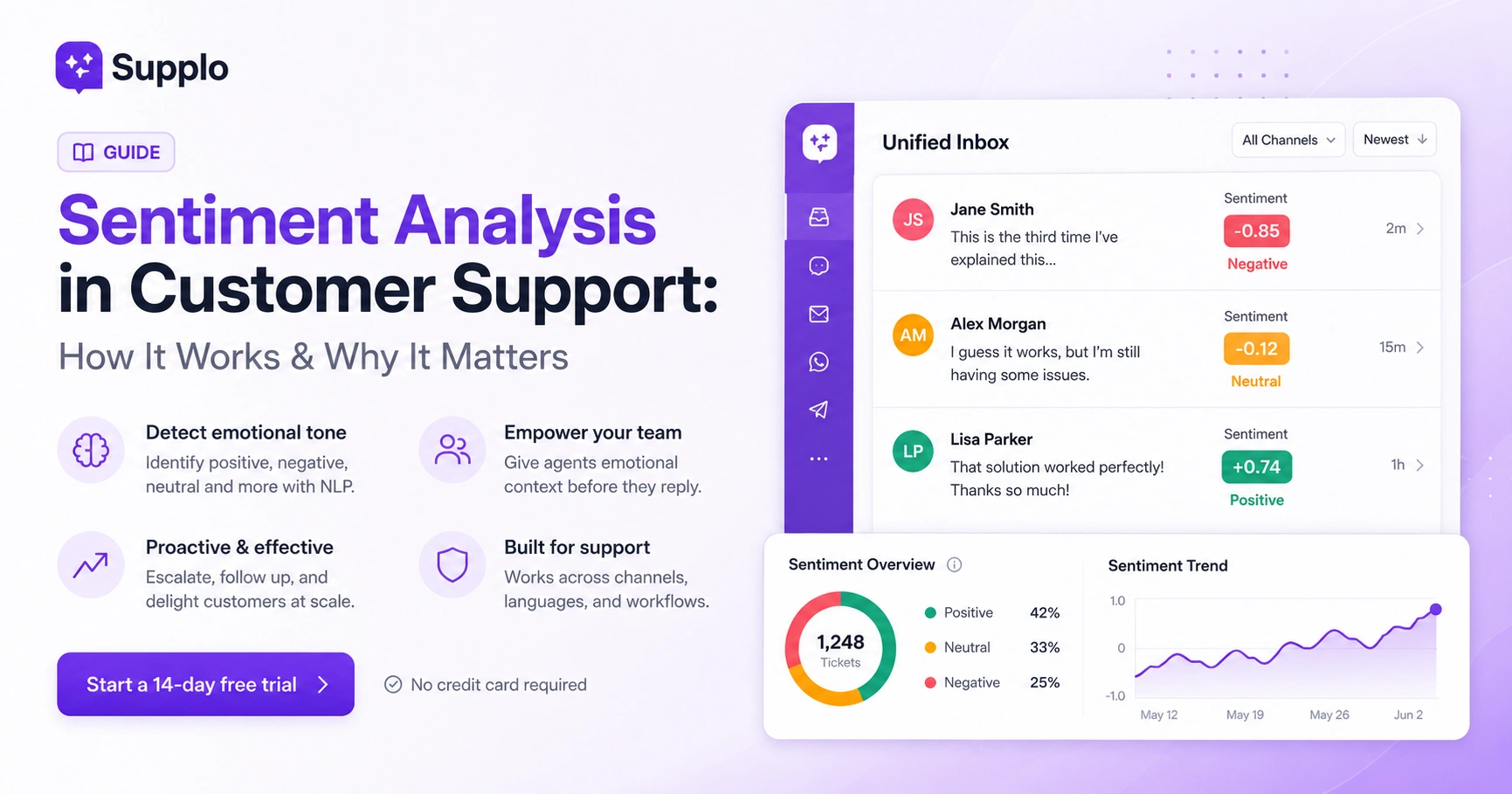
Here's the straightforward version: sentiment analysis in customer service is an automated system that detects the emotional tone behind a customer's message, whether they're positive, negative, neutral, or somewhere in the messy middle. It scans support tickets, chat messages and emails to flag frustration, satisfaction, or confusion so your team knows what's going on emotionally without having to play mind reader.
A few things to keep in mind:
- It's not magic; it's natural language processing (NLP) trained on millions of support interactions to recognize emotional signals.
- Most tools score sentiment on a scale (e.g., -1 to +1) and can detect specific emotions such as anger, urgency, or relief.
- It works best when it's paired with your actual support data and knowledge base, not just generic models that don't know your business.
- The whole point is to give emotional context alongside ticket priority, not to replace human judgment.
Quick Answer
- Sentiment analysis detects emotional tone (positive, negative, neutral) in customer messages using NLP.
- It works best when trained on your own support data and integrated into a unified inbox.
- Three high-value workflows: escalation of negative tickets, proactive follow-ups on neutral tickets and celebration of positive tickets.
- It supports empathy; it doesn't replace it by giving agents emotional context before they respond.
How Sentiment Analysis Works for Customer Service
So how does this thing actually work? Sentiment analysis uses machine learning models trained on labeled text to classify emotional tone. When a customer types something like "This is the third time I've explained this," the system catches on to frustration markers, things like word choice (third time, explained), punctuation (capital letters, repetition) and context from previous messages in the thread.
Here's what's happening behind the scenes:
- Common approaches: lexicon-based (keyword scoring), machine-learning (trained models) and hybrid (the best of both worlds).
- It analyzes sentence structure, negations (e.g., not happy flips a positive to negative) and intensity modifiers (e.g., very vs. slightly).
- When integrated with a support inbox, it can scan every inbound ticket and tag sentiment in real time.
- More advanced systems actually learn from your team's past resolutions to improve accuracy over time- pretty slick, right?
Understanding Sentiment in Support Tickets
A support ticket's sentiment isn't just about whether a customer is mad or happy. It can show subtle shifts, someone starting frustrated but becoming satisfied after a resolution, or a neutral tone that masks silent dissatisfaction. Recognizing these patterns helps you route tickets correctly and measure the real emotional impact of your support.
Some things to watch for:
- Sentiment can change mid-conversation; a ticket that starts at -0.8 (angry) can end at +0.6 (relieved) after a good resolution.
- Neutral sentiment is commonly misunderstood; it's not "fine"; it's often a customer who hasn't yet engaged emotionally.
- Multi-intent tickets (like a complaint hiding a question) need context beyond just the overall sentiment score.
- Tracking sentiment over time reveals if customers are getting more or less satisfied with your team's responses.
How to Implement Sentiment Analysis for Support Ticket Resolution
Ready to put this into practice? Start by connecting your support channels- email, chat, social DMs, WhatsApp to a unified inbox that can tag sentiment automatically. Once sentiment is tracked, set up routing rules: negative tickets go to senior agents, neutral tickets get a proactive follow-up and positive tickets are flagged for case studies or upsells.
Here's a practical game plan:
- Choose a tool or platform that offers a sentiment analysis API or built-in tagging (like Supplo's AI agent that reads tone alongside content).
- Train your model or adjust thresholds on your past 500+ support tickets for better relevance.
- Create automated actions: trigger an escalation if sentiment drops below a certain score, or send a satisfaction survey after negative-to-positive shifts.
- Review sentiment data weekly, not just ticket by ticket, to spot systemic issues.
Try it free: no obligation, no credit card required.
See sentiment analysis in action inside a real shared inbox. Connect your first channel in under 5 minutes and watch Supplo automatically tag emotional tone.
Start a 14-day free trial.
Improve Customer Support with Sentiment Analysis
Sentiment analysis turns vague emotional data into actionable triggers. Here are three high-impact workflows that actually move the needle:
- Auto-escalate negative tickets – tickets scored -0.7 or lower get a red flag and skip the queue to land with a senior agent.
- Proactive follow-ups for neutral tickets – trigger a follow-up email for neutral or slightly negative tickets that haven't been resolved in 24 hours.
- Celebrate positive tickets – automatically tag positive tickets (scored +0.6+) for your marketing or success teams to use as testimonials.
These workflows can run without human intervention, freeing your team to focus on the complex cases that actually need their brainpower.
Enhance Customer Service Using Sentiment Analysis for Proactive Outreach
Proactive customer support means reaching out before the customer asks and sentiment analysis gives you the trigger. If a customer leaves a negative score in a survey or their recent tickets show a downward trend in sentiment, you can contact them with an offer, a personal apology, or a check-in before they churn or publicly post a complaint.
Here's how to make it work:
- Monitor sentiment trends per account: if a normally positive customer drops to neutral or negative over three tickets, flag it for proactive outreach.
- Automate a "we're sorry this experience hasn't been great" email or chat with a direct line to a human manager.
- Use sentiment shifts after an outage or billing issue to prioritize follow-up calls.
- Proactive support based on sentiment builds loyalty much more effectively than reactive fixes.
How to Choose a Sentiment Analysis API for Customer Support
A good sentiment analysis API for customer support needs three things: real-time scoring, multilingual support and the ability to learn from your specific domain (e.g., how "cancel" means something different in a cancellation ticket vs. a bug report). Avoid generic APIs built for social media sentiment; they miss the nuance of support conversations entirely.
What to look for:
- APIs that offer customizable thresholds and allow you to feed your own training data.
- Multi-language support is non-negotiable if your customers communicate in different languages; some APIs translate before analysis, while others analyze natively.
- Check pricing: some charge per API call; others bundle it into a flat platform fee (like Supplo's $ 0.04-per-resolution model).
- Test with your own support data before buying; run 100 past tickets through a trial and compare the sentiment tags to human judgment.
Need a sentiment tool that actually scales?
Free APIs break at volume. Supplo's AI agent resolves tickets at a flat $0.04 per resolution, with built-in sentiment tagging, multi-language support and seamless handoff to your team.
Free Sentiment Analysis Tools for Customer Service
Several free sentiment analysis tools are good enough for testing or very small teams; Google Cloud Natural Language offers a free tier with up to 5,000 requests per month and MonkeyLearn has a free plan with limited features. But free tools typically lack customization, don't learn from your data and won't scale with real support volume.
Here's what's out there:
- Google Cloud Natural Language: good for basic sentiment scoring, free up to 5,000 requests/month, but needs technical setup.
- MonkeyLearn: offers a free sandbox with pre-built models; you can test on your own tickets before upgrading.
- VADER (Python library): free and open-source, specifically tuned for social media and support-style text.
- Limitation: free tools rarely handle multi-language, team inbox integration, or proactive routing without extra work.
- For serious support teams, investing in a platform with built-in sentiment analysis (like Supplo) is faster and more accurate.
Identifying At-Risk Customers with Sentiment Analysis
Your support tickets contain early warning signs of churn: customers who go from satisfied to frustrated, customers who submit multiple tickets about the same issue, or customers whose language shifts from specific (like "the login button") to vague (like "your software always fails"). Sentiment analysis quantifies these shifts so you can intervene before the cancellation comes.
Red flags to watch for:
- A consistent negative trend across 3+ tickets, even if each ticket isn't extremely angry.
- Accounts in which sentiment improves after resolution but then drops again within weeks signal a recurring problem.
- Combine sentiment data with support volume: a once-quiet customer suddenly opening multiple tickets is a red flag.
- Set up a "customer health" dashboard that tracks sentiment scores alongside ticket frequency and response times.
Empathetic Customer Support with Sentiment Analysis: Keeping the Human Element
Here's the thing: sentiment analysis helps teams be more empathetic, not less. Knowing that a customer is frustrated before you even open their ticket lets you adjust your tone, avoid canned answers and acknowledge their feelings right away. The goal isn't to automate empathy; it's to surface emotional context so your team can respond with genuine care.
Best practices for keeping it human:
- Start responses with emotional acknowledgment: "I can see this has been frustrating and I'm sorry."
- Avoid the trap of using sentiment scores as a replacement for human reading; always read the message.
- Train agents to use sentiment flags as cues, not as crutches. If a ticket is angry, it still needs a person who listens.
- A platform with a shared inbox and AI agent can flag sentiment and then hand off to a human when the emotional complexity exceeds what automation can handle.
Don't let silent frustration turn into churn.
Start your free trial today. No seat limits, no hidden fees, just honest, transparent AI support that helps your team respond with clarity and empathy.
Key Takeaways
- Sentiment analysis detects emotional tone in customer messages using NLP.
- It integrates best with a unified inbox and custom-trained models.
- Three workflows: escalate negative tickets, follow up on neutral ones and celebrate positive ones.
- Proactive outreach using sentiment analysis can prevent churn and build loyalty.
- Choose an API with real-time scoring and multi-language support.
- Free tools are useful for testing but have limitations for production support.
- Sentiment analysis enhances empathy by providing emotional context.
FAQ
What is sentiment analysis in customer support?
Sentiment analysis is the automated detection of emotional tone in customer messages, positive, negative, or neutral, using natural language processing. It helps support teams prioritize tickets and respond with the right level of empathy and urgency.
Can sentiment analysis replace human judgment?
No. It's a tool to surface emotional context, not a replacement for human reading or decision-making. The best results come from combining AI tagging with human review and response.
How accurate is sentiment analysis for support tickets?
Accuracy depends on the model and your data. General-purpose models may score 60–70% accuracy on support text, while custom-trained models on your own tickets can reach much higher. It's always worth testing with real data.
Does sentiment analysis work across different languages?
Yes, but not all tools handle every language equally. Some translate first, while others analyze natively. Look for tools that support the languages your customers actually use.
Can I use free sentiment analysis tools for production support?
Free tools are good for testing but rarely sufficient for real support volume; they lack customization, multi-language depth and inbox integration. Paid platforms or APIs are better for ongoing use.
How do I set up sentiment analysis for my support team?
Start by connecting your support channels to a unified inbox with built-in sentiment tagging. Then set up routing rules and automated workflows based on sentiment scores. Test with historical tickets first to calibrate thresholds.
What should I NOT use sentiment analysis for?
Don't use it to automatically respond to angry customers or make decisions without human review. Sentiment analysis should inform, not automate, your team's emotional responses.
Compliance line: Supplo is not affiliated with any app or website. Please follow each app's terms and local regulations.