On this page
Let's be real, nobody enjoys digging through a chaotic inbox first thing in the morning. If your team is wasting time figuring out what each ticket is about instead of actually solving problems, you need a better system. This guide walks you through creating support ticket categories that make sense for your team and your customers.
Whether you're a customer support manager, a team lead, or just someone trying to bring order to your help desk, these steps will help you turn a messy inbox into something you can actually manage. Start simple, stay consistent, and watch your response times improve.
Quick Answer
- Begin with 5–7 core categories, such as Billing, Technical, Account Access, Feature Requests, and General Inquiries.
- Name categories based on how customers describe their issues, not internal department structures.
- Leverage AI and rules to classify tickets, reducing manual effort and errors automatically.
- Add essential metadata such as priority or source channel, but avoid excessive fields that add complexity.
- Involve agents in the design process and provide clear guidelines to ensure consistent categorisation.
Why Organising Support Tickets Is the Foundation of Reliable Customer Service
Think about it, when every ticket lands in your inbox labelled correctly, your team can jump straight into solving it. No more waiting. What is this even about? moments. A messy inbox forces your agents to read every conversation twice to figure out where it should go. That's wasted time, and your customers feel it.
Proper ticket management categories mean the first person to see a ticket already knows what it needs. High-priority issues don't get buried under low-effort questions. And here's the bonus: your AI agent can learn faster when it's working with clean, consistent data. Customers notice when they don't have to repeat themselves; that's the kind of experience that builds loyalty.
Teams that skip categorisation end up spending nearly a third of their day just reassigning conversations. Don't be that team.
How to Categorise Support Tickets for Accuracy Without Overcomplicating It
Start with the most obvious question: is this a problem, a question, or a request? That single filter covers about 70% of what comes in. From there, build categories around your product's main features, not how your internal departments are organised. Your customers don't think in org charts. They think I can't log in or that my order is late.
Here's the golden rule: use your customers' language. If they say payment hiccup, don't call it Billing Anomaly 3.2. Save the jargon for internal notes. Limit yourself to 5–7 top-level categories; everything else becomes a sub-category or a tag. Spend two weeks auditing past tickets to see what naturally clusters together. Treat your categories like a filter, not a filing cabinet.
The 5 Core Support Ticket System Categories Every Team Needs
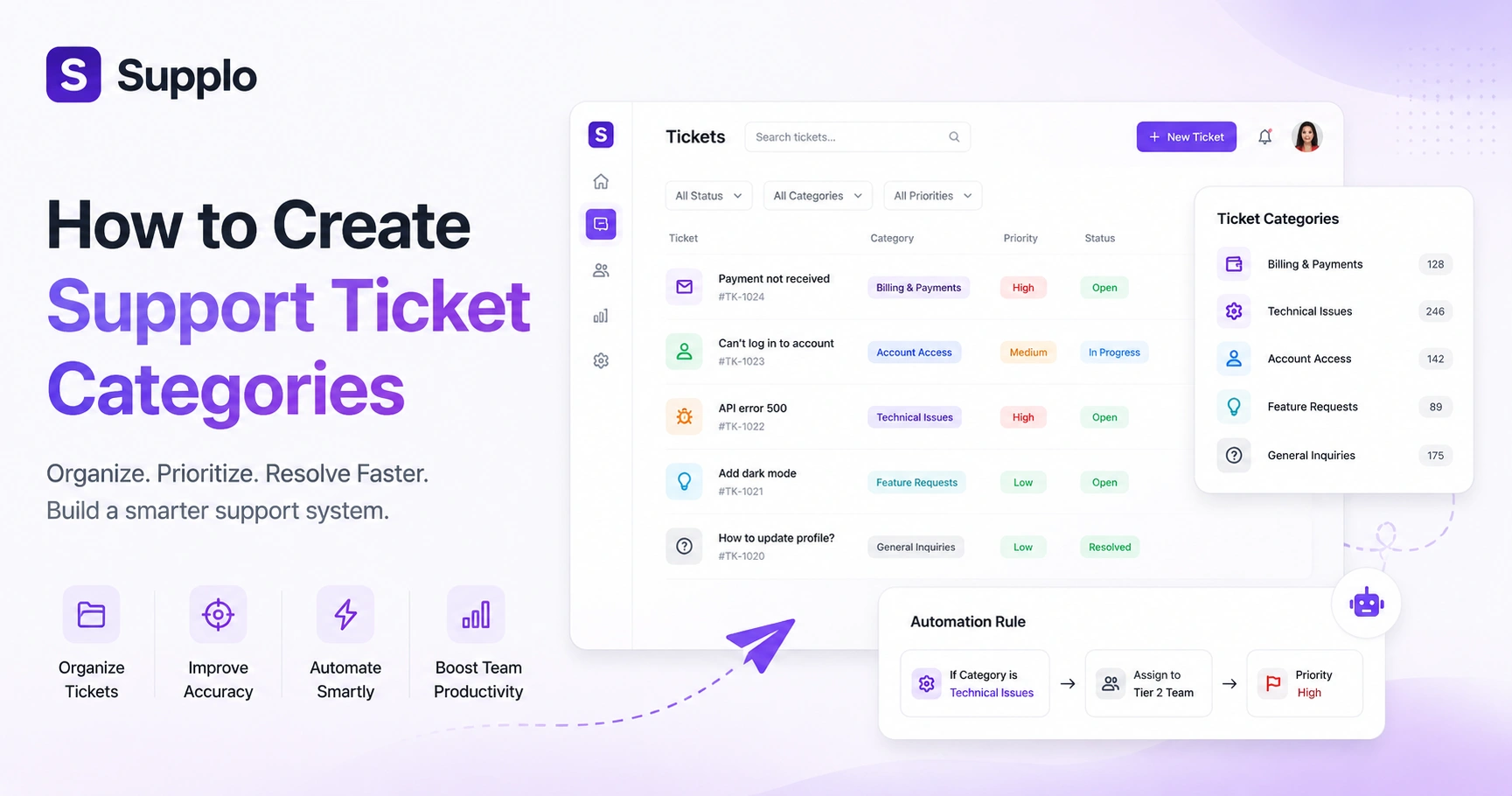
Most teams can start with five categories and handle 80% of their volume. Here they are:
- Billing & Payments: Invoicing errors, refunds, pricing questions, payment method issues. Pretty straightforward.
- Technical Issues: Bugs, error messages, API failures, integration problems. The stuff that makes everyone groan.
- Account Access: Login trouble, password resets, permission changes, and account lockouts.
- Feature Requests: New functionality suggestions, integrations, and customisations your customers wish you had.
- General Inquiries: Documentation questions, onboarding help, non-urgent feedback. Just checking in messages.
Keep your sub-categories lean, two or three per main category max. Too many options, and your team will start guessing. Remember, if you use Instagram DMs for support, make sure those conversations route to the right category automatically.
How to Create Support Ticket Categories in Your System
Before you touch a single setting, map out your customer journey from first contact to resolution. That map tells you exactly where friction lives. Then, in your support tool, here's how to set things up:
Audit Your Data. Review your last 200 tickets and group them by theme. Don't guess; use real data to identify what customers actually need help with.
Define Category Names. Use the language your customers already use. If they say they can't pay, don't call it a Payment Gateway Discrepancy.
Add Custom Ticket Fields. Include metadata like browser version, order ID, or subscription tier. This gives your team context without making them dig.
Create Automation Rules. Set it up so Technical Issues route to your Tier 2 team, Billing goes to finance, and so on. Use a unified inbox like Supplo to manage all category assignments from one workspace.
Test and Refine. Run your workflow with your team for a week before going live. Fix the edge cases now, not when a paying customer is waiting.
Want to test your new category system with real traffic? Start a free 14-day trial at Supplo.io and route tickets from email, live chat, WhatsApp, and Instagram into one organised inbox.
Best Practices for Customising Ticket Categories and Fields That Scale
Here's the mistake everyone makes: over-customising from day one. You don't need twenty custom fields when you're handling 100 tickets a month. Start with three essentials: category, priority, and source channel. Add things like product version or customer tier only when your volume demands it.
Keep your required custom fields under five; anything more and agents will start skipping them. Use dropdown menus instead of open-text fields. Why? Because refund requests and please refund should all land in the same bucket. Build fields that help your AI agent learn, not just satisfy your curiosity. Revisit your fields every quarter; if something hasn't been used in reporting for 90 days, archive it.
Smart Ticket Tagging: Automating Ticket Classification Without the Guesswork
Imagine a customer who was charged twice for my subscription and your system automatically tags it as Billing, sets it to high priority, and routes it to the right person. That's smart tagging. It uses keywords, customer behaviour, and conversation context to classify tickets as soon as they arrive.
Build a keyword library from your most common tickets. Refund, charged twice, cancel my plan, these should all auto-tag. Review your library monthly because customer language evolves. Let your AI agent pre-classify before routing; this can significantly reduce manual triage. Train your AI agent to auto-tag using your knowledge base and audit those automated tags regularly. Language changes, and your system needs to keep up.
Manage Ticket Fields and Metadata Customisation for Cleaner Reporting
Metadata is what turns a pile of tickets into actual insights. Add fields like customer segment, issue severity, or product version, and suddenly you can see which features cause the most problems or which payment methods trigger the most inquiries. But keep it simple; complex systems collapse under their own weight.
Your three must-have metadata fields are Source Channel, Priority, and Issue Category. Use metadata to track trends across payment methods, such as Binance Pay and GCash. Make sure your metadata exports cleanly into your analytics tools. Set up your email ticketing with proper metadata fields and make sure every agent knows what each field means. Consistency is everything.
How a Support Workflow Setup Prevents Tickets from Falling Through the Cracks
A good workflow doesn't just sort tickets; it guarantees action. Every category should have an SLA, an escalation path, and clear ownership. Billing issues might require a 2-hour response time, while feature requests can wait 24 hours. Without this structure, your categorisation system is just decorative.
Define SLAs per category. Build escalation rules that auto-promote tickets when SLA breaches happen. Use assignment rules tied to categories so no ticket sits unclaimed. Handle WhatsApp support with proper categorisation from day one. And test your workflow weekly with mock tickets; you don't want to discover a broken path when a real customer is waiting.
Avoiding Common Ticket Categorisation Mistakes That Hurt Response Times
The biggest mistake? Treating categories as labels instead of action triggers. If a Technical Issue ticket doesn't get handled any differently from a General Question, what's the point? Other pitfalls include over-nesting sub-categories, inconsistent tagging across your team, and building categories that don't match what customers actually need.
Don't create categories that only one person understands. Avoid overlapping definitions, such as Account Problem vs Login Issue. Never let team members create on-the-fly categories without following naming conventions. Run a monthly audit and merge any categories with fewer than three tickets. Clean data means faster responses.
If your tags are still landing wrong after these fixes, your AI agent might need retraining. Supplo's self-learning AI refines its classification based on your team's corrections. Try it risk-free.
Building a Ticket Classification System That Your Whole Team Will Actually Use
Your system only works if your team trusts it. That means involving your agents in the structure from the start. Keep it simple enough that new hires learn it in under an hour. And make sure categories directly impact their workflow, not just your reporting dashboard. When agents see that good categorisation makes their job easier, compliance becomes automatic.
Hold a 30-minute workshop where agents help name and define categories. Use dropdown menus with tooltips so nobody guesses. Reward consistent tagging, not perfection; accuracy improves with time. Build a feedback loop where agents can suggest new categories without needing admin permission.
Upgrade Your Support Workflow with a Flat-Rate AI Agent That Handles the Sorting for You
You've built the perfect categorisation system. Now imagine an AI that applies it automatically, resolves tickets before anyone reads them, and hands off only the complex ones with accurate tagging already in place. That's the Supplo difference. No per-seat pricing that punishes growth. No hidden fees. Just a flat $0.04 per resolution and a workspace that unifies email, chat, WhatsApp, Telegram, Instagram, and Facebook Messenger into one clean unified inbox.
Supplo's AI agent classifies and resolves tickets using your knowledge base and past conversations. It supports multiple payment methods, including Crypto, Binance Pay, Payeer, and GCash. With flat per-workspace pricing, your team grows without your bill ballooning. Compare Supplo's flat-rate pricing versus per-seat legacy tools.
You've built the system. Now let it run itself. Supplo's flat-rate AI agent handles categorisation, resolution, and multilingual support at $0.04 per resolution, with no per-seat fees and no surprise bills. Start your 14-day free trial at supplo.io.
FAQ
Why won't my new ticket categories show up in my reporting dashboard?
Most likely, you created the categories but didn't apply them to any ticket fields or automation rules. Categories only appear in reports after they've been attached to at least one ticket or workflow.
Can I change category names after my team has already been using them?
Yes, but plan the change carefully. Update automation rules and knowledge base documentation first, then rename categories in your system. Let your team know 48 hours in advance and run a cleanup of any old category references after the change.
How many ticket categories should I start with?
Start with 5 to 7 top-level categories. More than 10 creates confusion and reduces tagging consistency. You can always add sub-categories as your volume grows.
What's the difference between a category and a tag?
Categories are broad buckets (like Billing or Technical Issue) that determine routing and SLAs. Tags are granular descriptors (like Refund Request or Browser Bug) that provide context but don't change how the ticket is handled.
How do I handle tickets that fit multiple categories?
Assign the highest-priority category that applies. If a ticket involves both a technical issue and a billing question, categorise it as a technical issue and use tags for the billing aspect. Priority should always follow the most urgent component.
Does Supplo integrate with my current support workflows?
Yes. Supplo's AI agent learns from your existing knowledge base and ticket history, so it fits into your current categorisation setup. It translates messages across languages and unifies multiple channels into one thread-based inbox. Start free at supplo.io.
How often should I review and update my ticket categories?
Every quarter is a good cadence, but check monthly for the first three months after setup. Merge any categories with vanishingly few tickets and split categories that have grown too broad.
Compliance line: Supplo is not affiliated with any app or website. Please follow each app's terms and local regulations.


