On this page
Let's be real, if your support team is drowning in tickets, you've probably wondered if there's a smarter way to handle the chaos. AI ticket triage is exactly that: it automates the messy, time-consuming work of sorting through every incoming message so your team can focus on actually solving problems. This guide breaks down how AI sorts, categorises, and prioritises tickets, and why it's becoming the backbone of modern customer support.
Whether you're a support manager trying to keep your team sane, a team lead tracking those SLA numbers, or a business owner watching operational costs climb, this is for you. The short version? AI handles the repetitive stuff, humans handle the tricky stuff, and everyone wins.
You should consider AI-based ticket triage if your team is overwhelmed by ticket volume, struggles with slow first-response times, or spends too much effort on manual sorting. But here's the truth: AI isn't magic. It's great at patterns and repetition, but you still need human judgment for the messy, emotional, or legally sensitive stuff.
Quick Answer
- What it is: Automated sorting, categorisation, and prioritisation of customer support tickets using AI.
- How it works: AI analyses ticket content, identifies intent, assesses sentiment, and assigns priority to route tickets to the correct agent or team.
- Key benefits: Reduces response times, improves agent efficiency, lowers operational costs, and enhances customer satisfaction.
- Setup: Can be configured in hours by feeding the AI your knowledge base and historical ticket data, with continuous learning from agent feedback.
- Best use cases: Excels at high-volume, repetitive inquiries such as password resets, billing questions, and order status updates.
What Is AI Ticket Triage? The Simple Definition
AI ticket triage is the automated process of sorting, categorising, and prioritising incoming customer support tickets using machine learning and natural language processing. Instead of a human reading every message to decide what to do with it, the AI instantly reads the intent, urgency, and topic, then assigns the ticket to the right team member or queue. Think of it as a supercharged receptionist that never sleeps, never skips a detail, and works at machine speed.
This process eliminates the first-come, first-served chaos by routing based on actual ticket substance, not arrival time. It learns from past tickets and your knowledge base to continuously improve sorting accuracy. Covering all inbound channels- email, live chat, WhatsApp, Instagram DMs, Telegram- it ensures nothing gets lost in translation. This directly reduces average first response times from hours (or days) to seconds, which significantly improves CSAT scores. It also handles multilingual messages automatically, ensuring language barriers don't delay categorisation.
How Does AI Ticket Triage Work? The Engine Under the Hood
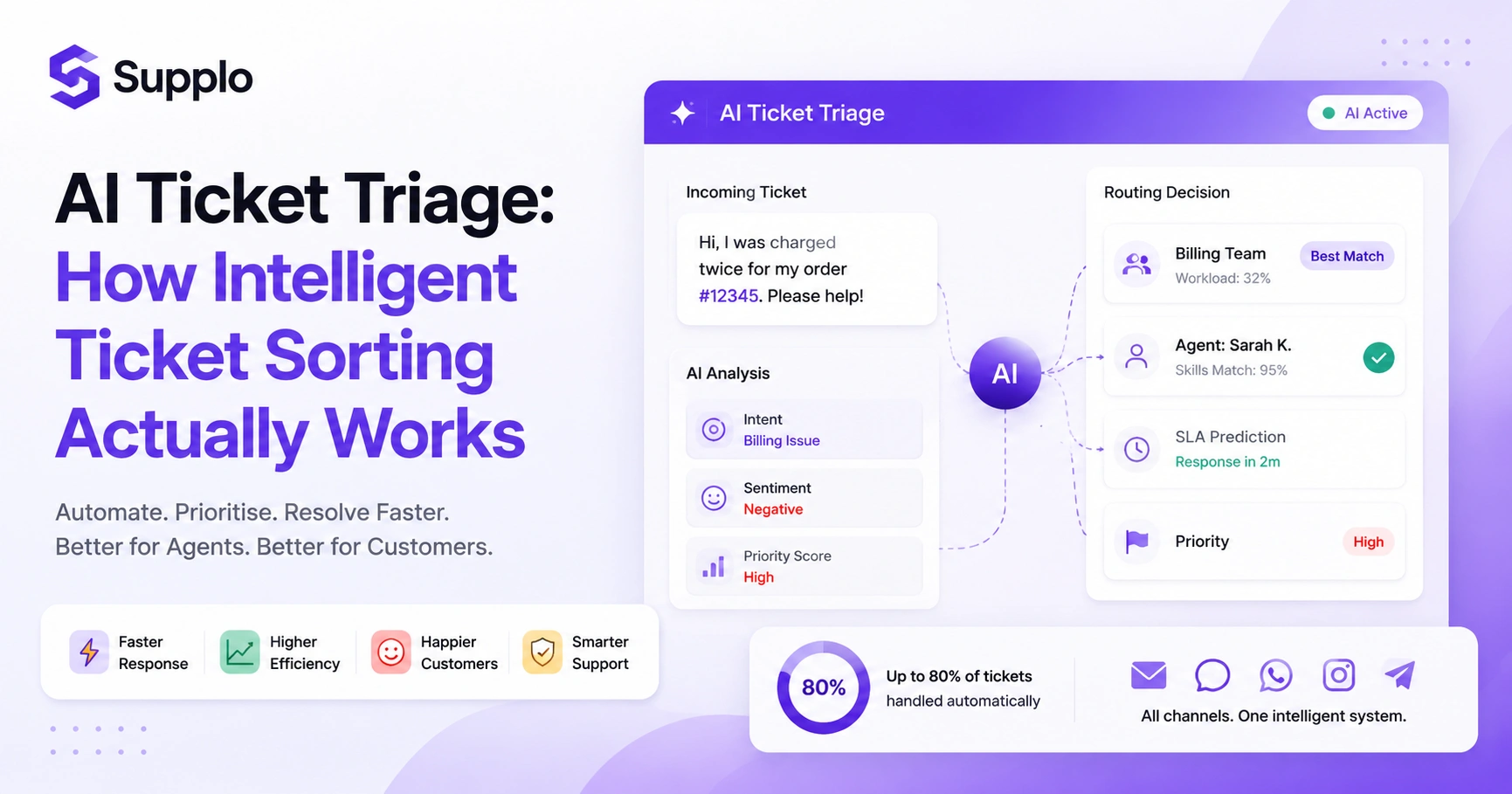
AI ticket triage works in three sequential phases: ingestion and analysis, classification, and action. First, the system ingests the ticket from any channel, extracts entities (product names, order IDs, customer names), and runs sentiment analysis. Then it classifies the ticket into predefined categories (billing, technical, account access) and assigns a priority score based on urgency and customer history. Finally, it routes the ticket to the correct queue or agent automatically, with context attached. The entire sequence happens in under a second.
- Data Ingestion & Entity Recognition: Entity recognition pulls key data points (e.g., order #12345, subscription plan) so agents don't have to ask basic questions. The AI also processes any attached media or documents.
- Intent Classification & Sentiment Analysis: Intent classification distinguishes between I need a refund (high urgency) vs How do I reset my password? (low urgency, self-serve). Meanwhile, sentiment analysis detects frustration or churn risk, flagging VIP or escalatable tickets before the customer asks for a manager.
- Priority Scoring & SLA Prediction: Priority scoring combines SLA rules, customer tier, and message urgency to create a dynamic queue. The AI attaches a summary card to every ticket, so human agents can jump straight to the solution without reading the entire thread. Our AI agent handles up to 80% of tickets automatically, dramatically improving efficiency.
AI Ticket Sorting vs AI Ticket Categorisation: What's the Difference?
These two terms are often used interchangeably, but they serve different purposes. AI ticket sorting is the broader process of organising tickets into queues based on criteria such as priority, channel, language, or customer value. AI ticket categorisation is a narrower subtask: tagging each ticket with a specific label, such as billing issue, technical glitch, or feature request. Sorting determines where the ticket goes; categorisation determines what the ticket is about. You need both for a truly intelligent system.
Sorting is action-oriented (routing, assignment); categorisation is descriptive (tagging, reporting). A ticket can be categorised as password reset (low effort) but sorted into a high-priority queue if the user is a VIP customer. Without categorisation, your reporting is useless; you won't know whether 40% of tickets are about the same bug. Without sorting, categorisation creates a mess of tagged-but-unassigned tickets. Modern AI systems handle both simultaneously: the same model categorises and sorts in a single pass.
Intelligent Ticket Routing & Automated Ticket Assignment in Practice
Intelligent ticket routing takes who should handle this decision entirely away from humans. The AI looks at agent skills, current workload, language match, and even time zone availability to assign each ticket to the best-suited person. Automated ticket assignment goes a step further: if a ticket matches a pattern the AI has seen before (e.g., my card was declined), it can assign it to a specialised bot or workflow without waiting for human input. The result is that agents see only tickets they can actually solve, and in the right order.
Skills-based routing ensures that Spanish-language billing tickets are routed to a Spanish-speaking billing specialist, not a generalist. Round-robin assignment distributes workload evenly across the team, preventing burnout for top performers. Overflow routing escalates tickets automatically if no agent is available within the SLA time limit. The AI can pre-assign a ticket to first available while also reserving a slot in the correct skill queue, no manual intervention needed. This system works across all channels: an email about a refund, a WhatsApp message about a broken feature, and an Instagram DM about shipping all get routed to the right person in the same inbox. To unify email, chat, and social DMs into one unified inbox, look for platforms with robust integration capabilities.
The Real Cost of Manual Ticket Management And Why Automation Wins
Manual ticket management is quietly one of the most expensive operational drains in customer support. Each agent spends an average of 30–40% of their shift just reading, categorising, and routing tickets before they even start solving problems. For a team of five agents handling 500 tickets a week, that's roughly $2,000–$3,000 of wasted labour monthly. AI ticket triage eliminates that overhead, cutting resolution costs to a flat $0.04 per ticket, not the $0.99 per ticket that legacy tools charge. The savings are immediate and scale with your volume.
Manual triage creates a bottleneck effect: one person sorting tickets while everyone else waits for work. Human error in categorisation leads to misrouted tickets, resulting in longer resolution times and frustrated customers. Agent turnover is higher when support staff spend half their day on admin work instead of helping people. Automated triage frees up senior agents to handle complex, high-value tickets that actually require human empathy. With pricing that stays flat per workspace (not per seat), your cost doesn't balloon as your team grows, a common trap with legacy tools. See how our pricing compares to legacy tools and provides a transparent alternative.
How to Choose an AI Ticket Management System That Won't Let You Down
Not all AI ticket management systems are built the same. The key differentiators are accuracy (how often does it mis-sort a ticket?), integration depth (does it connect to every channel your customers actually use?), and pricing honesty (does the cost explode as you add users?). Look for a system that offers a transparent trial so you can test its real-world performance with your actual tickets. The system should also provide a clear handoff to humans, no black boxes where tickets disappear into the AI void.
- Accuracy & Hallucination Rate: Accuracy is paramount. Ask for hallucination rates and test with edge cases (ambiguous language, typos, multilingual messages). A system's ability to minimise errors directly impacts agent productivity and customer satisfaction.
- Integration Depth (Email, Chat, Social DMs): The system must support all channels your customers use, including email ticketing, website chat, WhatsApp, Telegram, and Instagram DM support for ticket triage, not just email. Comprehensive integration ensures no customer query is missed.
- Pricing Transparency (Avoid Per-Seat Traps): Flat pricing is crucial. Per-seat pricing punishes growing teams; look for per-workspace or per-resolution pricing instead. The AI should also learn from your existing knowledge base and past conversations rather than start from scratch. Critically, the AI must know when to step aside and pass the ticket to a human, with full context included.
Worried about the wrong system making messy sorting decisions? Start with Supplo's free trial and test with your actual tickets. If the AI mis-sorts something, your team corrects it, and the model learns instantly. No commitment, no pressure, just a practical way to see if automated triage fits your workflow.
Setting Up Automated Customer Service Tickets Without the Headache
Setting up automated customer service tickets doesn't require a data science team or a months-long implementation project. Start by feeding your AI system your existing knowledge base, a sample set of past tickets, and your team's routing rules. Most modern systems can be trained in a few hours and start triaging accurately within a week. The setup process should involve defining your categories, priority levels, and escalation paths, then letting the AI learn from the corrections your team makes over time.
- Phase 1, Ingest: Upload your knowledge base, FAQ documents, and 100–200 historical tickets for initial training.
- Phase 2, Define: Set 5–10 main ticket categories (billing, technical, account, feature request, complaint) and 3 priority tiers.
- Phase 3, Route: Create routing rules based on skills, workload, and business hours (or use AI to auto-learn optimal routing).
- Phase 4, Review: Let the AI sort a batch of tickets, then have your team review and correct. This feedback loop sharpens accuracy.
- Phase 5, Launch: Go live with AI-assisted triage first, then transition to fully automated triage as confidence grows. Support customers via WhatsApp with full triage by setting up specific rules within these phases.
Ready to see AI triage in action with your own tickets? Sign up for a free 14-day trial at Supplo.io, no credit card required. Set up your first automated workflow in under an hour and see how many of your routine tickets the AI handles before your team even touches them.
AI Ticket Prioritisation: Why Not All Urgent Tickets Are Equal
AI ticket prioritisation goes beyond simple high/medium/low labels. It considers multiple factors simultaneously: the customer's lifetime value, the ticket's sentiment score, the SLA agreement for their plan, and the business impact of the issue (e.g., a payment outage vs a cosmetic bug). A VIP customer's billing problem might take precedence over a standard user's account lockout, even though both seem urgent. The AI dynamically weighs these variables, adjusting priorities as new tickets arrive or SLAs approach expiration.
VIP detection flags tickets from high-value or long-tenured customers and automatically escalates them. The system also manages SLA clocks, monitoring each ticket's time-to-resolution and re-prioritising those nearing an SLA breach. Sentiment escalation tracks language cues (furious, cancelling, lawsuit) and bumps those tickets regardless of category. Furthermore, business impact scoring assigns higher priority to issues affecting multiple users (reported bugs, payment gateway failures). During product launches or holiday sales, the AI adjusts thresholds to account for higher-than-normal volume, demonstrating its seasonal- and event-aware capabilities.
AI-Powered Support Workflow: What Happens When a Human Needs to Step In
A well-designed AI-powered support workflow doesn't try to solve every ticket on its own. When the AI detects ambiguity, high emotion, or a request that falls outside its training data, it should hand the ticket to a human, with full context, a suggested response, and a recommended action. The handoff should be invisible to the customer: they don't see you're now being transferred. They get the right answer from the right person, faster than they expected. The AI continues to learn from these interactions, so over time, it handles more tickets independently.
The AI uses confidence thresholds, triggering a human handoff when its confidence in categorising or responding to a ticket drops below 85%. Every handoff includes context preservation, with a summary of the ticket, the AI's attempted resolution, and an explanation of why it stepped back. There should be a feedback loop in which agents can correct the AI's categorisation or suggested answer, and those corrections train the model for future tickets. Escalation paths ensure that if a human doesn't respond within the SLA, the AI can re-escalate or send a follow-up to the customer. This ensures a seamless experience where the customer's thread remains intact across AI and human responses, no please repeat your issue.
Real-World Scenarios: Where AI Ticket Triage Software Shines And Where It Doesn't
AI ticket triage works brilliantly for high-volume, repetitive patterns: password resets, order status inquiries, billing questions, and feature requests. It shines when tickets follow predictable formats and your knowledge base is well maintained. Where it still struggles, and requires human oversight, is with deeply nuanced complaints, multi-issue tickets that mix billing and technical problems, or highly creative requests that don't fit established categories. The best systems are transparent about these limits and hand off accordingly.
AI ticket triage software shines with billing disputes (predictable patterns), account recovery (clear steps), product documentation requests (FAQ-driven), and subscription changes (defined workflows). However, it struggles with complex refund negotiations, sensitive account security issues, multi-part technical problems, and highly emotional complaints requiring empathy. Edge cases include tickets with heavy jargon or industry-specific slang, messages in unsupported languages (unless specific Telegram support is enabled), or tickets that contain no text (only images or attachments).
As a best practice, always run AI triage in suggest mode for the first week, reviewing every automated decision before going full autopilot.
You've read the guide. Now try the real thing. AI ticket triage shouldn't be a black box. With Supplo, you get transparent pricing ($0.04 per AI resolution), a shared inbox for your whole team, and integrations for WhatsApp, Telegram, Instagram DMs, and more. Accept payments via Crypto, Binance Pay, Payeer, GCash, AmanPay, QIWI Wallet, DOKU, and cards from Nigeria and South Africa. Start your free trial today at supplo.io.
Supplo is not affiliated with any app or website. Please follow each app's terms and local regulations.
Key Takeaways
- AI ticket triage automates the classification, sorting, and prioritisation of customer support tickets, freeing up human agents.
- It operates by ingesting ticket data, recognising entities, classifying intent, analysing sentiment, and assigning priority scores.
- Distinguish between sorting (routing tickets to queues) and categorisation (tagging tickets by issue type), as both are crucial for effective triage.
- Automated routing reduces operational costs, improves first-response times, and boosts agent productivity by minimising manual administrative tasks.
- When choosing a system, prioritise accuracy, broad integration with all customer channels, and transparent, flat-rate pricing models.
- Successful implementation involves feeding the AI historical data and continuously refining its learning through human feedback and corrections.
- AI is excellent for predictable, high-volume inquiries but requires human intervention for complex, nuanced, or highly sensitive tickets.
FAQ
Is AI ticket triage safe for handling sensitive customer data?
Yes, when deployed correctly. Enterprise-grade AI systems process data in encrypted environments and don't store raw message content beyond the session. Always choose a system that is GDPR-compliant and uses data masking for sensitive fields, such as credit card numbers and passwords.
Why do some AI ticket sorting tools get the priority wrong?
Most failures happen because the AI wasn't trained on enough edge cases, ambiguous language, mixed-intent tickets, or new product launches. The fix is a proper feedback loop where human agents correct mistakes, and those corrections retrain the model.
Can I test an AI ticket triage system before committing to a plan?
Absolutely. Most reputable providers, including Supplo, offer a free trial. Use it to run a sample of your real tickets through the system and compare the AI's sorting decisions against your team's manual sorting for a week.
How long does it take to set up automated ticket assignment?
With a modern system, you can have basic categorisation and routing up and running within a day. Full optimisation, where the AI learns your unique patterns, typically takes one to two weeks of human-in-the-loop review.
What should I NOT use AI ticket triage for?
Never use automated triage for legal compliance tickets, account security compromises, or situations requiring human judgment (e.g., deciding a refund amount). These should always route directly to a human.
Does AI triage work with multilingual support teams?
Yes, if the system supports language detection and translation. Supplo, for example, automatically translates messages so an agent in English can understand a ticket written in Spanish, and the categorisation works across languages.
What happens if the AI consistently mis-sorts tickets from a specific channel?
That's a signal the AI needs more training data from that channel. Feed it 50–100 correctly sorted tickets from that channel, and accuracy typically improves dramatically within one retraining cycle.
Compliance line: Supplo is not affiliated with any app or website. Please follow each app's terms and local regulations.