On this page
Look, we get it. You're tired of typing the same password reset instructions for the fifth time today. AI to write support replies is changing the game here, turning hours of repetitive typing into instant, accurate responses. This guide is for customer service managers, support agents, and business owners who want to bring AI into their workflow without losing their minds or their customers.
We'll show you how to train AI for support replies the right way, keep quality high, and never lose that human touch. Because of unchecked automation? That's a recipe for disaster.
Quick Answer
- Train AI for support replies by feeding it a clean, structured knowledge base rather than raw data.
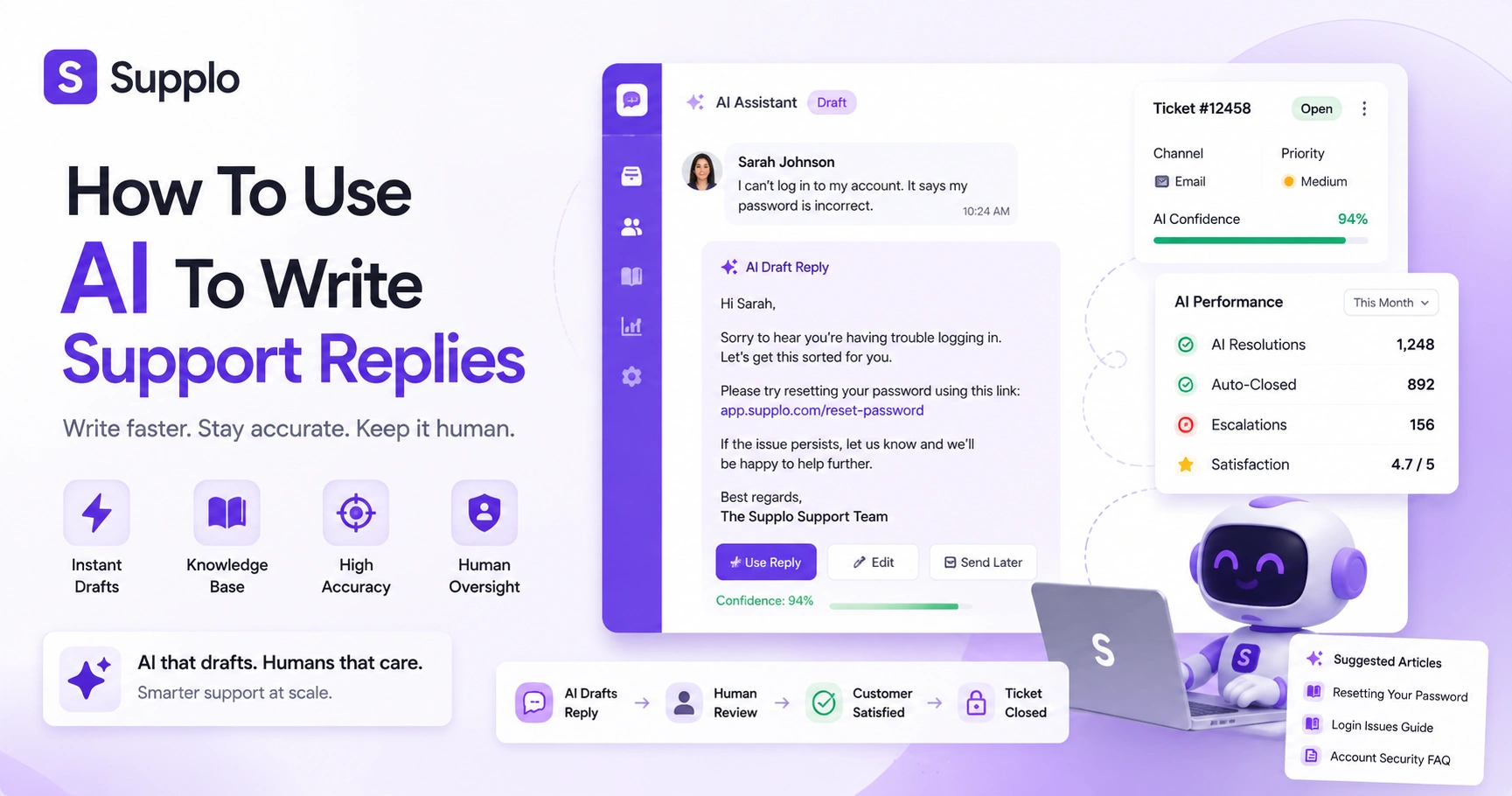
- Start AI in draft-only mode, then scale to auto-close once accuracy proves itself.
- Track AI ticket resolution rate and escalate anything below a 90% confidence threshold.
- Flat-rate pricing for AI customer service response keeps costs predictable as volume grows.
- Always maintain human oversight and a clear escalation path for complex issues.
What Does AI to Write Support Replies Actually Mean for Your Team?
Here's the thing: it's not magic, and it's not a robot taking over your job. AI to write support replies means your customer service software drafts and sends answers based on your existing documentation and past resolved tickets. The AI doesn't guess, it pulls from a verified knowledge base or from similar conversations it's seen before.
The result? Your team stops typing the same answers over and over. Every customer gets the same accurate response, whether they email at 2 PM or 2 AM.
Setup is usually straightforward: connect your help docs, approve a few sample replies, and you're off. The AI learns from your best past replies, not just any reply, so quality actually improves over time. And when things get nuanced or emotional? Human agents step in. Empathy isn't lost, it's just focused where it matters most.
How to Automate Support Email Replies with AI Without Sacrificing Quality
Start small. Feed your AI your most common email templates and top 10 FAQ answers. Then set a confidence threshold: if the AI is less than 90% confident, it drafts a reply but flags it for review. Over time, you can dial up the automation as the AI proves itself.
Here's a safe path:
- Start in draft-only mode: The AI writes the reply, and a human sends it. Builds trust fast
- Use the learning loop: Mark drafts as good or bad so the AI learns your brand voice.
- Don't automate sensitive emails yet: Billing disputes, account security, refunds, keep humans in the loop until reliability is proven.
Integrate a shared team inbox so all AI drafts and human replies live in the same thread. No more bouncing between tools. And monitor your escalation rate daily; if more than 20% of AI replies need editing, slow down and fine-tune your settings.
Check out how a unified inbox can keep everything organised.
The Right Way to Train AI for Support Replies Using Your Knowledge Base
Training isn't about dumping raw data into the AI. It's about curating your knowledge base so the AI has clean, consistent information to draw from.
Structure your knowledge base articles with clear headings, one idea per paragraph, and a resolution summary at the top. The AI will grab those structured summaries first. Tag articles by product version or region to prevent confusing answers. And crucially, remove or archive outdated articles. You don't want the AI giving instructions for a product you discontinued last year.
Run a test batch of 50 common questions and compare the AI's answers to your best human responses. This step catches gaps fast. Use an AI tool that lets you manually override or correct a reply in real time. Then retrain your knowledge base monthly, or after any major product update.
How AI Knowledge Base Customer Service Handles Complex Questions
Multi-part questions are tricky. The AI should break the query into sub-questions and match each part to a knowledge base section. If confidence drops on any single part, the AI hands off to a human, with a full transcript of what it did understand. Your agent doesn't start from zero.
Example: My order is late, and I need a refund, which requires two lookups: one for shipping-delay policies and another for refund procedures. If the AI can only confidently answer one part, it responds to that part and passes the rest to a human.
The best AI tools show the customer how the answer was derived. I found this in our refund policy. That transparency builds trust. Complex questions are also a great test of the clarity of your knowledge base. If the AI struggles, your docs may need to be restructured.
Never let the AI invent an answer. Silence or escalation is safer than incorrect info.
What Happens When the AI Closes a Ticket?
When the AI confidently answers a ticket, it can auto-close it, but only if the customer confirms the resolution. A hard close without confirmation? That's how you get frustrated customers.
Let the AI mark the ticket as resolved by the AI and reopen it if the customer replies within 72 hours. Use a two-step flow: the AI agent answers, the customer rates it as solved, and the ticket auto-closes. If the customer doesn't respond within 24 hours, the AI sends a gentle follow-up.
Log all AI-closed tickets in a separate view so managers can spot-check quality weekly. Never auto-close billing, account deletion, or refund requests without human review. The goal isn't 100% automation, it's reliable automation with a safety net.
How to Measure and Improve Efficiency
Your resolution rate is the percentage of tickets the AI handles to completion without human involvement. Start by measuring deflection rate (how many tickets never reach a human) and resolution satisfaction (how many customers confirmed the fix). Aim for 60-70% in the first month, then scale up.
Track first reply time for AI versus human agents; the AI should consistently respond in under 10 seconds. Monitor the reopen rate for AI-resolved tickets; a high reopen rate means the AI may be giving superficial solutions.
Use an agent dashboard that shows which knowledge base articles the AI used most often. This helps you find documentation gaps. Benchmark your AI ticket resolution rate monthly and compare it to your human team's top performers.
Efficiency isn't just speed. It's reducing repetitive human work without sacrificing accuracy.
How to Set Up an AI Chatbot Knowledge Base Integration
Connect your chatbot to your knowledge base via API or native integration. Map each FAQ category to a chatbot flow, then enable the AI to search the KB as a fallback for unknown queries.
Here are the steps:
- Export your KB: Export your knowledge base into plain text or Markdown format, and the AI can easily ingest it.
- Create intent categories: Set up clear categories (e.g., pricing, shipping, returns) and link them to specific articles.
- Configure escalation triggers: If the AI can't find a confident match after two attempts, pass the conversation to a human.
- Test thoroughly: Keep a human monitor actively supervising the first 100 conversations
- Review unanswered logs: Weekly, check the unanswered log to find missing content.
You can integrate channels like WhatsApp Customer Support, Telegram Support, Instagram DMs, and your website widget to create a truly unified support experience.
Try it free – no credit card needed.
You can connect your knowledge base and test AI replies in under 10 minutes. Start your 14-day free trial and see how your team interacts with AI-generated drafts before you commit to automation.
Common Pitfalls in AI-Generated Support Answers And How to Avoid Them
The biggest mistakes? Overconfident AI answering when it's unsure, and outdated data AI citing old policies. Avoid these by setting a low confidence threshold for escalation and scheduling automatic knowledge base refreshes. Never let the AI apologise for things it didn't do; stick to factual, helpful responses.
Watch out for these
- Pitfall: AI copying your brand voice too literally without context (being cheeky during a refund request)
Solution: Create a separate tone guideline for sensitive topics
- Pitfall: AI mixing up product versions, iOS instructions for an Android user
Solution: Tag knowledge base entries by platform and force the AI to ask which version they use
- Pitfall: AI generating long, irrelevant replies because the article is too long
Solution: Limit AI replies to 2-3 sentences unless the customer asks for more
When using AI to write support replies, remember that transparency about its capabilities sets customer expectations right.
Stuck on a tricky support scenario?
If the AI fails during testing, it's usually a KB or configuration issue. Our support team can help you troubleshoot.
Why a Flat Rate for AI Customer Service Response Beats Per-Seat Pricing
Per-seat pricing punishes you for scaling. Every new hire adds cost. With a flat rate, your AI handles unlimited volumes for a predictable fee. You can automate support email replies with AI aggressively without worrying about a spike in your bill.
Flat pricing encourages you to let the AI handle more, not less, because there's no per-interaction cost. Legacy tools often charge $ 0.99 or more per resolution. A flat rate means your cost per ticket drops as volume grows. This gives you transparent, predictable budgeting.
For growing businesses, flat pricing removes the fear of escalating support costs. Most legacy tools bill per seat or per resolution. Supplo keeps it simple with a flat workspace rate. We support a wide range of payment methods, including crypto, Binance Pay, Payeer, GCash, AmanPay, QIWI Wallet, DOKU, Nigerian and South African cards, Skrill, and Payoneer, so businesses anywhere can pay their way. Visit our pricing page for details.
How to Maintain Control While Using AI for Customer Service Response
You stay in control by setting clear boundaries. Define which ticket categories the AI can auto-reply to, which it can only draft, and which it must escalate immediately. Keep a comprehensive log of every AI-generated reply so your team can audit responses on the fly.
Use role-based permissions so only senior team members can edit the AI's knowledge base sources. Set a human review flag for any ticket that contains keywords such as lawsuit, cancel, or manager. Review the AI's reply history weekly, not monthly, to catch drift in tone or accuracy early.
Empower your team to temporarily disable AI in specific channels during outages or major product launches. Always have a manual override function; a single click should route all incoming tickets to human agents in an emergency.
Key Takeaways
- AI for support replies improves consistency and frees human agents for complex issues
- Effective training requires a well-structured and up-to-date knowledge base
- Always start with human oversight in draft mode and gradually increase automation
- Monitor key metrics like resolution rate and reopen rate to gauge AI performance
- Flat-rate pricing offers predictable costs, encouraging broader AI adoption
FAQ
Is it safe to let AI write support replies to my customers?
Yes, if you set it up correctly. Keep the AI in draft mode initially, review its outputs, and only enable auto-reply for low-risk categories like FAQs and order status. Always maintain a human escalation path.
Why do AI-generated support answers sometimes sound wrong?
Usually, it's because the AI is pulling from outdated or poorly structured knowledge base articles. Regularly refresh your knowledge base, use clear headings, and remove old content to keep answers accurate.
Do I need to manually train the AI for support replies?
Some upfront training is required, typically involving connecting your knowledge base and approving sample answers. But good AI tools continuously learn from your team's corrections, so the training gets lighter over time.
How long does it take to set up AI to write support replies?
Most teams are live with basic setup in 1-2 days. Full automation with high accuracy typically takes 2-4 weeks as the AI learns from live feedback.
Can the AI handle tickets in multiple languages?
Yes, modern AI tools translate incoming messages and reply in the customer's language using your knowledge base as a source. This works best when your knowledge base is also translated or written in plain, universal language.
What happens if the AI can't answer a customer's question?
The ticket should be escalated to a human with a full conversation transcript. The AI should never make up an answer. A good system tags the missed question so you can add content to your knowledge base.
Is there an industry standard for AI ticket resolution rate?
Most teams see 50-70% automated resolution within the first few months. Top performers reach 80% when their knowledge base is comprehensive, and the AI is properly tuned.
Compliance Line: Supplo is not affiliated with any app or website. Please follow each app's terms and local regulations.


