On this page
Building a customer support team from scratch isn't just about posting a job ad and hoping for the best. It's about designing a system that actually works, one that keeps your customers happy and your agents sane. Reliability is the whole game. This guide walks you through how to build a customer support team from scratch: whom to hire, how to structure them, and what tools make it all click.
Quick Answer
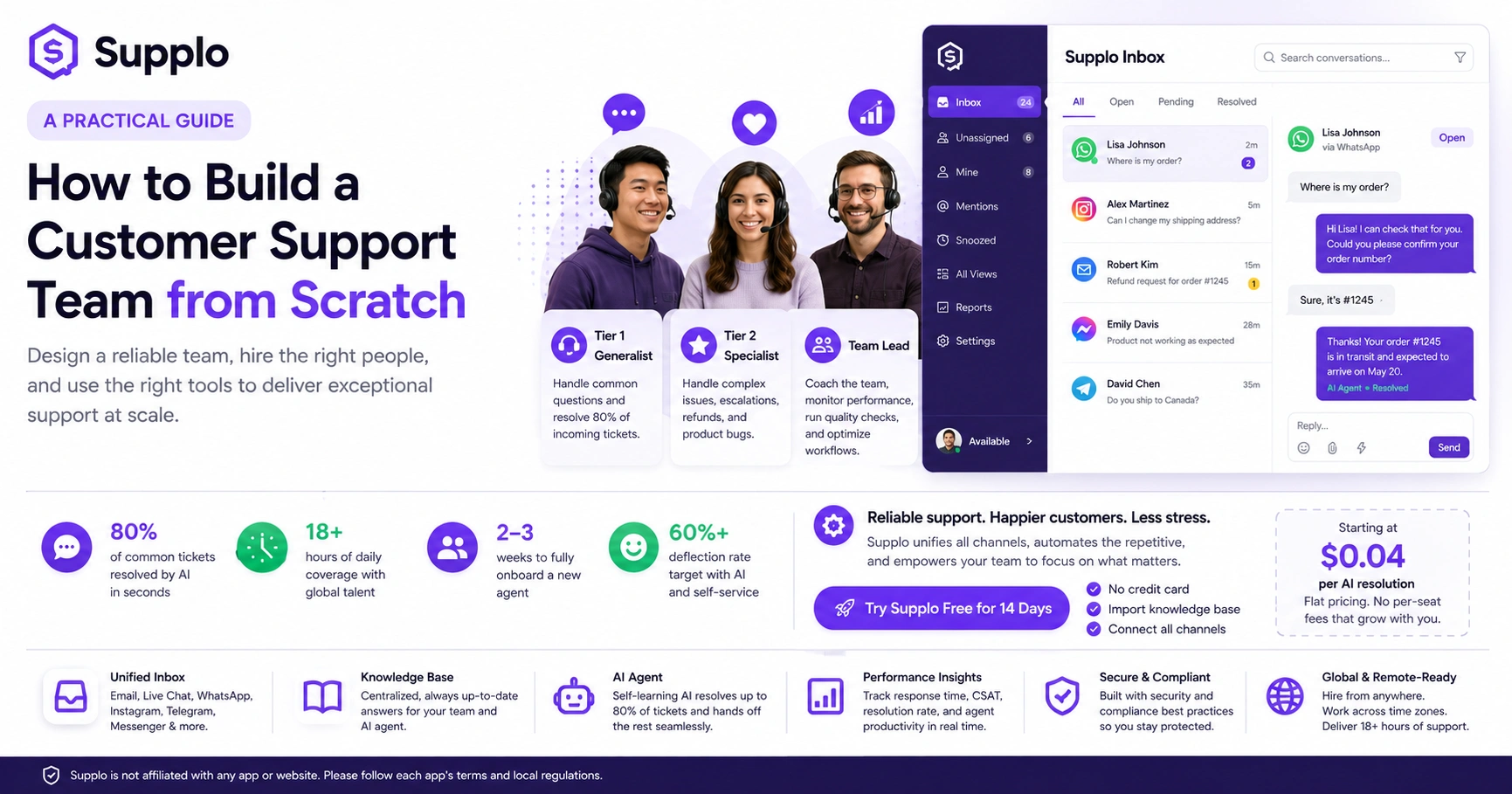
- Define 3 roles: Tier 1 generalist, Tier 2 specialist, and a team lead.
- Test candidates with a mock ticket scenario.
- Use a shared inbox and knowledge base (like Supplo) to stay aligned.
- Onboard for 2-3 weeks: shadowing → co-piloting → solo shifts with supervision.
Why a Remote Support Team Makes Sense and How to Keep It Reliable
Look, building a remote team isn't just about saving on office snacks and rent. It's about tapping into talent anywhere in the world and giving your customers coverage while you sleep. But here's the thing, remote only works if you've got solid protocols. Without them, it's chaos.
- Global talent, local hours. Hire across time zones, and suddenly your support runs 18+ hours a day without anyone having to work a night shift they hate.
- Documentation is your safety net. Write down how tickets get triaged, escalated, and resolved. Don't leave it to memory, you'll regret it.
- One inbox to rule them all. A shared inbox like Supplo's Inbox keeps every conversation in a single thread. No more "which channel did they message us on?"
- Async beats meetings. Daily standups via Slack or Discord keep everyone aligned without burning an hour in a Zoom call.
Define Your Customer Support Team Roles Before You Hire Anyone
Here's a mistake I see all the time: founders hire a "customer support person" without knowing what that actually means. Don't do that. Figure out the customer support team roles first: who handles the easy stuff, who dives into the messy stuff, and who keeps the whole operation running. This customer support team organization is the difference between a well-oiled machine and a dumpster fire.
- Entry-level agents own the basics, password resets, order status, and FAQ-level questions. No deep product knowledge needed.
- Senior agents handle escalations, refunds, and bugs. They also train juniors and keep the knowledge base up to date.
- A team lead or manager watches the numbers (response time, CSAT, resolution rate), sets schedules, and runs quality checks.
- Bonus role: knowledge base specialist. Someone who actually updates help articles as your product changes. This role pays for itself fast.
The Best Customer Support Team Structure for Small to Mid-Size Teams
For most growing companies, the best customer support team structure is flat but clear. You don't need five layers of management; you need generalists who can handle 80% of tickets and specialists who step in when things get weird. This customer support team hierarchy keeps things lean and responsive.
- Tier 1 (Generalists): Your frontline. They handle the bulk of incoming tickets using a solid knowledge base for quick answers.
- Tier 2 (Specialists): Product experts who own bugs, billing disputes, and complex workflows.
- Tier 3 (Escalation): Engineers or senior leadership for critical issues. Rarely needed if Tier 1 and 2 are trained well.
- 3–5 agents is the sweet spot for most startups. Add a team lead once you cross 6 people.
How to Recruit Customer Support Staff: The Hiring Process from Scratch
The customer support hiring process should start with what the job actually involves, not a wishlist of fancy degrees. Write a job description that says "you'll respond to chats, handle emails, and use our support tool", not "we need a ninja rockstar with 5 years of experience." Then test candidates with a mock ticket scenario before you even schedule a call.
- Focus the job post on empathy, clear writing, and problem-solving. Not "years of experience."
- The work sample test: Give candidates a real (but anonymized) customer email and ask them to draft a reply in 30 minutes. You'll learn more from this than any interview question.
- Interview for culture fit, but train for product knowledge. You can teach someone your software; you can't teach them to be kind.
- Consider a paid trial week for final candidates. It's the best way to see how they actually work under real conditions.
Finding Good Customer Service Reps: Where to Look and What to Test
Finding good customer service reps means going beyond the usual job boards. Check niche communities, remote job sites, and even freelance platforms for your first hires. The key is testing for written clarity, patience, and the ability to follow a process.
- Post on remote-focused job boards like Remote OK and Remote.co to attract candidates who already know how to work from home.
- Check customer support communities like Support Driven and CX Accelerator for experienced reps looking for new roles.
- Simulate a live chat during the interview process. See how they handle pressure and multitasking in real time.
- Look for candidates who ask good questions; that's a sign of critical thinking, not just script-following.
Onboarding New Support Agents for Long-Term Success
Onboarding new support agents remotely needs structure. A vague "just figure it out" approach will fail. Start with shadowing, move to co-piloting (where they draft responses and a senior agent reviews them), and finally to solo shifts with supervision. This builds confidence without leaving customers hanging.
- Knowledge base walkthrough on Day 1. Show them how to find answers before they need to give them.
- Pair each new hire with a buddy, a senior agent who answers questions and reviews tickets for the first two weeks.
- Use recorded screen shares of you handling real tickets. New hires can watch and pause at their own pace.
- Weekly 1:1 for the first month to address gaps, review feedback, and adjust training as needed.
Tools That Keep a Remote Support Team Reliable and Fast
The right tech stack turns a scattered team into a well-oiled machine. You need a shared inbox, an up-to-date knowledge base, and an AI agent that handles the repetitive stuff so your humans can focus on what matters. Without these, your team burns out fast.
- A shared team inbox like Supplo unifies email, chat, WhatsApp, Instagram, Telegram, and Facebook Messenger into one thread, no tab-switching madness.
- An AI agent that learns from your knowledge base and past conversations can resolve up to 80% of incoming tickets automatically.
- A collaboration tool (Slack or Discord) for internal communication and quick questions about tricky tickets.
- Reporting dashboards to track response times, resolution rates, and customer satisfaction help keep a remote team accountable.
How AI Changes the Game Without Replacing Your Team
Let's be clear: AI isn't here to fire your support team. It's here to make them faster and less stressed. A self-learning AI agent can handle password resets, order status checks, and FAQ responses, passing along only the complex tasks to humans. This cuts response times and frees your team for high-value work.
- AI resolves 80% of common tickets in seconds, not minutes, which means your human agents handle half the volume they used to.
- When AI doesn't know the answer, it cleanly hands off to a human agent with the full conversation history. No repeats. No frustration.
- AI learns from your knowledge base and past resolved tickets, becoming smarter every week.
- Your team can focus on complex issues, product feedback, and customer relationships, the parts only humans can do well.
Common Mistakes When Building a Remote Support Team And How to Avoid Them
The biggest mistakes? Hiring too fast, skipping documentation, and not setting clear work hours. A remote team needs structure: defined shifts, documented processes, and a single source of truth for answers. Without those, you'll get slow responses, inconsistent answers, and frustrated customers.
- Hiring for speed over quality: Rushed hires often lack empathy or written communication skills. Take your time with the hiring process.
- No knowledge base: If every agent writes their own answers, you'll get chaos. Use a shared knowledge base that everyone contributes to.
- Asking agents to be available 24/7: That leads to burnout fast. Define shifts or use an AI agent to cover off-hours.
- No escalation path: When a complex issue hits, agents need a clear next step. Define who handles what before it happens.
Start Your Support Team the Right Way
You've got the blueprint now. Start by defining your roles, writing a skills-based job description, and hiring for empathy and clarity. Use tools like Supplo to unify your inbox, automate the repetitive stuff with AI, and keep your team focused on real customer problems. A reliable support team doesn't happen by accident; it's built with intention.
- Start small: hire one or two generalists first, then scale as your ticket volume grows.
- Use an AI agent early (even before your team is full) to handle the initial load without burning out your first hires.
- Invest in onboarding, a week of shadowing, and co-piloting saves months of confusion later.
- Keep it human: your team's empathy and problem-solving are what customers remember. AI handles the rest.
Key Takeaways
- Define roles: Tier 1 generalist, Tier 2 specialist, and a team lead.
- Test candidates: Use mock ticket scenarios and simulated live chat sessions.
- Use a shared inbox and AI: Tools like Supplo keep your team aligned and reduce workload.
- Onboard with structure: Shadowing, co-piloting, and supervision ensure a smooth transition.
- Avoid common mistakes: Skip quick hires, document everything, and set clear shifts.
- Start small and scale: Build a reliable foundation before expanding.
FAQ
What's the minimum team size to start a customer support team?
One. You can start with a single part-time agent and an AI agent covering the basics. Scale as volume grows.
How do I know if a remote customer support agent is actually working?
Track metrics like first response time, tickets resolved per shift, and CSAT scores. Tools like Supplo give you real-time dashboards, so you see performance without micromanaging.
Should I hire generalists or specialists first?
Generalists. They handle 80% of common issues. Add specialists (product experts) only when you start seeing complex escalations that generalists can't handle.
How long does it take to onboard a new remote support agent?
Plan for two to three weeks. Week one is shadowing and knowledge base training. Week two is co-piloting with a senior agent. Week three is solo shifts with supervision.
What's the biggest risk of building a remote support team?
Lack of documentation. If every agent writes their own answers, you'll get inconsistent responses and frustrated customers. Invest in a shared knowledge base from day one.
Do I need to hire 24/7 coverage right away?
No. Use an AI agent to cover off-hours. Supplo's AI resolves common tickets automatically, so customers get answers while your team sleeps. Hand off complex issues to the next shift.
How much does it cost to build a remote support team?
It varies. But you can start small: one part-time agent plus an AI agent from Supplo costs a flat $0.04 per AI resolution, no per-seat pricing that balloons as you grow.
Compliance line: Supplo is not affiliated with any app or website. Please follow each app's terms and local regulations.