On this page
Look, if your support team is typing the same refund explanation for the tenth time today, you already know you need this. Canned responses, saved replies, snippets, whatever you call them, are the difference between a team that's drowning in repeat questions and one that handles them in seconds.
This guide is for support managers and agents who want to stop repeating themselves, start being consistent and maybe even let their team breathe a little. We'll walk through exactly how to set up canned responses in your helpdesk, from the boring prep work to the fun AI stuff.
Quick Answer
- Canned responses are pre-written templates for common questions.
- Set up by accessing your helpdesk's template library, writing concise responses and assigning shortcuts.
- Test each template before deploying to ensure formatting and personalization work.
- Avoid over-reliance on generic templates; add a personal touch.
- Integrate with an AI agent to automate routine ticket handling.
What Are Canned Responses and Why Do They Matter?
Canned responses are pre-written answers to frequently asked questions that can be quickly inserted into customer interactions. They differ from templates in that they are designed for repeated use and can include placeholders for dynamic content, such as customer names or order numbers.
The Difference Between a Template and a Canned Response
- Templates can be more detailed and used for a broader range of issues.
- Canned responses are tailored for quick, common replies and are often shorter and more specific.
How Canned Responses Boost Consistency and Reduce Burnout
- Consistency: Ensure all agents use the same language and information to reduce the risk of conflicting answers.
- Time Savings: New agents can quickly find and use the right response, speeding up their learning curve.
- Burnout Reduction: Agents spend less time on repetitive tasks, allowing them to focus on more complex issues.
How to Prepare Your Knowledge Base Before Writing Templates
Jumping straight into writing templates without reviewing your existing knowledge base is a recipe for inconsistency. Start by exporting your most common ticket subjects, look for the top 10–15 question patterns and cross-reference them with your help center articles, internal docs and recent agent replies.
Mining Past Conversations for Common Themes
- Pull a frequently asked questions report from your helpdesk to spot recurring topics.
- Check that any URLs or contact info referenced in a template still lead to live, correct pages.
Identifying High-Volume Ticket Categories
- Identify questions that come up only during specific seasons, promotions, or product launches.
- Watch for answers that require a quick escalation; those questions might need a template that ends with a clear hand-off cue.
How to Set Up Canned Responses in Your Helpdesk
Most modern helpdesks, including Supplo's shared inbox, allow you to create canned responses from a settings or admin panel. Here's how to set one up:
Accessing the Template or Snippet Library
- Log in to your helpdesk and navigate to the template or snippet library.
- Click the "Add Template" or "Create Snippet" button to start a new response.
Writing the Response with Clear Placeholders
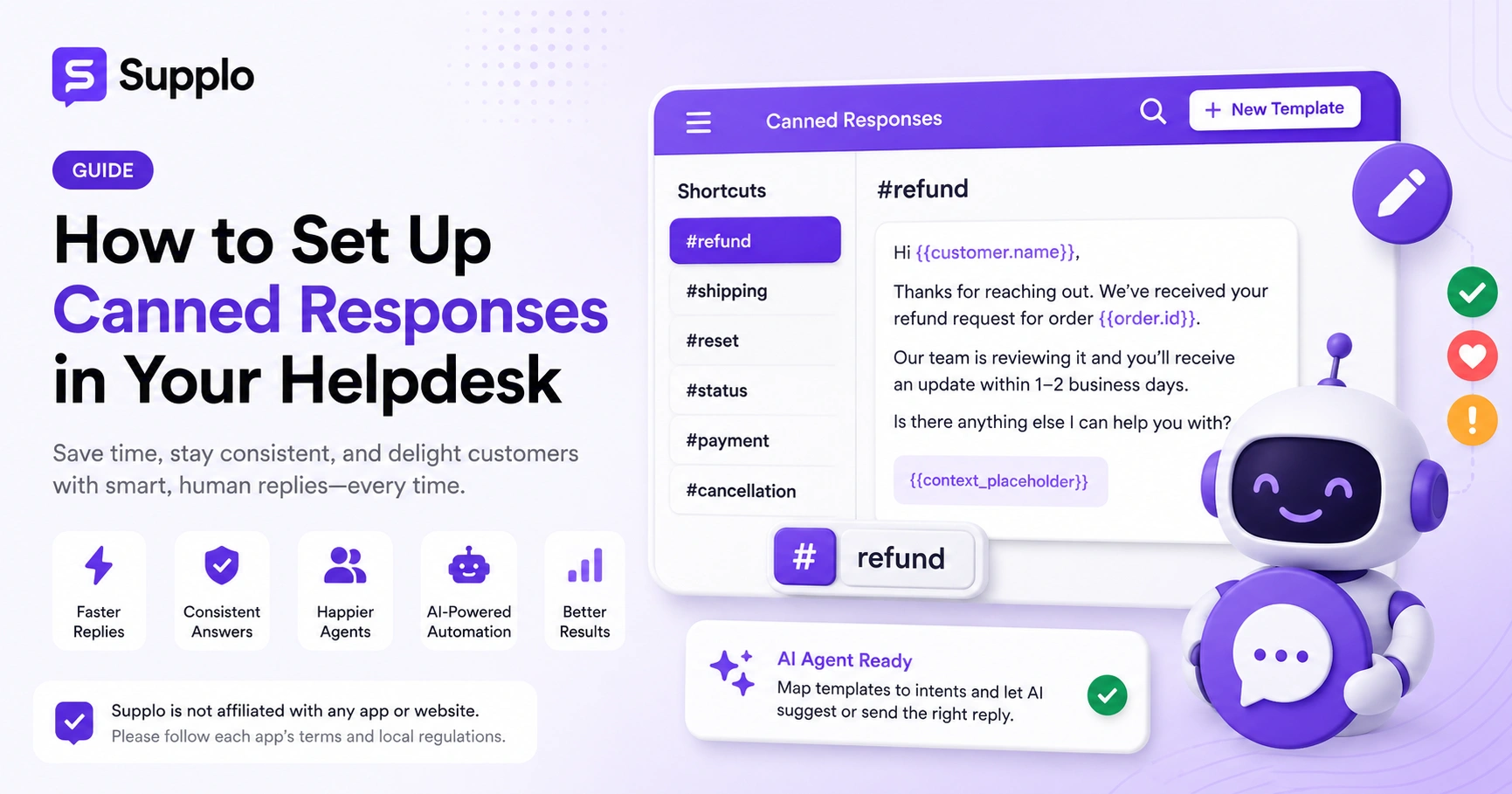
- Use short, memorable shortcuts that match common ticket types (e.g., "#refund", "#reset", "#status").
- Wrap customer-specific details in variables like {{customer.name}} or {{order.id}} so the template feels personal.
- Set permissions to limit who can edit templates versus who can only use them.
Assigning Keywords/Shortcuts for Quick Insertion
- Test each new template by sending it to yourself as a reply first to verify that the formatting and variable substitution look right on both desktop and mobile.
- In Supplo, the AI agent can also be trained to trigger the right canned response based on intent and sentiment, not just keywords.
Configuring Advanced Canned Responses
Once the basic library is in place, layer in variables, conditional logic and role-based permissions to keep your templates both flexible and secure.
Using Dynamic Placeholders for Personalization
- Test variable substitution with fake customers first to catch formatting gaps (e.g., missing spaces after merge tags).
- Use conditional blocks only if your helpdesk software supports them; otherwise, you risk broken renders.
Organizing by Team, Department, or Ticket Type
- Keep an audit log of who edits or deletes templates so you can quickly roll back mistakes.
- Group templates by "public" vs. "internal" notes; internal-only templates can guide agents on escalation paths.
Organizing Your Canned Response Library for Speed and Sanity
A library with 200+ unorganized templates is worse than no library at all. Organize by either folder hierarchies (e.g., Billing > Refunds > Partial) or flat tag systems that allow templates to belong to multiple categories.
Folder Structures vs. Tag-Based Categorization
- Use active names that describe the action, like "Password-Reset-Step1" instead of "Response-12".
- Archive seasonal templates rather than deleting them, so they can be reused without rewriting.
Naming Conventions That Scale
- Run a quarterly dead template check; anything unused for 90 days should be reviewed or removed.
- In Supplo's inbox, you can sync your template categories with your knowledge base sections for a unified structure.
Best Practices for Writing Effective Canned Responses That Don't Sound Robotic
The best canned responses are concise and human and include a deliberate minor variation point where the agent can add a personalized sentence. Start with a greeting that uses the customer's name, answer the core question in two to three short sentences and end with an open-ended invitation to continue the conversation.
Stripping Jargon and Corporate Speak
- Write as you talk. If you'd say "Happy to help!", say it in the template too.
- Never start a template with "Please be informed that"; cut straight to the answer.
Adding One Sentence of Human Context Per Template
- Include a {{context_placeholder}} for the agent to write one line about the specific issue.
- Read every template aloud before saving; if it feels stiff on your tongue, it will feel stiff to the customer.
Optimizing and Improving Your Canned Responses Over Time
Canned responses drift out of date fast; product changes, policy updates and new FAQ topics all render old templates risky. Run a quarterly review in which you compare the most-used templates with actual customer replies and satisfaction scores.
A/B Testing Response Variations
- Track template sent vs. template modified before sending; a high modification rate means the template is wrong or incomplete.
- Use sentiment analysis tools (or manual sampling) to see if customers reply more positively to one tone over another.
Tracking Usage Rates and Customer Sentiment
- Watch for tickets where the canned response caused a "customer asked again"; that's a clear signal the template missed the mark.
- Deprecate templates that link to retired products or changed workflows immediately.
Common Canned Response Setup Pitfalls to Avoid
The most common mistake is treating canned responses as a set-it-and-forget-it system. Stale templates that reference outdated prices, discontinued features, or former policies erode trust fast.
Over-Reliance That Leads to Generic Replies
- Never use a canned response as the sole reply to an angry or escalated customer; always add a personal acknowledgment first.
- Avoid overly long templates; if a response needs more than four sentences, it probably needs a knowledge base article link.
- Duplicate templates with slightly different wording create confusion; standardize on one version per question.
Stale or Outdated Answers That Confuse Customers
- Skipping the variable test might mean you send "Hi {{name}}" instead of "Hi John" on your first live ticket.
Integrating Canned Responses with AI for a Smarter Helpdesk
A well-maintained canned response library is the fuel for your AI agent. In Supplo, you can connect your template library directly to the AI so that when a customer asks about shipping, the AI picks the right "shipping-ETA" template, fills in the order data and sends the reply, or drafts it for agent review.
How AI Agents Can Suggest or Auto-Send the Right Template
- Map each canned response to a specific intent (e.g., "refund status," "account lockout") so the AI can route automatically.
- Set a confidence threshold: the AI sends only when confidence is above 90%; otherwise, it suggests to a human.
Blending Human Oversight with Automated Consistency
- Keep the human-in-the-loop for any canned response that includes pricing, legal disclaimers, or sensitive account data.
- Supplo supports payments via Crypto, Binance Pay, Payeer, GCash, AmanPay, QIWI Wallet, DOKU, cards from Nigeria and South Africa, Skrill and Payoneer so that billing questions can be handled by the AI seamlessly.
Reviewing and Updating Your Canned Response Library
Set a recurring calendar reminder every 90 days to audit your entire canned response library, even the templates nobody has touched lately. During the audit, check every link still works, every product reference is accurate, and every shortcut still makes sense to your newest agent.
Quarterly Audits Tied to Product or Policy Changes
- Tie your audit to major product releases or policy updates (e.g., after a pricing change, check all billing templates).
- Track "template usage vs. search" in your helpdesk; if a template is never searched for, it might have a bad shortcut.
Archiving Obsolete Templates
- Involve your support team in the audit; they know which templates feel out of touch in day-to-day use.
- Consider versioning your templates (e.g., v1, v2) so you can roll back if a rewritten version performs worse.
Key Takeaways
- Canned responses are pre-written answers to common questions, boosting consistency and reducing agent burnout.
- Prepare your knowledge base by mining past conversations and identifying high-volume ticket categories.
- Set up templates with clear placeholders, assign shortcuts and test before deploying.
- Configure advanced features such as dynamic placeholders and role-based permissions to enhance flexibility and security.
- Organize your library with folder structures or tags for easy access and scalability.
- Write templates that sound human, avoid jargon and include a personalized touch.
- Regularly review and update your templates to stay relevant and effective.
- Avoid common pitfalls such as overreliance on generic templates and stale content.
- Integrate with an AI agent to automate routine tickets while maintaining human oversight.
- Set a maintenance schedule to ensure your library stays up to date and aligned with your business needs.
FAQ
Are canned responses safe to use in regulated industries?
Yes, as long as each template is reviewed for compliance before deployment. In finance, healthcare, or legal support, avoid canned responses for anything containing specific numbers, confidential instructions, or regulatory disclaimers unless a compliance officer has signed off.
Why are my canned responses not appearing when I type the shortcut?
Most helpdesks require you to hit a specific trigger character (e.g., "#" or "/") before the shortcut. If the shortcut does not match the template exactly, including spaces and capitals, it will not fire. Check your helpdesk's keyboard shortcut syntax in the settings.
Can I use canned responses for refunds or cancellations?
You can, but use them only as a starting point. Refund and cancellation templates must be updated each time your refund policy changes and the agent should always verify the customer's specific situation before sending the template verbatim.
Should every agent have access to every canned response?
No. Restrict sensitive templates, like those containing internal escalation instructions or pricing override language, to senior agents or specific teams. A messy permission setup can lead to incorrect replies being sent.
How often should I update my canned response library?
Minimum once per quarter, plus immediately after any product launch, pricing change, or policy update. Many teams also run a quick check after reviewing negative support surveys to see if an old template caused the bad experience.
What should I NOT do with canned responses?
Do not use them as the entire reply to an emotionally charged ticket (angry customers, service outages, personal data issues). Always add a human sentence at the top. Never copy-paste blind without filling in the variables first.
Compliance line: Supplo is not affiliated with any app or website. Please follow each app's terms and local regulations.


