On this page
Digital products don't break in the mail. They don't arrive scratched or dented. But they do fail, usually at the worst possible moment, and when they do, your customers expect a fix in minutes, not days. That's the real challenge of digital product support: you're solving invisible problems for people who just paid for something they can't hold in their hands.
Here's how to build a support workflow that actually scales without burning out your team.
What Makes Digital Product Customer Service Different from Physical Goods?
Let's be honest, supporting a software license isn't like supporting a toaster. Digital products live in a completely different world. Customers can't return a buggy plugin at a store, and there's no "factory reset" button for a misconfigured account. Your support workflow needs to prioritize instant troubleshooting and access management, not shipping logistics.
The stakes feel different too. A $200 software license might cost less than a physical product, but the frustration is real when someone can't log in after purchase. The fix is usually a click away, if your team gets there fast enough.
- Digital products don't wear out, but they absolutely break from updates, compatibility shifts, or plain old user error.
- Support tickets almost always revolve around installation, activation, licensing, or feature discovery, not physical defects.
- Returns and refunds get replaced by deactivations, license revocations, and trial extensions.
- Your response time expectations are tighter. People use digital products immediately after buying them. They don't wait.
The Core Components of a Digital Product Support Workflow
A reliable digital product support workflow starts with triage and ends with resolution tracking. The middle part? That's where most teams drop the ball.
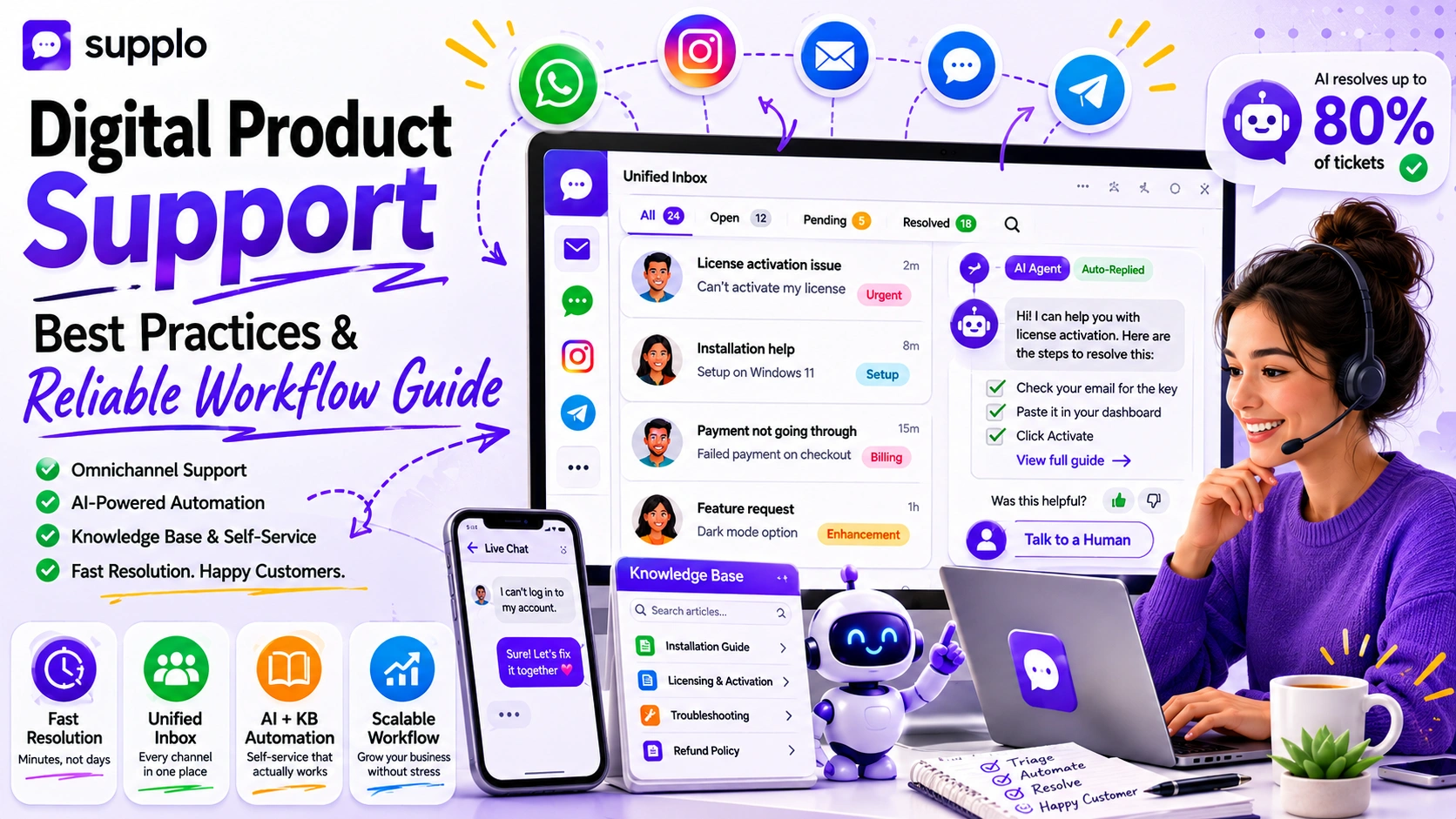
You need a shared inbox that centralizes every ticket, from email to chat to social channels, so nothing slips through the cracks. Pair that with a knowledge base your team and AI can reference instantly, and you've got a system that solves issues before they compound into bigger problems.
- Triage: Categorize tickets by urgency and product version. Break-fix issues get priority over feature requests.
- Knowledge base: Build a searchable library of guides, FAQs, and troubleshooting steps. Self-service is your friend.
- Automation: Use triggers to assign tickets to the right person, or provide instant answers straight from your library.
- Handoff: Define exactly when and how a conversation escalates from AI to a human agent. Full context preserved, no repeating.
How to Provide Customer Support for Digital Products Across Multiple Channels
Your customers won't all come through the same door. Some will email you after a failed download. Others will message you on Instagram. A few might DM you on Telegram because that's how they talk to everyone.
A multichannel support strategy means you're present on every platform your customers use. But a unified inbox strategy means you manage every conversation in one place without switching tabs. That's the difference between chaos and control.
- Start with the channels your highest-value customers actually use. Not every platform that exists.
- Email remains the baseline for formal support. Chat and social DMs? Those drive faster resolutions.
- WhatsApp and Telegram are essential for international digital product buyers who prefer messaging over email.
- A unified inbox pulls everything into a single thread view. You never lose context.
- Train your team to respond consistently no matter the channel; saved replies and shared notes make this possible.
Supplo is not affiliated with any app or website. Please follow each app's terms and local regulations.
Digital Product Support Channels: Which Ones Actually Matter for Your Business?
Not every channel is worth your time. For most digital product businesses, email, live chat, and one messaging app (like WhatsApp or Telegram) will cover 90% of customer interactions.
Widget-based chat on your product page or dashboard? That catches people mid-problem, right when they're most frustrated and most likely to churn if ignored.
- Email ticketing: Non-negotiable. You need it for detailed troubleshooting and audit trails. Check out Supplo's email ticketing system.
- Live chat widget: Perfect for real-time issues like login errors or payment failures.
- Instagram DMs: Relevant if you sell design assets, templates, or creator tools. Instagram DM support can help.
- Facebook Messenger: Still relevant for consumer-facing digital products like courses or apps.
- Telegram groups: Great for community-driven support and power users who want faster answers.
How to Automate Customer Support for Digital Products Without Losing the Human Touch
Here's the thing: automation doesn't mean replacing your team. It means letting AI handle the repetitive tasks so your agents can focus on the complex issues that require human judgment.
For digital products, the most automatable tickets are password resets, license key requests, and basic troubleshooting like "Why isn't my download starting?" The trick is setting a clear escalation path so the customer always feels heard, not shuffled.
- Automate answers to top repeat questions by training your AI agent on past conversations and your knowledge base.
- Set triggers for common events: new purchase, failed payment, trial expiration.
- Use the AI to resolve tickets silently; the customer gets an answer without ever creating a ticket.
- Always include a "Talk to a human" button at the end of every automated response. Preserve trust every time.
Want to see what automation looks like in practice? Start a free 14-day trial at Supplo and train your AI agent on your digital product knowledge base in under an hour—no credit card needed.
Using AI for Digital Product Customer Service: What to Automate and What to Keep Manual
Let AI handle the predictable, repetitive, and rule-based issues. Things like account verification, license activation, and FAQ lookups. Keep manual anything that requires nuanced judgment, legal disclaimers, or sensitive account changes.
The best approach? A hybrid workflow where the AI resolves up to 80% of tickets and hands off the rest with full context preserved for your team.
- Automate: License key delivery, password resets, refund eligibility checks, and setup guides.
- Keep manual: Account bans, escalated refund disputes, feature requests, and enterprise-level support.
- Train your AI on your actual product docs and past ticket resolutions. Accuracy matters.
- Monitor the AI's resolution rate weekly to catch drift or gaps in coverage.
- Use AI conversation analytics to identify missing knowledge base articles.
Best Practices for Digital Product Support: Building an Omnichannel Strategy That Works
Omnichannel isn't about being on every platform. It's about stitching those conversations together so the customer never has to repeat themselves.
If someone starts a chat on your widget, emails a follow-up, then DMs you on Instagram, your agent should see the whole thread. That continuity is what turns a disjointed experience into a reliable one, and it's one of the core best practices for digital product support.
- Use a shared inbox that consolidates email, chat, and social DMs into a single timeline per customer.
- Store conversation history so agents don't ask "What was your issue again?"
- Enable message translation to support international buyers in their preferred language.
- Set up routing rules so specific channel messages go to the right agent based on skill or availability.
A Practical Digital Product Customer Service Strategy for Growing Teams
As your customer base grows, ticket volume will outpace your hiring speed. That's just math.
A practical strategy front-loads resolution with self-service tools and AI automation, then reserves your best agents for the tricky cases. It also means your pricing model should support that growth without penalizing you per-agent; look for flat-rate workspaces instead of per-seat billing.
- Build or expand your knowledge base before you hire more support staff.
- Use the AI agent to automatically deflect common questions.
- Set up escalation rules for VIP customers or high-ticket product owners.
- Review resolution times weekly to identify bottlenecks before they turn into churn.
- Choose a support platform that scales with your team size without surprise seat costs. Supplo's pricing is designed that way.
Common Pitfalls in Digital Product Support (and How to Avoid Them)
The biggest mistakes digital product teams make? Treating support like a cost to minimize instead of a retention lever. And failing to unify their channels.
Another classic: over-relying on automation without properly training the AI. That leaves customers frustrated when it can't handle their issue, and they have to start over with a human.
- Pitfall 1: No self-service options. Customers abandon instead of waiting for an email reply.
- Pitfall 2: Siloed channels. Customers repeat themselves across email and chat, wasting everyone's time.
- Pitfall 3: Under-trained AI. The bot guesses wrong, escalates badly, and erodes trust.
- Pitfall 4: No escalation path. Customers get stuck in automated loops with no way to reach a human.
If your current support tool isn't unifying your channels or your AI is underperforming, it might be time for a change. Test Supplo's shared inbox and AI agent free; see if your team can resolve tickets faster without hiring more people.
How to Measure Success in Your Digital Product Support Workflow
Track the metrics that actually tell you if customers are happy, not just busy. First response time, resolution time, and self-service rate are the big three.
If your average resolution time drops while your self-service rate climbs, your workflow is working. If first response time is fast but repeat tickets are high, your resolution quality needs work.
- First response time: Aim for under 5 minutes for chat, under 2 hours for email.
- Resolution time: Track the median, not the average, to avoid outliers skewing the data.
- Self-service rate: The percentage of issues resolved without a human agent touching it.
- Customer satisfaction score (CSAT): Follow up every resolved ticket with a quick survey.
- Ticket deflection: Measure how many potential tickets your knowledge base or AI caught before they hit your inbox.
Scaling your digital product support workflow doesn't have to mean scaling your support team. A unified inbox, a well-trained AI agent, and a solid knowledge base can handle the bulk of your tickets and keep your customers happy while you grow.
Ready to build a customer service strategy that actually works? Supplo's flat-rate pricing means your bill doesn't balloon as your team grows. Start your 14-day free trial today.
Key Takeaways
- Digital product support requires fast, channel-agnostic workflows because issues are often time-sensitive and intangible.
- A reliable strategy starts with a unified inbox, a trained AI agent for ticket deflection, and a knowledge base for self-service.
- Automate repetitive issues like password resets and license key requests, but keep human agents for escalations and sensitive refunds.
- Measure success with first response time, resolution time, and self-service rate, not just ticket volume.
FAQ
What's the difference between multichannel and omnichannel support for digital products?
Multichannel means you're available on several platforms, but each operates in its own silo. Omnichannel means these platforms are connected so the conversation history follows the customer across every touchpoint. For digital products, omnichannel is better because issues often span multiple messages and channels.
Can AI really handle support for complex digital products?
Yes, but only if it's properly trained on your product documentation and past ticket data. AI excels at answering predictable questions like installation steps, license activation, and compatibility checks. For nuanced issues like debugging a rare error or handling a sensitive refund, you still need a human.
What channels should I prioritize for my digital product support?
Start with email and a live chat widget on your product page or dashboard. Add one messaging app (WhatsApp or Telegram) if your audience is international or prefers mobile communication. Expand to Instagram or Facebook only if your product has a strong social community there.
How do I train my AI agent to answer questions about digital products accurately?
Feed it your knowledge base, product guides, and at least 200–500 historical support conversations. Then review its first 50–100 automated answers manually to catch errors and refine its training. Most platforms allow you to mark responses as correct or incorrect to improve accuracy over time.
Is it safe to use AI for handling payment or refund issues?
AI can handle predictable tasks like checking refund eligibility or retrying a failed payment link. But you should manually review any refund decision that requires judgment, especially for high-value digital products. Always include a human approval step for escalations involving money.
What should I do if my digital product support tickets keep increasing?
That's usually a signal that your product needs a fix or your documentation is incomplete. Analyze repeat ticket themes; if 40% of tickets are about the same issue, either resolve it in the product or add a clear FAQ and let your AI deflect those tickets automatically.
How do I support digital product customers who speak different languages?
Use a support platform that includes built-in message translation. This lets your team respond in one language while the customer receives the answer in theirs. It's a practical way to serve a global audience without hiring a multilingual team from day one.
Compliance line: Supplo is not affiliated with any app or website. Please follow each app's terms and local regulations.